
1. Introduction
This manual provides comprehensive instructions for the installation, operation, and maintenance of your JBL Concert A704 4-Channel Amplifier. Please read this manual thoroughly before using the product to ensure proper function and to prevent damage.
The JBL Concert A704 is a powerful Class AB 4-channel amplifier designed to enhance your audio experience with its compact footprint and robust performance. It features adjustable high-pass/low-pass crossover filters and an auto turn-on facility, making it versatile for connecting various audio components including speakers, tube subwoofers, and subwoofers.

Figure 1.1: Top view of the JBL Concert A704 4-Channel Amplifier, showcasing its sleek design.
2. Important Safety Information
Always observe the following safety precautions to prevent injury or damage to the amplifier and connected components:
- Power Source: Ensure the amplifier is connected to a 12-volt DC power source with proper grounding. Incorrect voltage can cause severe damage.
- Ventilation: Install the amplifier in a location that allows for adequate air circulation to prevent overheating. Do not block ventilation openings.
- Moisture: Keep the amplifier away from water, moisture, and excessive humidity. Exposure to liquids can lead to electric shock or fire.
- Wiring: Use appropriate gauge wiring for power, ground, and speaker connections. Improper wiring can result in poor performance or fire hazards.
- Professional Installation: If you are unsure about any installation steps, seek assistance from a qualified professional.
- Protection Features: The amplifier is equipped with on-board protection against short circuits, over temperature, over voltage, under voltage, and over current. Do not attempt to bypass these safety features.
3. What's in the Box
Upon unpacking your JBL Concert A704 amplifier, please verify that all components are present:
- 1x JBL Concert A704 4-Channel Amplifier
- User Manual (this document)
- Mounting Hardware (screws, etc.)
If any items are missing or damaged, please contact your retailer or JBL customer support immediately.
4. Setup & Installation
Proper installation is crucial for optimal performance and safety. Follow these steps carefully:
4.1 Choosing a Mounting Location
Select a dry, well-ventilated location that is protected from direct sunlight and excessive heat. Ensure the amplifier is securely mounted to prevent movement during vehicle operation. Consider the amplifier's dimensions for proper fit.
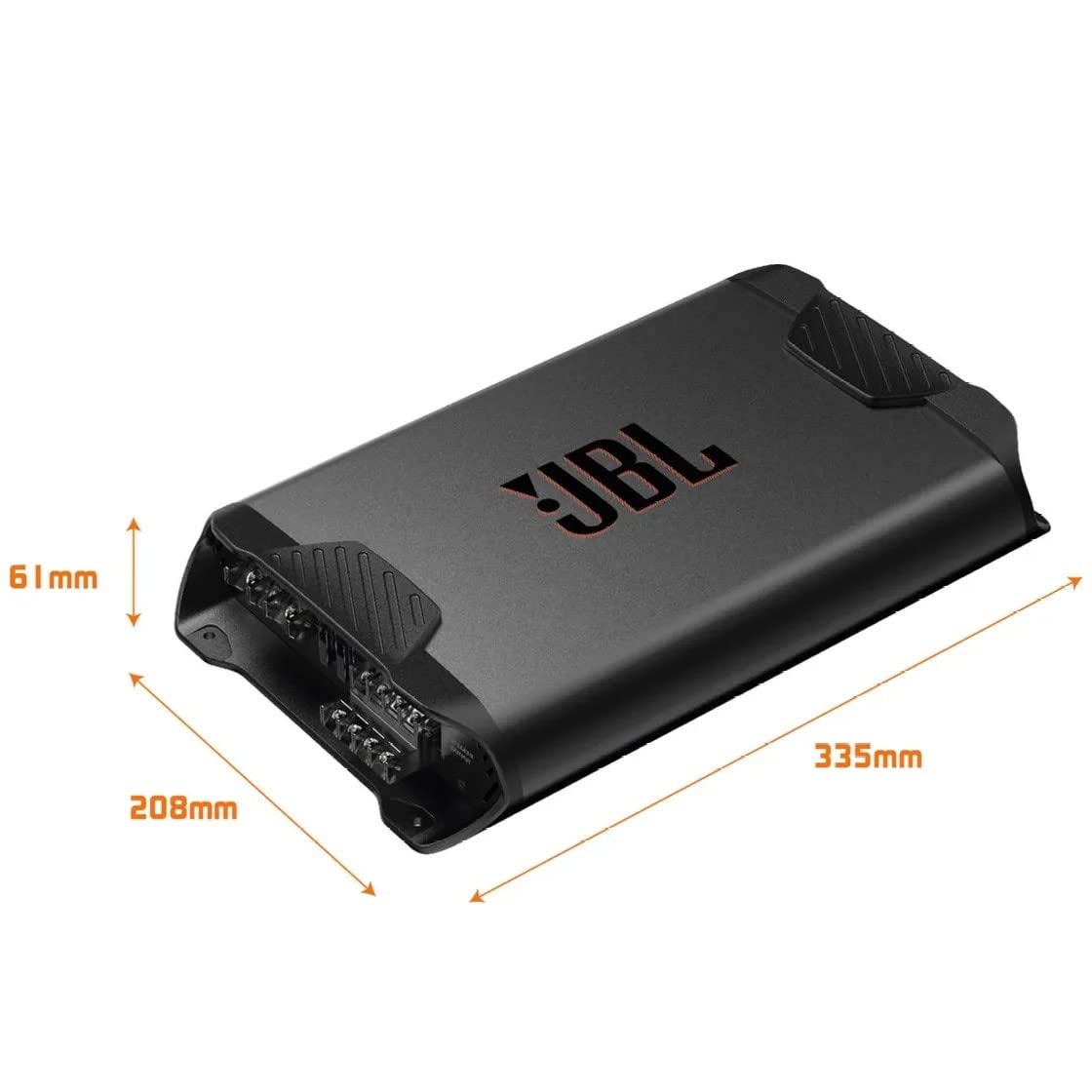
Figure 4.1: Amplifier dimensions (Length: 335mm, Width: 208mm, Height: 61mm) for planning installation space.
4.2 Wiring Connections
Refer to the diagram below for proper wiring connections. Ensure all connections are secure and insulated to prevent short circuits.

Figure 4.2: Top and bottom views of the amplifier showing power, ground, remote, speaker outputs, and input/control panel.
- Power (BATT+): Connect to the positive terminal of the vehicle's battery using a fuse (not supplied) within 18 inches of the battery.
- Ground (GND): Connect to a clean, unpainted metal surface of the vehicle chassis. Ensure a good electrical connection.
- Remote (REM): Connect to the remote turn-on lead from your head unit. This turns the amplifier on and off with your car stereo.
- Speaker Outputs (CH1, CH2, CH3, CH4): Connect your speakers to the appropriate channels. Observe correct polarity (+ to + and - to -). The amplifier supports both stereo and bridged configurations.
- Line Level Input: Connect RCA cables from your head unit's pre-amp outputs to the amplifier's line level inputs.
- High Level Input: If your head unit does not have RCA outputs, use the speaker level input option.
5. Operating Instructions
Once installed, configure the amplifier settings for optimal audio performance.
5.1 Gain Adjustment
The gain control matches the amplifier's input sensitivity to the output of your head unit. Start with the gain set to minimum and slowly increase it until you hear distortion, then back off slightly. Do not use the gain control as a volume knob.
5.2 Crossover Settings
The JBL Concert A704 features adjustable high-pass (HPF) and low-pass (LPF) crossover filters for each channel pair (CH1/CH2 and CH3/CH4). These filters allow you to direct specific frequency ranges to your speakers or subwoofers.
- HPF (High-Pass Filter): Allows frequencies above the set point to pass through. Use for full-range speakers to prevent distortion from low bass frequencies.
- LPF (Low-Pass Filter): Allows frequencies below the set point to pass through. Use for subwoofers to ensure only bass frequencies are reproduced.
- FULL: Bypasses the crossover filter, allowing the full frequency range to pass.
Adjust the frequency knobs (FREQ) to set the desired crossover point for your audio system.
6. Maintenance
The JBL Concert A704 amplifier requires minimal maintenance. Follow these guidelines to ensure longevity:
- Cleaning: Use a soft, dry cloth to clean the amplifier's exterior. Do not use harsh chemicals or abrasive cleaners.
- Connections: Periodically check all wiring connections to ensure they are secure and free from corrosion.
- Ventilation: Ensure that the amplifier's ventilation openings remain clear of dust and debris.
7. Troubleshooting
If you experience issues with your amplifier, consult the table below before contacting customer support.
| Problem | Possible Cause | Solution |
|---|---|---|
| No Power / Amplifier does not turn on |
|
|
| No Sound Output |
|
|
| Distorted Sound |
|
|
| Amplifier Overheats |
|
|
8. Specifications
| Feature | Specification |
|---|---|
| Model | A704 |
| Number of Channels | 4 |
| Peak Power Output | 1000 Watts |
| RMS Power Output (4 Ohms) | 70 Watts x 4 Channels |
| Frequency Response | 10Hz to 45KHz |
| Voltage | 12 Volts DC |
| Dimensions (L x W x H) | 33.5 x 20.8 x 6.1 Centimeters |
| Item Weight | 2.9 kg (2 kg 900 g) |
| Mounting Type | Surface Mount |
| Protection Features | Short Circuits, Over Temperature, Over Voltage, Under Voltage, Over Current |
| Input Options | RCA Line Level, Speaker Level |
| Crossover Filters | Adjustable High-Pass/Low-Pass |
9. Warranty & Support
JBL products are designed and manufactured to the highest standards. For detailed warranty information specific to your region and product, please refer to the warranty card included with your amplifier or visit the official JBL website.
For technical support, troubleshooting assistance, or service inquiries, please contact JBL customer support through their official channels. You can find contact information on the JBL website or in your product packaging.
Manufacturer: Harman International Industries Inc.
Website: www.jbl.com