
1. Introduction
Thank you for choosing the Winado 12000 BTU Window Air Conditioner. This unit is designed to provide efficient and quiet cooling for rooms up to 550 square feet. Its user-friendly design, including a washable filter and remote control, ensures a comfortable environment in various small spaces such as offices, kitchens, bedrooms, and living rooms.
This manual provides detailed instructions for the safe operation, installation, maintenance, and troubleshooting of your air conditioner. Please read it thoroughly before installation and use, and retain it for future reference.
2. Safety Information
To prevent injury to the user or other people and property damage, the following instructions must be followed. Incorrect operation due to ignoring instructions may cause harm or damage.
- Always connect to a grounded power outlet.
- Do not operate the unit with wet hands.
- Do not block air inlets or outlets.
- Ensure the unit is installed securely in the window opening.
- Keep children and pets away from the unit during operation.
- Unplug the unit before cleaning or servicing.
- Do not attempt to repair the unit yourself. Contact qualified service personnel.
3. Product Overview
3.1 Unit Components
Familiarize yourself with the main parts of your Winado Window Air Conditioner.

Figure 3.1: Front view of the Winado 12000 BTU Window Air Conditioner, showing the control panel and air vents.
- Control Panel: Digital display and buttons for operation.
- Air Outlet Louvers: Adjustable to direct airflow.
- Air Filter: Located behind the front grille, washable and reusable.
- Power Cord: For electrical connection.
- Remote Control: For convenient operation from a distance.
3.2 Control Panel and Remote Control
The unit can be operated via the intelligent touch panel on the unit or the included remote control.
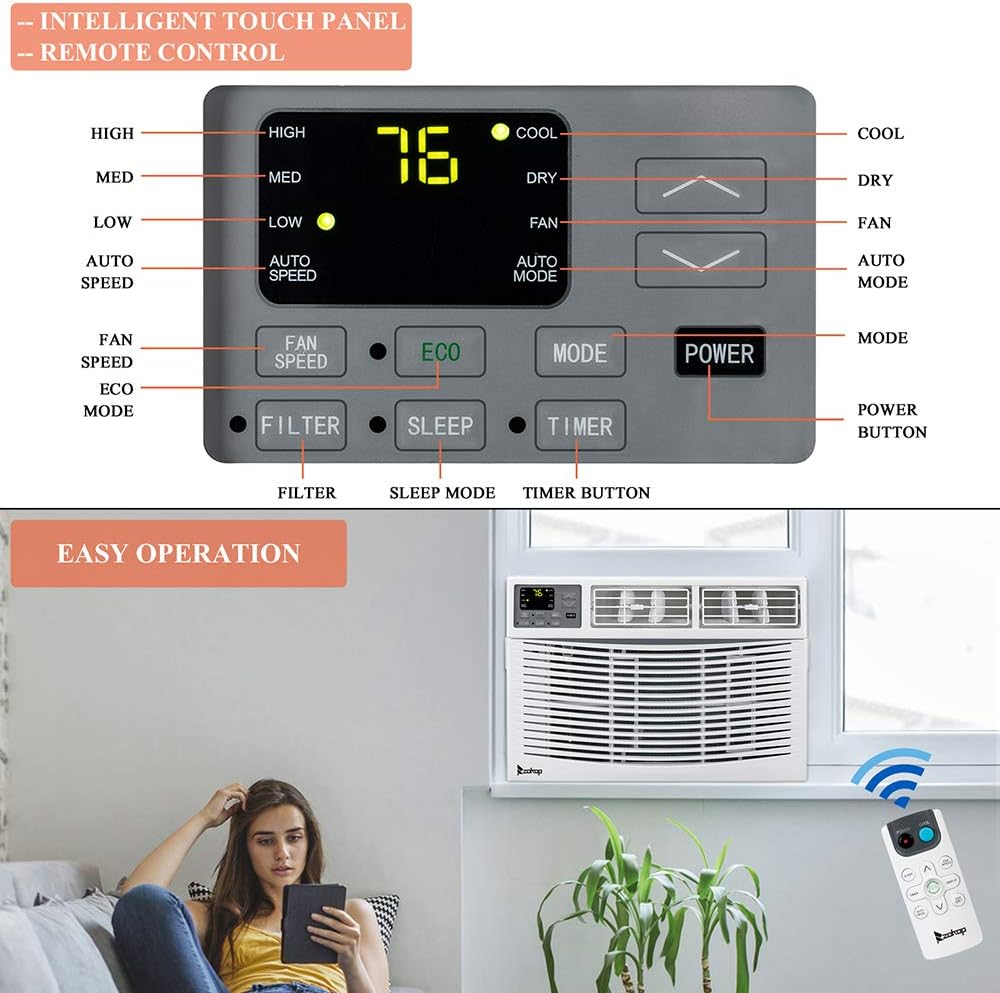
Figure 3.2: Illustration of the control panel buttons and LCD display, along with the remote control.
Key functions include:
- POWER Button: Turns the unit on or off.
- MODE Button: Cycles through operating modes (Cool, Dry, Fan, Auto Mode, Sleep, ECO).
- FAN SPEED Button: Adjusts fan speed (High, Med, Low, Auto Speed).
- Temperature Adjustment Buttons (Up/Down Arrows): Sets desired temperature.
- TIMER Button: Sets a timer for automatic on/off.
- FILTER Button: Indicates when the filter needs cleaning.
4. Setup and Installation
The Winado 12000 BTU Window Air Conditioner is designed for easy installation without requiring professional technical skills or major modifications to your window frame.

Figure 4.1: Visual representation of the simple installation process for the window unit compared to other AC types.
4.1 Recommended Window Size
Ensure your window meets the recommended dimensions for proper installation.
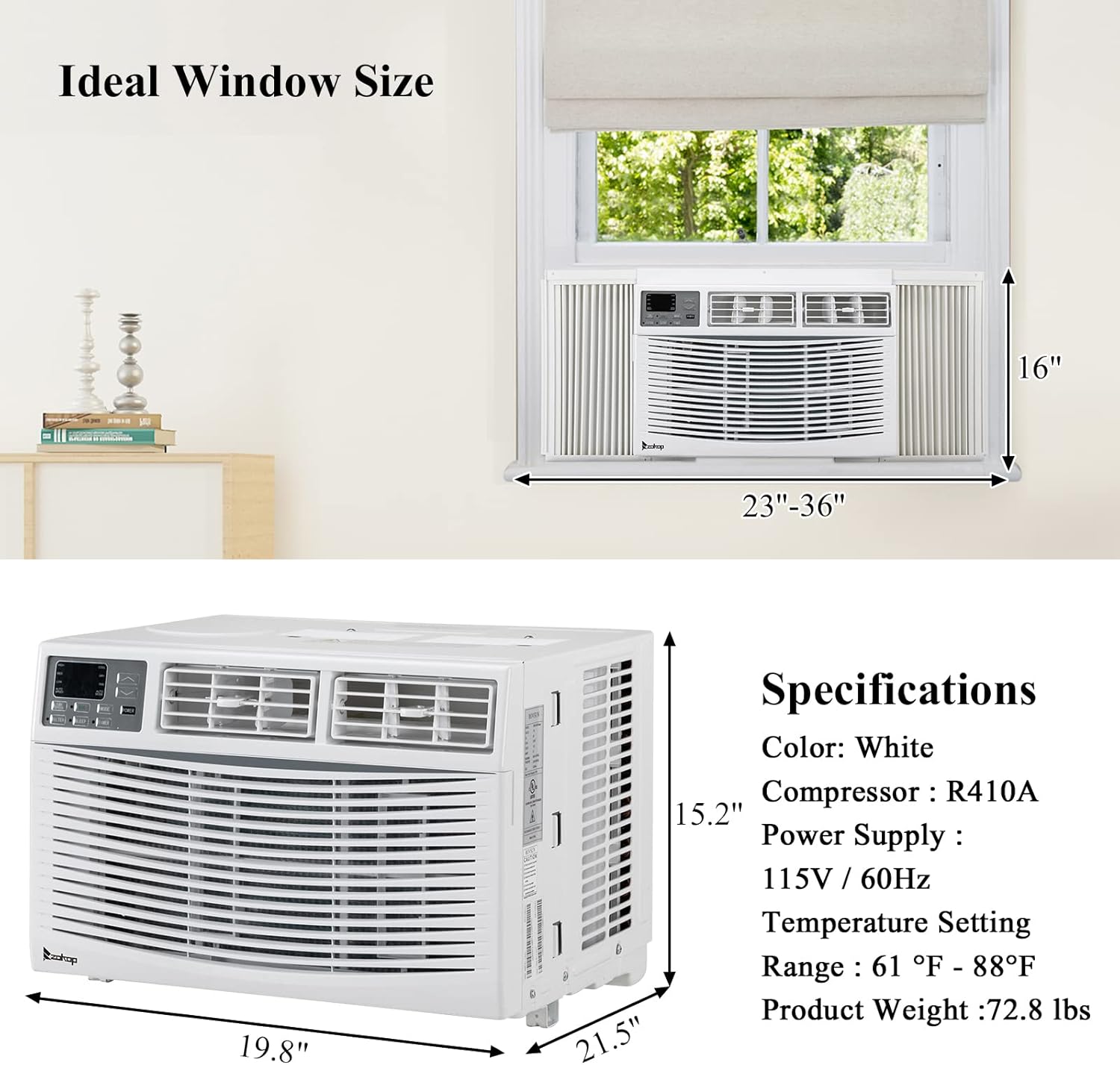
Figure 4.2: Recommended window width is 23"-36" and height is 14.5" (or 16" as per image).
- Recommended Window Width: 23" - 36"
- Recommended Window Height: 14.5" (minimum)
4.2 Installation Steps
The package includes the necessary installation window kit and screws. Follow these general steps for installation:
- Prepare the window opening by cleaning the area.
- Attach the top mounting rail to the unit.
- Carefully place the unit into the window opening, ensuring it is centered and level.
- Extend the side panels to fill the window gap and secure them with screws.
- Install the window sash seal and any additional insulation as needed to prevent air leakage.
- Secure the unit to the window frame using the provided brackets and screws.
- Ensure the unit is tilted slightly outwards to allow for proper condensate drainage.
- Important: After installation, wait at least 24 hours before plugging in and operating the unit to allow refrigerants to settle.
5. Operating Instructions
Your Winado air conditioner offers multiple operating modes and features for optimal comfort.

Figure 5.1: Key features of the Winado 12000 BTU Window Air Conditioner.
5.1 Basic Operation
- Power On/Off: Press the POWER button on the control panel or remote control.
- Select Mode: Press the MODE button to cycle through Cool, Dry, Fan, Auto Mode, Sleep, and ECO modes.
- Set Temperature: Use the Up/Down arrow buttons to adjust the desired temperature (Range: 61°F - 88°F).
- Adjust Fan Speed: Press the FAN SPEED button to select High, Med, Low, or Auto Speed.
5.2 Operating Modes
- Cool Mode: Provides powerful cooling. Adjust temperature and fan speed as desired.
- Dry Mode (Dehumidification): Reduces humidity in the room. The fan speed is automatically controlled.
- Fan Mode: Circulates air without cooling. Choose desired fan speed.
- Auto Mode: The unit automatically selects the operating mode (Cool, Dry, or Fan) and fan speed based on the room temperature to maintain the set temperature.
- Sleep Mode: Increases the set temperature gradually over time to save energy and provide comfortable sleeping conditions.
- ECO Mode: Optimizes energy consumption by cycling the compressor on and off to maintain the set temperature efficiently.
5.3 Timer Function
The timer function allows you to set a specific time for the unit to turn on or off automatically (up to 24 hours).
- Press the TIMER button.
- Use the Up/Down arrow buttons to set the desired time.
- Press the TIMER button again to confirm.
6. Maintenance
Regular maintenance ensures optimal performance and extends the lifespan of your air conditioner.
6.1 Air Filter Cleaning
The air filter is washable and reusable. A clean filter helps maintain cooling efficiency and air quality. The FILTER indicator light on the control panel will illuminate when cleaning is recommended.

Figure 6.1: Steps for accessing and cleaning the air filter.
- Unplug the air conditioner from the power outlet.
- Open the front grille and carefully remove the air filter.
- Wash the filter with warm, soapy water. Rinse thoroughly.
- Allow the filter to air dry completely before reinserting it. Do not use direct heat to dry.
- Once the filter is reinstalled, press the FILTER button to reset the indicator.
It is recommended to clean the filter every two weeks or more frequently depending on usage and air quality.
6.2 General Cleaning
- Wipe the unit's exterior with a soft, damp cloth. Do not use harsh chemicals or abrasives.
- Ensure the drainage area at the back of the unit is clear of debris.
- For long-term storage, clean the unit thoroughly, allow it to dry, and cover it to protect from dust.
7. Troubleshooting
Before contacting customer service, please refer to the following table for common issues and their solutions.
| Problem | Possible Cause | Solution |
|---|---|---|
| Unit does not turn on. | No power, tripped circuit breaker, power cord not fully plugged in. | Check power supply, reset circuit breaker, ensure plug is secure. |
| Unit not cooling effectively. | Dirty air filter, blocked air vents, room too large, open doors/windows. | Clean air filter, clear obstructions, close doors/windows, ensure unit capacity matches room size. |
| Water dripping inside. | Unit not tilted correctly, drain hole blocked. | Ensure slight outward tilt, clear drain hole. |
| Noisy operation. | Loose installation, fan obstruction, normal operating sounds. | Check installation for tightness, remove any obstructions. Some fan and compressor sounds are normal. |
| Remote control not working. | Dead batteries, obstruction between remote and unit. | Replace batteries, remove obstructions, ensure remote is pointed at the unit. |
8. Specifications
Technical specifications for the Winado 12000 BTU Window Air Conditioner, Model WAC-12000.
Figure 8.1: Product dimensions and specifications overview.
| Specification | Value |
|---|---|
| Model | WAC-12000 |
| Color | White |
| Power Supply | 1Ph, 115V~, 60Hz |
| Cooling Capacity (Rated) | 12000 Btu/h |
| Rated Input | 992W |
| Rated Current | 8.6A |
| Refrigerant Type | R32 / 650g / 22.93 ozs |
| Temperature Range | 61°F - 88°F |
| Indoor Noise Level (Hi/Med/Lo) | 59/57/55 dB(A) |
| Outdoor Noise Level (Hi/Med/Lo) | 66/64/61 dB(A) |
| Recommended Window Width | 23"-36" |
| Recommended Window Height | 14.5" (minimum) |
| Product Dimensions (D x W x H) | 19.8" x 21.5" x 15.2" |
| Item Weight | 72.6 pounds |
| Applicable Room Area | Up to 550 Sq.Ft. |
| Material Type | ABS, Steel |
| Included Components | Air Conditioner, Installation Window Kit, Screws, Remote Control |
9. Warranty and Support
For warranty information or technical support, please refer to the documentation included with your purchase or contact Winado customer service through their official website or the retailer where the product was purchased.
Please have your model number (WAC-12000) and purchase date ready when contacting support.