
1. Product Overview
The AWBLIN NS-837 Digital Circuit Tester is a versatile tool designed for testing DC voltage in automotive and other low-voltage electrical systems. It features a digital LED display for precise voltage readings, a buzzer warning for continuity, and bidirectional testing capabilities. This manual provides essential information for safe and effective use of your device.

Figure 1: AWBLIN NS-837 Digital Circuit Tester with coiled cable and alligator clip.
2. Setup and Components
Before first use, familiarize yourself with the components of the circuit tester:
- Stainless Steel Needle Probe: For making contact with electrical points.
- LED Display: Shows digital voltage readings.
- Indicator Lights: Red for positive polarity, Green for negative polarity.
- Buzzer: Provides audible warning for continuity or specific conditions.
- Extended Spring Wire: Coiled cable for flexible reach, up to 102 inches.
- Large Size Alligator Clip: For connecting to ground or positive terminals.
- Probe Cover: Protects the needle probe when not in use.
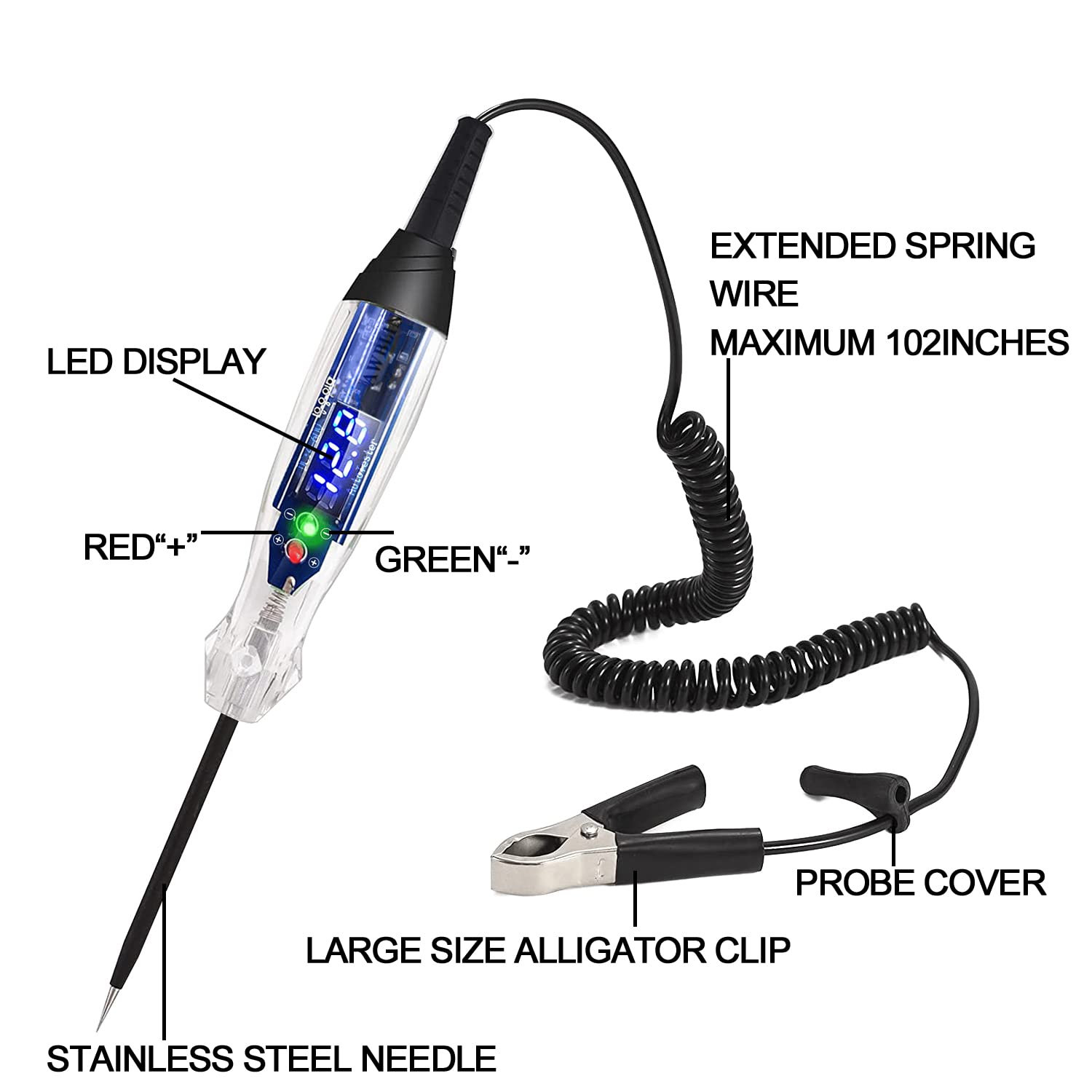
Figure 2: Key components of the AWBL0IN NS-837 Digital Circuit Tester.
3. Operating Instructions
The AWBLIN NS-837 is designed for testing DC voltage between 4V and 60V. It provides both visual (LED display and indicator lights) and audible (buzzer) feedback.
3.1. Polarity Detection and Voltage Measurement
- Connect the Alligator Clip: Attach the large size alligator clip to either the negative (ground) or positive terminal of the circuit you are testing.
- Test Positive Polarity: If the alligator clip is connected to a negative ground, touch the stainless steel needle probe to a positive voltage point. The tester will display the voltage, and the RED indicator light will illuminate. A buzzer sound will also be emitted.

Figure 3: Testing positive polarity. Red light indicates positive.
- Test Negative Polarity: If the alligator clip is connected to a positive terminal, touch the stainless steel needle probe to a negative voltage point (ground). The tester will display the voltage, and the GREEN indicator light will illuminate. A buzzer sound will also be emitted.

Figure 4: Testing negative polarity. Green light indicates negative.
3.2. Buzzer Warning
During testing, the integrated buzzer will sound to provide an audible indication of a successful connection and voltage detection. This feature is particularly useful in noisy environments or when the display is not easily visible.

Figure 5: The tester provides an audible buzzer warning during operation.
4. Maintenance
- Cleaning: Wipe the tester with a dry, soft cloth. Do not use abrasive cleaners or solvents.
- Storage: Store the tester in a dry place, away from direct sunlight and extreme temperatures. Ensure the probe cover is on the needle when not in use.
- Cable Care: Avoid sharp bends or excessive pulling on the coiled cable to prevent damage.
5. Troubleshooting
5.1. Over-Range Warning
The AWBLIN NS-837 is designed for DC voltage testing within the 4V to 60V range. If the measured DC voltage exceeds 60V, the LED display will show "OL" (Over Limit).

Figure 6: Over-range warning display ("OL").
NOTE: If the display shows "OL", immediately stop testing to prevent potential damage to the device or the circuit.
5.2. No Display or Inaccurate Readings
- Ensure proper connection of the alligator clip to a known good ground or positive terminal.
- Verify that the probe is making solid contact with the test point.
- Check if the voltage being tested is within the 4V-60V DC range.
- Inspect the cable and connections for any visible damage.
6. Specifications

Figure 7: Product dimensions.
| Feature | Detail |
|---|---|
| Model Number | NS-837 |
| Voltage Range | 4-60V DC |
| Power Source | DC (from circuit being tested) |
| Display Type | Digital LED |
| Cable Length | Max 102 inches (extended spring wire) |
| Dimensions (Tester Body) | Approx. 9.84 inches (length) |
| Weight | 170 grams (approx.) |
| UPC | 787803772142 |
7. Warranty and Support
For warranty information and technical support, please refer to the manufacturer's official website or contact your point of purchase. Keep your proof of purchase for any warranty claims.