
WISTEK WISTEK 4-sensor TPMS
WISTEK Bluetooth Tire Pressure Monitoring System User Manual
Model: WISTEK 4-sensor TPMS
1. Product Overview
Thank you for choosing the WISTEK Bluetooth Tire Pressure Monitoring System (TPMS) with 4 external sensors. This system provides real-time monitoring of tire pressure and temperature via a dedicated mobile application, ensuring enhanced safety and optimal tire performance. It features 5 alarm modes to alert you to potential issues, contributing to fuel efficiency and prolonged tire life.
The system is designed for easy installation and supports both iOS and Android devices through the "TPMSII" APP.
2. Package Contents

Image: WISTEK TPMS product box containing four external sensors and anti-theft nuts.

Image: Open WISTEK TPMS product box revealing the four external sensors securely placed in foam, alongside a small wrench tool for installation.
The package typically includes:
- 4 x External TPMS Sensors
- 1 x Wrench Tool
- 4 x Anti-theft Nuts
- User Manual (this document)
3. Setup and Installation
3.1. APP Installation
- Scan the QR code provided with the product packaging to download the "TPMSII" APP.
- Install the APP on your iOS or Android device.
- When performing a Bluetooth scan, the APP may request location permission. Please grant this permission as it is a requirement for Bluetooth functionality on Android systems.
3.2. External Sensor Installation
Follow these steps to install the external sensors on your vehicle's tire valves:
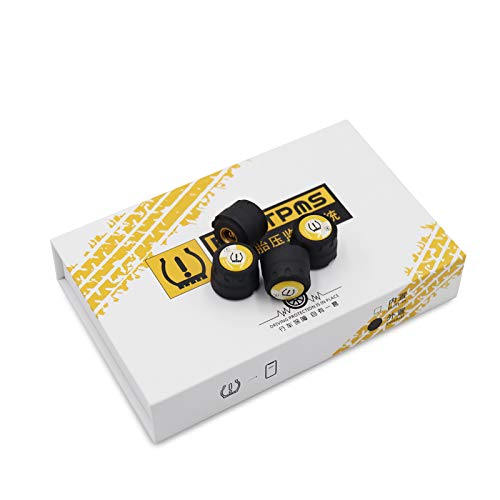
Image: Step-by-step visual guide illustrating the installation process for the external TPMS sensors on a tire valve.
- Remove the existing tire valve caps.
- Screw the anti-theft nuts onto the tire valve stems.
- Install the external sensor onto the tire valve in the correct order (e.g., front left, front right, etc., as indicated by the sensor markings if any).
- Hold the sensor firmly and tighten the anti-theft screw against the sensor.
- Use the provided wrench to further tighten the anti-theft nut, securing the sensor in place. Ensure each sensor is installed on its corresponding tire valve.
The system is compatible with various vehicle types, as the sensors are designed for universal fitment on standard tire valves.

Image: A WISTEK TPMS sensor being installed on a tire valve, demonstrating its applicability to various vehicle types.
4. Operating Instructions
4.1. APP Operation and Monitoring
Once the sensors are installed and the APP is connected via Bluetooth, you can monitor tire pressure and temperature in real-time.

Image: The WISTEK TPMS APP displaying real-time tire pressure and temperature data for all four tires, with the corresponding sensors shown.

Image: The WISTEK TPMS APP settings menu, allowing customization of various parameters including pressure and temperature warning limits.
The APP provides a stable and quick connection, ensuring real-time data transfer. You can view the current pressure and temperature for each tire dynamically.
4.2. Alarm Modes
The system is equipped with 5 alarm modes to alert you to potential tire issues:
- High-temperature alarm: Alerts when tire temperature exceeds the set limit.
- Low battery alarm: Indicates that a sensor's battery is low and needs attention.
- Quick leak alarm: Notifies you of a rapid drop in tire pressure.
- Slow leak alarm: Alerts for a gradual decrease in tire pressure.
- High pressure alarm: Alerts when tire pressure exceeds the set upper limit.
You can set the desired range for tire pressures and maximum temperature within the APP. The adjustable pressure range is from 36.2 Psi (250 Kpa / 2.5 Bar) to 92.6 Psi (640 Kpa / 6.4 Bar).
5. Maintenance
The WISTEK TPMS sensors are designed to be waterproof and anti-corrosion, ensuring durability even in rainy conditions. To maintain optimal performance:
- Periodically check the sensors for any visible damage or debris.
- Ensure the anti-theft nuts remain securely tightened to prevent sensor loss.
- Monitor the low battery alarm in the APP and replace sensor batteries as needed (if user-replaceable).
- Keep the APP updated to the latest version for best performance and new features.
6. Troubleshooting
- APP not connecting to sensors:
Ensure Bluetooth is enabled on your device. For Android, confirm that location permission has been granted to the "TPMSII" APP, as this is required for Bluetooth scanning.
- Inaccurate readings:
Verify that sensors are correctly installed on their respective tires. Ensure the tires are at ambient temperature before taking initial readings. If issues persist, re-pair the sensors with the APP.
- Sensor battery low:
The APP will alert you if a sensor's battery is low. Replace the battery according to the instructions (if applicable) or contact customer support for assistance.
7. Specifications
| Feature | Detail |
|---|---|
| Brand | WISTEK |
| Model Number | WISTEK 4-sensor TPMS |
| Connectivity | Bluetooth |
| Sensor Type | External Sensors (4 included) |
| Supported OS | iOS and Android (via "TPMSII" APP) |
| Pressure Range | 36.2 Psi / 250 Kpa / 2.5 Bar to 92.6 Psi / 640 Kpa / 6.4 Bar |
| Alarm Modes | High-temperature, Low battery, Quick leak, Slow leak, High pressure |
| Sensor Features | Waterproof, Anti-corrosion, Anti-theft technology, High sensitivity, Good accuracy |
| Item Weight (per sensor) | 5 Grams |
| Batteries Included | Yes |
| Lithium Battery Energy Content | 1 Watt Hours |
| Lithium Battery Weight | 1 g |
8. Warranty and Support
Specific warranty information is not provided in the product details. For any support inquiries, technical assistance, or warranty claims, please contact WISTEK customer service through the contact information provided with your product packaging or on the official WISTEK website.
We are committed to providing full support to our customers. Thank you for choosing WISTEK.
Ask a question about this manual
Ask about setup, troubleshooting, compatibility, parts, safety, or missing instructions. Manuals+ will review the question and use this page’s manual context to help answer it.