
1. Introduction
The Fleettrack Pro Wired GPS Tracker is a robust and reliable device designed to provide real-time location tracking and security features for various vehicles, including cars, bikes, scooters, EVs, and trucks. This manual provides detailed instructions for installation, operation, maintenance, and troubleshooting to ensure optimal performance and user experience.
The device comes with a pre-activated SIM card and a 12-month data plan, eliminating the need for additional activation or hidden fees, allowing immediate use upon installation.
2. Package Contents
Please verify that all items listed below are included in your package:
- 1 Fleettrack Pro Device
- Pre-Activated SIM Card with 12 Months Data
- 1 Connecting Cable
- User Manual

Image: The Fleettrack Pro Wired GPS Tracker, its included SIM card, and a smartphone displaying the Fleettrack mobile application interface.
3. Setup and Installation
The Fleettrack Pro Wired GPS Tracker is designed for hidden installation and universal compatibility with various vehicle types. Professional installation is recommended for optimal performance.
- Device Placement: Choose a discreet location within your vehicle for installation, such as under the dashboard, in the rooftop, within door panels, or in the boot space. The compact size of the device (1.2 x 7.5 x 1.2 cm) allows for flexible placement.
- Power Connection: Connect the provided wiring harness to your vehicle's battery (9-90V). Ensure a secure and stable connection to prevent power interruptions. The device is designed for low current consumption to be battery-friendly.
- SIM Card: The included SIM card is pre-activated with 12 months of data. No additional steps are required for SIM activation.
- Mobile Application: Download the Fleettrack application from the Google Play Store or Apple App Store. Follow the in-app instructions to register your device and begin tracking.
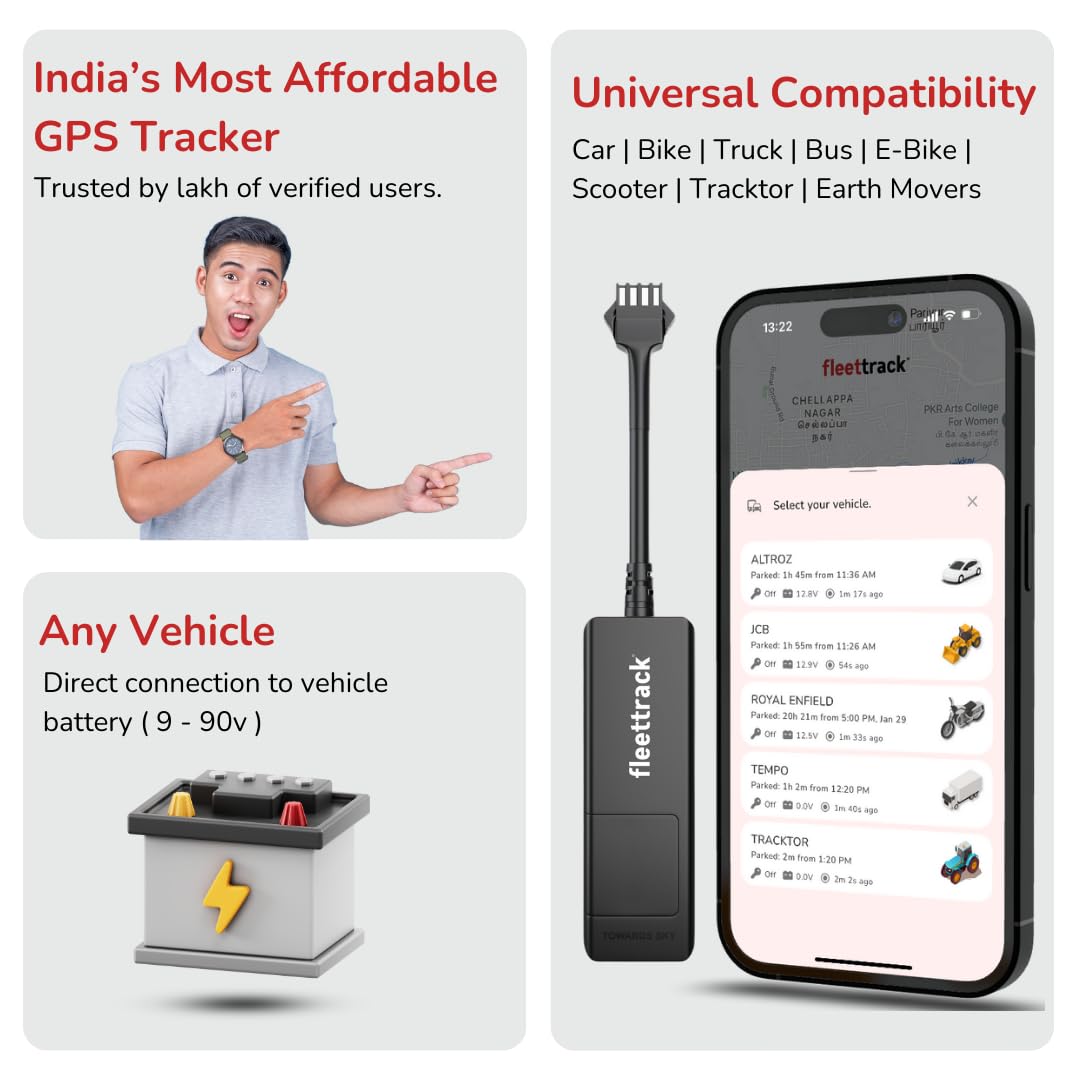
Image: Illustration demonstrating the universal compatibility of the Fleettrack GPS tracker with cars, bikes, trucks, buses, and scooters, along with a visual of direct connection to a vehicle battery.

Image: Visual representation of the Fleettrack device's compatibility with various vehicle types including cars, trucks, scooters, and buses, highlighting its small size.
4. Operating Instructions
The Fleettrack mobile application provides a comprehensive suite of features for vehicle monitoring and security.
4.1. Real-Time GPS Tracking
Monitor your vehicle's precise location in real-time through the mobile app. The highly sensitive GPS chip ensures accurate and instant location updates.

Image: A smartphone showing the Fleettrack application with a map displaying the real-time location of a vehicle, along with options for playback and safe parking.
4.2. Travel History Data
Access a full-day driving history, including routes, stoppages, and speed, directly from the mobile application. This feature allows for detailed analysis of vehicle usage.

Image: A smartphone screen showing the Fleettrack app's vehicle analytics, including a bar graph of total distance covered over several days, and a separate screen for real-time tracking on a map.
4.3. Ignition Alerts
Receive instant notifications when your vehicle's ignition is turned ON or OFF. This provides immediate awareness of vehicle activity.
4.4. Remote Engine Lock (Optional)
An optional remote engine lock feature is available. This requires a relay, which can be obtained by contacting customer care. This feature allows you to remotely disable the vehicle's engine.
4.5. Geo-Fencing
Define safe zones (geo-fences) on the map. You will receive instant alerts when your vehicle enters or exits these predefined areas.

Image: A smartphone displaying the Fleettrack app with a geo-fence alert notification and an overspeed alert notification, alongside a visual of the device and a tag.
4.6. Overspeeding Alerts
Set a custom speed limit within the app. The system will send instant alerts if the vehicle exceeds this limit.
4.7. Anti-Theft Alarm & Safe Parking
Receive instant alarms or calls in case of potential theft, such as when the ignition is turned on without authorization or if the vehicle is moved by towing or pushing. The Safe Parking feature provides ignition and motion alerts via call when your vehicle is parked.

Image: A smartphone displaying the Fleettrack app with various instant notifications including ignition ON/OFF, geo-fence entry/exit, and overspeed alerts. Another image shows a hand holding a phone receiving a 'Safe Parking' call alert.

Image: A smartphone displaying the Fleettrack app with a notification indicating 'Safe parking alarm is enabled' and a map interface for creating and managing geo-fences.
4.8. Additional App Features
- Vehicle Analytics: Access detailed graphical driving reports, including total distance, speed, and stoppage times.
- Nearby Locations: Locate fuel stations, service centers, hospitals, and other points of interest directly through the app.
- Live Traffic: View real-time traffic data to optimize routes and improve efficiency.
- Group Rides: Share your live location with others and view their current location in real-time within the Fleettrack app.

Image: A smartphone displaying the Fleettrack app with screens for managing shared links for group rides, searching for nearby locations like ATMs and hospitals, and viewing live traffic conditions.

Image: A collage of multiple smartphone screens showcasing the diverse functionalities of the Fleettrack application, including tracking, alerts, history, and device management.
5. Maintenance
The Fleettrack Pro Wired GPS Tracker is designed for minimal maintenance. Its advanced sleep and wake technology ensures lowest current consumption, making it friendly to your vehicle's battery. Ensure the device remains securely installed and its wiring connections are intact. No user-serviceable parts are inside the device.
6. Troubleshooting
If you encounter any issues with your Fleettrack Pro Wired GPS Tracker, please consider the following common troubleshooting steps:
- No Location Data: Ensure the device is properly connected to the vehicle's power source and has a clear view of the sky for GPS signal reception. Check your mobile data connection.
- Inaccurate Location: Verify that the device is installed in a location free from heavy metal obstructions that might interfere with GPS signals.
- App Not Responding: Close and restart the Fleettrack mobile application. Ensure your smartphone's operating system is up to date.
- Network Connectivity Issues: While the device uses a pre-activated SIM, occasional network drops may occur in remote areas. If persistent, contact customer support.
For further assistance, please refer to the Customer Support section.
7. Specifications

Image: A graphic illustrating the internal components and performance aspects of the Fleettrack device, including an Ignition Alert Sensor, an Ultra-fast Processor (MediaTek), and details on chip and battery power for live tracking, geo-fence alerts, and vehicle statistics.
| Feature | Detail |
|---|---|
| Brand | FLEETTRACK |
| Model | Pro Wired |
| Product Dimensions | 1.2 x 7.5 x 1.2 cm |
| Item Weight | 50 g |
| Compatible Devices | Smartphone |
| Special Features | Accident Alert, Anti-Theft Alerts, Geo-Fence, Live Tracking, Remote Engine Lock |
| Connectivity Technology | Cellular |
| Supported Application | GPS |
| Power Source | Vehicle Battery |
| Inbuilt Battery | 50 mAh (for backup) |
| Country of Origin | India |

Image: A comparison chart detailing features like device type, water resistance, engine lock, ignition alerts, inbuilt battery, power source, voice monitoring, magnet, weight, and usability across different Fleettrack GPS tracker models.
8. Warranty and Support
8.1. Warranty Information
The Fleettrack Pro Wired GPS Tracker comes with a Door to Door Replacement warranty service during the warranty period. For any warranty claims or service requests, please contact our customer support.
8.2. Customer Support
For technical queries, assistance with installation, or any other support needs, our 24/7 customer support team is available. You can raise a request on our WhatsApp Helpline:
WhatsApp Helpline: +91-9092488444

Image: A graphic illustrating quick customer support, featuring a customer service representative and the WhatsApp helpline number for inquiries.
9. Important Notes
- Always ensure the device is securely installed to prevent accidental disconnections.
- Regularly check the mobile application for updates to ensure access to the latest features and improvements.
- Do not attempt to open or modify the device, as this will void the warranty.