Introduction
This manual provides essential information for the installation, operation, and maintenance of your Ideal Standard Ceratherm C100 individual built-in thermostatic mixer for shower. Please read these instructions carefully before installation and use to ensure proper function and safety.
The Ceratherm C100 is designed to provide precise temperature control and water flow management for your shower. It consists of external parts and a thermostatic cartridge, and requires the separate Ideal Standard Easy Box A1000NU recessed body for complete installation.
Safety Information
- Installation must be carried out by a qualified professional in accordance with local plumbing and building regulations.
- Ensure the main water supply is turned off before commencing any installation or maintenance work.
- Do not use abrasive cleaners or solvents on the chrome-plated surfaces, as this may damage the finish.
- Verify all connections are secure and watertight to prevent leaks.
- The thermostatic mixer is designed to prevent scalding, but always test water temperature before use, especially for children or individuals with sensitive skin.
Package Contents
The Ceratherm C100 package includes the following components:
- External trim parts (faceplate, handles/knobs)
- Thermostatic cartridge
Note: The Ideal Standard Easy Box A1000NU recessed body is required for installation and must be ordered separately.
Setup and Installation
The Ceratherm C100 is a built-in, recessed shower mixer. Proper installation requires the Ideal Standard Easy Box A1000NU recessed body (not included). Follow the instructions provided with the Easy Box A1000NU for its installation into the wall.
Once the recessed body is installed and water connections are made, proceed with installing the external parts of the Ceratherm C100 mixer.
- Ensure the recessed body is securely mounted and all plumbing connections are tested for leaks.
- Carefully attach the faceplate to the recessed body, ensuring it is flush with the wall surface.
- Install the thermostatic cartridge into its designated position within the mixer body.
- Attach the control handles/knobs according to the specific design, ensuring they operate smoothly.
- Refer to the technical drawing for precise dimensions and installation clearances.
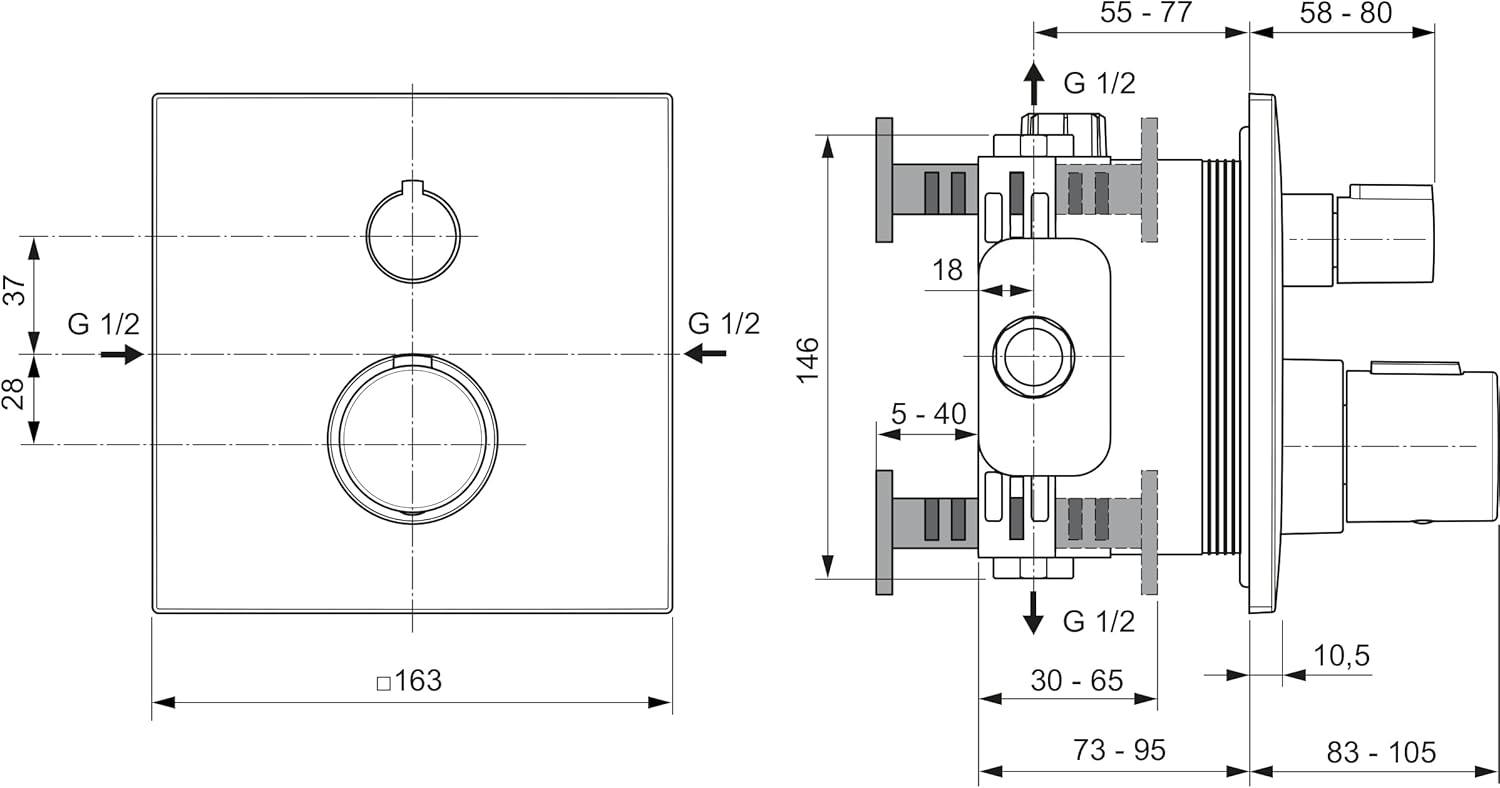
Figure 1: Technical drawing showing dimensions and installation details for the Ceratherm C100 mixer.

Figure 2: Front view of the Ceratherm C100 mixer, showing the two control knobs. The upper knob controls water flow, and the lower knob controls temperature.
Operating Instructions
The Ceratherm C100 features two main controls:
- Water Flow Control: The upper handle/knob regulates the water flow rate. Turn it to increase or decrease the water volume.
- Thermostatic Temperature Control: The lower handle/knob allows you to set your desired water temperature. The thermostatic cartridge maintains a consistent temperature, preventing sudden changes. A safety stop is typically integrated to prevent accidental setting of excessively hot temperatures. To exceed this safety stop, a button or override mechanism usually needs to be pressed.
To operate:
- Turn the upper handle to the desired flow rate.
- Adjust the lower handle to set the water temperature.
- Allow a few moments for the thermostatic mixer to stabilize the water temperature.
Maintenance
Regular cleaning and maintenance will ensure the longevity and optimal performance of your Ceratherm C100 mixer.
- Cleaning: Clean the chrome-plated surfaces regularly with a soft cloth and mild soap or a non-abrasive cleaner specifically designed for chrome. Rinse thoroughly with clean water and dry with a soft cloth to prevent water spots.
- Avoid: Do not use abrasive sponges, scouring pads, harsh chemicals, or acid-based cleaners, as these can damage the chrome finish and internal components.
- Thermostatic Cartridge: If temperature fluctuations occur or the mixer is not maintaining temperature correctly, the thermostatic cartridge may need cleaning or replacement. This should ideally be performed by a qualified plumber.
Troubleshooting
| Problem | Possible Cause | Solution |
|---|---|---|
| No water flow or low pressure. | Main water supply off, clogged filters, or issues with the recessed body. | Check main water supply. Inspect and clean filters. Consult a plumber for recessed body issues. |
| Water temperature fluctuates or is incorrect. | Thermostatic cartridge issues, unbalanced hot/cold water pressure, or sediment buildup. | Recalibrate or replace thermostatic cartridge (professional recommended). Check water pressure balance. |
| Leaks from the mixer. | Loose connections, damaged seals, or faulty cartridge. | Tighten connections. Inspect and replace seals. Replace cartridge if necessary. Contact a plumber. |
If you are unable to resolve an issue, please contact a qualified plumber or Ideal Standard customer support.
Specifications
| Brand | Ideal Standard |
| Model Name | Ceratherm C100 |
| Part Number | A6956AA |
| Mounting Type | Recessed |
| Finish Type | Chrome plated |
| Material | Metal (Brass) |
| Color | Chrome-plated |
| Number of Handles | 1 (for flow and temperature) |
| Item Weight | 1.64 Kilograms (3.61 pounds) |
| Product Dimensions | 0.41 x 6.42 x 6.42 inches |
| Special Feature | Wassersparsystem (Water-saving system) |
| Included Components | External parts and thermostatic cartridge (Easy Box A1000NU sold separately) |
Warranty and Support
For warranty information, please refer to the documentation provided with your purchase or visit the official Ideal Standard website. For technical support or assistance with parts, please contact Ideal Standard customer service or your authorized dealer.
Manufacturer: Ideal Standard Italia