
1. Introduction
The ChipPower GS2 Performance Tuning Box is an electronic module designed to optimize engine parameters for compatible vehicles. This manual provides essential information for the correct installation, operation, and maintenance of your tuning box. Please read these instructions carefully before proceeding with installation or use.
2. Safety Information
- Ensure the vehicle's ignition is completely off and the engine is cool before beginning installation.
- Disconnect the vehicle's battery if instructed by specific vehicle service procedures, though typically not required for this installation.
- Avoid contact with hot engine components or moving parts during and after installation.
- The tuning box is equipped with an engine protection function to help ensure safe operation within engine limits.
- If you are unsure about any step, consult a qualified automotive technician.
3. Package Contents
Verify that all components listed below are present in your package:
- ChipPower GS2 Tuning Module
- Vehicle-specific Connection Cable/Harness
- Zip Ties for securing cables
- Installation Instructions (may include a QR code for online access)
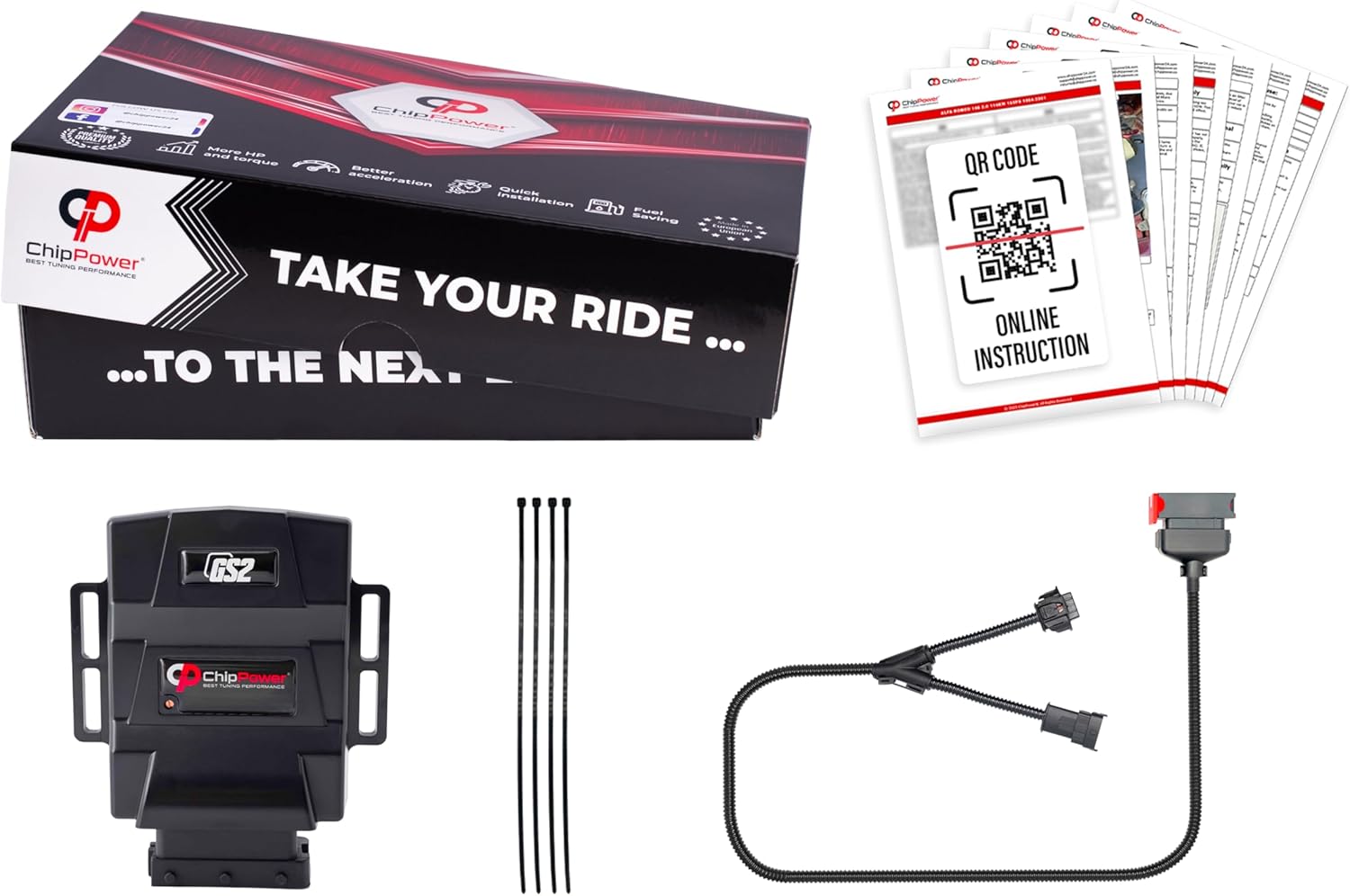
4. Product Overview
The ChipPower GS2 module is designed for easy integration into your vehicle's engine management system. It features a robust casing and specific connectors for a 'Plug&Drive' installation. The module includes an adjustment screw for fine-tuning the performance characteristics.


5. Installation Guide
Follow these steps carefully for proper installation of your ChipPower GS2 tuning box.
5.1. Preparation
- Turn off the vehicle's ignition and remove the key.
- Open the hood and locate the engine compartment.
- Identify the correct sensor for connection. For your Ford Fiesta Mk7 VII 1.0 EcoBoost, this typically involves the MAP (Manifold Absolute Pressure) or MAF (Mass Air Flow) sensor, or potentially the IAT (Intake Air Temperature) sensor. Refer to your vehicle's specific engine layout or the online instructions via the QR code provided.


5.2. Connect Tuning Module to Cable
Connect the ChipPower GS2 tuning module to the provided vehicle-specific connection cable. Ensure the connectors click securely into place.

5.3. Connect Harness to Vehicle Sensor
Disconnect the factory plug from the identified sensor (MAP, MAF, or IAT). Then, connect the tuning box harness inline, plugging one end into the sensor and the other end into the factory plug. Ensure all connections are firm and secure.


5.4. Secure Module and Cables
Mount the ChipPower GS2 module in a secure location within the engine bay, away from excessive heat, moisture, and moving parts. Use the provided zip ties to neatly secure all cables, preventing them from interfering with other engine components.

5.5. Initial Adjustment (Optional)
The module comes with a default setting. If desired, you can fine-tune the performance using the adjustment screw (refer to Image 4.2). Small adjustments should be made incrementally, and the vehicle's performance observed after each change. Consult the online manual for detailed adjustment guidelines.
6. Operating Instructions
Once installed, the ChipPower GS2 tuning box operates automatically. It modifies signals from the engine sensors to optimize fuel delivery and ignition timing, aiming to enhance engine performance and efficiency. No further user interaction is typically required during normal operation.
7. Maintenance
- Periodically inspect the module and its connections for any signs of wear, damage, or loose connections.
- Keep the module clean and free from excessive dirt or moisture. Use a dry cloth for cleaning.
- Ensure the cables remain securely fastened and away from hot or moving engine parts.
8. Troubleshooting
- Engine Warning Light: If an engine warning light appears after installation, first re-check all connections to ensure they are secure. If the light persists, remove the tuning box and revert to the factory setup. Consult a mechanic if the issue continues.
- No Perceptible Change: Verify that the module is correctly connected and powered. Ensure the adjustment screw is not set to its minimum position if you expect a performance change.
- Rough Idling or Hesitation: This could indicate an incorrect connection or an overly aggressive setting. Re-check connections and try adjusting the module to a lower setting.
9. Specifications
| Model | GS2 |
| Manufacturer | ChipPower |
| Compatible Vehicles | Ford Fiesta Mk7 VII 1.0 EcoBoost (2017+) Gasoline |
| Safety Rating | CE, UKCA, RoHS |
| Manufacturer Part Number | 220102201 |
| Module Dimensions (L x W x H) | 110 mm x 90 mm x 37 mm (approximate, based on diagram) |
| Cable Length | 1000 mm (approximate, based on diagram) |

10. Warranty and Support
For warranty information, technical support, or further assistance, please refer to the official ChipPower website or contact their customer service directly. Details can typically be found on the product packaging or through the online resources linked via the QR code in your package.