
Introduction
This manual provides detailed instructions for the installation, operation, and maintenance of your HUANLANG G14 Wall Mounted 12-Digit Combination Key Lock Box. Please read these instructions carefully before use to ensure proper functionality and security.
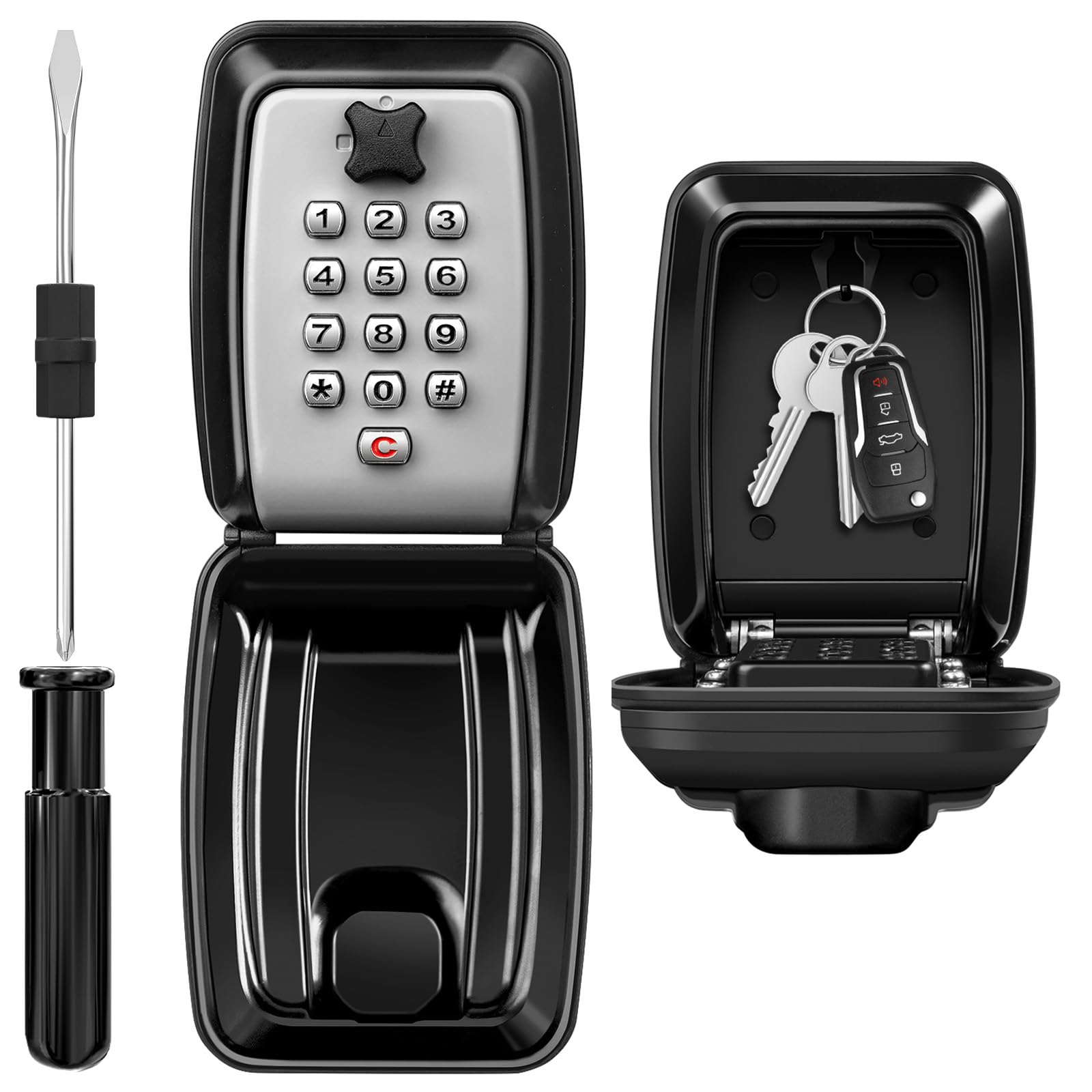
The HUANLANG G14 Wall Mounted Key Lock Box, designed for secure key storage.
Package Contents
Verify that all items listed below are included in your package:
- 1 x HUANLANG Key Lock Box (Main Product)
- 4 x Screws
- 4 x Expansion Plugs
- 1 x Screwdriver
- 1 x Instruction Manual (in 5 languages)
The image displays the HUANLANG Key Lock Box along with the included mounting hardware (screws and expansion plugs) and a small screwdriver for setting the code.
Product Features
- Durable Construction: Made from high-quality heavy-duty PVC material, aluminum alloy, and zinc alloy for enhanced durability.
- Weatherproof Design: Features a protective cover to withstand various weather conditions, including rain and snow.
- High Security: Utilizes a 12-digit combination mechanism, offering thousands of possible codes for increased security. Note that the order of numbers does not matter, and numbers cannot be repeated within a code.
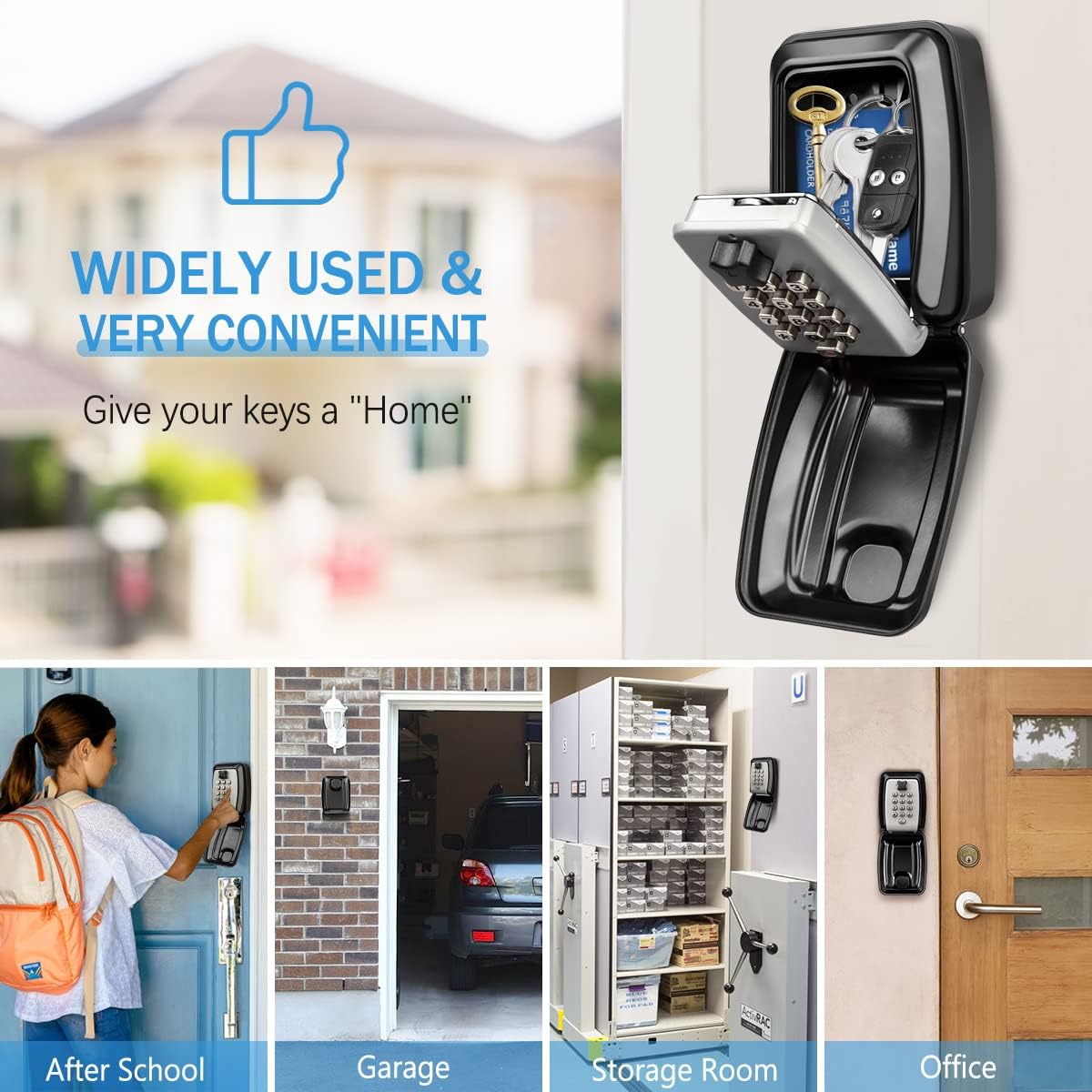
- Large Capacity: Spacious interior designed to hold multiple house keys, car keys, access cards, credit cards, and USB keys.
- Internal Hook: Includes an internal hook for organizing keys, making them easier to find and preventing clutter.
- Wall-Mounted Design: Securely mounts to a wall for convenient access and discreet placement.

This image highlights key features: a large internal space for multiple keys and cards, a 12-digit combination keypad for secure access, a robust aluminum alloy body for protection against tampering, and an internal hook to keep keys organized.

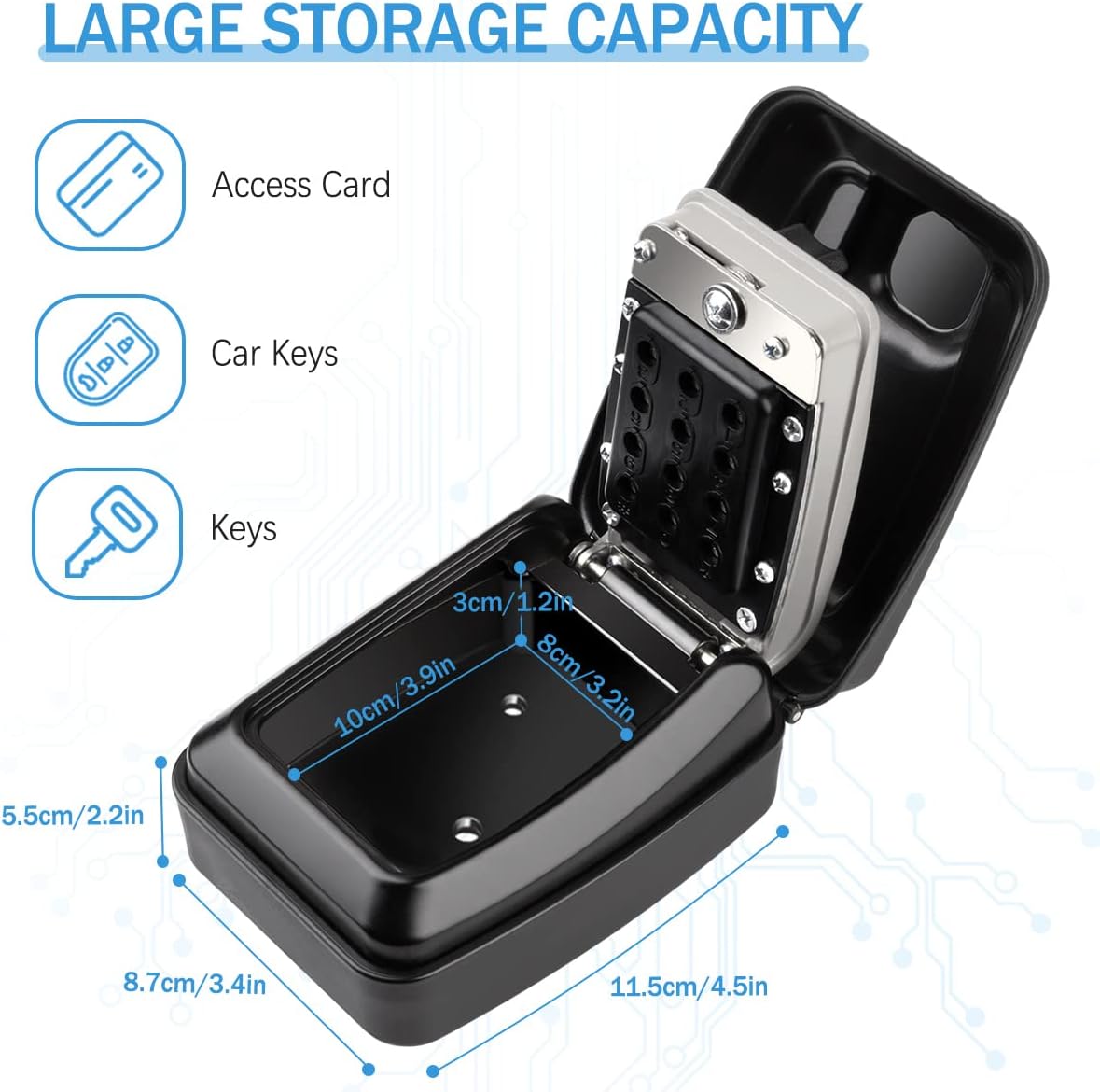
This image shows the interior dimensions of the lock box (10cm/3.9in length, 8cm/3.2in width, 5.5cm/2.2in depth) and illustrates its capacity to store various items like access cards, car keys, and multiple standard keys.

The image illustrates the weatherproof and dust-proof design of the HUANLANG lock box, featuring a protective cover. It contrasts this with a generic lock box that shows signs of rust due to lack of protection.

The image emphasizes the lock box's weather resistance, depicting it under simulated rain, snow, and sun, highlighting its suitability for outdoor use.
Setup and Installation
Follow these steps to securely install your HUANLANG Key Lock Box:
- Choose a Location: Select a suitable wall surface for mounting. Ensure the surface is solid and can support the lock box securely.
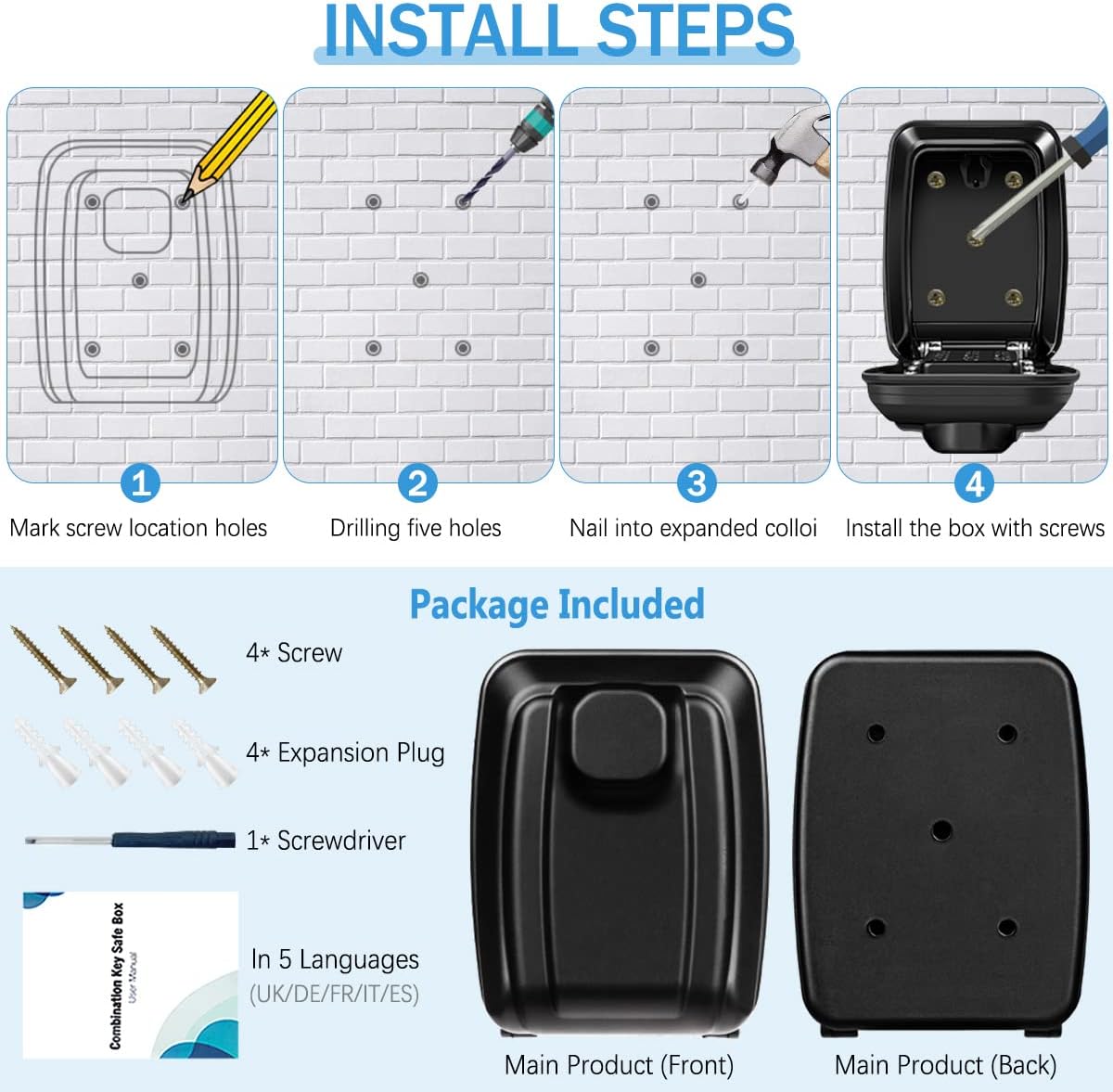
- Mark Screw Holes: Hold the lock box against the desired installation spot. Use a pencil to mark the locations for the four mounting screws.
- Drill Holes: Using an appropriate drill bit for your wall type, drill holes at the marked locations. Insert the expansion plugs into these holes.
- Mount the Lock Box: Align the lock box with the drilled holes. Insert the screws through the lock box's mounting holes and into the expansion plugs. Tighten the screws firmly to secure the lock box to the wall.
This visual guide details the installation process: Step 1 shows marking screw locations, Step 2 illustrates drilling the holes, Step 3 depicts inserting expansion plugs, and Step 4 shows the final step of installing the box with screws.
Operating Instructions
Setting Your Combination Code
Your HUANLANG Key Lock Box comes with a default code or no code set. It is crucial to set your own unique combination code immediately after installation. The lock box supports 4 to 12 non-repeating digits, and the order of entry does not matter.
- Open the Lock Box: Rotate the black knob on the front of the lock box to the open position to access the internal mechanism.
- Access the Reset Switch: On the inside of the lock box, locate the reset switch (often a small lever or screw). Rotate this switch to the code setting position (usually 180 degrees).
- Select Your Code: Using the provided screwdriver, rotate the small screws on the back of the keypad for each digit you wish to include in your code. For example, if you want '1-2-3-4' as your code, rotate the screws corresponding to 1, 2, 3, and 4. Ensure these are set to the 'ON' position.
- Record Your Code: Write down your new combination code and store it in a safe, memorable place. Do not store it inside the lock box.
- Confirm Code Setting: Rotate the reset switch back to its original position to lock in the new code.
- Test the Code: Close the lock box. Enter your newly set combination by pressing the corresponding buttons. Then, rotate the black knob to open the box. If it opens, your code is successfully set. If not, repeat the steps.
This image provides a step-by-step visual guide for setting the lock box's code. It shows rotating the knob to open, accessing the internal mechanism, using a screwdriver to set the code digits, recording the code, and testing the new combination.
This video demonstrates the process of setting and testing a new combination code for the HUANLANG Key Lock Box.
Opening the Lock Box
To open the lock box with your set combination:
- Enter the Code: Press the buttons corresponding to your combination code. The order in which you press the buttons does not matter, as long as all correct digits are pressed.
- Rotate the Knob: After entering the code, rotate the black knob on the front of the lock box to the open position.
- Access Contents: The front cover will open, allowing access to the keys or other items stored inside.
- Close and Secure: After retrieving or placing items, close the front cover and rotate the black knob back to the locked position to secure the box.
Maintenance
To ensure the longevity and reliable operation of your HUANLANG Key Lock Box, follow these maintenance guidelines:
- Regular Cleaning: Periodically wipe down the exterior of the lock box with a soft, damp cloth to remove dirt and grime. Avoid abrasive cleaners that could damage the finish.
- Check Mechanism: Occasionally check the combination buttons and the opening mechanism for smooth operation. If any stiffness is noted, a small amount of graphite lubricant (not oil-based) can be applied to the moving parts.
- Inspect for Damage: Regularly inspect the lock box for any signs of physical damage, such as cracks, dents, or loose mounting screws. Address any issues promptly to maintain security.
- Weather Protection: Ensure the protective cover is always properly closed when the lock box is not in use to maximize its weatherproof capabilities.
Troubleshooting
If you encounter issues with your HUANLANG Key Lock Box, refer to the following common problems and solutions:
| Problem | Possible Cause | Solution |
|---|---|---|
| Lock box will not open after entering code. | Incorrect code entered, or code not fully reset after changing. | Ensure all correct digits are pressed. Remember that the order of digits does not matter, but all selected digits must be pressed. Verify that the code setting switch was fully returned to its original position after setting a new code. |
| Difficulty pressing buttons or turning the knob. | Dirt or debris in the mechanism, or lack of lubrication. | Clean the keypad and knob area. Apply a small amount of graphite lubricant to the moving parts if necessary. |
| Code was forgotten. | The combination code was not recorded or remembered. | Unfortunately, if the code is forgotten and not recorded, there is no master key or override. You may need to try common combinations or contact customer support for further assistance, though recovery without the code is generally not possible for security reasons. |
| Lock box feels loose on the wall. | Mounting screws have loosened over time. | Tighten the mounting screws. If the wall anchors are damaged, replace them with new ones. |
Specifications
| Feature | Detail |
|---|---|
| Brand | HUANLANG |
| Model Number | G14 |
| Lock Type | 12-Digit Combination Lock |
| Material | Alloy Steel, Aluminium, Polyvinyl Chloride |
| Item Dimensions (L x W x H) | 4.53 x 3.35 x 4.53 inches |
| Item Weight | 1 Pound |
| Special Feature | Durable, Weatherproof |
| Recommended Uses | Key storage for homes, offices, garages, realtors, emergency entry. |
Warranty and Support
For warranty information or technical support, please refer to the contact details provided with your purchase or visit the official HUANLANG website. Keep your purchase receipt as proof of purchase.