
1. Introduction
This manual provides essential information for the safe and effective operation, installation, and maintenance of the ZTUOAUMA DSE8610 MKII Synchronizing & Load Sharing Auto Start Control Module. This module is designed for use with grid-type multiple generators, offering advanced control and monitoring capabilities. Please read this manual thoroughly before installation or operation.
2. Product Overview and Features
The ZTUOAUMA DSE8610 MKII is a sophisticated auto start control module compatible with DSE Deep Sea Control Module DES8610 MKII. It offers comprehensive features for generator management and synchronization.
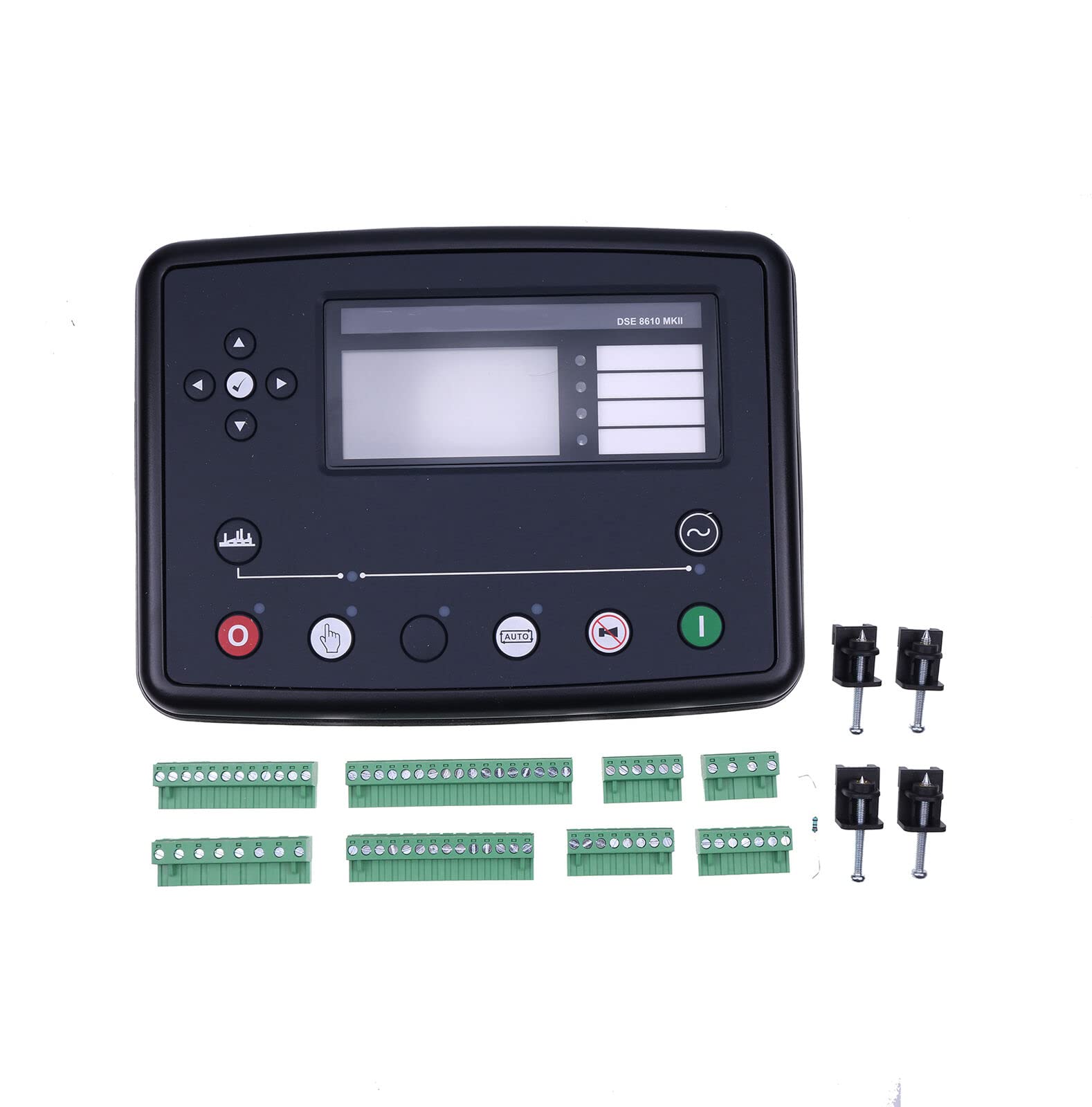
Figure 2.1: Front view of the ZTUOAUMA DSE8610 MKII control module, showing the display screen and control buttons.
Key Features:
- 32-Set Synchronization: Enables synchronization for system expansion, allowing multiple generators to operate in parallel.
- Remote Communications: Supports RS232, RS485, and Ethernet for remote monitoring and control.
- Comprehensive Monitoring: Continuously monitors all external situations and keeps all ports active.
- Configurable Inputs/Outputs: Features 11 configurable inputs and 8 configurable outputs for flexible system integration.
- Integral PLC Editor: Allows for custom logic programming within the module.
- Direct Replacement: Designed as a direct replacement for DSE Deep Sea Control Module DES8610 MKII.
3. Specifications
Detailed technical specifications for the DSE8610 MKII control module are provided below:
| Parameter | Value |
|---|---|
| DC Supply and Continuous Voltage Rating | 8V-35V |
| Max Operating Current (at 12V) | 460mA |
| Max Operating Current (at 24V) | 245mA |
| Max Standby Current (at 12V) | 375mA |
| Max Standby Current (at 24V) | 200mA |
| Charging/Excitation Voltage | 0-35V |
| Output A (Fuel) | 15A DC |
| Output B (Start) | 15A DC |
| Output C & D (Voltage Free) | 8A AC at 250V AC |
| Voltage Range (Phase to Neutral) | 15V-415V AC |
| Voltage Range (Phase to Phase) | 25V-719V AC |
| Frequency Range | 3.5Hz-75Hz |
| Minimum Load Impedance | 1000Ω |
| Manufacturer | ZTUOAUMA |
| Part Number | DSE8610 MKII |
| Engine Type Compatibility | 4 Stroke |
4. Setup and Installation
Proper installation is crucial for the safe and reliable operation of the DSE8610 MKII module. Refer to the connection diagrams and terminal descriptions carefully. Installation should only be performed by qualified personnel.
4.1 Terminal Connections Overview
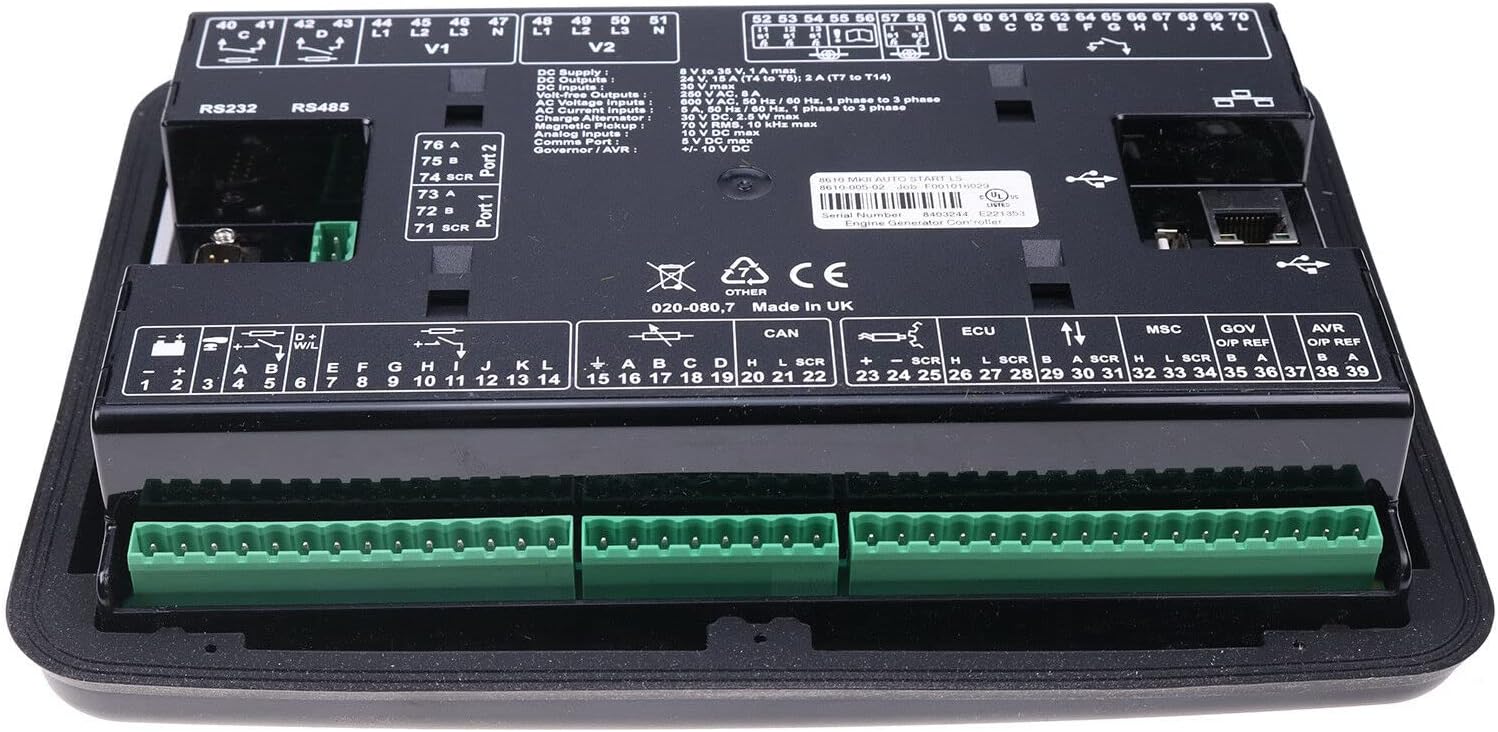
Figure 4.1: Rear view of the DSE8610 MKII control module, detailing the various connection terminals for power, inputs, outputs, and communication ports.
The module features multiple terminals for power, inputs, outputs, and communication. Ensure all connections are secure and correctly polarized.
- DC Supply (Terminals 1-2): Connect the module to a stable DC power source within the 8V-35V range. Terminal 1 is positive (+), Terminal 2 is negative (-).
- DC Outputs (Terminals 3-6): These are configurable outputs. Output A (Fuel) and Output B (Start) are rated for 15A DC.
- Voltage Outputs (Terminals 7-14): Configurable outputs for various control functions.
- AC Current Inputs (Terminals 41-51): For monitoring generator current.
- Voltage Inputs (Terminals 41-51): For monitoring generator voltage (Phase to Neutral: 15V-415V AC, Phase to Phase: 25V-719V AC).
- RS232/RS485 Ports (Top Left): For remote communication and configuration.
- Ethernet Port (Top Right): For network connectivity and remote monitoring.
- CAN Bus (Terminals 19-22): For communication with CAN-enabled engines.
- AVR (Terminals 38-39): Automatic Voltage Regulator connections.
4.2 Detailed Connection Diagram

Figure 4.2: Comprehensive connection diagram illustrating various input, output, and communication interfaces of the DSE8610 MKII module, including DSEnet expansion, USB, configurable inputs, DC outputs, analogue senders, emergency stop, and DC power supply.
The connection diagram provides a visual guide for wiring the module to your generator system. Pay close attention to the labeling for Bus Sensing, Volt Free Outputs, Generator Sensing (Current and Volts), Fuel & Start Outputs, Charge Alternator, Electronic Engines, and Magnetic Pick-up connections.
- DSEnet® Expansion: Connects to other DSE modules for system expansion.
- USB Port: For local configuration and firmware updates.
- Configurable Inputs: Connect various sensors and switches.
- DC Outputs: Control external relays and devices.
- Analogue Senders: For connecting analogue sensors (e.g., oil pressure, engine temperature).
- Emergency Stop: Connect to an external emergency stop button for safety.
- DC Power Supply: Main power input for the module (5-35V).
Always ensure power is disconnected before making or changing any wiring connections. Incorrect wiring can damage the module or connected equipment.
5. Operating Instructions
The DSE8610 MKII module is designed for automatic and manual control of generators. Familiarize yourself with the front panel controls and display messages.
5.1 Basic Operation Modes
- AUTO Mode: In this mode, the module automatically starts and stops the generator based on configured conditions (e.g., mains failure, scheduled run times). The module will also manage synchronization and load sharing with other generators or the grid.
- MANUAL Mode: Allows for manual control of the generator start and stop functions. This mode is typically used for testing or specific operational requirements.
- STOP Mode: Shuts down the generator and resets any active alarms.
5.2 Starting the Generator (AUTO Mode)
- Ensure all safety precautions are observed and the generator is ready for operation.
- Select the AUTO mode button on the front panel.
- The module will monitor the system for a start request (e.g., mains failure).
- Upon a valid start request, the module will initiate the start sequence, including pre-heat (if configured), cranking, and engine run.
- Once the generator is running and stable, the module will manage synchronization and load transfer as per its configuration.
5.3 Stopping the Generator (AUTO Mode)
- When the start request is removed (e.g., mains supply returns), the module will initiate the stop sequence.
- This typically involves load transfer back to the mains, a cooling-down period for the engine, and then engine shutdown.
5.4 Manual Start/Stop
- Select the MANUAL mode button.
- Press the START button to initiate the generator start sequence.
- Press the STOP button to shut down the generator.
5.5 Display and Navigation
The module's display provides real-time information about the generator, engine, and mains status. Use the navigation buttons (up, down, left, right, enter) to scroll through different screens and access parameters. Refer to the module's specific software manual for detailed navigation and configuration instructions.
6. Maintenance
Regular maintenance ensures the longevity and optimal performance of your DSE8610 MKII control module and the connected generator system.
- Regular Inspections: Periodically check all wiring connections for tightness and signs of corrosion or damage.
- Cleaning: Keep the module's front panel and ventilation openings clean and free from dust and debris. Use a soft, dry cloth. Do not use abrasive cleaners or solvents.
- Firmware Updates: Check the manufacturer's website for available firmware updates to ensure the module operates with the latest features and bug fixes.
- Battery Check: Ensure the DC supply battery for the control module is in good condition and adequately charged.
- Environmental Conditions: Ensure the module is operating within its specified environmental limits (temperature, humidity) to prevent premature failure.
For detailed maintenance schedules and procedures related to the generator itself, refer to the generator manufacturer's manual.
7. Troubleshooting
This section provides basic troubleshooting steps for common issues. For complex problems, contact qualified service personnel.
7.1 Common Issues and Solutions
| Problem | Possible Cause | Solution |
|---|---|---|
| Module does not power on | No DC supply; Blown fuse; Incorrect wiring | Check DC supply voltage and connections (8V-35V). Inspect fuses. Verify wiring according to diagram. |
| Generator fails to start | Low fuel; Low battery; Engine fault; Emergency stop active; Incorrect mode selection | Check fuel level. Check generator battery voltage. Inspect engine for faults. Ensure emergency stop is disengaged. Verify module is in AUTO or MANUAL mode. |
| Generator starts but shuts down immediately | High engine temperature; Low oil pressure; Overspeed/Underspeed; Generator over/under voltage/frequency | Check engine coolant level and temperature. Verify oil pressure. Check generator output parameters. Consult the module's display for specific shutdown alarms. |
| Synchronization issues | Incorrect synchronization parameters; Sensor issues; Wiring problems | Verify synchronization settings in the module configuration. Check voltage and frequency sensor connections. Ensure proper wiring between modules for load sharing. |
| Communication errors (RS232/RS485/Ethernet) | Incorrect cable; Wrong settings; Network issue | Ensure correct communication cables are used. Verify baud rates, IP addresses, and other network settings. Check network connectivity. |
Always refer to the module's display for specific alarm messages, which can provide valuable clues for troubleshooting.
8. Warranty and Support
8.1 Warranty Information
The ZTUOAUMA DSE8610 MKII control module comes with a warranty:
- Return Policy: Returnable for 6 months from the date of purchase.
- Change Policy: Changeable for 1 year (return and change for free).
- For specific terms and conditions, please refer to your purchase documentation or contact the seller.
8.2 Technical Support
For technical assistance, installation guidance, or troubleshooting beyond the scope of this manual, please contact ZTUOAUMA customer support or your authorized distributor. When contacting support, please have your product model number (DSE8610 MKII) and purchase details readily available.
You can visit the official ZTUOAUMA store for more information: ZTUOAUMA Store