
1. Important Safety Information
Please read this manual carefully before installing and operating the ChipPower Performance Chip GS2. Incorrect installation can lead to vehicle damage or malfunction. If you are unsure about any step, consult a qualified automotive technician.
- Ensure the vehicle's engine is turned off and cool before beginning installation.
- Disconnect the vehicle's battery before installation to prevent electrical damage. Reconnect only after installation is complete and verified.
- Keep the chip box and cables away from moving engine parts, extreme heat, and moisture.
- The ChipPower GS2 is designed with an engine protection function to ensure safe operation.
- Removal of the chip box will return the vehicle to factory settings.
2. Package Contents
Verify that all items listed below are present in your package:
- ChipPower GS2 Chip Box
- Dedicated Connection Cable for Volkswagen Passat B7 (3C/36) 1.4 TSI
- Zip Ties for cable management
- User Manual (this document)
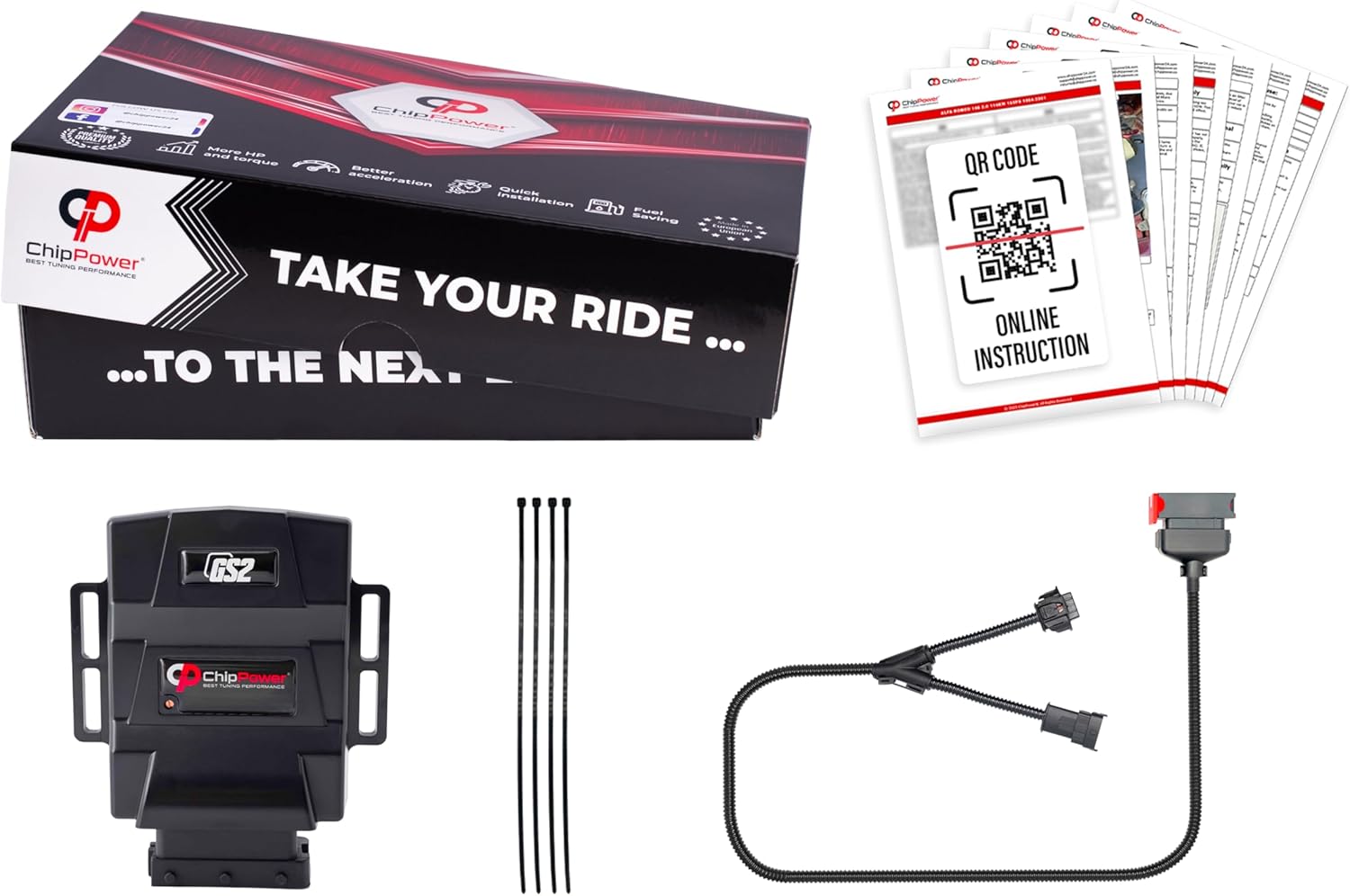
Image 2.1: Contents of the ChipPower GS2 package, including the chip box, connection cable, zip ties, and instruction manual.
3. Setup and Installation
The ChipPower GS2 is a Plug & Drive device designed for quick installation, typically within 10 minutes. No special tools are required beyond a small screwdriver for potential adjustments.
3.1 Identifying Sensor Type
The installation involves connecting the chip box to a specific sensor in your vehicle's engine. For the Volkswagen Passat B7 1.4 TSI, this typically involves the MAP (Manifold Absolute Pressure) or MAF (Mass Air Flow) sensor. Refer to your vehicle's service manual or consult a professional if you are unsure of the sensor location.

Image 3.1: Example of a MAP sensor.

Image 3.2: Example of a MAF sensor.
3.2 Installation Steps
- Prepare the Vehicle: Ensure the engine is off and cool. Disconnect the negative terminal of the car battery.
- Locate the Sensor: Identify the correct MAP or MAF sensor on your engine.
- Disconnect the Original Sensor Connector: Carefully disconnect the existing electrical connector from the sensor.
- Connect the ChipPower Cable: Connect one end of the dedicated ChipPower connection cable to the vehicle's original sensor, and the other end to the original connector that was just removed. The ChipPower cable acts as an intermediary. Ensure connections are secure and click into place.

Image 3.3: Diagram illustrating the connection of the ChipPower GS2 cable between the vehicle's sensor and its original connector.
- Connect the Chip Box: Plug the ChipPower GS2 chip box into the designated connector on the newly installed ChipPower cable. Ensure it clicks securely.

Image 3.4: Step-by-step visual guide for connecting the dedicated cable to the ChipPower GS2 module.
Image 3.5: Close-up view of the secure connection between the ChipPower GS2 module and its dedicated cable.
- Secure the Chip Box and Cables: Use the provided zip ties to secure the chip box and all cables, ensuring they are not loose or in contact with hot or moving engine components.

Image 3.6: Example of the ChipPower GS2 module and cables securely installed within an engine bay.
- Reconnect Battery: Reconnect the negative terminal of the car battery.
- Start Engine: Start the engine and check for any warning lights. If warning lights appear, turn off the engine, recheck all connections, and restart.
3.3 Adjustment (Optional)
The ChipPower GS2 may feature a potentiometer for fine-tuning performance. This adjustment should only be made if you understand its function and desired outcome. Consult the specific instructions provided with your unit for adjustment details.

Image 3.7: Illustrates the adjustment point on the ChipPower GS2 module, typically accessed with a small screwdriver.
4. Operating Instructions
Once installed, the ChipPower GS2 operates automatically. It is designed to optimize engine parameters to achieve the following benefits:
- Increased Power and Torque: The module modifies engine control unit (ECU) signals to enhance engine output.
- Improved Fuel Economy: Optimized engine efficiency can lead to reduced fuel consumption.
- Reduced Turbo Lag: The chip helps to minimize the delay in power delivery from turbocharged engines.
The device is compatible with both key and keyless car starter systems and is suitable for all types of gearboxes.
5. Maintenance
The ChipPower GS2 is a maintenance-free device. Periodically inspect the connections to ensure they remain secure and free from corrosion or damage. Ensure the chip box and cables are clean and dry.
6. Troubleshooting
If you experience any issues after installing the ChipPower GS2, follow these steps:
- Check Connections: Ensure all connectors are fully seated and secure. Disconnect and reconnect them to confirm.
- Battery Disconnect: Disconnect the car battery for 15 minutes, then reconnect. This can reset the ECU.
- Remove Chip Box: If problems persist, remove the ChipPower GS2 and its dedicated cable, reconnecting the original sensor connector directly. If the vehicle operates normally without the chip, contact ChipPower customer support.
- Consult a Professional: If you are unable to resolve the issue, seek assistance from a qualified automotive technician.
7. Specifications
| Model | GS2 |
| Manufacturer | ChipPower |
| Compatibility | Volkswagen Passat B7 (3C/36) 1.4 TSI 90 kW 122 HP Gasoline (2010-2015) |
| Safety Ratings | CE, UKCA, RoHS |
| Dimensions (Chip Box) | Approx. 110 mm (L) x 90 mm (W) x 37 mm (H) |
| Cable Length | Approx. 1000 mm |

Image 7.1: Technical dimensions of the ChipPower GS2 module and its connection cable.
8. Warranty and Support
ChipPower products are manufactured in Europe and are designed for reliability. The engine protection function ensures the safety of your vehicle's engine. Installation of the chip box does not void your vehicle's warranty, and removal returns the car to factory settings.
For technical support, warranty claims, or further assistance, please contact ChipPower directly through their official website or authorized distributors. Refer to the contact information provided in your product packaging or on the ChipPower website.