
Laticrete 0804-0403-TW
Laticrete STRATA Heat 0804-0403-TW WiFi Touchscreen Programmable Thermostat User Manual
Model: 0804-0403-TW
Introduction
This manual provides comprehensive instructions for the installation, operation, and maintenance of your Laticrete STRATA Heat 0804-0403-TW WiFi Touchscreen Programmable Thermostat. This advanced thermostat is designed for electric radiant floor heating systems, offering precise temperature control, energy efficiency, and smart home integration. Please read this manual thoroughly before installation and use to ensure proper function and safety.
Safety Information
Important Safety Instructions:
- Installation must be performed by a qualified electrician in accordance with local electrical codes.
- Always disconnect power at the circuit breaker before installing or servicing the thermostat.
- The thermostat features a built-in Ground Fault Circuit Interrupter (GFCI) for maximum safety. Do not bypass or disable this feature.
- This device is designed for electric radiant floor heating systems only. Do not use for other heating applications.
- Ensure the thermostat is compatible with your heating system's voltage (120V or 240V).
Product Overview
The Laticrete STRATA Heat 0804-0403-TW thermostat provides advanced control for your electric radiant floor heating. Key features include:
- Dual voltage compatibility (120V/240V).
- High-resolution LCD touchscreen display.
- Wi-Fi connectivity for remote control via the My Strata Heat app.
- Programmable heating schedules.
- Energy usage monitoring.
- Geo-fencing GPS functions.
- Compatibility with Amazon Alexa and Google Home.
- Built-in GFCI for safety.
- Includes NTC 10k floor sensor probe.
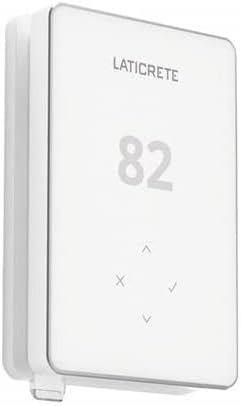
Image 1: Front view of the Laticrete STRATA Heat 0804-0403-TW WiFi Touchscreen Programmable Thermostat, showing the digital display and control buttons.
Setup and Installation
- Power Disconnection: Before beginning any installation, ensure the main power to the heating circuit is turned off at the circuit breaker.
- Wiring: Connect the thermostat according to the wiring diagram provided in the product packaging. This thermostat supports both 120V and 240V systems. Ensure all connections are secure and comply with local electrical codes.
- Floor Sensor Installation: Install the included NTC 10k floor sensor probe in the floor according to your heating system's instructions. The sensor should be placed centrally between two heating cables for accurate temperature readings.
- Mounting: Mount the thermostat securely to the wall junction box.
- Power Restoration: Once installation is complete and all connections are verified, restore power at the circuit breaker.
- Wi-Fi Setup:
Download the "My Strata Heat" app from your device's app store.
Follow the in-app instructions for a single-step QR code setup. Scan the QR code displayed on the thermostat or provided in the packaging.
Important: The thermostat requires a 2.4GHz Wi-Fi network for connection. It is not compatible with 5GHz networks. If you have a dual-band router, ensure your device is connected to the 2.4GHz band during setup.

Image 2: Cross-section diagram illustrating the layers of a radiant floor heating system, including the heating mat, mortar, and tile, indicating where the thermostat sensor would be placed.
Operating Instructions
Manual Operation (Touchscreen)
The thermostat features an intuitive touchscreen display. Use the up and down arrows to adjust the desired temperature. The display will show the current floor temperature and the setpoint.
App Control (My Strata Heat App)
Once connected to Wi-Fi, the My Strata Heat app provides advanced control and monitoring features:
- Programming Schedules: Create and manage custom heating schedules for different days and times to optimize comfort and energy savings.
- Energy Monitoring: View real-time and historical energy consumption data to track and manage your heating costs.
- Geo-fencing: Enable geo-fencing to automatically adjust the thermostat's temperature based on your proximity to home, ensuring your floors are warm when you arrive and saving energy when you're away.
- Remote Access: Control your thermostat from anywhere using your smartphone or tablet.

Image 3: Screenshot of the My Strata Heat mobile application interface, showing options for geo-active heating, daily usage, and room temperature settings.
Smart Home Integration
The Laticrete STRATA Heat thermostat is compatible with Amazon Alexa and Google Home. Refer to the respective smart home platform's instructions for connecting your thermostat and enabling voice control features.
Maintenance
- Cleaning: Gently wipe the thermostat screen and casing with a soft, damp cloth. Do not use abrasive cleaners or solvents.
- Software Updates: Ensure your My Strata Heat app is up to date to receive the latest features and performance improvements. Firmware updates for the thermostat may be pushed through the app.
- GFCI Test: Periodically test the GFCI function as recommended by local electrical codes. Refer to the thermostat's on-screen menu or app for GFCI test procedures.
Troubleshooting
| Problem | Possible Cause | Solution |
|---|---|---|
| Thermostat not powering on. | No power from circuit breaker; incorrect wiring. | Check circuit breaker. Verify wiring connections are correct and secure. Consult a qualified electrician if unsure. |
| Cannot connect to Wi-Fi. | Incorrect Wi-Fi band (5GHz instead of 2.4GHz); incorrect password; weak signal. | Ensure your router is broadcasting a 2.4GHz network and your device is connected to it during setup. Verify Wi-Fi password. Move router closer or use a Wi-Fi extender. Restart router and thermostat. |
| Floor not heating to set temperature. | Incorrect settings; floor sensor issue; heating element malfunction. | Check thermostat settings and schedule in the app. Ensure the floor sensor is properly installed and functioning. If the issue persists, contact Laticrete technical support. |
| GFCI trip. | Ground fault detected in the heating system. | Press the GFCI reset button. If it trips repeatedly, there may be an electrical fault in the heating system. Disconnect power and consult a qualified electrician immediately. |
Specifications
- Brand: Laticrete
- Model Number: 0804-0403-TW (STRATA HEAT)
- Voltage: 120V / 240V AC
- Max Load: 15 Amps (1800W @ 120V, 3600W @ 240V)
- Controller Type: Amazon Alexa, Google Home
- Connectivity Technology: Wi-Fi (2.4GHz only)
- Display Type: High-resolution LCD Touchscreen
- Sensor: NTC 10k Floor Sensor Probe
- Safety: Built-in GFCI, UL and cUL certified
- Dimensions: 3 x 1 x 5 inches
- Item Weight: 12 ounces
- UPC: 720912064098
Warranty and Support
For warranty information and technical support, please refer to the documentation included with your product or visit the official Laticrete website. You can also contact Laticrete customer service directly for assistance with installation, operation, or troubleshooting.
Laticrete Contact Information:
- Website: www.laticrete.com
- Customer Service: Refer to the website for regional contact details.
Ask a question about this manual
Ask about setup, troubleshooting, compatibility, parts, safety, or missing instructions. Manuals+ will review the question and use this page’s manual context to help answer it.