
1. Introduction
Thank you for choosing the Aurabeam Replacement TV Remote Control. This remote is designed to provide seamless control for your compatible Telefunken television without the need for any complex programming. Simply insert batteries, and it is ready for immediate use, replicating all essential functions of your original remote.
2. Product Overview
Familiarize yourself with the layout and functions of your new remote control.

This image displays the front view of the Aurabeam replacement TV remote control. It is a black, rectangular remote with various buttons for TV operation. The top section features power, input, and number keys. Below that are volume, channel, and navigation buttons, including dedicated buttons for Netflix and YouTube. The central part includes a directional pad with an 'OK' button. The lower section contains playback controls and colored function buttons.
3. Setup: Battery Installation
The remote control requires two AAA batteries (not included). Follow these steps to install them:
- Locate the battery compartment cover on the back of the remote control.
- Slide the cover downwards or press the latch and lift to open the compartment.
- Insert two AAA batteries, ensuring the positive (+) and negative (-) terminals align correctly with the markings inside the compartment.
- Slide the battery compartment cover back into place until it clicks securely.
Your remote is now ready for use.

This image shows an angled back view of the Aurabeam replacement TV remote control, highlighting the battery compartment cover. The cover is located at the bottom rear of the remote and can be slid open to insert or replace batteries.
4. Operating Instructions
This remote control is designed for intuitive operation. Point the remote directly at your television's infrared receiver for optimal performance.
Basic Functions:
- Power Button (⏻): Turns the TV on or off.
- Number Buttons (0-9): Directly select channels.
- Volume Up/Down (V+ / V-): Adjusts the sound volume.
- Channel Up/Down (P+ / P-): Changes the TV channel.
- Mute Button (🔇): Mutes or unmutes the TV sound.
- Input/Source Button (⎚): Cycles through available input sources (HDMI, AV, etc.).
Navigation and Menu Functions:
- Directional Pad (Up, Down, Left, Right): Navigates through menus and options.
- OK Button: Confirms selections within menus.
- Back Button: Returns to the previous menu or screen.
- Exit Button: Exits the current menu or application.
- Home Button (🏠): Accesses the TV's smart home screen or main menu.
Special Function Buttons:
- Netflix Button: Direct access to the Netflix application.
- YouTube Button: Direct access to the YouTube application.
- Prime Video Button: Direct access to the Amazon Prime Video application.
- Playback Controls (Rewind, Play/Pause, Fast Forward, Stop, Record): Control media playback.
- Colored Buttons (Red, Green, Yellow, Blue): These buttons often correspond to specific functions displayed on-screen within certain applications or TV menus.
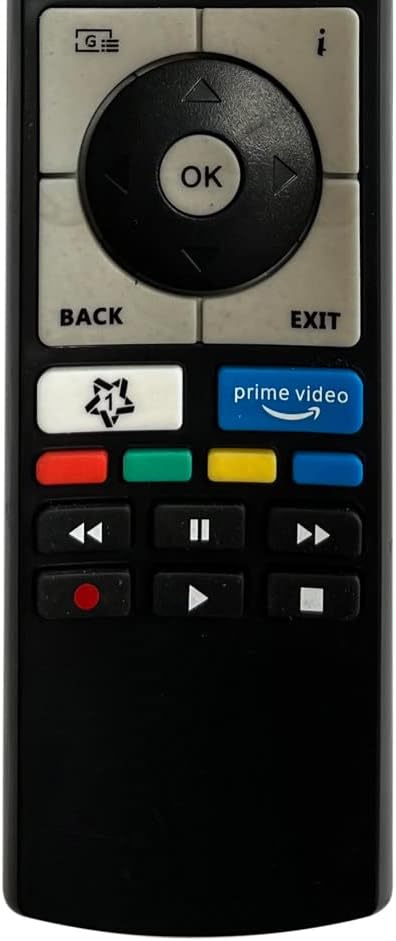
This image provides a close-up view of the lower section of the Aurabeam replacement TV remote control. It highlights the dedicated buttons for Netflix, YouTube, and Prime Video, along with standard media playback controls (rewind, play/pause, fast forward, stop, record) and four colored function buttons.
5. Compatibility
This Aurabeam replacement remote control is compatible with a wide range of Telefunken TV models, including but not limited to:
- D55U700M4CWH
- 32DTH531
- 32FTV660BK
- 40U298N4CWH
- 49DTU652
- C40U446
- D32F289M4CWII
- D32H289M4CWD
- D43U700M4CWH
- D50U550B4CW
- D65U700M4CWH
- H43V32A
- JT32FBS200
- XF43G511W
- XH32G511D-W
- XU55E512
For a comprehensive list of compatible models, please refer to the product's original listing or contact customer support.
6. Troubleshooting
If you encounter issues with your remote control, try the following troubleshooting steps:
- Remote Not Responding:
- Ensure the batteries are inserted correctly with the proper polarity.
- Replace old batteries with new ones. Low battery power is a common cause of unresponsiveness.
- Check for any obstructions between the remote control and the TV's infrared receiver.
- Ensure you are within the effective operating range (up to 10 meters).
- Specific Buttons Not Working:
- Clean the remote control buttons and surrounding areas to remove any dirt or debris that might be interfering with button presses.
- If only certain buttons are unresponsive after checking batteries, the remote may be faulty.
- Interference:
- Bright light sources, especially fluorescent lights, can sometimes interfere with infrared signals. Try operating the remote in different lighting conditions.
If these steps do not resolve the issue, please refer to the warranty and support section.
7. Maintenance
To ensure the longevity and optimal performance of your remote control, follow these maintenance guidelines:
- Cleaning: Use a soft, dry cloth to clean the remote control. For stubborn dirt, slightly dampen the cloth with water or a mild cleaning solution, then wipe dry immediately. Avoid using harsh chemicals or abrasive cleaners.
- Storage: Store the remote in a cool, dry place away from direct sunlight and extreme temperatures.
- Battery Care: Remove batteries if the remote control will not be used for an extended period to prevent leakage and potential damage.
- Avoid Drops: Protect the remote from physical impact, as drops can damage internal components.
8. Specifications
| Feature | Description |
|---|---|
| Brand | Aurabeam |
| Connectivity Technology | Infrared |
| Special Features | No programming required, Universal functionality |
| Compatible Devices | Television |
| Number of Buttons | 25 |
| Controller Type | Button Control |
| Maximum Range | 10 Meters |
| UPC | 794207369069 |
| Remote Model Number | 24ba271e-9f4f-4502-9d8f-a6a87e64d77f |
9. Warranty and Support
This Aurabeam replacement remote control comes with a 1-year warranty from the date of purchase.
For warranty claims, technical assistance, or further inquiries, please contact your retailer or the Aurabeam customer support channel where the product was purchased. Please have your purchase receipt and product details available when contacting support.