1. Introduction
The Oral-B iO Series 6 Electric Toothbrush offers an advanced brushing experience with revolutionary magnetic iO technology. This manual provides essential information for the safe and effective use of your new toothbrush, ensuring optimal oral hygiene.

Image: Oral-B iO Series 6 electric toothbrush in black, with charging base and travel case.
2. Safety Information
Please read all instructions carefully before using this appliance. Keep this manual for future reference.
General Safety Guidelines:
- Regularly check the product, power cord, and accessories for any damage. Do not use a damaged or malfunctioning device.
- If the product, cord, or accessories are damaged, return them to an Oral-B service center. Do not modify or repair the product yourself, as this may cause fire, electric shock, or personal injury.
- Use of the device by children under 3 years of age is not recommended.
- Children and persons with reduced physical, sensory, or mental capabilities, or lack of experience and knowledge, may use the device only under supervision or after receiving training on safe and proper use, and provided they understand the associated hazards.
- Cleaning and maintenance should not be performed by children without supervision. Children should not play with this device.
- The product should only be used as intended and described in this manual. Do not use accessories not recommended by the manufacturer.

Image: Icons reminding users to conserve water by turning off the tap during brushing and to unplug the charger when not in use.
3. Package Contents
Your Oral-B iO Series 6 package typically includes:
- Oral-B iO Series 6 Electric Toothbrush Handle
- 1 Oral-B iO Ultimate Clean Brush Head
- Charging Station
- Travel Case
- User Manual (this document)

Image: Included accessories: Oral-B iO Series 6 toothbrush, Ultimate Clean brush head, charging station, and hard travel case.
4. Setup
4.1 Initial Charging
- Place the toothbrush handle on the charging station.
- Plug the charging station into a power outlet.
- The interactive display will show the charging progress. For first use, charge the toothbrush for at least 3 hours to ensure a full battery. A full charge provides approximately 2 weeks of brushing.

Image: The Oral-B iO Series 6 charging on its base, illustrating its long operating time of up to 2 weeks.
4.2 Attaching the Brush Head
Align the brush head with the shaft of the toothbrush handle and push it down until it clicks into place. To remove, pull the brush head straight off.
5. Operating Instructions
5.1 Turning On/Off and Brushing
- Wet the brush head and apply a small amount of toothpaste.
- Place the brush head in your mouth before turning on the toothbrush.
- Press the On/Off button to start brushing.
- Guide the brush head slowly from tooth to tooth, spending a few seconds on each tooth surface.
- The toothbrush will pause briefly every 30 seconds to signal you to move to the next quadrant of your mouth, and a longer pause after 2 minutes indicates the completion of the recommended brushing time.
- Press the On/Off button again to turn off the toothbrush.
5.2 Smart Pressure Sensor
The iO Series 6 features a smart pressure sensor to protect your gums and ensure effective cleaning:
- Green Light: Indicates optimal brushing pressure.
- Red Light: Signals that you are brushing too hard. Reduce pressure immediately.
- White Light: Indicates insufficient pressure. Apply slightly more pressure.
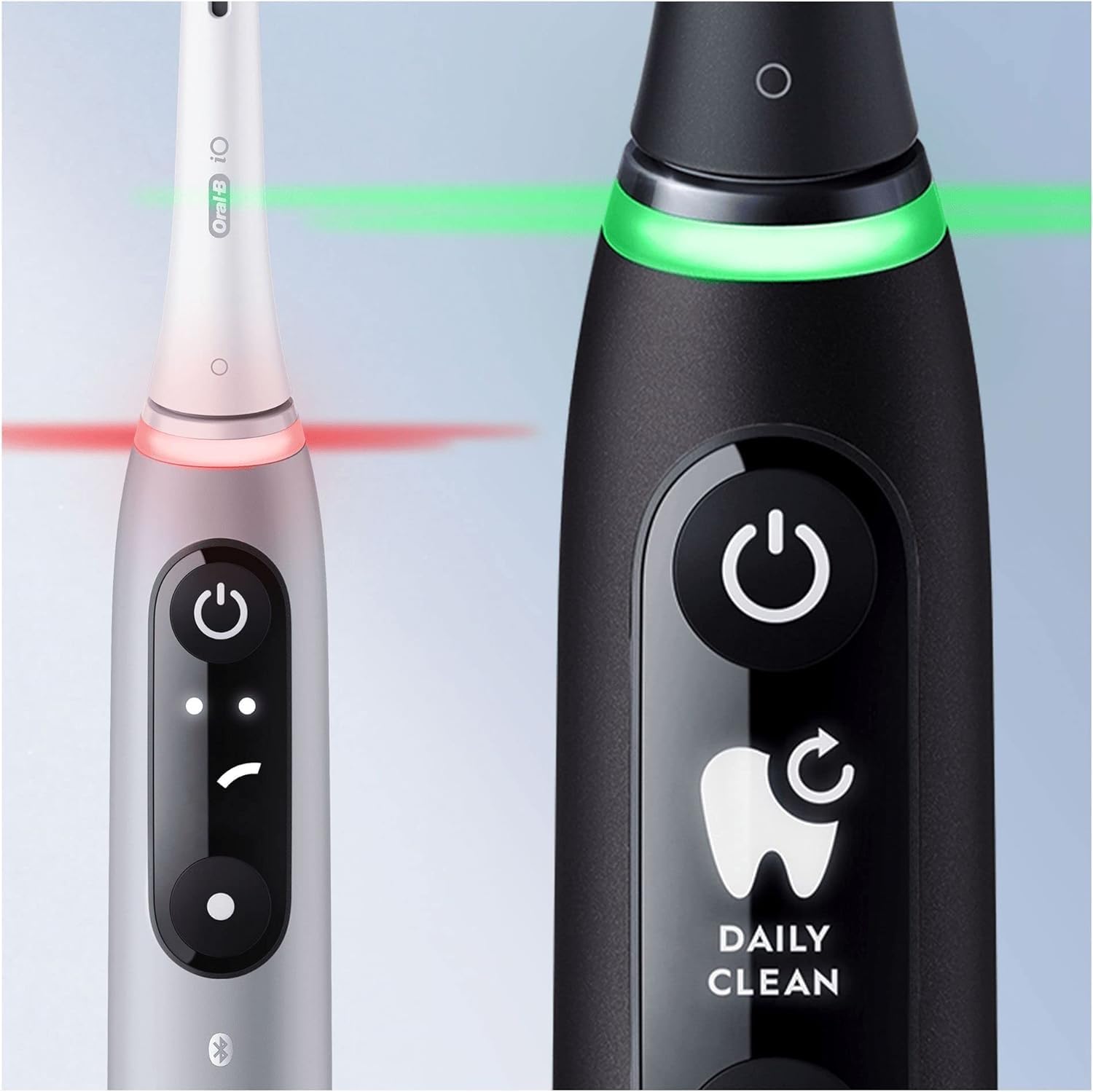
Image: The smart pressure sensor indicating correct (green) and excessive (red) brushing pressure.

Image: Illustration of the pressure sensor protecting gums by signaling correct brushing force.
5.3 Interactive Display and Brushing Modes
The interactive OLED display provides real-time feedback and allows you to customize your brushing experience. You can switch between 5 smart modes:
- Daily Clean: For everyday cleaning.
- Sensitive: Gentle yet thorough cleaning for sensitive areas.
- Gum Care: Gentle massage for gums.
- Intense Clean: For an extra thorough clean.
- Whitening: Designed to polish teeth for stain removal.
Use the mode button on the handle to cycle through the available modes. The display will show the selected mode, battery level, and a brush head replacement reminder.

Image: Oral-B iO Series 6 toothbrushes showcasing various brushing modes on their interactive displays.

Image: Personalization options with 5 brushing modes for a tailored cleaning experience.
5.4 Oral-B App Connectivity
The Oral-B iO Series 6 can connect to the Oral-B app via Bluetooth for personalized brushing guidance and tracking. The app uses Artificial Intelligence to recognize 6 areas of your mouth, providing real-time feedback to ensure thorough cleaning.

Image: Interactive display, AI brushing tracking in the Oral-B App, and icons for 5 brushing modes.

Image: The Oral-B app displaying brushing score, coverage, and pressure feedback for improved brushing habits.
6. Maintenance
6.1 Cleaning the Toothbrush
- After each use, rinse the brush head thoroughly under running water with the handle switched on.
- Turn off the handle and remove the brush head. Rinse both the handle and the brush head separately under running water.
- Wipe the handle dry with a soft cloth.
- Clean the charging station regularly with a damp cloth. Ensure it is unplugged before cleaning.
6.2 Replacing the Brush Head
Dentists recommend replacing your brush head every 3 months, or sooner if the bristles are splayed or worn. The interactive display will also provide a reminder when it's time to replace the brush head.

Image: The interactive display indicating a brush head replacement reminder.
7. Troubleshooting
If you encounter any issues with your Oral-B iO Series 6 toothbrush, please refer to the following common solutions:
- Toothbrush not turning on: Ensure the toothbrush is fully charged. Place it on the charging station for several hours.
- Weak brushing performance: Replace the brush head if it is old or worn. Ensure the brush head is securely attached.
- Pressure sensor always red: You might be applying too much pressure. Practice brushing gently, letting the micro-vibrations do the work.
- App connectivity issues: Ensure Bluetooth is enabled on your smartphone and the Oral-B app is up to date. Try restarting both the toothbrush and your phone.
- Unusual noise: If the noise is persistent and not related to normal operation, discontinue use and contact Oral-B customer service.
For further assistance, please contact Oral-B customer support.
8. Specifications
| Feature | Detail |
|---|---|
| Product Name | Electric Toothbrush |
| Brand | Oral-B |
| Model Number | 4210201409199 |
| Power Source | Battery Powered |
| Age Range Description | Adult |
| Special Feature | Portable, Smart Pressure Sensor, Interactive Display, AI Brushing Recognition |
| Brushing Modes | 5 (Daily Clean, Sensitive, Gum Care, Intense Clean, Whitening) |
| Toothbrush Head Shape | Round |
| Battery Life | Up to 2 weeks (based on 2 minutes, twice daily brushing) |
| Connectivity | Bluetooth (for Oral-B App) |
9. Warranty and Support
For warranty information, please refer to the warranty card included with your product or visit the official Oral-B website. If you require technical support or have questions about your Oral-B iO Series 6, please contact Oral-B customer service through their official website or the contact information provided in your product packaging.
You can also visit the Oral-B Store on Amazon for more product information and accessories.


