Introduction
This manual provides instructions for the AIDITIYMI AXD7692 replacement remote control, designed for use with various Pioneer Stereo AV Receivers. This remote functions as a direct replacement for the original AXD7692 and AXD7664 remotes, offering seamless operation without the need for complex programming.
Setup: Battery Installation
To begin using your remote control, you must first install the batteries. No programming or pairing is required for this replacement remote.
- Locate the battery compartment on the back of the remote control.
- Slide the battery cover downwards or press the latch and lift to open.
- Insert two (2) new 1.5V AAA alkaline batteries, ensuring the positive (+) and negative (-) terminals align correctly with the markings inside the compartment.
- Replace the battery cover by sliding it back into place until it clicks securely.

Image: Back view of the remote control with the battery compartment open, illustrating where to insert the two AAA batteries.
Once batteries are installed, the remote is ready for immediate use with compatible Pioneer AV Receivers.
Operating Instructions
This section outlines the primary functions of the buttons on your AIDITIYMI AXD7692 remote control.
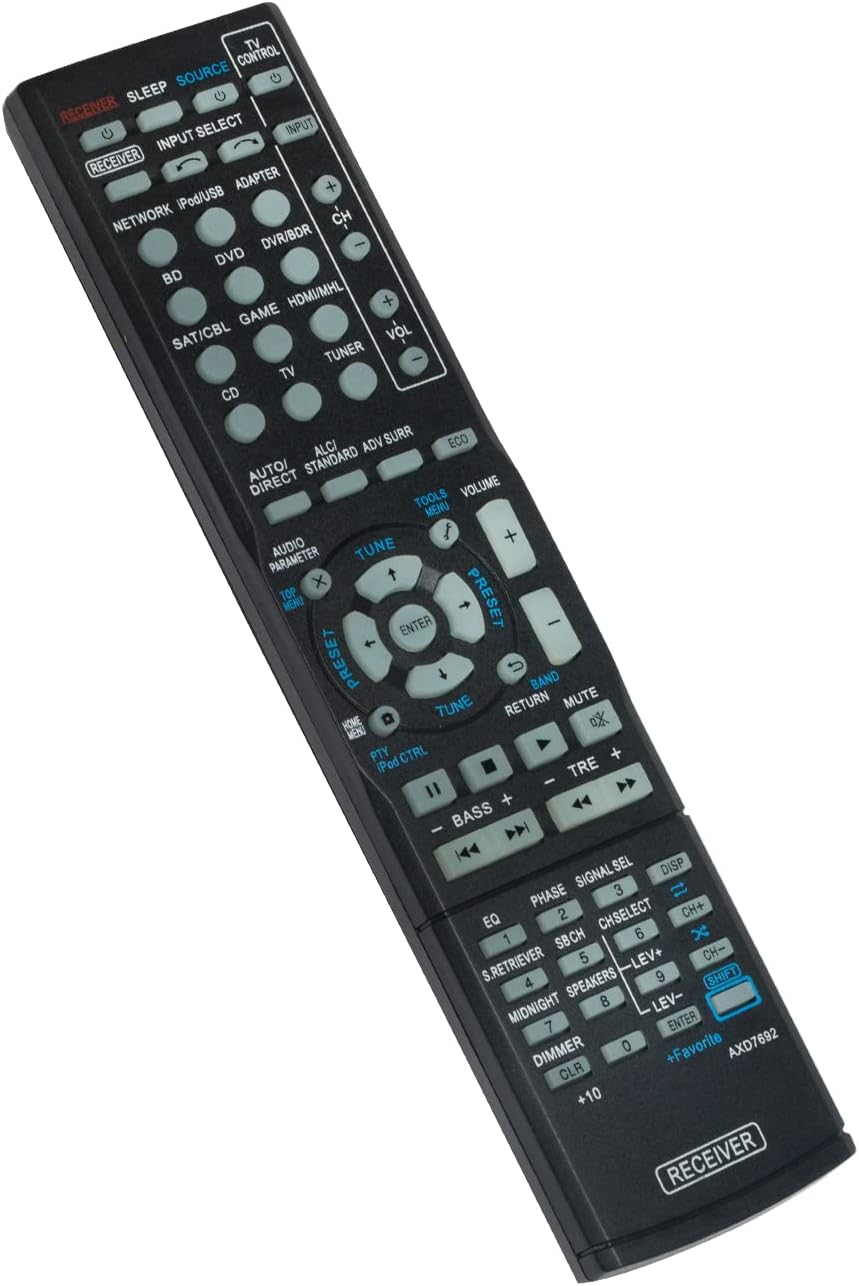
Image: Front view of the remote control, displaying the layout of all control buttons.
Basic Functions:
- RECEIVER (Power): Turns the Pioneer AV Receiver on or off.
- INPUT SELECT (Source): Cycles through available input sources (e.g., BD, DVD, SAT/CBL, CD, TV, TUNER, NETWORK, iPod/USB, ADAPTER).
- VOLUME (+/-): Adjusts the master volume level of the receiver.
- MUTE: Silences or restores the audio output.
- NAVIGATION (Up, Down, Left, Right, ENTER): Used to navigate menus and confirm selections on the receiver's display.
- TOP MENU / HOME MENU: Accesses the main menu or home screen of the connected device or receiver.
- RETURN: Goes back to the previous menu or screen.
Advanced Functions:
- TV CONTROL: Buttons for controlling a connected television (Power, Input, CH+/-, VOL+/-). Note: These buttons may require setup with your TV.
- AUDIO PARAMETER: Accesses audio settings and adjustments.
- TOOLS MENU: Opens a menu for various tools and settings.
- TUNE (+/-): Adjusts radio frequency when in Tuner mode.
- PRESET (+/-): Selects preset radio stations.
- BAND: Switches between AM/FM radio bands.
- AUTO/DIRECT, ALC/STANDARD, ADV SURR, ECO: Sound mode and processing controls.
- BASS (+/-), TRE (+/-): Adjusts bass and treble levels.
- EQ, PHASE, SIGNAL SEL: Equalizer, phase control, and signal selection options.
- S.RETRIEVER, SBCH, CHSELECT, MIDNIGHT, SPEAKERS: Specific audio enhancement and speaker configuration controls.
- DIMMER: Adjusts the brightness of the receiver's display.
- CLR: Clears current selections or entries.
- +Favorite: Adds or accesses favorite settings or stations.
- SHIFT: Used in conjunction with other buttons for secondary functions (e.g., CH+ / CH-).
Compatible Pioneer AV Receiver Models
This AIDITIYMI AXD7692 replacement remote control is compatible with the following Pioneer Stereo AV Receiver models:
- VSX-828
- VSX-43
- VSX-528
- VSX-423
- VSX-323
- VSX-823
- VSX-1023
- VSX-823-K
- VSX-822
- VSX-1022-K
- VSX-822-K
- VSX-828-K
- VSX-828-S
- VSX-528-K
- VSX-528-S
- VSX-1023-K
- VSX-523-K
- VSX-1012-K
- VSX-AX5i-G
If your Pioneer receiver model is listed above, this remote should function correctly without any additional setup.
Maintenance
- Cleaning: Wipe the remote control with a soft, dry cloth. Do not use abrasive cleaners, waxes, or solvents.
- Battery Replacement: Replace batteries when the remote's response becomes sluggish or stops working. Always replace both batteries at the same time with new ones of the same type (AAA alkaline).
- Storage: If the remote control will not be used for an extended period, remove the batteries to prevent leakage and potential damage. Store in a cool, dry place.
Troubleshooting
- Remote not responding:
- Ensure fresh AAA batteries are correctly installed with proper polarity (+/-).
- Check for any obstructions between the remote control and the receiver's infrared sensor.
- Make sure you are within the effective range and line of sight of the receiver.
- Specific buttons not working:
- Verify that the receiver is powered on and the correct input source is selected.
- Some buttons (e.g., TV CONTROL) may require specific setup with your television, which is not part of this remote's primary function for the AV receiver.
Specifications
| Model Number | AXD7692 (Replacement) |
| Compatible with | Pioneer Stereo AV Receivers (models listed in Compatibility section) |
| Power Source | 2 x 1.5V AAA Alkaline Batteries (not included) |
| Dimensions (L x W x H) | Approximately 8.27 x 1.97 x 0.59 inches |
| Weight | Approximately 3 ounces (without batteries) |
| Color | Black |
Warranty and Support
As a replacement remote control, specific warranty details may vary depending on the retailer or seller. Please refer to your purchase documentation for information regarding returns, exchanges, or warranty coverage.
For technical support or further assistance, please contact the seller or manufacturer directly through the platform where the product was purchased.