1. Introduction
This manual provides essential information for the safe and effective operation of your DongCheng DCJZ2050 20V Max Brushless Drill Driver. Please read thoroughly before use to ensure proper handling, maximize tool lifespan, and prevent injury.

The DongCheng DCJZ2050 20V Max Brushless Drill Driver, shown with its included 20V battery, rapid charger, and a selection of drill and screwdriver bits, all contained within a durable carry bag.
Key Features:
- Brushless Motor: Provides extended tool life, increased efficiency, and higher torque output.
- 1/2-inch (13mm) Keyless Chuck: Allows for quick and easy bit changes.
- 20+1 Position Clutch: Offers precise torque control for various driving and drilling applications.
- 2-Speed Transmission: Delivers optimal speed and torque for different materials and tasks.
- Integrated LED Work Light: Illuminates the work area for improved visibility.
- Ergonomic Design: Ensures comfortable handling and reduced user fatigue.
- Belt Hook: Provides convenient portability and access during work.
- 20V Max Lithium-ion Battery System: Compatible with other DongCheng 20V Max tools.
2. Safety Instructions
Always observe basic safety precautions when using electric tools to reduce the risk of fire, electric shock, and personal injury.
- Work Area Safety: Keep your work area clean and well-lit. Cluttered or dark areas invite accidents. Do not operate power tools in explosive atmospheres, such as in the presence of flammable liquids, gases, or dust.
- Electrical Safety: Avoid body contact with earthed or grounded surfaces. Do not expose power tools to rain or wet conditions.
- Personal Safety: Always wear eye protection. Use hearing protection when operating for extended periods. Dress properly; avoid loose clothing or jewelry. Secure long hair.
- Tool Use and Care: Do not force the power tool. Use the correct power tool for your application. Disconnect the battery pack from the power tool before making any adjustments, changing accessories, or storing power tools.
- Battery Pack Use and Care: Recharge only with the charger specified by the manufacturer. Do not use battery packs with any other power tools. Do not open the battery pack.
3. Package Contents
Verify that all items listed below are present in your package:
- 1 x DongCheng DCJZ2050 20V Max Brushless Drill Driver
- 1 x 2.0Ah Lithium-ion Battery (Model: FFBL2020)
- 1 x 20V Rapid Charger
- 1 x Belt Hook
- 1 x Heavy-Duty Storage and Carry Bag
- 10 x Drilling Bits (for metal and wood)
- 32 x Screwdriver Bits (with plastic case)

This image illustrates the complete contents of the DongCheng DCJZ2050 package, including the drill driver, one 2.0Ah lithium-ion battery, a 1-hour rapid charger, 10 drilling bits for metal and wood, 32 screwdriver bits with a plastic case, and a heavy-duty storage and carry bag.
4. Setup
4.1 Battery Installation and Charging
- Charging the Battery: Connect the rapid charger to a power outlet. Align the battery pack with the charger and slide it in until it clicks. The charger indicator lights will show the charging status.
- Installing the Battery: Align the battery pack with the base of the drill driver handle. Slide the battery into place until it locks securely with a click.
- Removing the Battery: Press the battery release button (located on the sides of the battery pack) and slide the battery out of the tool.

The 1-hour rapid charger ensures minimal downtime, while the 4-bar fuel gauge on the battery provides a clear indication of the remaining charge level.
4.2 Installing and Removing Bits
- Opening the Chuck: Grasp the rear portion of the chuck with one hand and rotate the front portion counter-clockwise until the chuck jaws are open wide enough to accept the bit.
- Inserting the Bit: Insert the desired drill bit or screwdriver bit into the chuck jaws. Ensure the bit is centered and inserted as far as possible.
- Tightening the Chuck: Grasp the rear portion of the chuck and rotate the front portion clockwise until the bit is securely clamped. Hand-tighten firmly.

The 1/2-inch keyless chuck allows for quick and easy bit changes without the need for a separate chuck key. Simply twist to open or close the jaws around the bit.
4.3 Attaching the Belt Hook
The belt hook can be attached to either side of the drill driver for convenient carrying.
- Align the belt hook with the screw hole on the side of the drill handle.
- Insert the provided screw and tighten it securely with a screwdriver.

The ergonomic design provides a comfortable and secure grip. The ambidextrous belt hook can be attached to either side of the tool for convenient carrying.
5. Operating Instructions

This diagram highlights the main operational features of the drill driver, such as the 1/2-inch keyless chuck, 20+1 position clutch, 2-speed transmission, brushless motor, built-in LED work light, forward/reverse switch, variable speed trigger, comfortable rubberized grip, belt hook, and the 4-bar fuel gauge on the 2.0Ah Lithium-ion battery.
5.1 Powering On/Off and Variable Speed Trigger
The tool is activated by pressing the variable speed trigger. The speed of the drill is controlled by the amount of pressure applied to the trigger: more pressure results in higher speed.
5.2 2-Speed Transmission
The drill driver features a 2-speed gearbox, allowing you to select the appropriate speed range for your task.
- Low Speed (0-600 RPM): Ideal for high-torque applications such as driving large screws or drilling into tough materials.
- High Speed (0-2000 RPM): Suitable for faster drilling in softer materials or when less torque is required.
To change speeds, slide the speed selector switch (located on top of the drill) to the desired position (1 for low speed, 2 for high speed). Ensure the tool is stopped before changing speeds.
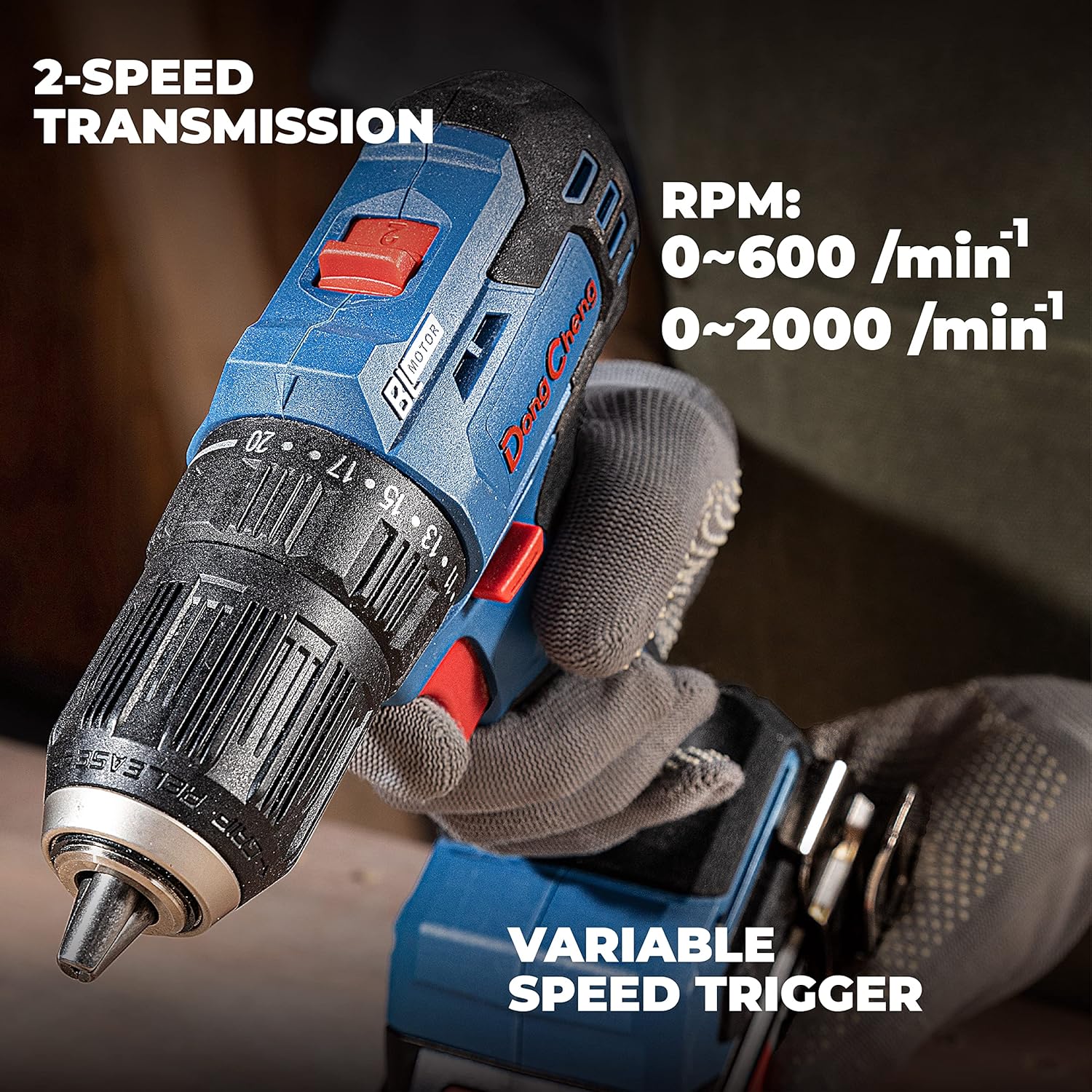
The drill features a 2-speed transmission for optimal performance across different tasks (0-600 RPM for high torque, 0-2000 RPM for high speed) and a variable speed trigger for precise control.
5.3 Torque Adjustment (20+1 Position Clutch)
The clutch ring allows you to set the torque for driving screws. This prevents over-driving screws and damaging the workpiece or screw head. The 'drill' symbol setting bypasses the clutch for maximum torque when drilling.
- Rotate the clutch ring to select a number from 1 to 20. Lower numbers indicate lower torque, suitable for smaller screws or softer materials. Higher numbers provide more torque for larger screws or harder materials.
- For drilling, rotate the clutch ring to the drill symbol position.
5.4 Forward/Reverse Switch
The forward/reverse switch (located above the trigger) controls the direction of rotation.
- Push the switch to the left for forward rotation (for driving screws or drilling).
- Push the switch to the right for reverse rotation (for removing screws or backing out bits).
- When the switch is in the center position, the trigger is locked, preventing accidental startup.
5.5 LED Work Light
The integrated LED work light automatically illuminates the work surface when the trigger is pressed, providing better visibility in dimly lit areas.

The built-in LED work light automatically activates when the trigger is pressed, providing illumination to the work area for improved visibility.
5.6 Battery Fuel Gauge
The 4-bar fuel gauge on the battery pack indicates the remaining charge level. Press the button on the battery to activate the indicator lights.
6. Maintenance
Regular maintenance ensures optimal performance and extends the life of your tool.
6.1 Cleaning
- Keep the ventilation openings of the tool clean to prevent overheating.
- Use a soft, damp cloth to clean the exterior of the tool. Do not use harsh chemicals or abrasive cleaners.
- Periodically clean the chuck jaws to ensure proper gripping of bits.
6.2 Storage
- Store the drill driver, battery, and charger in a cool, dry place, away from direct sunlight, moisture, and extreme temperatures.
- Always remove the battery pack from the tool before storage.
- Store the tool and accessories in the provided heavy-duty storage bag for protection.
6.3 Battery Care
- Do not store batteries in a discharged state. Charge them fully before storing for extended periods.
- For long-term storage, recharge the battery every 3-6 months to maintain its health and capacity.
- Avoid exposing batteries to temperatures above 50°C (122°F) or below -20°C (-4°F).
7. Troubleshooting
Refer to this section for common issues and their solutions.
| Problem | Possible Cause | Solution |
|---|---|---|
| Tool does not start | Battery not charged or improperly installed; Forward/reverse switch in center (locked) position; Tool malfunction. | Charge battery fully and ensure it is securely installed; Move forward/reverse switch to forward or reverse position; Contact customer support if issue persists. |
| Reduced power or speed | Low battery charge; Incorrect speed setting; Clutch set too low for task. | Recharge battery; Select higher speed setting; Adjust clutch to a higher torque setting or drill mode. |
| Bit slips in chuck | Chuck not tightened sufficiently; Bit shank is dirty or damaged. | Ensure chuck is hand-tightened firmly; Clean bit shank or replace damaged bit. |
| Battery not charging | Charger not plugged in; Faulty battery or charger; Battery too hot/cold. | Check power connection; Allow battery to reach room temperature; Contact customer support for replacement if faulty. |
8. Specifications
| Specification | Value |
|---|---|
| Manufacturer | Jiangsu Dongcheng M&E Tools Co.,Ltd |
| Model Number | DCJZ2050 |
| Voltage | 18 Volts (Nominal), 20V Max |
| Battery Type | Lithium-ion |
| Battery Capacity | 2.0 Ah |
| Max Torque | 50 Newton-meters (442.5 in/lbs) |
| No-Load Speed (Low) | 0-600 RPM |
| No-Load Speed (High) | 0-2000 RPM |
| Chuck Size | 1/2 inch (13mm) Keyless |
| Product Dimensions (L x W x H) | 29.3 x 19.5 x 7.6 cm |
| Weight (Tool only) | 800 grams |
| Special Features | Brushless Motor, LED Work Light, Reverse Rotation, 20+1 Position Clutch, 2-Speed Transmission, Belt Hook, 4-Bar Fuel Gauge |
9. Warranty and Support
For warranty information, technical support, or to inquire about replacement parts, please refer to the documentation included with your original purchase. You may also contact Dong Cheng customer service through their official website or authorized distributors.