
1. Product Overview
The Generic M36 Plus Max Smartwatch is a versatile wearable device designed for seamless integration with both Android and iOS smartphones. Featuring a 1.8-inch display and Bluetooth 5.2 connectivity, it offers a range of functionalities including fitness tracking, health monitoring, and smart notifications. This manual provides essential information for setting up, operating, and maintaining your smartwatch.

Image 1.1: The M36 Plus Max Smartwatch, including the watch unit, strap, and charging cable, displayed with its packaging.
2. Setup Guide
2.1 Initial Charging
Before first use, fully charge your M36 Plus Max Smartwatch. Connect the magnetic charging cable to the charging points on the back of the watch and plug the USB end into a standard USB power adapter (not included) or a computer USB port. The watch display will indicate charging status.
2.2 App Installation and Pairing
- Download the Companion App: Search for the official companion application (refer to the watch packaging or quick start guide for the app name) on the Apple App Store (for iOS) or Google Play Store (for Android). Install the app on your smartphone.
- Enable Bluetooth: Ensure Bluetooth is enabled on your smartphone.
- Open the App: Launch the installed app and follow the on-screen instructions to create an account or log in.
- Add Device: Within the app, navigate to the 'Add Device' or 'Pair Device' section. The app will search for available smartwatches. Select 'M36 Plus Max' from the list.
- Confirm Pairing: A pairing request may appear on both your phone and the smartwatch. Confirm the pairing on both devices.
Once successfully paired, the watch will synchronize with your phone, and you can customize settings and access data through the app.
3. Operating Instructions
3.1 Basic Navigation
The M36 Plus Max Smartwatch features a 1.8-inch touchscreen display for interaction. Swipe left, right, up, or down to navigate through menus and access different functions. Tap to select an option or open an application. The side button typically serves as a power button or a return-to-home screen button.
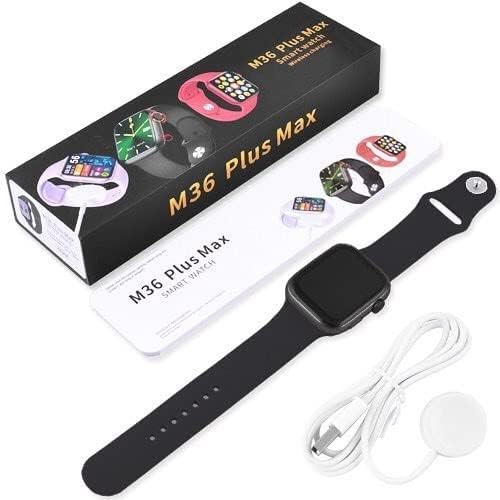
Image 3.1: The M36 Plus Max Smartwatch display showing the time, weather, and various health metrics.
3.2 Key Features and Applications
The smartwatch supports a variety of applications and features:
- Fitness Tracker: Monitors steps, distance, and calories burned.
- Heart Rate Monitor: Provides real-time heart rate readings.
- SpO2 Monitor: Measures blood oxygen levels.
- Sleep Duration: Tracks sleep patterns and quality.
- Notifications: Receives alerts for calls, messages, and social media from your paired smartphone.
- Music Player Control: Controls music playback on your smartphone.
- Weather: Displays current weather information.
- Alarm, Calculator, Calendar, Contacts, Email: Basic utility applications.
- Find My Phone: Helps locate your paired smartphone.
- GPS: Utilizes your smartphone's GPS for location tracking during activities.
- Voice Assistant: Accesses your smartphone's voice assistant.
3.3 Health Monitoring
For accurate health monitoring, ensure the watch is worn snugly on your wrist, approximately one finger's width above the wrist bone. Avoid excessive movement during measurements. Data collected by the watch is for reference only and should not be used for medical diagnosis.
4. Maintenance
4.1 Cleaning
Regularly clean your smartwatch and strap to prevent skin irritation and maintain functionality. Use a soft, lint-free cloth to wipe the screen and watch body. For the resin strap, a damp cloth with mild soap can be used, followed by thorough drying. Avoid using harsh chemicals or abrasive materials.
4.2 Water Resistance
The M36 Plus Max Smartwatch is water-resistant. This means it can withstand splashes, rain, and brief immersion in shallow water. However, it is not suitable for swimming, diving, or high-pressure water activities. Avoid exposing the watch to hot water or steam, as this can compromise its water resistance.
4.3 Charging Best Practices
- Use only the provided charging cable.
- Ensure the charging contacts on the watch and cable are clean and dry before charging.
- Do not leave the watch charging for extended periods after it is fully charged.
- Avoid charging in extreme temperatures.
5. Troubleshooting
If you encounter issues with your M36 Plus Max Smartwatch, refer to the following common problems and solutions:
| Problem | Possible Solution |
|---|---|
| Watch does not turn on | Ensure the watch is fully charged. Press and hold the side button for several seconds. |
| Cannot pair with smartphone | Check if Bluetooth is enabled on your phone. Ensure the watch is charged and within range. Restart both the watch and phone. Try unpairing and re-pairing through the app. |
| Inaccurate health data | Ensure the watch is worn snugly on your wrist. Clean the sensor on the back of the watch. Avoid excessive movement during measurements. |
| Notifications not received | Check app settings to ensure notifications are enabled for desired applications. Verify Bluetooth connection is stable. Ensure your phone's notification settings allow the companion app to display alerts. |
| Screen unresponsive | Restart the watch by holding the side button. If unresponsive, allow the battery to drain completely and then recharge. |
If the issue persists after trying these solutions, please contact customer support.
6. Specifications
Below are the technical specifications for the Generic M36 Plus Max Smartwatch:
- Brand: Generic
- Model Name: M36 Plus Max
- Wearable Computer Type: Smartwatch
- Operating System: iOS, Android
- Connectivity Technology: Bluetooth
- Wireless Communication Standard: Bluetooth 5.2
- Compatible Devices: Smartphone
- Display Type: LCD
- Screen Size: 1.8 inch
- Item Shape: Square
- Human Interface Input: Touchscreen
- Control Type: Touch Control
- Band Material Type: Resin
- Case Material Type: Resin
- Clasp Type: Buckle
- Buckle Type: Loop Buckle
- Color: Black
- Water Resistance Level: Water Resistant
- Supported Applications: Alarm, Calculator, Calendar, Contacts, Email, Find My Phone, Fitness Tracker, GPS (Via Smartphone), Heart Rate Monitor, Messages, Music Player, Pedometer, Phone, Reminders, Social Media, SpO2 Monitor, Voice Assistant, Weather
- Meter Type: Heart Rate, Sleep Duration, Blood Oxygen
- Included Components: Strap
- Target Audience: Adults, Unisex
- Style: Modern
7. Warranty and Support
For warranty information, please refer to the documentation provided at the time of purchase or contact your retailer. Specific warranty terms and conditions may vary.
For technical support or further assistance, please contact the manufacturer or your point of purchase. Keep your purchase receipt and product model number (M36 Plus Max) readily available when seeking support.