
1. Introduction
Thank you for choosing the G G-WEI E1 Motorcycle Helmet Headset. This manual provides detailed instructions for the proper installation, operation, and maintenance of your device. Please read this manual thoroughly before use to ensure optimal performance and safety.
2. Product Overview
2.1 Key Features
- Two-way Intercom: Supports communication between 2 riders within a 30-meter range.
- Hands-free Calling: Allows answering and making calls directly from the headset.
- CVC Noise Reduction: Advanced technology to minimize background noise for clear audio.
- Music Playback: Stream stereo music from your connected device.
- Voice Assistant Access: Convenient access to digital assistants.
- Long Battery Life: 800mAh rechargeable battery provides up to 12 hours of talk/music time and 120 hours of standby time.
- IPX6 Waterproof: Designed to withstand rain and wet weather conditions.
- Hard Mic: Includes a hard microphone suitable for modular full-face helmets.
2.2 Package Contents
The G G-WEI E1 package includes the following items:
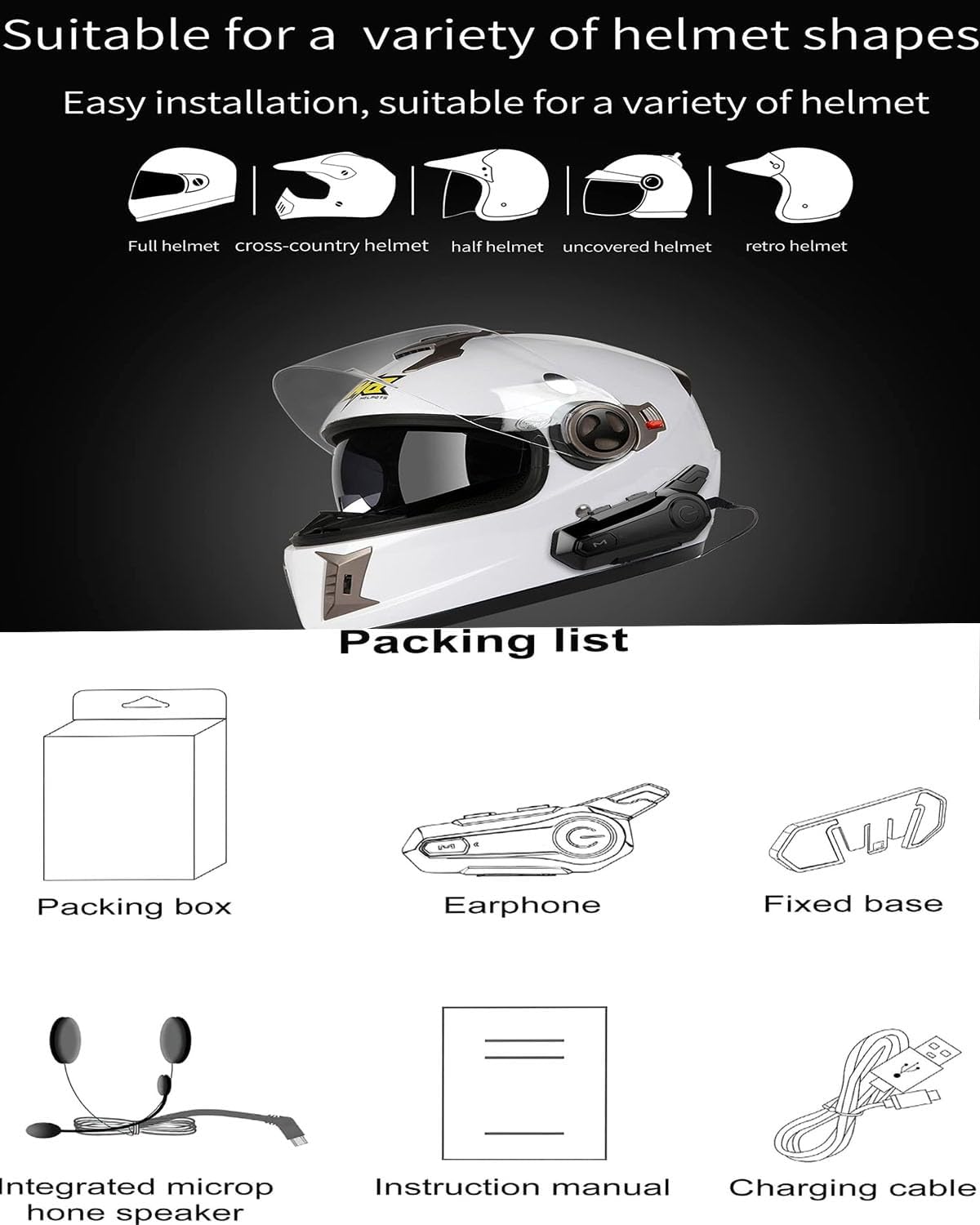
Image: Contents of the G G-WEI E1 Helmet Headset package, showing the main unit, earphone, fixed base, integrated microphone speaker, instruction manual, and charging cable.
- E1 Headset Unit
- Earphone/Speaker Set
- Fixed Base (Mounting Bracket)
- Integrated Microphone Speaker
- Instruction Manual (this document)
- USB Charging Cable
2.3 Device Layout and Controls
Familiarize yourself with the buttons and ports on your E1 headset:
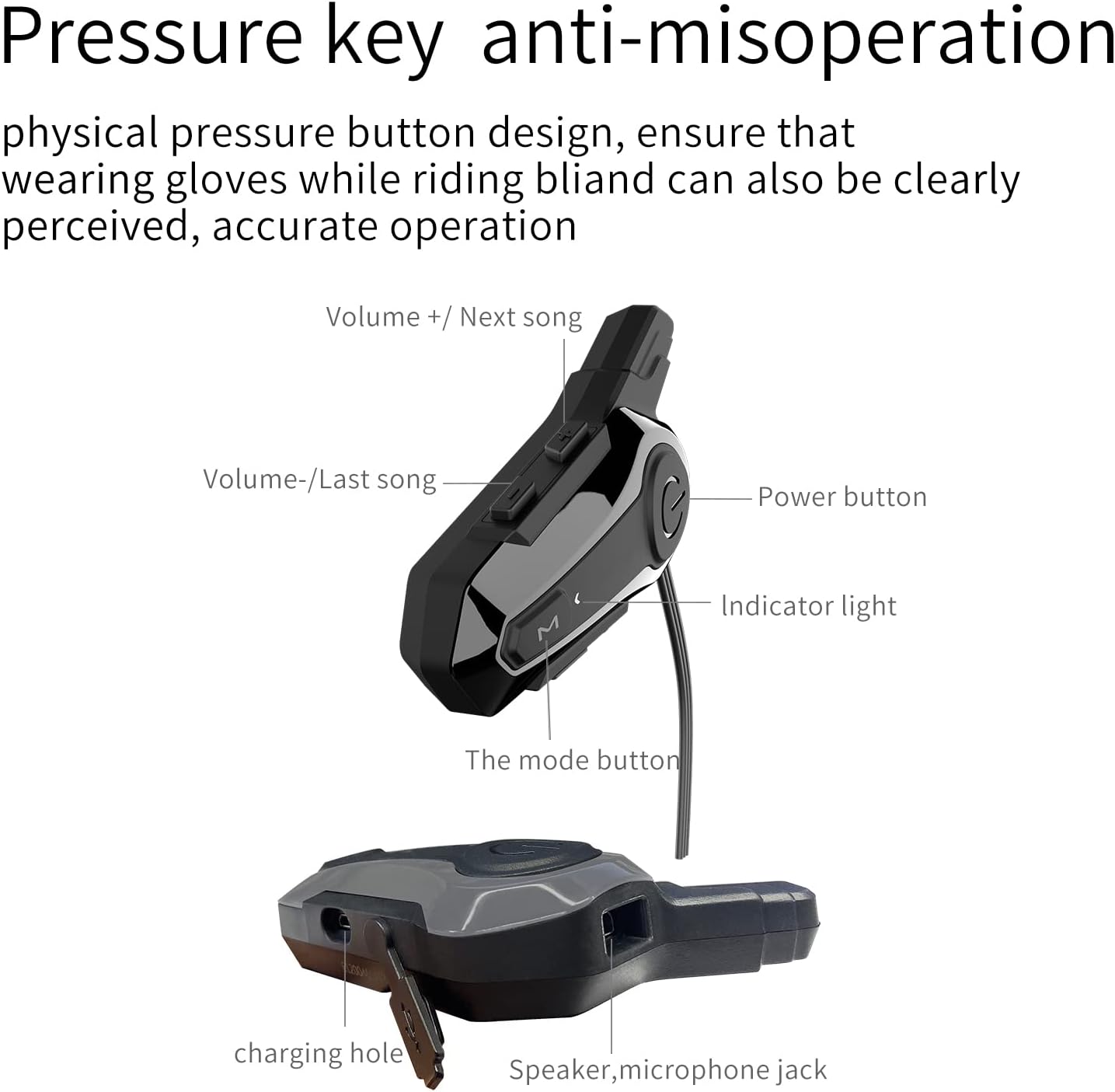
Image: Detailed diagram of the E1 headset, indicating the location of the Volume Up/Next Song button, Volume Down/Last Song button, Power button, Indicator light, Mode button, Charging port, and Speaker/Microphone jack.
- Power Button: Used for Power On/Off, Play/Pause.
- Volume + / Next Song Button: Increases volume, skips to the next track.
- Volume - / Last Song Button: Decreases volume, goes to the previous track.
- Mode Button: Switches between Bluetooth and Intercom modes.
- Indicator Light: Displays device status (e.g., pairing, charging).
- Charging Hole: USB port for charging the device.
- Speaker/Microphone Jack: Connects the speaker and microphone assembly.
3. Setup and Installation
3.1 Helmet Compatibility
The G G-WEI E1 headset is designed for easy installation on various helmet types, including full-face, cross-country, half-face, uncovered, and retro helmets.
Image: Visual representation of different helmet styles compatible with the E1 headset installation.
3.2 Mounting the Headset Unit
- Choose a suitable location on the left side of your helmet for the fixed base. Ensure it does not obstruct your vision or helmet functionality.
- Clean the helmet surface thoroughly where the fixed base will be attached.
- Peel off the protective film from the adhesive on the fixed base and firmly press it onto the helmet for at least 30 seconds. Allow the adhesive to cure for several hours before use.
- Slide the E1 headset unit onto the fixed base until it clicks securely into place.
3.3 Installing Speakers and Microphone
- Open the helmet's interior padding to access the ear pockets.
- Attach the speakers to the inside of the helmet's ear pockets using the provided adhesive pads. Ensure they are positioned directly over your ears for optimal sound.
- Route the microphone cable along the helmet's interior, positioning the microphone in front of your mouth, ensuring it is close but not touching.
- Connect the speaker and microphone assembly to the headset unit's dedicated jack.
- Carefully tuck away any excess cables behind the helmet padding.
4. Basic Operation
4.1 Power On/Off
- Power On: Press and hold the Power button for approximately 3 seconds until the indicator light illuminates.
- Power Off: Press and hold the Power button for approximately 3 seconds until the indicator light turns off.
4.2 Bluetooth Pairing (Phone)
- Ensure the headset is powered off.
- Press and hold the Power button for approximately 5-7 seconds until the indicator light flashes red and blue alternately, indicating pairing mode.
- On your mobile phone, enable Bluetooth and search for available devices.
- Select "E1" from the list of devices.
- Once paired, the indicator light will flash blue slowly.
4.3 Volume Control
- Increase Volume: Press the Volume + button.
- Decrease Volume: Press the Volume - button.
4.4 Music Playback
- Play/Pause: Press the Power button once.
- Next Track: Press the Volume + button once.
- Previous Track: Press the Volume - button once.
5. Advanced Functions
5.1 Two-way Intercom
The E1 headset supports intercom communication between two riders within a 30-meter range.

Image: Two riders on a motorcycle, demonstrating the application of the E1 intercom system for communication.
- Ensure both E1 headsets are powered on and within range.
- On one headset, press and hold the Mode button until the indicator light flashes green, indicating intercom pairing mode.
- Repeat the same step on the second headset.
- Once connected, the indicator lights on both units will flash green slowly.
- To end intercom, press the Mode button once.
5.2 Hands-free Calling
- Answer Call: When an incoming call is received, press the Power button once.
- End Call: During a call, press the Power button once.
- Reject Call: When an incoming call is received, press and hold the Power button for approximately 2 seconds.
5.3 Voice Assistant
- To activate your phone's voice assistant (e.g., Siri, Google Assistant), press the Mode button twice quickly.
6. Charging and Battery
The E1 headset is equipped with an 800mAh rechargeable battery.
- Charging: Connect the provided USB charging cable to the charging hole on the headset and a suitable USB power source. The indicator light will show charging status.
- Charging Time: Approximately 2 hours for a full charge.
- Battery Life: Up to 12 hours of continuous talk or music playback, and up to 120 hours of standby time on a single charge.
7. Maintenance
7.1 Waterproofing
The E1 headset features an IPX6 waterproof rating, providing protection against strong jets of water. This ensures functionality in rain and wet conditions.

Image: The E1 headset shown with water splashing over it, highlighting its IPX6 waterproof design.
7.2 General Care
- Keep the device clean by wiping it with a soft, damp cloth.
- Avoid using harsh chemicals or abrasive cleaners.
- Store the headset in a cool, dry place when not in use.
- Do not attempt to disassemble or modify the device, as this will void the warranty.
8. Troubleshooting
If you encounter issues with your G G-WEI E1 headset, please refer to the following common solutions:
- Device not powering on: Ensure the battery is charged. Connect the headset to a charger for at least 30 minutes.
- Cannot pair with phone: Make sure the headset is in pairing mode (flashing red and blue). Turn off and on your phone's Bluetooth, then try pairing again.
- No sound from speakers: Check that the speaker/microphone cable is securely connected to the headset unit. Verify volume levels on both the headset and your phone.
- Intercom not connecting: Ensure both headsets are in intercom pairing mode (flashing green) and within the 30-meter range.
- Poor sound quality/noise: Ensure the microphone is positioned correctly and not obstructed. For optimal intercom quality, riding speed below 70 yards is recommended.
9. Specifications
| Model Name | E1 |
| Connectivity Technology | Wireless (Bluetooth 4.0) |
| Material | Plastic, Rubber |
| Charging Time | 2 Hours |
| Compatible Devices | Motorcycles |
| Control Type | Volume Control, Touch |
| Item Weight | 0.15 Kilograms (5.3 ounces) |
| Water Resistance Level | IPX6 Waterproof |
| Frequency Range | 200 Hz - 20,000 Hz |
| Battery Life | 12 Hours (Talk/Music), 120 Hours (Standby) |
| Bluetooth Range | Up to 30 meters |
| Special Feature | Noise Cancellation (CVC) |
10. Warranty and Support
G G-WEI is committed to providing quality products and customer satisfaction. If you have any questions or require assistance with your E1 motorcycle communication system, please do not hesitate to contact us.
- Customer Support: For any inquiries before or after purchase, please contact us through the "G-WEI US storefront" on Amazon and select "Ask a question". Our team will provide dedicated support.