
1. Introduction
This manual provides comprehensive instructions for the installation, operation, and maintenance of your podofo 10.1-inch Android Car Radio Stereo. This unit is specifically designed for Honda Accord models manufactured between 2003 and 2007. Please read this manual thoroughly before installation and use to ensure proper functionality and to maximize your experience with the device.
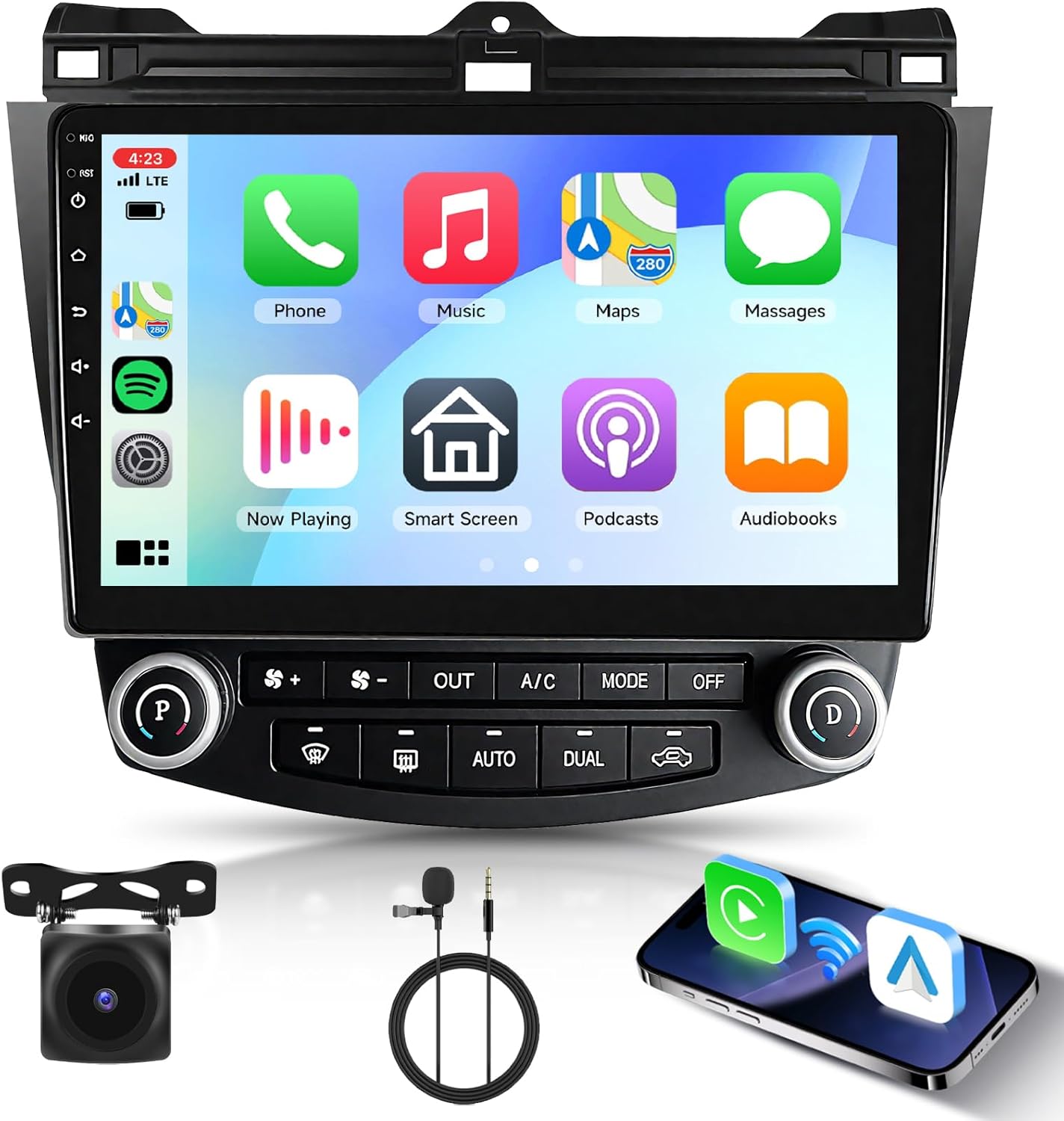
Figure 1.1: Podofo 10.1-inch Android Car Radio Stereo with included accessories.
2. Key Features
- 10.1-inch Capacitive HD Touch Screen: Provides a clear and responsive interface for all functions.
- Wireless CarPlay & Android Auto: Seamlessly integrate your smartphone for navigation, communication, and entertainment. Access via the Zlink app.
- WiFi & GPS Navigation: Connect to Wi-Fi or a mobile hotspot for online services and real-time navigation. Supports offline maps for navigation without an internet connection.
- Bluetooth Handsfree Call & FM Radio: Enjoy stable Bluetooth connectivity for hands-free calling with an external microphone and stream music. Tune into your favorite FM radio stations with RDS support.
- HiFi Audio with 16-band EQ: Experience high-fidelity sound with extensive equalization options to customize your listening experience.
- Steering Wheel Control (SWC): Retain control of essential functions directly from your vehicle's steering wheel.
- Full HD Rear View Camera Support: Enhance parking safety with compatible rear view cameras.
- Mirroring Link: Display your smartphone screen directly on the car stereo.
- Dual USB Ports: Connect multiple USB devices for media playback or charging.
- Split Screen Functionality: Run two applications simultaneously on the display.
3. Setup and Installation
3.1 Compatibility Check
This unit is designed for Honda Accord models from 2003 to 2007. Before installation, please confirm your vehicle's model, year, and compare your center console with product images to ensure compatibility. If unsure, contact customer support with a photo of your vehicle's center console.
3.2 Package Contents
Verify that all components are present in the package:
- 1 x Car Radio for Honda Accord
- 3 x Power Cables
- 1 x GPS Antenna
- 1 x Backup Camera
- 1 x Camera Input Cable
- 1 x RCA Input and Output Cable
- 2 x USB Cables
- 1 x User Manual

Figure 3.1: Product dimensions and included accessories.
3.3 Wiring Instructions
Refer to the following diagrams for correct wiring connections. Professional installation is recommended if you are unfamiliar with car audio system wiring.
3.3.1 Rear Camera Wiring
Connect the backup camera as shown. Ensure the reverse trigger cable (labeled 'back' or 'reverse') is correctly connected. The black cable (D) connects to ground (GND), and the red cable (E) connects to the backup light's positive (+) terminal.

Figure 3.2: Rear camera wiring diagram.
3.3.2 Air Conditioning (AC) Wiring
Wiring varies based on whether your Honda Accord has a single or dual zone AC system.
- Single AC: Plug the green AC plugs into the designated ports (A & B) on the unit. Ensure connections 1-1, 2-2, and 3-3 are made.
- Dual AC: Do not use the green AC wire from the package. Directly plug your original AC plugs into the 2 ports (A & B) on the unit. Ensure connections 1-1 and 2-2 are made.

Figure 3.3: AC wiring for single and dual zone systems.
4. Operating Instructions
4.1 Wireless CarPlay & Android Auto
Connect your smartphone wirelessly or via a wired connection to access CarPlay or Android Auto. Open the 'Zlink' application on the stereo to initiate the connection. This allows access to navigation, phone contacts, emails, and music directly from your phone's interface on the stereo screen.

Figure 4.1: Wireless CarPlay and Android Auto interface.
4.2 GPS Navigation & WiFi Connectivity
The unit supports both online and offline navigation. Connect to a Wi-Fi network or your phone's hotspot to use online navigation services. For offline navigation, download maps for your desired regions through the 'Download Maps' menu option.

Figure 4.2: GPS Navigation and WiFi connection display.
4.3 Bluetooth Handsfree & FM Radio
Pair your mobile device via Bluetooth for hands-free calling and audio streaming. The external microphone ensures clear communication. The integrated FM radio supports RDS and allows you to save your favorite stations. Use the EQ adjust feature to fine-tune your audio preferences.

Figure 4.3: Bluetooth hands-free calling and FM radio interface.
4.4 Audio Settings
Access the audio settings to utilize the HiFi technology and 16-band EQ options. These settings allow for precise adjustment of sound output, enhancing clarity and providing an immersive listening experience.

Figure 4.4: DSP Audio settings interface.
4.5 Steering Wheel Control (SWC)
After proper wiring, the unit supports your vehicle's existing steering wheel controls. This allows for safe and convenient operation of volume, track changes, and call management without taking your hands off the wheel. Refer to the unit's settings for SWC configuration if necessary.

Figure 4.5: Steering Wheel Control functionality.
5. Maintenance
To ensure the longevity and optimal performance of your car stereo, follow these maintenance guidelines:
- Screen Cleaning: Use a soft, lint-free cloth specifically designed for electronic screens. Dampen the cloth slightly with water or a screen cleaner, then gently wipe the screen. Avoid harsh chemicals or abrasive materials.
- Software Updates: Periodically check for available software updates through the unit's settings menu. Updates can improve performance, add new features, and resolve bugs.
- Environmental Care: Avoid exposing the unit to extreme temperatures, direct sunlight for prolonged periods, or excessive moisture.
6. Troubleshooting
If you encounter issues with your podofo car stereo, refer to the following common problems and solutions:
- AC Control Screen Interruption: If the AC control screen frequently interrupts other functions, check the unit's system settings for options to manage or bypass this feature. Some settings may allow you to adjust its behavior.
- AC Non-Functional After Installation: This is often due to incorrect wiring. Re-verify all AC wiring connections according to the diagrams in Section 3.3.2. Ensure the correct plugs are used for single or dual AC systems.
- Apps Not Working / Offline Maps Not Downloading: Ensure the unit is properly connected to a stable Wi-Fi network or mobile hotspot. Check internet connectivity. For offline maps, ensure sufficient storage space is available and the download process completes without interruption.
- Reverse Camera Not Working: Inspect all camera wiring connections, especially the reverse trigger cable and its connection to the backup light. Ensure the camera itself is powered and functioning.
- General Unresponsiveness: Try restarting the unit. If the issue persists, check all power connections to ensure they are secure.
For persistent issues or problems not listed here, please contact technical support.
7. Specifications
| Feature | Detail |
|---|---|
| Item Weight | 4.44 pounds |
| Product Dimensions | 10.83 x 9.84 x 8.5 inches |
| Item Model Number | SB-A2969A3MI2 |
| Display Size | 10.1 Inches |
| Voice Command | Touchscreen |
| Brand | podofo |
| Model Name | RM |
| Vehicle Service Type | Car |
| Special Feature | Mirror Link, Navigation, Touchscreen |
| Connectivity Technology | Bluetooth, USB, Wi-Fi |
| Map Type | Worldwide |
| Audio Output Mode | Stereo |
| Mounting Type | Dashboard Mount |
8. Warranty
The podofo Android Car Radio Stereo (Model: SB-A2969A3MI2) comes with a 2-year warranty from the date of purchase. This warranty covers manufacturing defects and malfunctions under normal use. Please retain your proof of purchase for warranty claims.
9. Technical Support
podofo offers professional technical support to assist with any concerns regarding installation, operation, or troubleshooting. If you require assistance, please reach out to us directly via Amazon. When contacting support, it is helpful to provide your vehicle's model, year, and a photo of your center console for compatibility-related inquiries.