
ivkey KWL-B01
IVKEY Digital Automatic Upper Arm Blood Pressure Monitor User Manual
Model: KWL-B01
Brand: ivkey
1. Introduction
Thank you for choosing the IVKEY Digital Automatic Upper Arm Blood Pressure Monitor. This device is designed for accurate and convenient measurement of blood pressure and pulse rate at home. Regular monitoring can provide valuable health insights. Please read this manual thoroughly before first use to ensure proper operation and safety.

The IVKEY Blood Pressure Monitor is designed for convenient home health monitoring.
2. Safety Information
- Consult your physician before using this device if you have any medical conditions.
- Do not self-diagnose or self-treat based on measurements. Always consult a healthcare professional.
- Keep the device out of reach of children and pets.
- Do not use the device in a moving vehicle or on an unstable surface.
- Avoid taking measurements immediately after exercise, bathing, eating, or consuming alcohol/caffeine.
- Ensure the cuff is applied correctly and comfortably; over-tightening can cause discomfort or injury.
- Only use accessories specified by the manufacturer.

The device complies with relevant safety standards.
3. Package Contents
Please check the package contents to ensure all items are present:
- 1 x IVKEY Blood Pressure Monitor Unit
- 1 x Upper Arm Cuff (22-32cm / 8.7 - 12.6in)
- 4 x AAA Batteries
- 1 x Instruction Manual
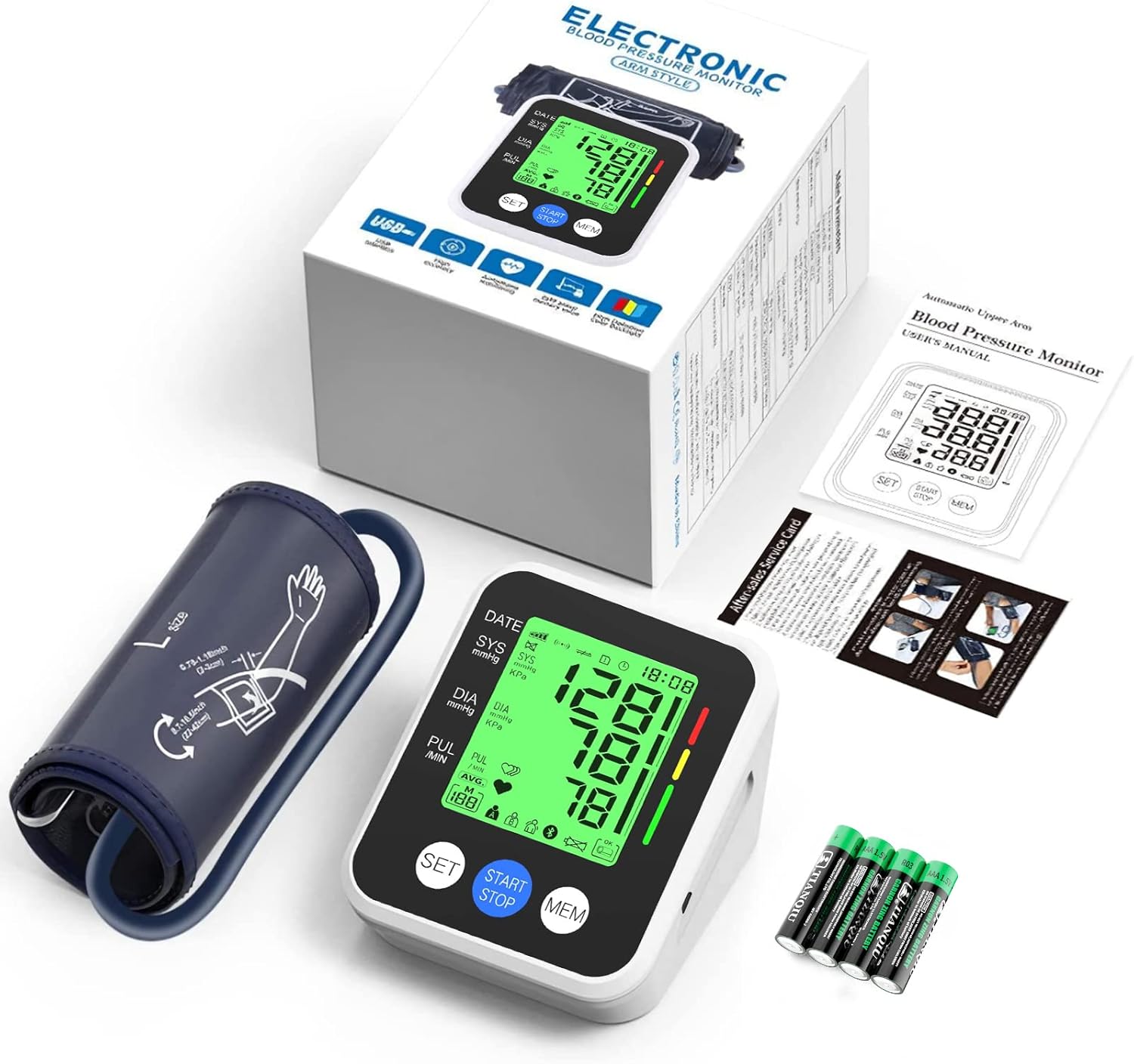
The image displays the complete package contents.
4. Product Overview
The IVKEY Blood Pressure Monitor features a large, easy-to-read display and intuitive controls for simple operation.
4.1 Main Unit and Display

The main unit with its large display and included accessories.
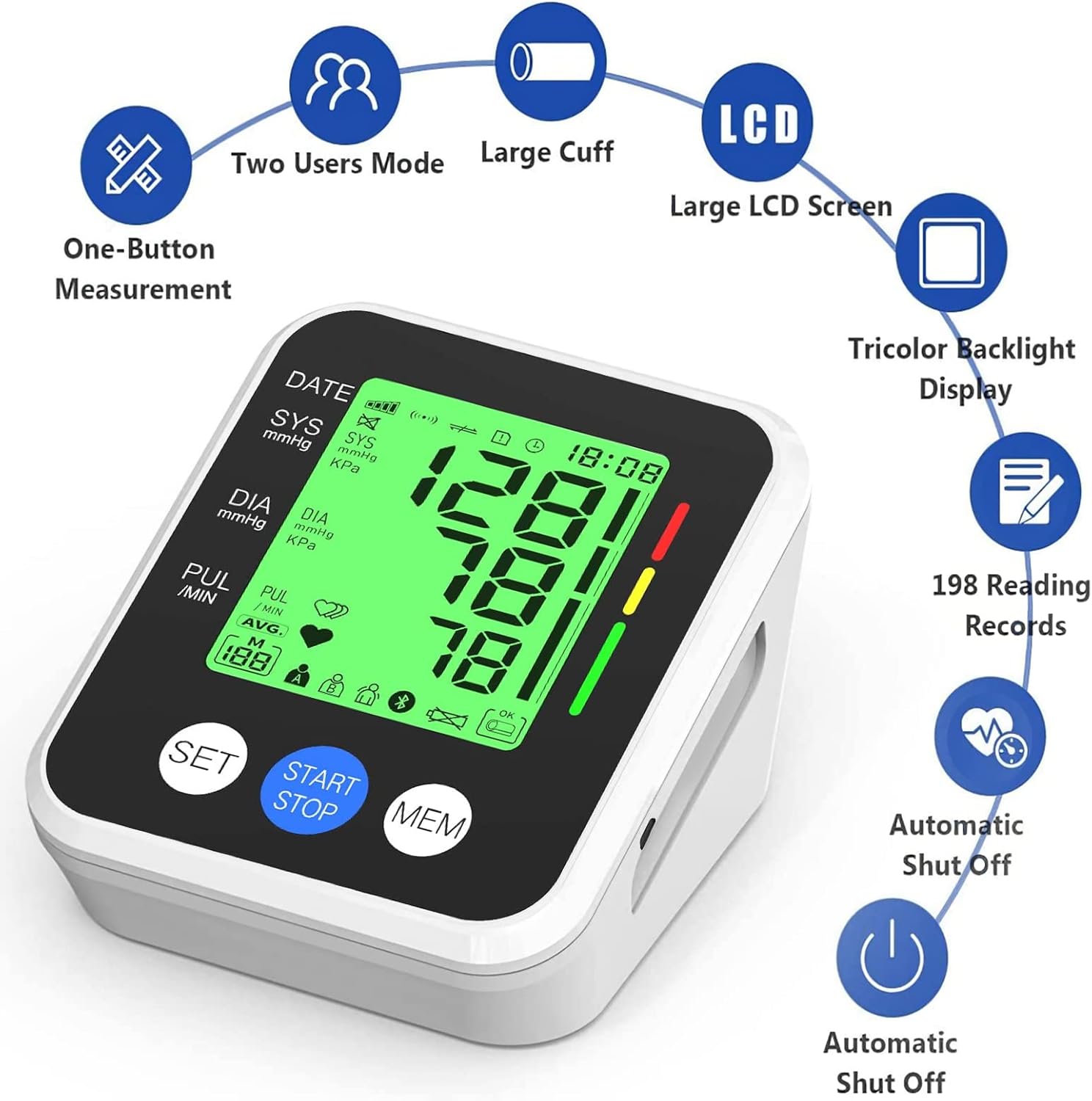
Key features of the blood pressure monitor.
4.2 Display Indicators
The large LCD screen provides clear readings and various indicators:

Explanation of all icons and readings on the LCD display.
- DATE/TIME: Displays current date and time.
- SYS (Systolic Pressure): Upper blood pressure reading.
- DIA (Diastolic Pressure): Lower blood pressure reading.
- PUL (Pulse Rate): Heart rate in beats per minute.
- AVG: Average of previous readings.
- User A/B: Indicates which user's memory is active.
- Irregular Heartbeat Symbol: Appears if an irregular heartbeat is detected.
- Battery Indicator: Shows battery level.
- Blood Pressure Classification Bar: Tricolor bar (Green, Yellow, Red) indicates blood pressure level.
5. Setup
5.1 Installing Batteries
The monitor requires 4 AAA batteries (included). Alternatively, it can be powered via a Micro USB cable (not included).
- Open the battery compartment cover on the back of the unit.
- Insert the 4 AAA batteries according to the polarity indicators (+/-).
- Close the battery compartment cover securely.
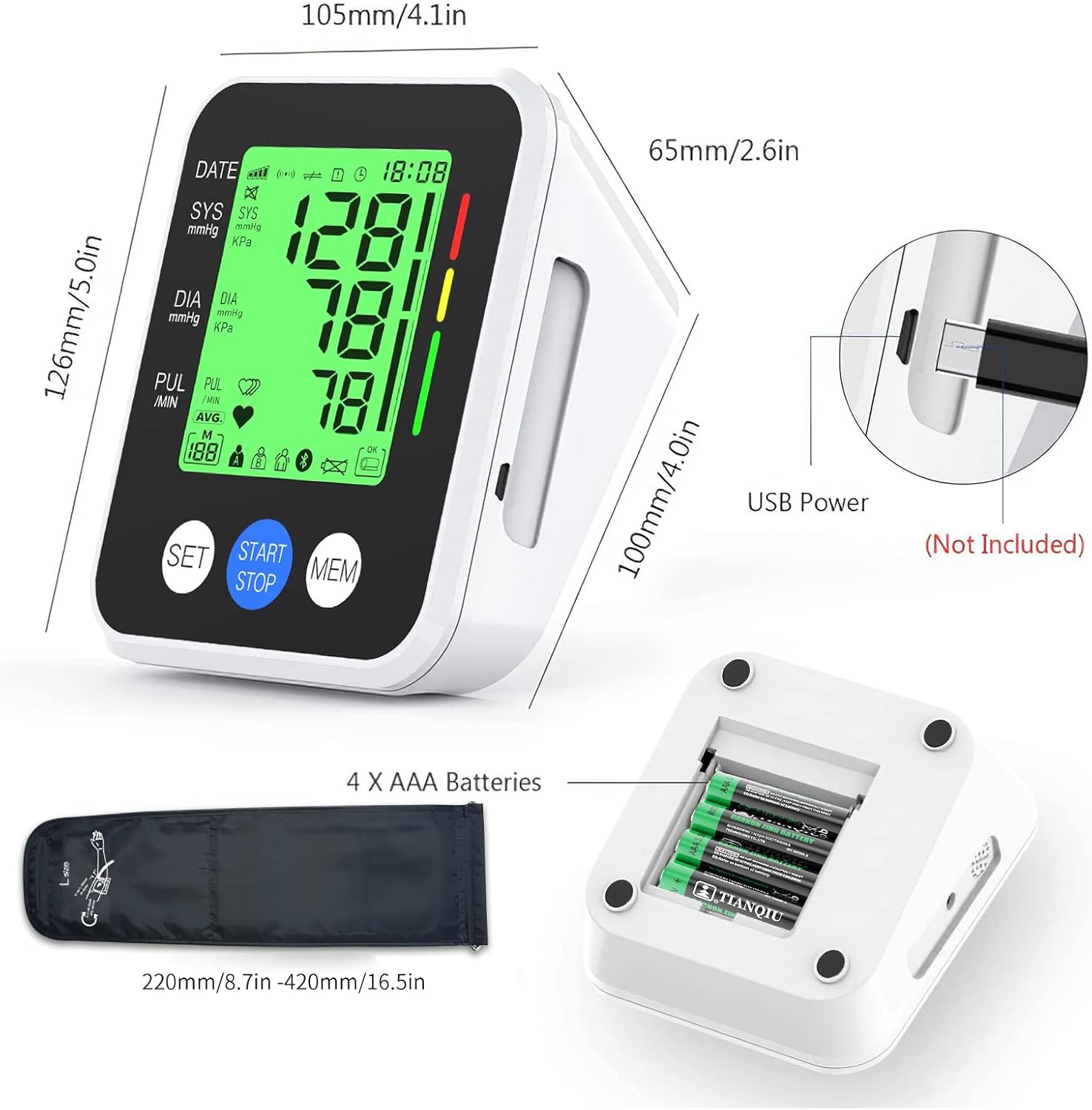
Dimensions of the unit and battery installation.

Power options: AC cable (Micro USB) or AAA batteries.
5.2 Setting Date and Time
Before first use, set the correct date and time for accurate record-keeping:
- With the unit off, press the 'SET' button. The year will start flashing.
- Use the 'MEM' button to adjust the year. Press 'SET' to confirm and move to the next setting (month, day, hour, minute).
- Repeat the process for month, day, hour, and minute.
- Press 'SET' again to exit the setting mode.
6. Operation - Taking a Measurement
Follow these steps for an accurate blood pressure measurement:
- Prepare for Measurement: Sit comfortably with your back supported and feet flat on the floor. Rest your arm on a table so the cuff is at heart level. Remain still and quiet.
- Apply the Cuff: Wrap the cuff around your bare upper arm, approximately 1-2 cm above the elbow joint. Ensure the air tube runs down the center of your arm in line with your middle finger. The cuff should be snug but not too tight (you should be able to insert two fingers).
- Select User: If using the 2-user mode, press the 'SET' button briefly to switch between User A and User B.
- Start Measurement: Press the 'START/STOP' button. The cuff will inflate automatically. Remain still and do not talk during the measurement.
- Read Results: Once the measurement is complete, the cuff will deflate, and your Systolic, Diastolic, and Pulse readings will be displayed on the screen. The results will be automatically saved to the selected user's memory.
- Power Off: The device will automatically shut down after 30 seconds of inactivity. You can also press 'START/STOP' to manually turn it off.

Correct posture for taking a blood pressure measurement.

Pressing the START/STOP button to begin.
7. Memory Functions
The monitor stores up to 99 readings for each of the two users (198 total memories) with date and time stamps.
7.1 Accessing Stored Readings
- With the unit off, press the 'MEM' button. The most recent reading will be displayed.
- Press the 'MEM' button repeatedly to scroll through older readings.
- To view the average of the last three readings, continue pressing 'MEM' until 'AVG' appears.
- To exit memory mode, press 'START/STOP' or wait for automatic shut-off.

The monitor supports two users, A and B, each with separate memory storage.
7.2 Clearing Memory
To clear all readings for the currently selected user:
- Enter memory mode by pressing 'MEM'.
- Press and hold the 'SET' button for approximately 3 seconds until 'CL' appears, indicating memory is cleared.
8. Understanding Your Readings
The IVKEY monitor uses a tricolor backlight display and a classification bar to help you understand your blood pressure readings according to WHO (World Health Organization) guidelines.
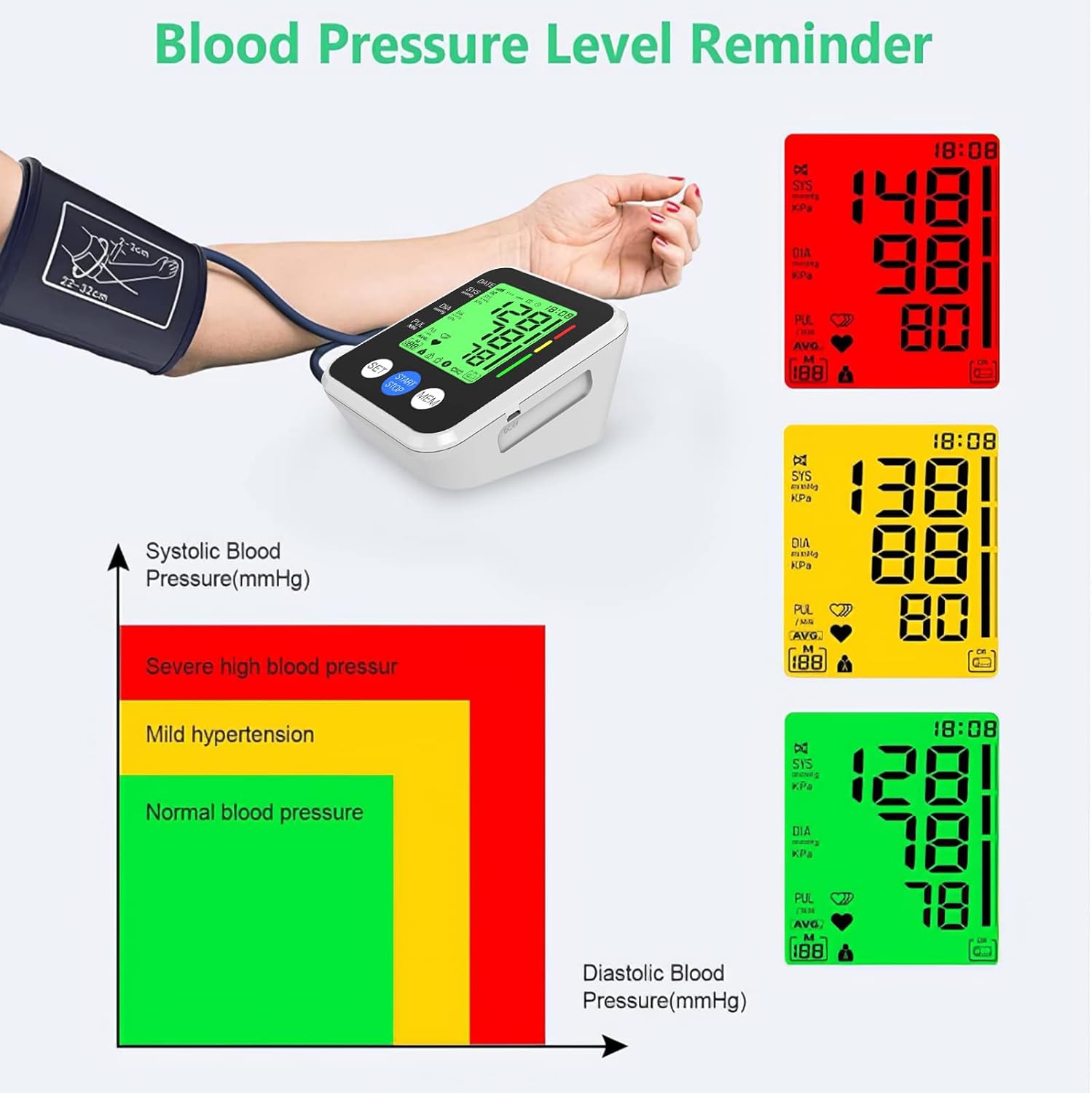
Blood pressure classification based on WHO guidelines.
- Green: Normal blood pressure.
- Yellow: Mild hypertension (pre-hypertension).
- Red: Severe high blood pressure (hypertension).
If an irregular heartbeat is detected, the irregular heartbeat symbol will appear on the display. If this symbol appears frequently, consult your physician.
9. Maintenance and Care
- Cleaning: Wipe the monitor and cuff with a soft, dry cloth. Do not use abrasive cleaners or immerse the unit in water.
- Storage: Store the device in a cool, dry place, away from direct sunlight, extreme temperatures, and humidity. If not used for a long period, remove the batteries.
- Handling: Avoid dropping the unit or subjecting it to strong shocks. Do not disassemble the device.
10. Troubleshooting
| Problem | Possible Cause | Solution |
|---|---|---|
| No display when powered on | Batteries are dead or incorrectly inserted. | Replace batteries or check polarity. Ensure USB cable is properly connected if using external power. |
| Error message (e.g., 'Err') | Cuff not applied correctly, excessive movement during measurement, or irregular pulse. | Re-apply cuff, remain still and quiet. If persistent, consult a physician. |
| Inaccurate readings | Incorrect cuff placement, talking/moving during measurement, or recent activity. | Ensure proper cuff placement and arm position. Take measurements at rest. Take 2-3 readings for accuracy. |
| Memory not saving | Memory is full or user not selected. | Clear memory if full. Ensure correct user (A/B) is selected before measurement. |
11. Specifications
| Feature | Detail |
|---|---|
| Model Name | KWL-B01 |
| Measurement Method | Oscillometric |
| Measurement Range | Pressure: 0-299 mmHg; Pulse: 40-199 beats/minute |
| Accuracy | Pressure: ±3 mmHg; Pulse: ±5% |
| Cuff Size | 22-32 cm (8.7 - 12.6 in) |
| Memory | 2 users x 99 sets of readings |
| Display Type | Large LCD with Tricolor Backlight |
| Power Source | 4 x AAA Batteries (included) or Micro USB (DC 5V) |
| Automatic Shut-off | After 30 seconds of inactivity |
| Product Dimensions | 11.5L x 10.5W x 5.5Th cm |
| Item Weight | 400 Grams |
| Manufacturer | Dongguan Kangweile Electronic Technology Co., Ltd. |
12. Warranty and Support
The IVKEY Blood Pressure Monitor comes with a 12-month warranty from the date of purchase. This warranty covers manufacturing defects and malfunctions under normal use.
For warranty claims, technical support, or any questions regarding your device, please contact IVKEY customer service through the retailer where you purchased the product or refer to the contact information provided on the product packaging.
Please retain your proof of purchase for warranty purposes.
Ask a question about this manual
Ask about setup, troubleshooting, compatibility, parts, safety, or missing instructions. Manuals+ will review the question and use this page’s manual context to help answer it.