1. Introduction
The Sony WI-C100 Wireless in-Ear Bluetooth Headphones offer a high-quality audio experience with convenient wireless connectivity. Designed for comfort and durability, these headphones feature a flexible neckband, long battery life, and splash-proof construction, making them suitable for daily use and active lifestyles.
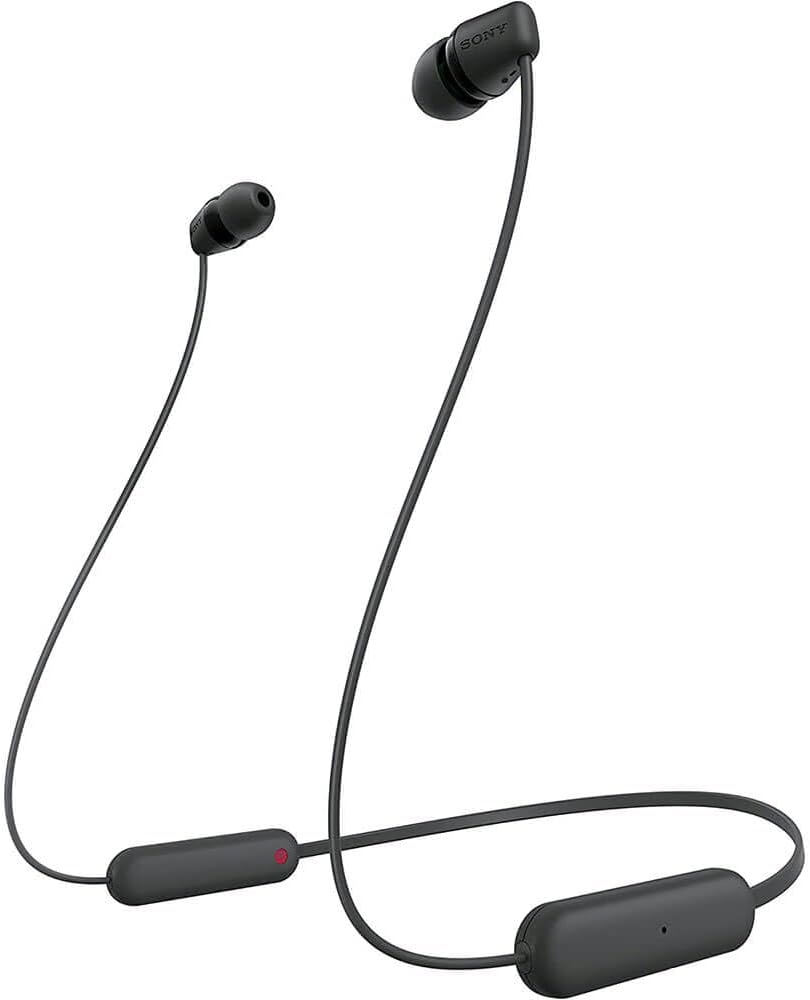
Figure 1.1: The Sony WI-C100 Wireless Headphones, featuring an in-ear design and a flexible neckband, are shown in black.
2. What's in the Box
- Sony WI-C100 Wireless Stereo Headset
- Hybrid Silicone Rubber Earbud Tips (various sizes)

Figure 2.1: The WI-C100 wireless headphones are shown along with three different sizes of hybrid silicone rubber earbud tips, allowing for a customized and comfortable fit.
3. Product Features
- Extended Battery Life: Enjoy up to 25 hours of continuous audio playback on a single charge.
- Digital Sound Enhancement Engine (DSEE): Restores high-frequency sounds lost during audio compression, delivering a richer listening experience.
- IPX4 Splash and Sweat Resistance: Designed to withstand splashes and sweat, making them ideal for workouts and outdoor activities.
- Clear Hands-Free Calling: Features a high-quality built-in microphone for clearer voice calls.
- Sony | Headphones Connect App: Fine-tune your sound preferences and access additional features through the dedicated mobile application.
- Easy Operation: Intuitive buttons allow for convenient control of playback (play, pause, skip tracks) and volume adjustment.
- Flexible Neckband Design: The headphones feature a flexible neckband that ensures a stable and comfortable fit around your neck.
- Fast Pair: Quickly and easily sync your headphones with compatible devices.

Figure 3.1: The WI-C100 headphones offer up to 25 hours of battery life and a quick charge function: 10 minutes of charging provides 60 minutes of playback.

Figure 3.2: Digital Sound Enhancement Engine (DSEE) technology enhances compressed audio for a higher quality listening experience.

Figure 3.3: The IPX4 rating ensures the headphones are resistant to splashes and sweat, making them suitable for active use.
4. Setup
4.1. Charging the Headphones
Before initial use, fully charge the headphones. Connect the charging cable to the charging port on the control unit and to a USB power source. A full charge provides up to 25 hours of playback. A quick 10-minute charge can provide up to 60 minutes of playback.
4.2. Pairing with a Bluetooth Device
- Ensure the headphones are powered off.
- Press and hold the power button until the indicator light flashes blue and a voice guidance announces "Pairing".
- On your device (smartphone, tablet, etc.), enable Bluetooth and search for available devices.
- Select "WI-C100" from the list of detected devices.
- Once connected, the indicator light will flash blue slowly, and a voice guidance will announce "Bluetooth connected".
For compatible Android devices, Fast Pair allows for quick and seamless pairing by simply bringing the headphones close to your device and following the on-screen prompts.
5. Operating Instructions
5.1. Basic Controls

Figure 5.1: The inline control unit provides easy access to various functions.
- Power On/Off: Press and hold the power button (usually the center button) for approximately 2 seconds to turn on or off.
- Play/Pause: Press the center button once to play or pause audio.
- Skip Track: Press the '+' button to skip to the next track. Press the '-' button to go to the previous track.
- Volume Adjustment: Press and hold the '+' button to increase volume. Press and hold the '-' button to decrease volume.
5.2. Hands-Free Calling

Figure 5.2: The built-in microphone ensures clear communication during calls.
- Answer/End Call: Press the center button once to answer an incoming call or end an ongoing call.
- Reject Call: Press and hold the center button for approximately 2 seconds to reject an incoming call.
5.3. Using the Sony | Headphones Connect App
Download the Sony | Headphones Connect app from your device's app store to unlock additional functionalities and customize your listening experience. The app allows you to:
- Adjust equalizer settings for personalized sound.
- Enable/disable DSEE for enhanced audio quality.
- Check battery status.
- Manage Bluetooth connections.
6. Maintenance
6.1. Cleaning the Earbud Tips
Regularly clean the hybrid silicone rubber earbud tips to maintain hygiene and optimal sound quality. Gently remove the tips from the headphones and wipe them with a soft, dry cloth. Ensure they are completely dry before reattaching.
6.2. Proper Storage
When not in use, store the headphones in a clean, dry place away from extreme temperatures and direct sunlight. Avoid tangling the cables to prevent damage.
7. Troubleshooting
- Poor Sound Quality or Call Performance: Ensure the earbud tips match the size of your ear canals and the headset is worn properly. Experiment with different tip sizes for a more snug fit.
- No Power: Charge the headphones using the provided USB cable.
- Cannot Pair: Ensure the headphones are in pairing mode and within 10 meters of your device. Check your device's Bluetooth settings.
8. Specifications
| Feature | Detail |
|---|---|
| Model Name | WI-C100 |
| Brand | Sony |
| Connectivity Technology | Bluetooth 5.0 |
| Bluetooth Range | Up to 10 meters (33 feet) |
| Battery Life (Playback) | Up to 25 hours |
| Quick Charge | 10 minutes charge for 60 minutes playback |
| Water Resistance | IPX4 (Splash and Sweat Proof) |
| Microphone | Built-in for hands-free calling |
| Audio Driver Size | 9 mm |
| Weight | Approximately 20 grams (0.71 ounces) |
| Dimensions (approx.) | 2.76 x 0.75 x 6.3 inches |
9. Official Product Video
Video 9.1: An official product video showcasing the key features and design of the Sony WI-C100 Wireless Bluetooth Headphones.
10. Warranty and Support
For warranty information and customer support, please refer to the documentation included with your product or visit the official Sony support website. Keep your proof of purchase for warranty claims.


