
1. Introduction and Overview
The Healcity EMS TENS Muscle Stimulator is an electronic pulse massager designed for pain management and muscle relief. It offers a non-invasive, non-pharmacological option for alleviating chronic and acute pain. Utilizing human body simulation technology, bioelectricity, electromagnetic principles, bionic technology, and microcomputer intelligent control, this device simulates various massage methods such as cupping and acupuncture.
This portable device features a large LCD touch screen, multiple modes, and a built-in rechargeable lithium battery, making it convenient for use at home or on the go.

Figure 1: Key features of the Healcity EMS TENS Muscle Stimulator, including TENS & EMS function, dual channel, built-in battery, portability, adjustable treatment time, and multiple modes with pads.
2. Important Safety Information
Please read all instructions carefully before using the device. Failure to follow safety guidelines may result in injury or device malfunction.
- Do not use if you have a pacemaker, implanted defibrillator, or other metallic or electronic implanted devices.
- Consult a physician before use if you have any medical conditions, including but not limited to heart disease, epilepsy, cancer, or are pregnant.
- Do not apply pads over open wounds, rashes, swollen, red, infected, or inflamed skin areas.
- Do not use while driving, operating machinery, or during any activity where involuntary muscle contractions could put you at risk of injury.
- Keep out of reach of children.
- Do not immerse the device in water or use it in excessively humid environments.
- Use only the provided accessories and power adapter.
3. Package Contents
Verify that all items listed below are included in your package:
- 1 x TENS Unit EMS Muscle Stimulator
- 1 set of Small Reusable TENS Pads
- 2 sets of Large Reusable TENS Unit Pads
- 2 x Replacement TENS Wires with two leads each
- 1 x USB Extension Cable
- 1 x AC/DC Power Adapter
- 1 x Acupuncture Point Chart
- 1 x Electrode Holder
- 1 x Stylus Pen
- 1 x Storage Box
- 1 x Instruction Manual

Figure 2: All components included with the Healcity EMS TENS Muscle Stimulator.
4. Product Diagram
Familiarize yourself with the components of your Healcity EMS TENS Muscle Stimulator:

Figure 3: Labeled diagram of the device and its accessories.
- Big LCD Touch-screen: Displays modes, intensity, and time.
- Power ON/OFF: Button to turn the device on or off.
- Modes Switch: Button to cycle through available massage modes.
- '+' Intensity Adjustment: Increases stimulation intensity.
- '-' Intensity Adjustment: Decreases stimulation intensity.
- A & B Channels Switch: Allows independent control of two output channels.
- Duration Setting: Adjusts treatment time.
- USB Charging Port: For recharging the internal battery.
- Electrode Pads: Adhesive pads that deliver electrical pulses.
- Pad Wires: Connect the electrode pads to the device.
- USB Cable: For charging.
- Charger: AC/DC adapter for charging.
- Pads Sticking Board: For storing pads when not in use.
5. Setup
5.1 Charging the Device
- Connect the USB cable to the device's USB charging port.
- Connect the other end of the USB cable to the AC/DC power adapter.
- Plug the power adapter into a wall outlet.
- The battery indicator on the LCD screen will show charging status. A full charge provides up to 10 hours of continuous use.
5.2 Connecting Electrode Pads
- Ensure the device is turned off before connecting pads.
- Attach the pad wires to the electrode pads.
- Plug the pad wires into the 'A' and/or 'B' output ports at the bottom of the device.
6. Operating Instructions
6.1 Pad Placement Guidelines
Proper pad placement is crucial for effective treatment. Refer to the included Acupuncture Point Chart for specific guidance.
- Finding the Pain Point: Identify the exact area of pain. This is the optimal position for pad placement.
- Twin Mode: Place two pads side-by-side on the same side of the body, very close to each other, over the target area.
- Opposite Mode: Place two pads in a similar location but on opposite sides of the body (e.g., front and back of the shoulder) to encompass the affected area.

Figure 4: Example of TENS unit usage for back and leg relief.
6.2 Powering On and Selecting Modes
- Press the Power ON/OFF button to turn on the device. The large LCD screen will illuminate.
- Use the stylus or your finger to select a desired massage mode from the icons displayed on the touch screen. The device offers 28 pre-programmed modes.
- If using both channels, press the A & B Channels Switch to select which channel's intensity you wish to adjust.

Figure 5: Large LCD touch screen for mode selection and intensity control.
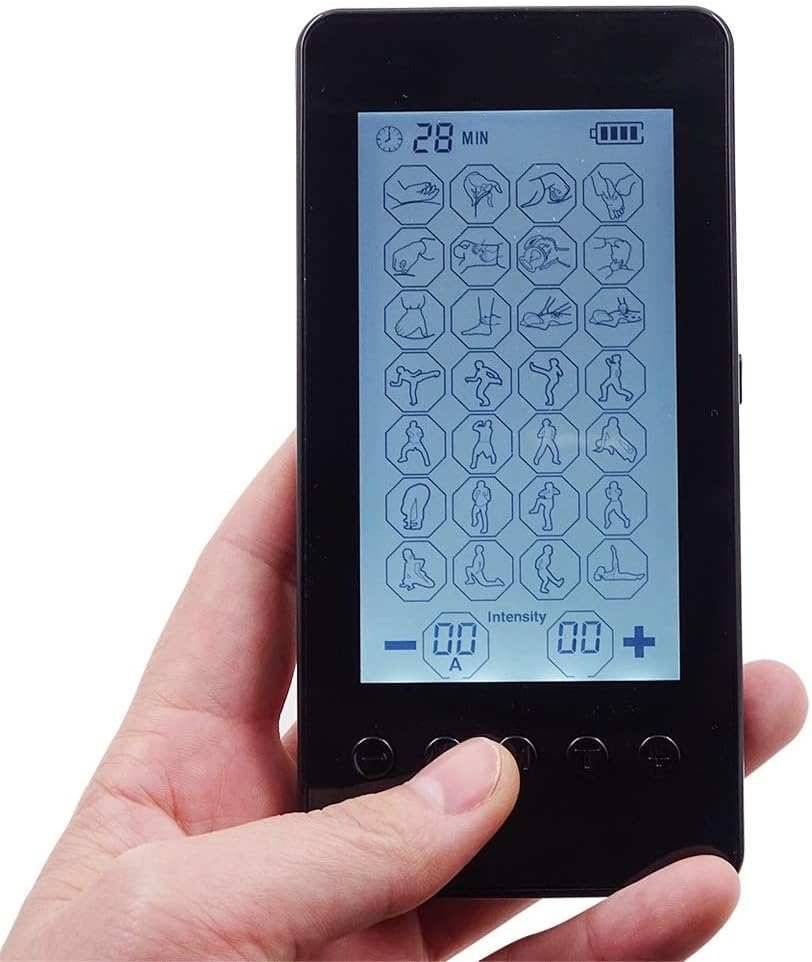
Figure 6: Detailed view of the LCD screen and control buttons.
6.3 Adjusting Intensity and Duration
- Gradually adjust the intensity using the '+' and '-' buttons. It is most effective to reach the highest intensity level you can comfortably tolerate.
- Set the treatment duration using the Duration Setting button. The recommended duration is 40 to 60 minutes per application. The device allows setting from 10 to 90 minutes.
6.4 Recommended Application Principles
- Apply 2 to 3 times a day.
- Each application should last 40 to 60 minutes.
- For a full course of treatment, continue for more than 10 days.
7. Maintenance
7.1 Cleaning the Device and Pads
- Wipe the device with a soft, slightly damp cloth. Do not use abrasive cleaners or immerse in water.
- Clean the electrode pads with a small amount of water and mild soap if necessary. Allow them to air dry completely before reattaching to the sticking board.
7.2 Battery Care
- Recharge the device when the battery indicator shows low power.
- Avoid fully discharging the battery frequently to prolong its lifespan.
- If storing the device for an extended period, charge it periodically to maintain battery health.
7.3 Storage
- After each use, place the electrode pads back on their sticking board to preserve their adhesive quality.
- Store the device and all accessories in the provided storage box in a cool, dry place, away from direct sunlight and extreme temperatures.

Figure 7: The compact size allows for easy portability and storage.
8. Troubleshooting
| Problem | Possible Cause | Solution |
|---|---|---|
| Device does not turn on. | Low battery or device is off. | Charge the device. Press and hold the power button. |
| No sensation or weak sensation. | Pads not properly attached, low intensity, or pads are dry. | Ensure pads are firmly on skin. Increase intensity gradually. Replace old/dry pads. |
| Pads do not stick well. | Pads are dirty or worn out. | Clean pads with a damp cloth. Replace pads if adhesive is lost. |
| Screen is unresponsive. | Temporary software glitch. | Turn off the device and restart it. If issue persists, contact customer support. |
9. Specifications
- Brand: Healcity
- Models: MH-1080, MH-1083, MH-1085, MH-1087, MH-1088, MH-1089
- Display: Large LCD Touch Screen (3.7 inches)
- Modes: 28 Pre-programmed massage modes
- Intensity Levels: 20 levels
- Channels: Dual Channel (A & B)
- Treatment Time: Adjustable from 10 to 90 minutes
- Battery: Built-in Rechargeable Lithium Battery
- Battery Life: Up to 10 hours of continuous use per full charge
- Dimensions: Approximately 13.3 cm (5.2 inches) x 6.2 cm (2.4 inches)

Figure 8: Device dimensions.
10. Warranty and Support
For warranty information or technical support, please refer to the contact details provided with your purchase documentation or visit the official Healcity website. Keep your purchase receipt as proof of purchase.


