
1. Important Safety Information
Please read all instructions carefully before using the Healcity EMS Muscle Stimulator TENS Unit. Failure to follow these instructions may result in injury or damage to the device.
- Consult your physician: Before using this device, especially if you have pre-existing medical conditions, are pregnant, have a pacemaker, or any other implanted electronic device.
- Do not use: On broken skin, open wounds, or over areas of swelling, redness, skin eruptions, or inflammation.
- Avoid sensitive areas: Do not place electrode pads over your heart, on your head, face, throat, or directly over your eyes.
- Keep out of reach of children: This device is not a toy.
- Discontinue use: If you experience any adverse reactions, discomfort, or skin irritation.
- Not for diagnostic or therapeutic purposes: This device is intended for pain management and muscle relief only. Statements regarding dietary supplements have not been evaluated by the FDA and are not intended to diagnose, treat, cure, or prevent any disease or health condition.
2. Package Contents
Verify that all items are present in your package:
- 1 x TENS unit EMS muscle stimulator
- 1 x Set of small reusable TENS unit pads
- 2 x Sets of large reusable TENS unit pads
- 2 x Replacement TENS unit wires with two leads
- 1 x USB extension wire
- 1 x AC/DC power adapter
- 1 x Application acupuncture points chart
- 1 x Electrode Pad holder
- 1 x Touch Pen
- 1 x Packing Box
- 1 x User manual (this document)
3. Product Overview
The Healcity EMS Muscle Stimulator TENS Unit is an electronic pulse massager designed for pain management and muscle relief. It utilizes human body simulation technology, bioelectricity technology, bionic technology, and microcomputer intelligent control technology to simulate various massage methods. This non-invasive, non-drug option helps alleviate chronic or acute pain.
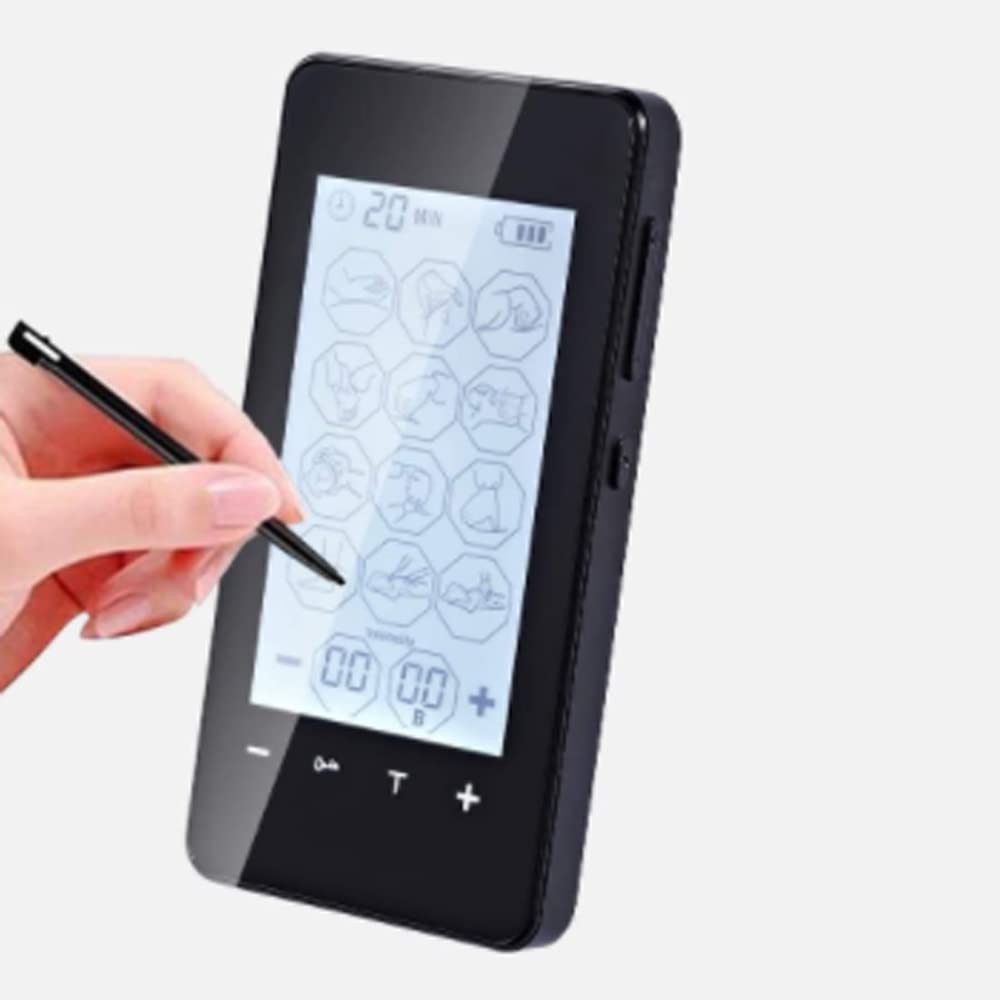
Image: The Healcity EMS Muscle Stimulator TENS Unit, a compact black device with a large LCD screen, being operated by a stylus.
Key Features:
- Multi-functional: Provides TENS (Transcutaneous Electrical Nerve Stimulation) for pain relief and EMS (Electrical Muscle Stimulation) for muscle conditioning.
- Large LCD & Multi-Modes: Features a 3.69-inch backlit LCD screen with enlarged icons for easy reading and operation. Offers various massage modes.
- Adjustable Treatment Time: Set working time from 10 to 90 minutes.
- Rechargeable Lithium Battery: Built-in battery provides up to 10 hours of continuous use and can be charged via a wall socket or USB outlet. Includes a battery level indicator.
- Portable Design: Pocket-sized for convenient use anywhere on various body parts including back, knees, shoulders, ankles, wrists, and elbows.
4. Setup
4.1 Charging the Device
- Connect the USB extension wire to the TENS unit.
- Plug the USB extension wire into the AC/DC power adapter.
- Insert the AC/DC power adapter into a standard wall outlet, or connect the USB extension wire to a USB outlet (e.g., computer USB port).
- The battery level indicator on the LCD screen will show charging status. Charge fully before first use.
4.2 Attaching Electrode Pads
- Ensure the device is turned off before attaching pads.
- Clean and dry the skin area where the pads will be placed.
- Connect the TENS unit wires to the electrode pads. Each wire has two leads for two pads.
- Remove the protective film from the adhesive side of the electrode pads.
- Apply the pads firmly to the desired treatment area on your skin. Ensure good contact.
5. Operating Instructions
5.1 Power On/Off
- To power on, press and hold the power button (usually marked with a power symbol) until the LCD screen illuminates.
- To power off, press and hold the power button again until the screen turns off.
5.2 Selecting a Mode
- Once powered on, use the mode selection buttons (refer to the device's screen icons) to cycle through the available massage modes.
- The selected mode will be displayed on the LCD screen.
5.3 Adjusting Intensity
- Use the '+' and '-' buttons to increase or decrease the intensity level of the stimulation.
- Adjust gradually to a comfortable level. It is often more effective to reach the highest intensity level you can comfortably tolerate.
5.4 Setting Treatment Duration
- The device allows you to set a working time from 10 to 90 minutes.
- Use the timer adjustment buttons (refer to the device's interface) to select your desired treatment duration.
5.5 Pad Placement Guidelines
Proper pad placement is crucial for effective treatment. Refer to the included application acupuncture points chart for specific guidance.
- Twin Mode: Place the two pads next to each other on the same side of the body and in close proximity to the pain point.
- Opposed Mode: Place the two pads on a similar spot but on opposite sides of the body, for example, on the front and back of the shoulder.
5.6 Regular Application Principles
- Locate Pain Point: Find the exact pain point; this is the optimal position for the pads.
- Gradual Intensity: Adjust the intensity gradually. It is more effective to reach the highest intensity level you can stand.
- Recommended Duration: Apply 2-3 times per day for 40-60 minutes per application. A typical course of treatment is over 10 days.
6. Maintenance
6.1 Cleaning the Device
- Turn off the device and disconnect all wires before cleaning.
- Wipe the device with a soft, slightly damp cloth. Do not use abrasive cleaners or immerse the device in water.
6.2 Electrode Pad Care
- After each use, place the protective film back onto the adhesive side of the pads to preserve their stickiness and prolong their lifespan.
- Store pads in a cool, dry place.
- Replace pads when they lose their adhesiveness or become damaged.
6.3 Storage
- Store the device and all accessories in the original packing box or a clean, dry place away from direct sunlight and extreme temperatures.
7. Troubleshooting
If you encounter any issues with your Healcity EMS Muscle Stimulator, please refer to the table below for common problems and solutions.
| Problem | Possible Cause | Solution |
|---|---|---|
| Device does not turn on | Low battery; Device not charged | Charge the device fully using the provided adapter and USB cable. |
| No sensation or weak sensation | Pads not properly attached; Intensity too low; Pads worn out; Wires loose or damaged | Ensure pads are firmly attached to clean, dry skin. Increase intensity gradually. Replace old pads. Check wire connections. |
| Skin irritation under pads | Pads left on too long; Allergic reaction; Skin not clean | Remove pads immediately. Clean skin thoroughly. Reduce treatment duration. Consult a doctor if irritation persists. |
| Device turns off unexpectedly | Low battery; Timer expired | Recharge the device. Check the set treatment duration. |
8. Specifications
- Model Numbers: MH-1080, MH-1083, MH-1085, MH-1087, MH-1088, MH-1089
- ASIN: B09YKZDC5
- Manufacturer: Think center llc
- First Available: April 22, 2022
- Battery: Rechargeable Lithium Battery
- Display: 3.69-inch LCD Backlit Screen
9. Warranty and Support
Healcity is committed to providing high-quality products. While specific warranty details are not provided in this manual, please retain your proof of purchase for any warranty claims.
For technical support, troubleshooting assistance, or to inquire about warranty information, please contact Healcity customer service through the retailer where you purchased the product or visit the official Healcity website.
We value your feedback and are here to help ensure your satisfaction with our product.