
1. Introduction
This manual provides detailed instructions for the installation, operation, and maintenance of your Kenwood Excelon DPX795BH Double DIN Bluetooth in-Dash Car Stereo CD Receiver. Please read this manual thoroughly before using the product to ensure correct operation and to prevent damage.
The Kenwood Excelon DPX795BH features a large 3-line display, versatile Bluetooth options, Amazon Alexa compatibility, and support for various audio sources including CD, USB, and HD/Satellite Radio.
2. Safety Information
- Installation: Ensure professional installation to avoid electrical damage or vehicle malfunction. Incorrect wiring can cause fire or injury.
- Power Supply: Connect the unit only to a 12V DC car battery with a negative ground.
- Volume Level: Keep the volume at a level where you can still hear outside sounds, such as emergency vehicles. Prolonged exposure to high volume levels can cause hearing damage.
- Driving Safety: Do not operate the unit in a way that distracts you from driving. Always prioritize road safety.
- Moisture: Do not expose the unit to moisture or water to prevent electric shock or fire.
3. Package Contents
Upon opening the package, verify that all items are present and undamaged:
- Kenwood Excelon DPX795BH Receiver Unit
- Wiring Harness
- Mounting Hardware
- Owner's Manual (this document)
4. Setup and Installation
Installation of this Double DIN car stereo requires technical knowledge. It is highly recommended to have the unit installed by a qualified professional to ensure proper functionality and to prevent damage to your vehicle or the unit.
4.1. Installation Overview
The DPX795BH is designed for a Double DIN dash opening. Ensure your vehicle has the appropriate space. Refer to your vehicle's service manual for specific dash disassembly and reassembly instructions.
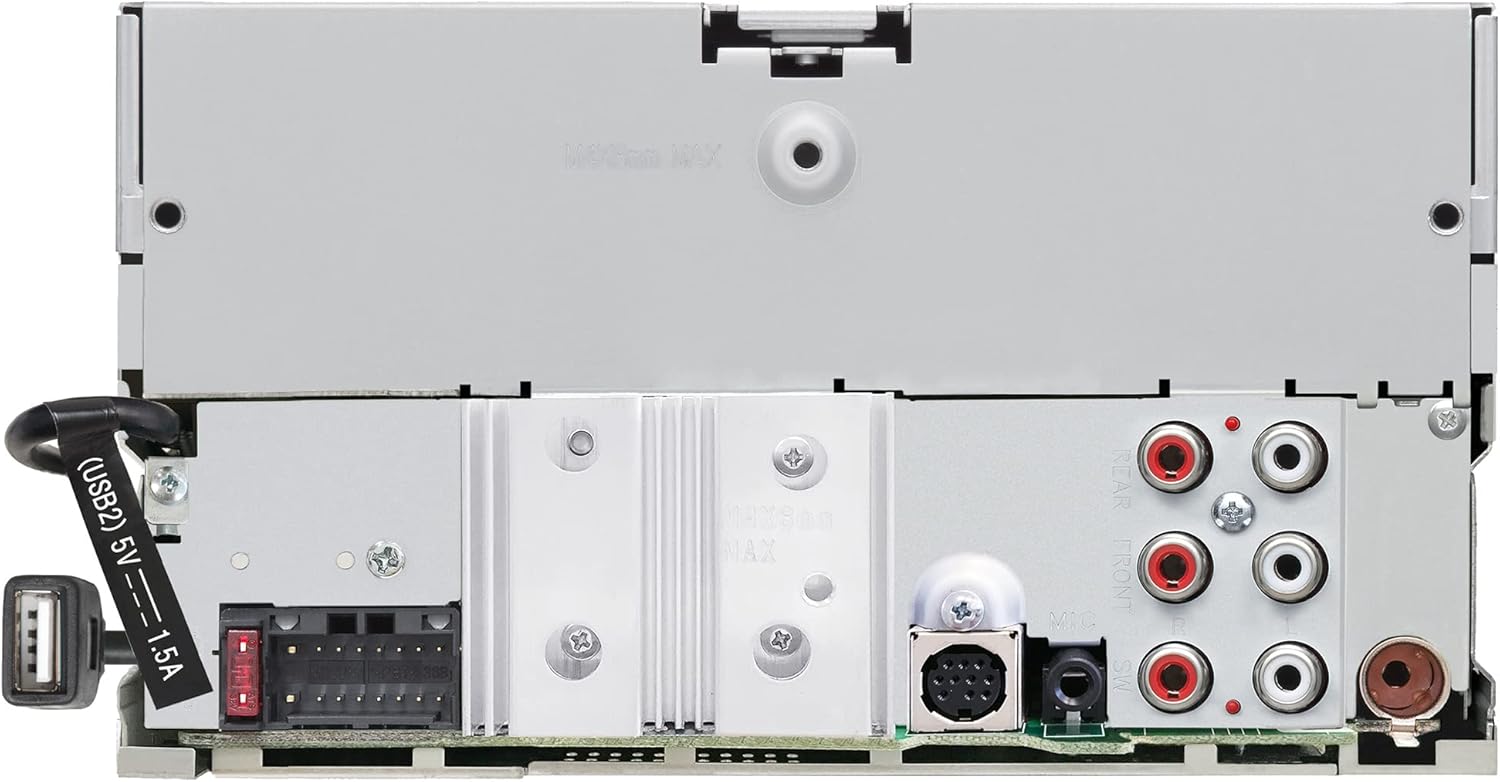
Figure 4.1: Rear Connections of the DPX795BH. This image displays the rear panel of the Kenwood DPX795BH receiver, highlighting the various input and output ports, including the wiring harness connector, antenna input, and RCA pre-outs for front and rear speakers, and subwoofer. A USB cable is also visible, indicating a rear USB port.
- Wiring: Connect the included wiring harness to your vehicle's wiring. Pay close attention to power, ground, accessory, and speaker connections.
- Antenna: Connect your vehicle's antenna cable to the receiver.
- USB Connections: The unit features both front and rear USB ports. The rear USB port can be routed to a convenient location in your vehicle.
4.2. Initial Configuration
After installation, turn on your vehicle's ignition to power the unit. The first power-on may require setting basic parameters such as language, clock, and initial audio settings. Follow the on-screen prompts.
5. Operating Instructions
This section details the various functions and controls of your Kenwood Excelon DPX795BH receiver.

Figure 5.1: Front Panel Overview. This image shows the front panel of the Kenwood DPX795BH car stereo, featuring the main display, large central rotary knob, and various control buttons for source selection, display, band, and track control. A front USB port is also visible on the right side.
5.1. Basic Controls
- Power/Source (SRC) Button: Press to turn the unit on. Press and hold to turn off. Short press to cycle through available audio sources (Radio, CD, USB, Bluetooth Audio, AUX).
- Volume Knob: Rotate clockwise to increase volume, counter-clockwise to decrease. Press to access audio settings.
- Display (DISP) Button: Changes the information shown on the 3-line display.
- Band Button: In radio mode, cycles through FM1, FM2, FM3, AM, and Satellite Radio bands.
- Track/Seek Buttons (<< / >>): Skips tracks on CD/USB/Bluetooth, or seeks radio stations.
- Numeric Preset Buttons (1-6): Store and recall radio station presets.
5.2. Bluetooth Connectivity
The DPX795BH allows for wireless audio streaming and hands-free calling via Bluetooth.
- Pairing: Enable Bluetooth on your smartphone. Select "KENWOOD DPX795BH" from the list of available devices. Confirm the pairing code if prompted.
- Dual Phone Connection: The unit supports connecting two phones simultaneously. You can switch between the two connected phones with a touch of a button.
- Bluetooth Audio: Select "Bluetooth Audio" as the source to stream music from your paired device.
- Hands-Free Calling: Use the dedicated call buttons on the unit to answer, end, or reject calls.
5.3. Amazon Alexa Compatibility
With Alexa Built-in, you can use voice commands for various functions while keeping your hands on the wheel.
- Activation: Ensure your smartphone is connected via Bluetooth and the Alexa app is running. Press the dedicated Alexa button or activate via voice command (if configured).
- Voice Commands: You can ask Alexa to:
- Play music from supported services.
- Place calls.
- Listen to audiobooks.
- Hear the news.
- Check the weather.
- Control smart home devices.
- Get directions and find parking.
5.4. CD and USB Playback
The unit supports audio playback from CDs and USB storage devices.
- CD Player: Insert an audio CD into the disc slot. Playback will begin automatically.
- USB Playback: Connect a USB storage device (e.g., flash drive) to either the front or rear USB port. The unit supports various audio formats, including FLAC files. Select "USB" as the source.
- Smartphone Integration: Connect your iPhone (via USB or Bluetooth) or Android device (via Bluetooth) to access and control music applications like Spotify and Pandora. Ensure the respective apps are installed on your device.
5.5. Radio Functions (AM/FM, HD Radio, Satellite Radio)
Access various radio broadcasts with the DPX795BH.
- AM/FM Radio: Select "Radio" as the source, then use the Band button to select AM or FM. Use the seek buttons to find stations.
- HD Radio: The unit features a built-in HD tuner for improved sound quality and additional station information where available.
- Satellite Radio: With a compatible SiriusXM tuner (sold separately), you can access satellite radio features including:
- Pausing, rewinding, and replaying up to 60 minutes of live satellite radio.
- TuneStart: Automatically starts songs from the beginning on favorite channels.
- Traffic & Weather Now: Provides current updates.
5.6. Kenwood Remote App Control
Control your receiver using the free Kenwood Remote app on your smartphone. Install the app and connect your phone via Bluetooth to manage music and settings.
6. Maintenance
- Cleaning the Unit: Use a soft, dry cloth to wipe the front panel. For stubborn dirt, dampen the cloth with water. Never use abrasive cleaners, solvents, or alcohol-based cleaners, as they can damage the surface.
- CD Player Maintenance: Avoid inserting damaged or dirty CDs. Use a commercially available CD cleaner if necessary.
- USB Port: Keep the USB ports free of dust and debris.
7. Troubleshooting
If you experience issues with your DPX795BH, refer to the following common problems and solutions before contacting support.
| Problem | Possible Cause | Solution |
|---|---|---|
| No power | Incorrect wiring; Blown fuse; Vehicle ignition off. | Check power and ground connections. Replace fuse if necessary. Ensure ignition is on. |
| No sound | Volume too low; Mute activated; Incorrect speaker wiring; Audio settings. | Increase volume. Check mute status. Verify speaker connections. Reset audio settings. |
| Bluetooth not connecting | Bluetooth off on phone/unit; Device not paired; Interference. | Ensure Bluetooth is enabled on both devices. Re-pair the device. Move closer to the unit. |
| CD/USB playback issues | Damaged disc/file; Incompatible format; USB device not recognized. | Try a different disc/file. Ensure files are in supported formats (e.g., FLAC, MP3). Reformat USB device if needed. |
| Alexa not responding | No Bluetooth connection; Alexa app not running; No internet connection on phone. | Verify Bluetooth connection. Ensure Alexa app is open. Check phone's internet connectivity. |
8. Specifications
| Feature | Detail |
|---|---|
| Model Number | DPX795BH |
| Product Dimensions | 10.6 x 6.9 x 9.3 inches (26.9 x 17.5 x 23.6 cm) |
| Item Weight | 4.5 pounds (2.04 kg) |
| Connectivity Technology | Bluetooth, USB |
| Controller Type | Amazon Alexa, Android |
| Special Features | Pandora, Spotify, HD Radio, SiriusXM Ready |
| Compatible Devices | Smartphone, Speaker |
| Audio Output Mode | Mono, Stereo |
| Color | Black |
| Manufacturer | KENWOOD |
9. Warranty and Support
For warranty information and technical support, please refer to the warranty card included with your product or visit the official Kenwood website. Kenwood provides customer support for product inquiries, troubleshooting assistance, and service requests.
Manufacturer: KENWOOD
For the most up-to-date support resources, including FAQs and contact information, please visit the Kenwood Official Website.