
1. Introduction
Thank you for choosing the Cloud Massage Shiatsu Foot Massager with Heat. This device is designed to provide deep kneading therapy, heat, and compression for pain relief, improved circulation, and relaxation for your feet, ankles, and calves. Please read this manual thoroughly before use to ensure safe and effective operation.

Image 1.1: The Cloud Massage Shiatsu Foot Massager with Heat, shown with its remote control and packaging.
2. Safety Information
To ensure safe operation and prevent injury or damage, please adhere to the following guidelines:
- Always start at the lowest intensity setting and gradually adjust to a comfortable level.
- Wear socks during foot massages to enhance comfort and hygiene.
- If you have extremely sensitive feet, test the pressure on your arms first to gauge comfort.
- Do not use the massager if you have open wounds, skin irritations, or severe circulatory problems. Consult a physician if you have any medical conditions.
- Keep the device away from water and moisture.
- Unplug the massager from the power outlet when not in use or before cleaning.
- Do not attempt to repair or disassemble the unit yourself. Contact customer support for assistance.
3. Product Overview and Components
The Cloud Massage Shiatsu Foot Massager is designed with multiple features to provide a comprehensive massage experience. Key components include:
- Massage Chambers: Designed to accommodate feet and calves.
- Control Panel: Integrated buttons for power, mode selection, intensity, and heat.
- Remote Control: For convenient adjustment of settings from a distance.
- Adjustable Bar: Allows for tilting the massager to target different areas like feet, ankles, or calves.
- Power Cord: Connects the device to an electrical outlet.
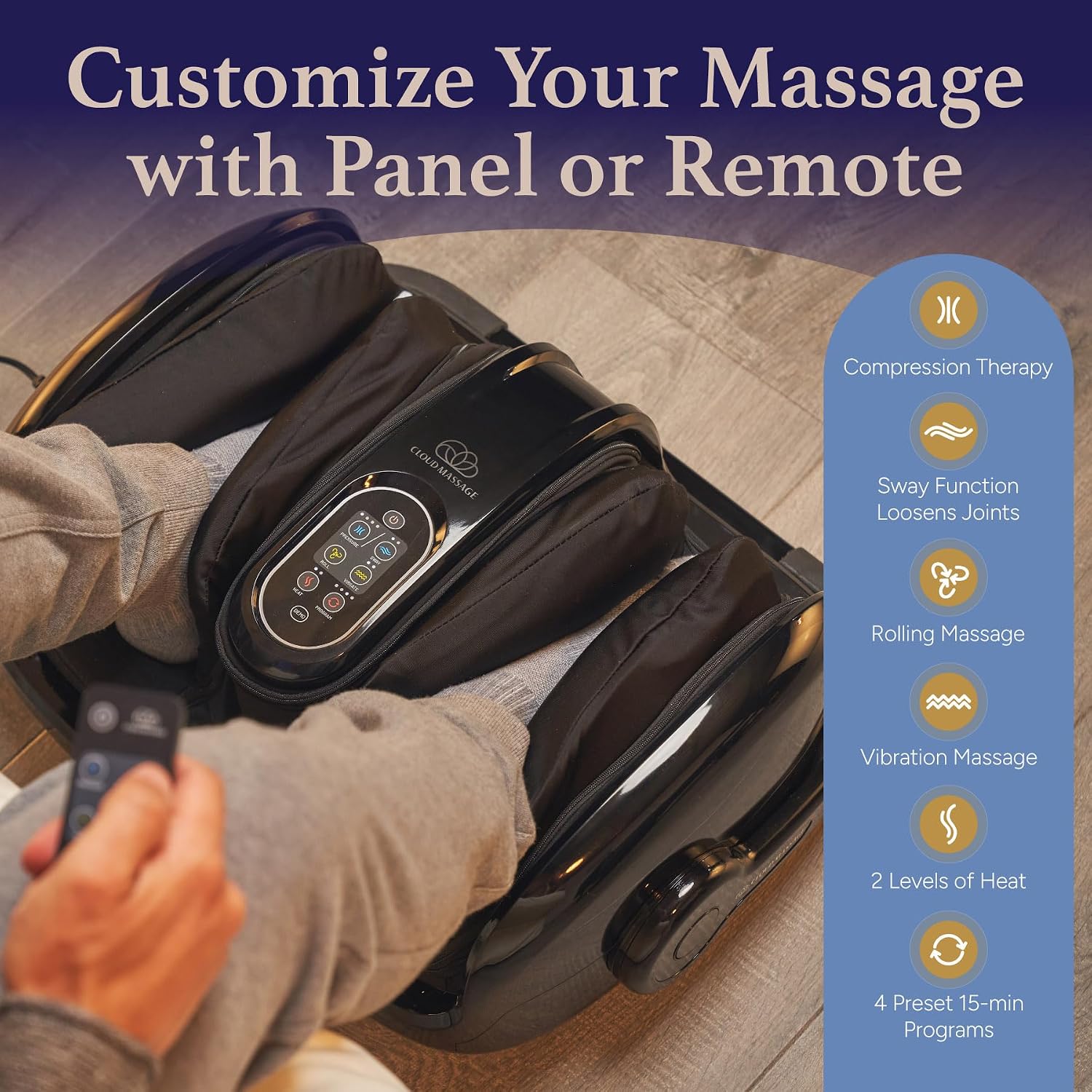
Image 3.1: Detailed view of the massager's control panel and the included remote control, highlighting various function buttons.
4. Setup
- Unpack: Carefully remove the massager and all accessories from the packaging.
- Placement: Place the massager on a flat, stable surface. Ensure there is enough space around the unit for comfortable use.
- Power Connection: Plug the power cord into a standard electrical outlet. The device is now in standby mode.
5. Operating Instructions
The Cloud Massage Shiatsu Foot Massager offers various settings for a personalized experience. Always begin with the lowest intensity and gradually increase as desired.
5.1 Basic Operation
- Positioning: Adjust the massager to your preferred position using the adjustable bar. It can be used flat for feet or tilted for calves and ankles.
- Power On: Press the power button on the control panel or remote control to turn on the device.
- Select Mode: Choose your desired massage mode (e.g., Pressure, Sway, Roll, Vibrate) using the corresponding buttons.
- Adjust Intensity: Increase or decrease the intensity level for each active feature.
- Activate Heat: Press the 'Heat' button to turn on the heat function.
- Duration: The massager typically operates in 15-minute cycles. You can stop a program at any time by pressing the power button.

Image 5.1: The massager positioned to provide massage to the calves, demonstrating its adjustable design.
5.2 Important Usage Tips
- Always wear socks during use for comfort and hygiene.
- Begin with the lowest settings and gradually increase intensity to find your comfort level.
- The device can be used for feet, ankles, and calves by adjusting its angle.

Image 5.2: A user initiating a massage session, with visual cues emphasizing starting on the lowest setting, gradually increasing intensity, and always wearing socks.
6. Preset Programs
The massager includes several preset 15-minute programs for instant relaxation. You can stop a program at any time, adjust intensity levels, and select/deselect features to customize your massage. A long beep indicates the program has finished.

Image 6.1: A visual guide to the four preset massage programs, outlining their active features and settings.
| Program | Name | Active Features |
|---|---|---|
| Program 1 | Pressure & Vibrate | Pressure, Vibrate |
| Program 2 | Roll & Vibrate | Roll, Vibrate |
| Program 3 | Pressure, Sway, Roll & Vibrate | Pressure, Sway, Roll, Vibrate |
| Program 4 | Pressure, Extra Sway Time, Roll & Vibrate | Pressure, Sway (extended), Roll, Vibrate |
| No Program (Off) | Custom Combination | Manually select any combination of Pressure, Sway, Roll, Vibrate. Note: Pressure and Sway cannot be on simultaneously. |
Note: Each program cycles through the lowest intensity levels. You can raise the intensity level of each feature by pressing that feature's button. The intensity level indicator above the button will light up with the new intensity level.
7. Care and Maintenance
- Cleaning: Always unplug the massager before cleaning. Wipe the exterior with a soft, damp cloth. Do not use abrasive cleaners or immerse the unit in water.
- Storage: Store the massager in a cool, dry place, away from direct sunlight and extreme temperatures. Avoid placing heavy objects on the unit.
- Cord Care: Do not wrap the power cord tightly around the unit. Avoid kinking or stretching the cord.
8. Troubleshooting
If you encounter any issues with your Cloud Massage Shiatsu Foot Massager, please refer to the following common solutions:
- Device does not power on: Ensure the power cord is securely plugged into both the massager and a working electrical outlet.
- Massage intensity feels too strong/weak: Adjust the intensity settings using the control panel or remote. Remember to start at the lowest setting.
- Unusual noises during operation: Minor operational sounds are normal. If the noise is loud or unusual, discontinue use and contact customer support.
- Heat function not working: Ensure the heat button has been activated. Allow a few minutes for the heat to become noticeable.
If the problem persists after attempting these solutions, please contact Cloud Massage customer support.
9. Specifications
| Feature | Specification |
|---|---|
| Product Dimensions | 22 x 11 x 17.7 inches |
| Item Weight | 22 Pounds |
| Item Model Number | 860007737053 |
| Power Source | Corded Electric |
| Manufacturer | Cloud Massage |
| Color | Black |
| Use For | Ankle, Ball of Foot, Calf, Feet |
10. Warranty and Support
Cloud Massage is committed to providing reliable products and excellent customer service. If any issues arise with your foot massager machine, our responsive customer support team is ready to assist with repairs or replacements as needed. Please refer to your purchase documentation for specific warranty terms and contact information.
11. Legal Disclaimer
Statements regarding this product have not been evaluated by the Food and Drug Administration. This product is not intended to diagnose, treat, cure, or prevent any disease or health condition. Always consult with a healthcare professional for any health concerns.