
1. Introduction
Thank you for choosing the JHK Ergonomic High Back Office Chair, model MC83BU. This chair is designed to provide comfort and support during extended periods of sitting, featuring a breathable mesh back, adjustable components, and a sturdy construction. Please read this manual carefully before assembly and use to ensure proper function and longevity of your chair.
For your safety, please adhere to all instructions and warnings provided herein.
2. Safety Information
- Maximum Weight Capacity: Do not exceed the maximum weight capacity of 300 lbs (approximately 136 kg).
- Proper Use: Use the chair only for its intended purpose as an office chair. Avoid standing on the chair or using it as a step stool.
- Assembly: Ensure all bolts and screws are securely tightened before use. Periodically check and re-tighten as necessary.
- Children: Keep small parts away from children during assembly. This chair is not a toy.
- Floor Protection: Consider using a chair mat on delicate flooring to prevent scratches from the casters.
3. Parts List
Before beginning assembly, please ensure all parts are present and undamaged. If any parts are missing or damaged, contact customer support.

Figure 3.1: Exploded view of chair components.
Typical components include:
- Backrest with headrest
- Seat cushion
- Armrests (2)
- Mechanism/Control unit
- Gas lift cylinder
- Base (star base)
- Casters (5)
- Hardware (screws, washers, Allen wrench)
4. Setup and Assembly Instructions
Follow these steps carefully to assemble your JHK Ergonomic High Back Office Chair. It is recommended to assemble the chair on a soft, clean surface to prevent damage.
- Attach Casters to Base: Insert the five casters into the holes at the end of each leg of the star base. Push firmly until they click into place.
- Insert Gas Lift: Place the gas lift cylinder into the center hole of the star base.
- Attach Mechanism to Seat: Align the control mechanism with the screw holes on the underside of the seat cushion. Ensure the front of the mechanism faces the front of the seat. Secure with screws using the provided Allen wrench.
- Attach Armrests to Seat: Attach the armrests to the sides of the seat cushion using the designated screws. Do not fully tighten yet.
- Attach Backrest to Seat/Mechanism: Connect the backrest to the seat assembly. The method may vary; typically, it involves aligning brackets and securing with screws. Once attached, fully tighten all armrest and backrest screws.
- Connect Seat Assembly to Gas Lift: Carefully place the assembled seat and backrest onto the gas lift cylinder, ensuring the center hole of the mechanism aligns with the top of the gas lift. Press down firmly to secure.

Figure 4.1: Fully assembled JHK Ergonomic High Back Office Chair.
5. Operating Instructions and Adjustments
Your JHK Ergonomic High Back Office Chair offers several adjustment features to customize your seating experience for optimal comfort and support.
5.1. Seat Height Adjustment
To adjust the seat height, locate the lever on the right side under the seat. While seated, pull the lever up to lower the seat. To raise the seat, stand up slightly and pull the lever up. Release the lever at the desired height.

Figure 5.1: Level 3 gas cylinder for stable height adjustment.
5.2. Reclining Function and Tilt Tension
The chair features a reclining function from 90° to 135°.
- Recline Lock/Unlock: Use the lever on the left side under the seat. Push the lever in to lock the backrest in an upright position. Pull the lever out to allow the backrest to recline freely.
- Tilt Tension Adjustment: The round knob located under the front of the seat controls the tension of the recline. Turn clockwise to increase tension (making it harder to recline) or counter-clockwise to decrease tension (making it easier to recline).
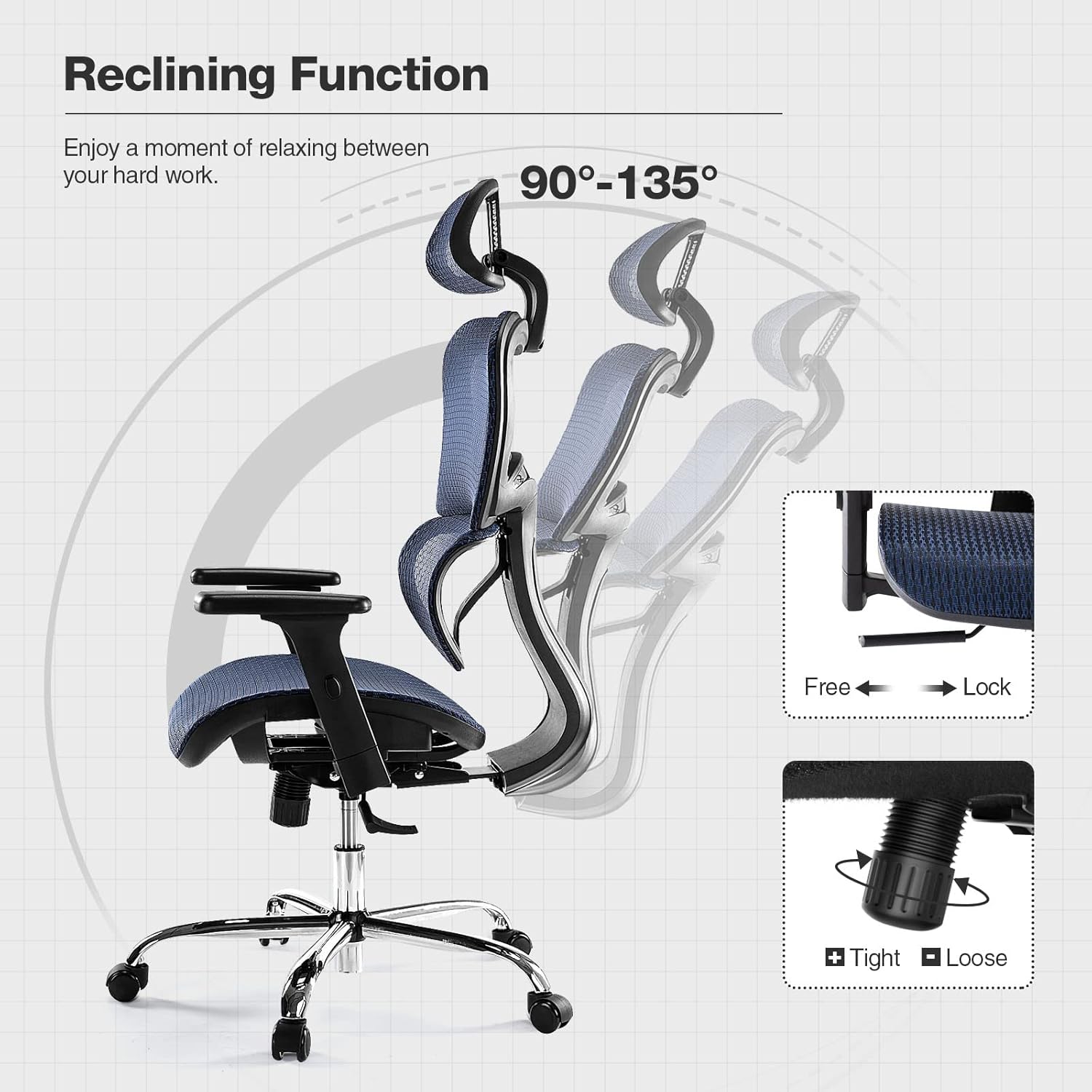
Figure 5.2: Reclining function and tilt tension adjustment.
5.3. Adjustable Headrest
The headrest can be adjusted vertically and tilted to provide optimal neck and head support.
- Vertical Adjustment: Gently pull the headrest up or push it down to adjust its height.
- Tilt Adjustment: The headrest can be tilted up to 45 degrees to find your preferred angle.

Figure 5.3: Headrest vertical and tilt adjustment.
5.4. Elastic Lumbar Support
The chair features an elastic lumbar pillow designed to support the natural curvature of your lower back, helping to relieve fatigue. This support is integrated into the backrest design.
Figure 5.4: Elastic lumbar pillow for back support.
5.5. 3D Adjustable Armrests
The armrests offer three-dimensional adjustment for personalized comfort.
- Height Adjustment: Press the button on the side of the armrest and move it up or down. Release the button to lock. (Up and Down 2.75 inches)
- Forward and Backward: Slide the armrest pad forward or backward to your desired position. (Forward and Back 2 inches)
- Rotation: Rotate the armrest pad left or right. (Left and Right 20° Rotation)

Figure 5.5: 3D adjustable armrests.
6. Maintenance
Regular maintenance will help prolong the life and appearance of your JHK office chair.
- Cleaning Mesh and Fabric: Use a soft cloth dampened with mild soap and water to clean mesh and fabric surfaces. Avoid abrasive cleaners or harsh chemicals. Allow to air dry completely.
- Cleaning Plastic and Metal Parts: Wipe plastic and metal components with a soft, damp cloth. For stubborn marks, a mild, non-abrasive cleaner can be used.
- Caster Maintenance: Periodically check casters for accumulated hair or debris and clean as needed to ensure smooth movement.
- Hardware Check: Every 3-6 months, inspect all screws and bolts to ensure they are tight. Re-tighten if necessary to maintain stability and safety.
7. Troubleshooting
If you encounter any issues with your chair, refer to the following common problems and solutions:
| Problem | Possible Cause | Solution |
|---|---|---|
| Chair is wobbly or unstable. | Loose screws or bolts. | Check and re-tighten all assembly screws, especially those connecting the seat, backrest, and armrests. |
| Difficulty adjusting seat height. | Gas lift not properly engaged or faulty. | Ensure the gas lift lever is fully pulled. If the issue persists, the gas lift may need replacement. Contact support. |
| Backrest does not recline or lock. | Recline lock lever not engaged/disengaged correctly. | Push or pull the recline lock lever firmly. Check if the tilt tension knob is too tight. |
| Casters do not roll smoothly. | Debris (hair, lint) caught in casters. | Turn the chair over and remove any debris from the caster wheels. |
8. Specifications
Detailed specifications for the JHK Ergonomic High Back Office Chair, model MC83BU:
- Model Number: MC83BU
- Brand: JHK
- Product Dimensions (L x W x H): 71.37 x 67.31 x 122 cm (approximately 28.1 x 26.5 x 48.03 inches)
- Item Weight: 11.79 kg (approximately 26 lbs)
- Maximum Weight Capacity: 300 lbs (approximately 136 kg)
- Material: Mesh backrest and seat, plastic frame, metal base and gas lift.
- Recline Angle: 90° - 135°
- Armrest Adjustment: 3D (Height, Forward/Backward, Rotation)
- Headrest Adjustment: Vertical and 45° Tilt

Figure 8.1: Chair dimension details.
9. Warranty and Support
JHK stands behind the quality of its products. For specific warranty information, please refer to the warranty card included with your purchase or contact the retailer where the chair was purchased. Keep your proof of purchase for warranty claims.
If you have any questions, require assistance with assembly, or need to report missing/damaged parts, please contact JHK customer support or your authorized dealer. Please have your model number (MC83BU) and purchase date ready when contacting support.


