
LEFXMOPHY RMF-TX810U, RMF-TX910U, RMF-TX800U, RMF-TX900U
LEFXMOPHY Silicone Protective Cover User Manual
For Sony RMF-TX810U, RMF-TX910U, RMF-TX800U, RMF-TX900U Voice Remote Controls
1. Introduction
Thank you for choosing the LEFXMOPHY Silicone Protective Cover. This cover is specifically designed to provide enhanced protection and improved usability for your Sony Voice Remote Control. Made from premium silicone, it offers durability, a comfortable grip, and helps prevent damage from drops, scratches, and dust. Its precise design ensures full access to all buttons and functions.
2. Product Features
- Compatibility: Specifically designed for Sony XR X80K, X95K, X90K, A80K, A95K, Z9K, X95L, X93L, X90L, A80L Series RMF-TX800U, RMF-TX900U, RMF-TX810U, RMF-TX910U, RMF-TX811U, RMF-TX810D, RMF-TX811D, RMF-TX810P, RMF-TX810T, RMF-TX811T Voice Remote Controls.
- Premium Silicone Material: Soft, lightweight, and durable rubber skin sleeves that feel great in hand.
- Enhanced Protection: Protects your remote from slipping, cracking, scratching, and dusting. It is also washable for easy cleaning.
- Precise Cutouts: Ensures full access to all buttons, ports, and functions without obstruction.
- Anti-Slip & Anti-Greasy: Features a diamond pattern texture for improved grip and is resistant to fingerprints and stains.
- Glow-in-the-Dark (for specific colors): Certain color variants glow in the dark, making your remote easy to locate in low-light conditions.
3. Setup and Installation
Installing your LEFXMOPHY silicone cover is quick and easy. Follow these steps:
- Ensure your Sony Voice Remote Control is clean and free of dust or debris.
- Gently slide the remote control into the silicone cover, starting from the top (button end).
- Adjust the cover to ensure it fits snugly and all buttons align perfectly with the cutouts.
- Verify that the infrared emitter and microphone openings are not obstructed.

Figure 3.1: The LEFXMOPHY black silicone cover installed on a compatible Sony remote control, showing the front and back views.
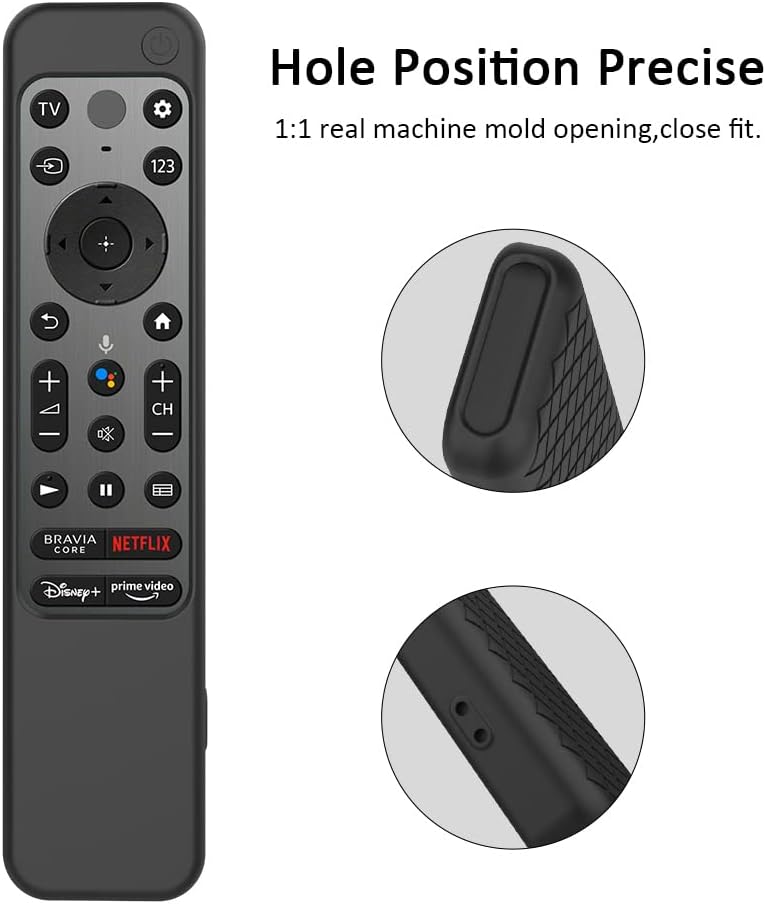
Figure 3.2: Close-up view illustrating the precise cutouts and fit of the silicone cover around the remote's buttons and ports.
4. Operating Instructions
Once installed, the LEFXMOPHY silicone cover does not interfere with the normal operation of your remote control. All buttons remain fully functional and accessible. The cover is designed to enhance your grip and protect the remote during daily use.
- Improved Grip: The soft silicone material and diamond pattern (on the back) provide a comfortable and secure grip, reducing the chance of accidental drops.
- Button Accessibility: The precise cutouts ensure that all buttons, including power, volume, channel, and dedicated app buttons, are easy to press and respond as usual.
- Voice Control: The microphone opening is unobstructed, allowing for seamless use of the voice control feature on your remote.
- Glow-in-the-Dark Functionality: For glow-in-the-dark variants, expose the cover to light for a period to charge its luminescence, making it visible in dark environments.

Figure 4.1: A hand holding the remote with the silicone cover, highlighting the anti-slip diamond pattern on the back for enhanced grip.

Figure 4.2: A visual comparison showing the remote before and after the cover installation, demonstrating improved button access and overall usability.
5. Maintenance and Care
To ensure the longevity and cleanliness of your LEFXMOPHY silicone cover, follow these simple maintenance guidelines:
- Cleaning: The silicone cover is washable. If it gets dirty, simply remove it from the remote and rinse it under running water. You can use a mild soap if necessary.
- Drying: After washing, allow the cover to air dry completely before re-installing it on your remote control.
- Stain Prevention: The material is designed to be anti-greasy and resistant to stains, but prompt cleaning of spills is recommended.
- Storage: If storing the cover separately, keep it in a clean, dry place away from direct sunlight and extreme temperatures.

Figure 5.1: The silicone cover being washed, demonstrating its washable feature for easy cleaning.
6. Troubleshooting
While the LEFXMOPHY silicone cover is designed for a perfect fit and optimal performance, here are some common issues and their solutions:
| Issue | Possible Cause | Solution |
|---|---|---|
| Buttons are difficult to press. | Cover is not aligned correctly. | Remove the cover and re-install, ensuring all cutouts align precisely with the remote's buttons. |
| Remote signal is obstructed. | Cover is blocking the IR emitter or microphone. | Verify that the top opening of the cover is not pushed too far down, obstructing the IR sensor. Ensure microphone hole is clear. |
| Cover feels loose. | Incorrect remote model or improper installation. | Confirm your remote model matches the compatible models listed in Section 2. Re-install the cover, ensuring a snug fit. |
| Glow-in-the-dark feature is weak. | Insufficient light exposure. | Expose the cover to bright light (natural or artificial) for a longer period to charge its luminescence. |
7. Specifications
- Material: Premium Silicone
- Color: Black (as per current product variant, other colors available separately)
- Dimensions: Approximately 8.03 x 2.76 x 0.75 inches (20.4 x 7.0 x 1.9 cm)
- Weight: Approximately 1.13 ounces (32 grams)
- Compatibility: Sony RMF-TX810U, RMF-TX910U, RMF-TX800U, RMF-TX900U, and other listed compatible models.
- Features: Anti-slip, anti-greasy, washable, drop-proof, precise cutouts, glow-in-the-dark (on select colors).
8. Warranty and Support
LEFXMOPHY stands behind the quality of its products. For any questions, concerns, or warranty claims, please contact our customer support. While specific warranty details may vary, we are committed to ensuring your satisfaction with our products.
For support, please refer to the contact information provided on the product packaging or the retailer's website where you purchased this item.
Ask a question about this manual
Ask about setup, troubleshooting, compatibility, parts, safety, or missing instructions. Manuals+ will review the question and use this page’s manual context to help answer it.