
1. Introduction
The PingaOculto Nano V6 Invisible Spy Earpiece is a state-of-the-art communication device designed for discreet and secure audio transmission. Its ultra-compact size allows it to be completely hidden within the ear canal, making it ideal for situations requiring covert communication, such as examinations, presentations, or specialized security operations.
This manual provides detailed instructions on how to set up, operate, maintain, and troubleshoot your Nano V6 earpiece system to ensure optimal performance and longevity.

Figure 1: Overview of Nano V6 system features, including its compact size and wireless capabilities.

Figure 2: The Nano V6 earpiece, showcasing its extremely small and discreet design.
2. Package Contents
Please verify that all the following components are included in your package:
- 1 x Nano V6 Invisible Spy Earpiece
- 1 x GSM Inductor Necklace (with integrated SIM card slot)
- 1 x Wired Microphone
- 1 x Extractor Bar
- 1 x Extractor Magnet
- 1 x USB Charging Cable
- 1 x European Charger
- 1 x User Manual
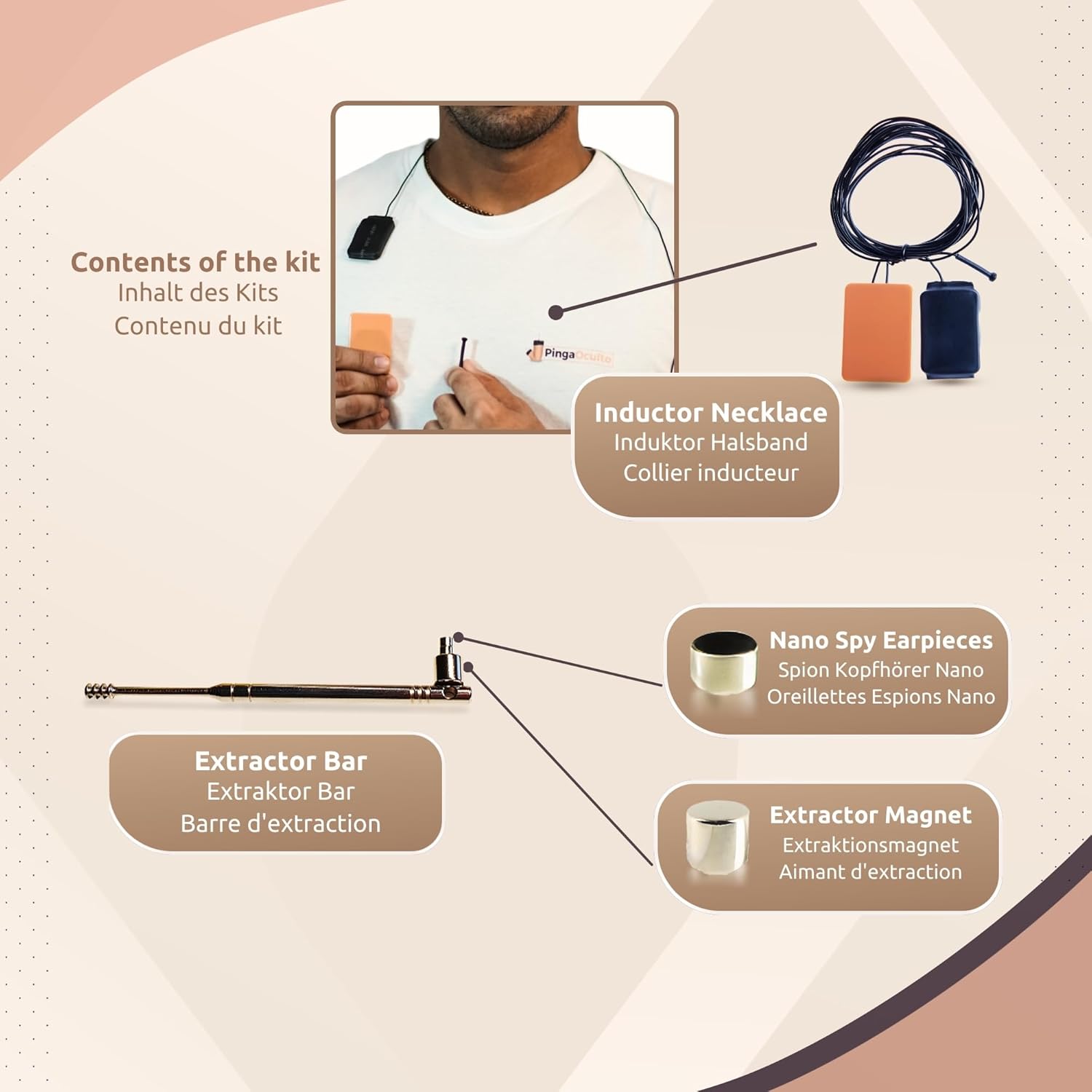
Figure 3: All components included in the Nano V6 kit.
3. Product Features
- Invisible Earpiece: The smallest wireless hidden magnetic earpiece on the market, measuring only 3mm in diameter. It is designed to be completely concealed within the ear.
- GSM Inductor Necklace: Features a built-in SIM card slot, eliminating the need for a mobile phone. Compatible with GSM bands 850, 900, 1800, and 1900 for telephone calls.
- Wired Microphone: A discreet wired microphone that can be hidden in a sleeve or around the neck, enabling clear communication even when whispering.
- Long Battery Life: The inductor necklace provides approximately 3 hours of battery life, depending on volume levels. The earpiece itself does not require recharging.
- Versatile Applications: Ideal for examinations, presentations, and covert communication scenarios where discretion is paramount.

Figure 4: Proper placement of the Nano V6 earpiece within the ear canal for complete concealment.

Figure 5: Examples of discreet applications for the Nano V6 system.
4. Setup Guide
- Charge the Inductor Necklace: Before first use, fully charge the GSM Inductor Necklace using the provided USB charging cable and European charger. The charging indicator will show when it's fully charged.
- Insert SIM Card: Open the SIM card slot on the Inductor Necklace and carefully insert a standard Nano SIM card. Ensure it is correctly oriented as per the diagram on the device.
- Wear the Necklace: Place the Inductor Necklace around your neck, ensuring it is concealed under your clothing. The necklace acts as the primary communication hub.
- Position the Microphone: Connect the wired microphone to the designated port on the necklace. Route the microphone wire discreetly, for example, down your sleeve or under your collar, so the microphone is close to your mouth for clear audio input.
- Insert the Earpiece: Carefully place the Nano V6 earpiece deep into your ear canal. It should be completely invisible from the outside. You may need to gently shake your head or use a non-metallic tool to help it settle.
- Power On: Turn on the Inductor Necklace using its power button. It will automatically connect to the GSM network.

Figure 6: Diagram illustrating the discreet placement of the earpiece, necklace, and microphone.
5. Operating Instructions
Once the system is set up and powered on, you can begin using it for communication:
- Making Calls: To initiate a call, you will need to dial the number using a connected mobile phone (if applicable, though the necklace supports direct SIM calls) or use the necklace's dialing function if available. For direct SIM calls, the necklace acts as a standalone phone.
- Receiving Calls: When a call comes in, the necklace will typically auto-answer or have a button to answer. Audio will be transmitted directly to the earpiece.
- Adjusting Volume: Use the volume controls on the Inductor Necklace to adjust the audio level in the earpiece.
- Using the Microphone: Speak softly or whisper into the wired microphone. Ensure the microphone is positioned correctly to pick up your voice clearly.
- Ending Calls: Press the designated button on the necklace to end a call.
6. Maintenance and Care
Proper maintenance ensures the longevity and optimal performance of your device:
- Cleaning the Earpiece: After each use, carefully remove the earpiece using the extractor bar or magnet. Clean any earwax or debris from the earpiece using a soft, dry cloth. Do not use liquids or harsh chemicals.
- Charging: Recharge the Inductor Necklace regularly, especially after prolonged use, to maintain battery health. Avoid overcharging.
- Storage: Store the device in a cool, dry place away from direct sunlight and extreme temperatures. Keep it in its original packaging or a protective case when not in use.
- Water Resistance: The product is listed as 'Waterproof'. However, avoid submerging the device in water. 'Waterproof' typically refers to resistance against splashes or light rain, not full immersion.
7. Troubleshooting
If you encounter any issues with your PingaOculto Nano V6, please refer to the following common problems and their solutions:
| Problem | Possible Cause | Solution |
|---|---|---|
| Device does not turn on / No power. | Low battery; Incorrect charging; Power button not pressed correctly. | Ensure the Inductor Necklace is fully charged. Verify charging cable and adapter are working. Press and hold the power button for a few seconds. |
| No sound from earpiece / Sound is too low or too loud. | Earpiece not properly inserted; Volume too low/high; SIM card issue; Network signal. | Ensure the earpiece is correctly and deeply inserted. Adjust volume on the necklace. Check SIM card insertion and network signal strength. |
| Microphone not picking up voice. | Microphone not connected; Microphone positioned incorrectly; Damaged microphone. | Ensure the microphone is securely connected. Reposition the microphone closer to your mouth. Test with another call. |
| Difficulty extracting earpiece. | Earpiece lodged too deep; Incorrect use of extractor. | Use the provided extractor bar or magnet. Gently guide the extractor towards the earpiece until it attaches, then carefully pull it out. Do not use sharp objects. |
| Poor network reception. | Weak GSM signal; SIM card issues. | Move to an area with better network coverage. Ensure your SIM card is active and has credit/data. |
8. Technical Specifications
| Feature | Specification |
|---|---|
| Brand | PingaOculto |
| Model Name | Oreillette Espion Nano V6 |
| Item Model Number | UMD-ST-NANO-6 |
| Earpiece Size | 3 mm diameter |
| Material | Plastic |
| Connectivity Technology | Wireless (Handy) |
| Compatible Devices | Cellular Phone (via SIM in necklace) |
| Frequency Range | 200 Hz – 3.4 kHz (limited range) |
| Impedance | 100 ohms |
| Noise Cancellation | Active Noise Suppression |
| Headphone Jack | USB |
| Water Resistance Level | Waterproof |
| Manufacturer | PingaOculto |
| Country of Origin | China |
9. Warranty and Support
Manufacturer's Warranty: The PingaOculto Nano V6 Invisible Spy Earpiece comes with a 2-year manufacturer's warranty from the date of purchase. This warranty covers defects in materials and workmanship under normal use. It does not cover damage caused by misuse, accidents, unauthorized modifications, or normal wear and tear.
Customer Support: For any questions, technical assistance, or warranty claims, please contact PingaOculto customer support through the retailer's platform or the official PingaOculto website. Please have your product model number (UMD-ST-NANO-6) and proof of purchase ready when contacting support.
Information regarding spare parts availability and guaranteed software updates is not available at this time.