
1. Overview
The ionvac UV UltraClean RoboVac is an intelligent robotic vacuum cleaner designed to automate floor cleaning. It utilizes advanced sensors and mapping technology to navigate and clean various floor types, including hardwood, rugs, and carpets. Key features include a sanitizing UV-C light, powerful suction, and multiple control options.
Key Features:
- UV Light: Features an effective, chemical-free UV-C mode for sanitization.
- Mapping Technology: Self-navigating sensors map your floor plan to create efficient cleaning paths.
- Powerful Motor: Delivers 2200Pa of suction power for thorough cleaning.
- Anti-Collision & Cliff Sensors: Prevents collisions with objects and falls down stairs.
- Automatic Charging: Automatically returns to its dock to recharge its Li-ion battery, providing up to 100 minutes of runtime.
- Complete Cleaning System: Equipped with side brushes, a roller brush, a 500 ml dustbin, HEPA filter, and rubber terrain wheels.
- 4 Cleaning Modes: Offers Auto Clean, Spot Clean, Edge Clean, and Manual Control.
- Multiple Control Options: Can be operated via the included remote control or the Tzumi Smart Home App.
- Voice Command: Wi-Fi-enabled for syncing with Amazon Alexa or Google Assistant.

Image: The ionvac UV UltraClean Robovac effectively cleaning a floor with 2200Pa suction power.

Image: The ionvac UV UltraClean Robovac operating with a quiet 62dB noise level, suitable for use in quiet environments.
2. What's in the Box
Upon opening the package, ensure all components are present and in good condition. The standard package contents include:
- ionvac UV UltraClean Robovac Unit
- Charging Dock
- Power Adapter
- Remote Control
- Side Brushes (x2)
- Cleaning Tool
- User Manual (this document)

Image: The ionvac UV UltraClean Robovac with its remote control and the companion smartphone app.

Image: All included accessories and the main unit of the ionvac UV UltraClean Robovac.
3. Setup
3.1 Initial Charging
- Place the charging dock against a wall in an open, uncluttered area, ensuring at least 0.5 meters (1.6 feet) of clear space on either side and 1.5 meters (5 feet) in front.
- Connect the power adapter to the charging dock and plug the other end into a wall outlet.
- Place the RoboVac onto the charging dock, ensuring the charging contacts align. The indicator light on the RoboVac will illuminate to confirm charging has begun.
- Allow the RoboVac to fully charge before its first use. A full charge typically takes several hours.
3.2 Preparing Your Home Environment
- Remove any loose cables, small objects, or fragile items from the floor that could entangle the RoboVac or be damaged.
- For optimal performance, ensure doors to rooms you wish to clean are open.
- The RoboVac is designed with anti-collision and cliff sensors to prevent falls and bumps. However, it is advisable to block off areas with steep drops or very delicate items during initial runs.
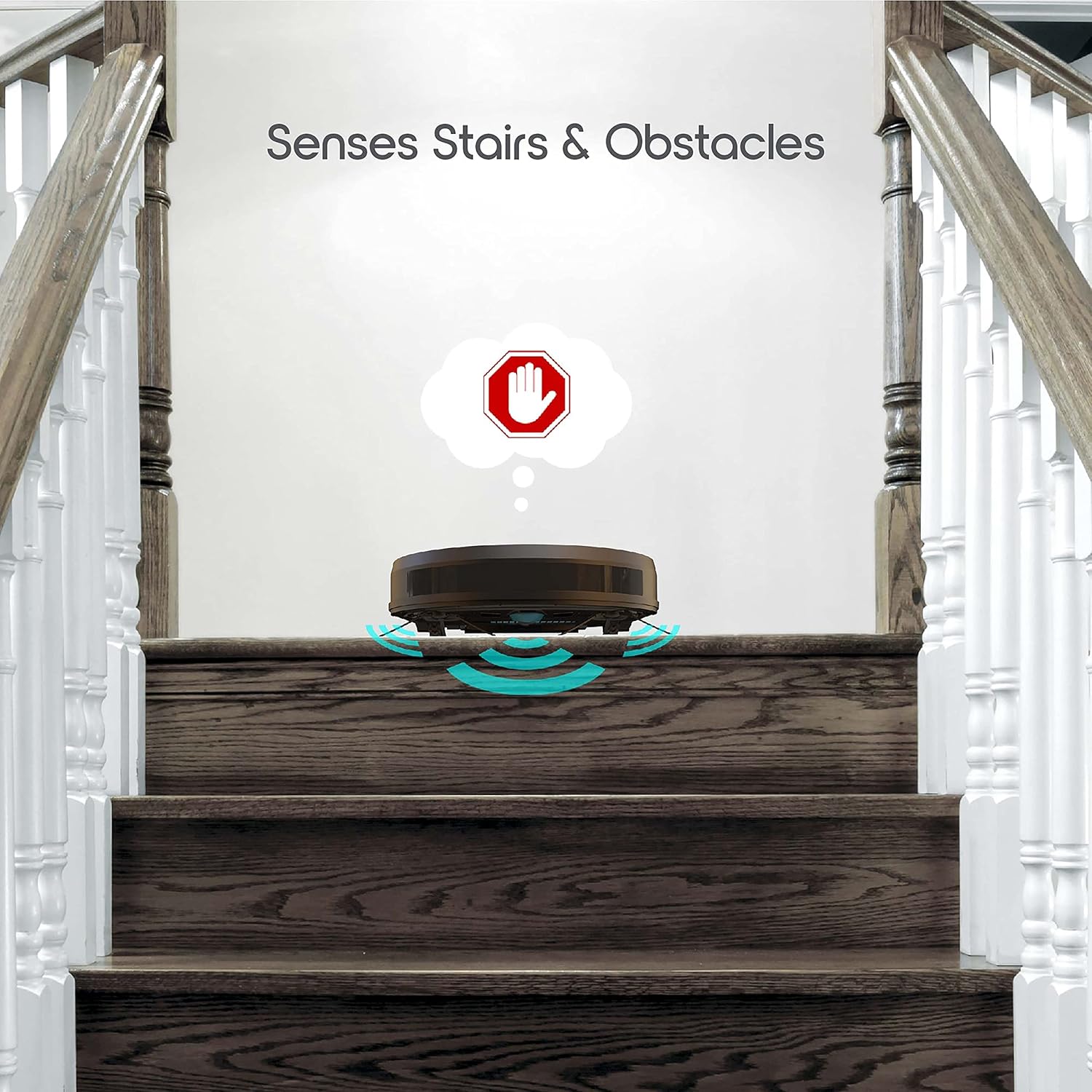
Image: The ionvac UV UltraClean Robovac's sensors detecting stairs and obstacles, preventing falls.
3.3 Connecting to the Tzumi Smart Home App (Optional)
For advanced control, scheduling, and smart mapping features, download the Tzumi Smart Home App.
- Download the "Tzumi Smart Home" app from the Google Play Store or Apple App Store.
- Register or log in to your account.
- Follow the in-app instructions to add your ionvac UV UltraClean RoboVac. This typically involves putting the RoboVac into pairing mode and connecting it to your home Wi-Fi network.
3.4 Voice Assistant Integration (Optional)
Once connected to the Tzumi Smart Home App, you can link your RoboVac to Amazon Alexa or Google Assistant for voice control.
- Open the Alexa or Google Home app.
- Enable the "Tzumi Smart Home" skill/action.
- Follow the prompts to link your Tzumi account and discover your RoboVac.
Image: Control options for the ionvac UV UltraClean Robovac, including app, remote, and voice commands.
4. Operation
4.1 Starting a Cleaning Cycle
You can start a cleaning cycle using the button on the RoboVac, the remote control, or the Tzumi Smart Home App.
- On the RoboVac: Press the power button once to start an Auto Clean cycle.
- Using the Remote Control: Press the "Auto" button to begin an automatic cleaning cycle. Use directional arrows for manual control.
- Using the App: Select the desired cleaning mode and initiate cleaning from the app interface.
4.2 Cleaning Modes
The RoboVac offers four distinct cleaning modes to suit different needs:
- Auto Clean: The default mode, where the RoboVac intelligently navigates and cleans the entire accessible area.
- Spot Clean: Focuses on a specific dirty area, cleaning in a spiral pattern. Ideal for concentrated spills or debris.
- Edge Clean: Cleans along walls and furniture edges, ensuring thorough cleaning of room perimeters.
- Manual Control: Allows you to steer the RoboVac using the remote control or app's directional buttons.

Image: Visual representation of the four cleaning modes available on the ionvac UV UltraClean Robovac.
4.3 Smart Mapping and Navigation
The RoboVac uses smart mapping technology to create a layout of your home, optimizing its cleaning path to cover all areas efficiently and avoid missing spots. Its multi-directional movement and sensors help it navigate around furniture and obstacles.

Image: Illustration of the intelligent room mapping technology, showing an organized cleaning path compared to a random one.
4.4 UV-C Sanitization Mode
The integrated UV-C light provides an additional layer of sanitization during cleaning cycles. This mode can be activated to help reduce germs and bacteria on floor surfaces without the use of chemicals.
4.5 Automatic Docking and Recharging
When the battery level is low or a cleaning cycle is complete, the RoboVac will automatically return to its charging dock to recharge. Ensure the charging dock remains accessible and powered on.
5. Maintenance
Regular maintenance ensures optimal performance and extends the lifespan of your ionvac UV UltraClean RoboVac. Always power off the device before performing any maintenance.

Image: Detailed underside view of the ionvac UV UltraClean Robovac, highlighting key components for maintenance.
5.1 Emptying the Dustbin
- Press the dustbin release button and pull out the 500 ml dustbin.
- Open the dustbin lid and empty its contents into a trash receptacle.
- Rinse the dustbin with water if necessary, ensuring it is completely dry before reinserting.
5.2 Cleaning the HEPA Filter
- Remove the HEPA filter from the dustbin.
- Tap the filter gently over a trash can to remove dust and debris.
- Do not wash the HEPA filter with water. Replace the filter every 3-6 months, or as needed, depending on usage.
5.3 Cleaning the Roller Brush
- Flip the RoboVac over and locate the roller brush cover.
- Remove the cover and lift out the roller brush.
- Use the provided cleaning tool or scissors to cut and remove any hair or debris wrapped around the brush.
- Reinsert the roller brush and secure the cover.
5.4 Cleaning the Side Brushes
- Gently pull the side brushes upwards to remove them.
- Remove any tangled hair or debris.
- If brushes are worn or damaged, replace them. Press new brushes firmly into place.
5.5 Cleaning Sensors and Charging Contacts
- Wipe the anti-collision sensors, cliff sensors (located on the underside), and charging contacts on both the RoboVac and the charging dock with a clean, dry cloth.
- Keeping these clean ensures proper navigation and charging.
6. Troubleshooting
If you encounter issues with your ionvac UV UltraClean RoboVac, refer to the following common problems and solutions:
| Problem | Possible Cause | Solution |
|---|---|---|
| RoboVac does not turn on or charge. | Battery is depleted; charging contacts are dirty; power adapter is not connected. | Ensure the charging dock is powered and the RoboVac is correctly docked. Clean charging contacts on both the RoboVac and the dock. |
| RoboVac gets stuck frequently. | Obstacles on the floor; tangled brushes; dirty sensors. | Clear loose cables, rugs, or small objects. Clean the roller brush and side brushes. Wipe all sensors. |
| Poor cleaning performance. | Full dustbin; clogged filter; worn brushes. | Empty the dustbin. Clean or replace the HEPA filter. Clean or replace side and roller brushes. |
| RoboVac does not return to charging dock. | Charging dock is blocked or unplugged; RoboVac is too far from the dock. | Ensure the charging dock is powered and has clear space around it. Manually place the RoboVac closer to the dock. |
| App connection issues. | Incorrect Wi-Fi password; RoboVac is out of Wi-Fi range; app needs update. | Verify Wi-Fi password and network (2.4GHz recommended). Move RoboVac closer to router. Update the Tzumi Smart Home app. Restart RoboVac and router. |
7. Specifications
Detailed technical specifications for the ionvac UV UltraClean RoboVac:
| Feature | Detail |
|---|---|
| Brand | Ionvac |
| Model Number | 7688 |
| Color | Black |
| Product Dimensions | 48.26 x 40.64 x 12.7 cm |
| Item Weight | 4.51 kg |
| Dustbin Capacity | 0.5 Liters (500 ml) |
| Power/Wattage | 1200 watts |
| Voltage | 22.2 Volts |
| Runtime | Up to 100 minutes (1 hour and 40 minutes) |
| Suction Power | 2200Pa |
| Battery Type | Lithium Ion |
| Filter Type | HEPA |
| Compatible Models/Systems | Amazon Echo, Android, Google Home, iOS |
| Control Type | App Control, Remote Control, Voice Control |
| Surface Recommendation | Hardwood floors, rugs, carpet |
| Manufacturer | Tzumi |
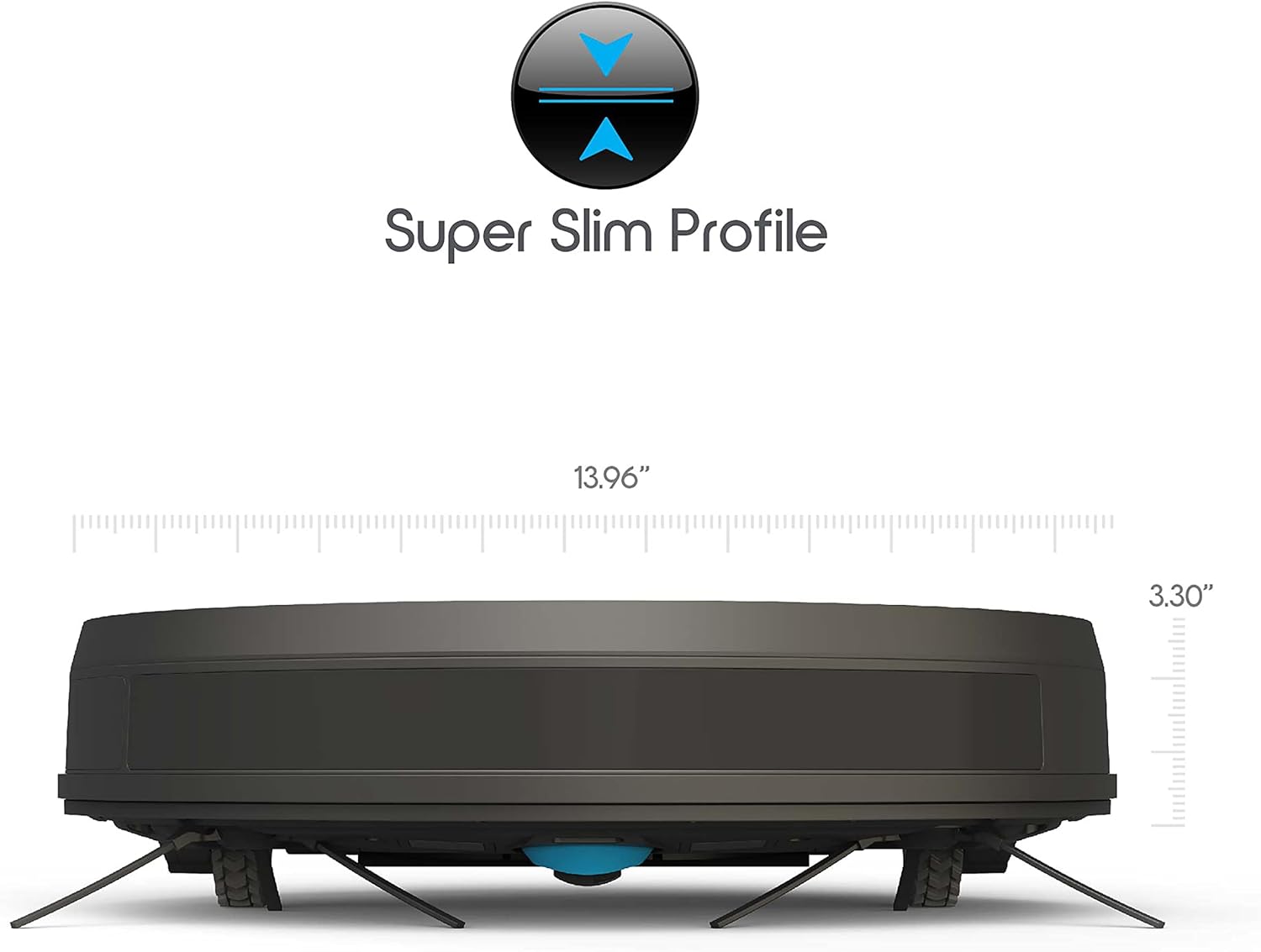
Image: The slim profile of the ionvac UV UltraClean Robovac, allowing it to clean under furniture.
8. Warranty and Support
For product support, warranty information, or to purchase replacement parts, please contact Ionvac customer service or visit their official website. Keep your purchase receipt as proof of purchase for warranty claims.
For the most up-to-date support information, please refer to the contact details provided on the product packaging or the official Ionvac/Tzumi website.


