
Introduction
The HP 150 Wired Mouse and Keyboard Combo offers a seamless plug-and-play experience for enhanced productivity and comfort. This combo features an ergonomically designed, low-profile chiclet keyboard with a numeric keypad and an ambidextrous mouse. Designed for quiet operation, it minimizes distracting noise from clicks and keystrokes. The keyboard includes 12 dedicated shortcut keys for quick access to common functions, while the mouse boasts a 1600 DPI optical sensor for precise control on various surfaces. Both components are built for all-day comfort, ensuring a natural hand and wrist position.
Setup
The HP 150 Wired Mouse and Keyboard Combo is designed for quick and easy setup with its USB plug-and-play functionality. No additional drivers are typically required for basic operation.
- Connect the Keyboard: Locate an available USB-A port on your computer (desktop PC or laptop). Insert the USB connector of the keyboard firmly into the USB port.
- Connect the Mouse: Locate another available USB-A port on your computer. Insert the USB connector of the mouse firmly into the USB port.
- System Recognition: Your operating system (Windows or Mac OS) should automatically detect and install the necessary drivers for the keyboard and mouse. This process usually takes a few seconds.
- Verify Functionality: Once connected, test the keyboard by typing and the mouse by moving the cursor and clicking. The LED indicators for Num Lock, Caps Lock, and Scroll Lock on the keyboard should function correctly.

Image: The HP 150 Wired Keyboard and Mouse Combo, showcasing both peripherals with their USB cables, ready for plug-and-play connection to your computer.

Image: A close-up view of the HP 150 Wired Keyboard and Mouse, emphasizing the USB Type-A connectivity and its compatibility with Windows, Mac, and Chrome operating systems.
Operating
Keyboard Features
- Low-Profile Chiclet Keys: Designed for faster, more accurate, and quiet typing, reducing noise during use.
- Numeric Keypad: Full-sized keypad for efficient data entry and calculations.
- LED Indicators: Clearly visible LEDs for Num Lock, Caps Lock, and Scroll Lock status.
- 12 Dedicated Shortcut Keys: Convenient top-row keys to instantly activate common functions such as media control (music, movies, volume), homepage, bookmarks, and email.

Image: A user's hands positioned on the HP 150 Wired Keyboard, demonstrating its comfortable layout for typing.

Image: A promotional image highlighting the "Keystroke of Genius" feature of the HP 150 Wired Keyboard, emphasizing accurate and quiet typing.
Mouse Features
- 1600 DPI Optical Sensor: Provides smooth, lag-free movement and precise control on virtually any surface.
- Multi-Surface Compatibility: Works reliably whether you're using a desktop computer at the office or computing from a kitchen table.
- Adjustable Sensitivity: Easily adjust the mouse pointer speed and sensitivity for tasks requiring greater precision, such as photo editing or detailed selections.
- Ambidextrous & Contoured Design: Ergonomically shaped for comfortable use by both left and right-handed users, ensuring all-day hand and wrist comfort.

Image: A visual representation of the HP 150 Wired Mouse, illustrating its "Precisely Right" feature with a 1600 DPI optical sensor for accurate tracking on various surfaces.

Image: The HP 150 Wired Keyboard and Mouse, highlighting their contoured design for ergonomic comfort during extended use.
Maintenance
To ensure the longevity and optimal performance of your HP 150 Wired Mouse and Keyboard Combo, regular maintenance is recommended.
- Cleaning: Use a soft, lint-free cloth slightly dampened with water or a mild cleaning solution to wipe down the surfaces of the keyboard and mouse. Avoid harsh chemicals or abrasive materials.
- Dust Removal: For the keyboard, use compressed air to clear dust and debris from between the keys. For the mouse, ensure the optical sensor on the bottom is clean and free of obstructions.
- Cable Care: Avoid sharp bends or excessive pulling on the USB cables to prevent damage.
Troubleshooting
If you encounter issues with your HP 150 Wired Mouse and Keyboard Combo, try the following troubleshooting steps:
- No Response from Keyboard/Mouse:
- Ensure the USB cables are securely plugged into the computer's USB-A ports.
- Try plugging the keyboard and mouse into different USB ports on your computer.
- Restart your computer.
- Test the keyboard and mouse on another computer to determine if the issue is with the peripherals or your system.
- Mouse Cursor Jumps or is Erratic:
- Clean the optical sensor on the bottom of the mouse with a soft cloth.
- Ensure you are using the mouse on a suitable surface. Highly reflective or transparent surfaces may affect tracking.
- Keys Not Responding:
- Clean any debris from around and under the affected keys using compressed air.
Specifications
| Feature | Detail |
|---|---|
| Brand | HP |
| Model Number | 240J7AA#ABL |
| Connectivity Technology | USB |
| Keyboard Type | Full-Sized, Low-Profile Chiclet with Numeric Keypad |
| Mouse Sensor | Optical, 1600 DPI |
| Operating System Compatibility | Windows, Mac OS |
| Hardware Platform | PC, Mac |
| Color | Black |
| Item Weight (Keyboard) | 0.97 lbs (approx.) |
| Item Weight (Mouse) | 0.13 lbs (approx.) |
| Product Dimensions (Keyboard) | 16.76" L x 5.75" W x 1.06" H (approx.) |
| Product Dimensions (Mouse) | 4.07" L x 2.41" W (approx.) |
| Power Source | Corded Electric (USB) |
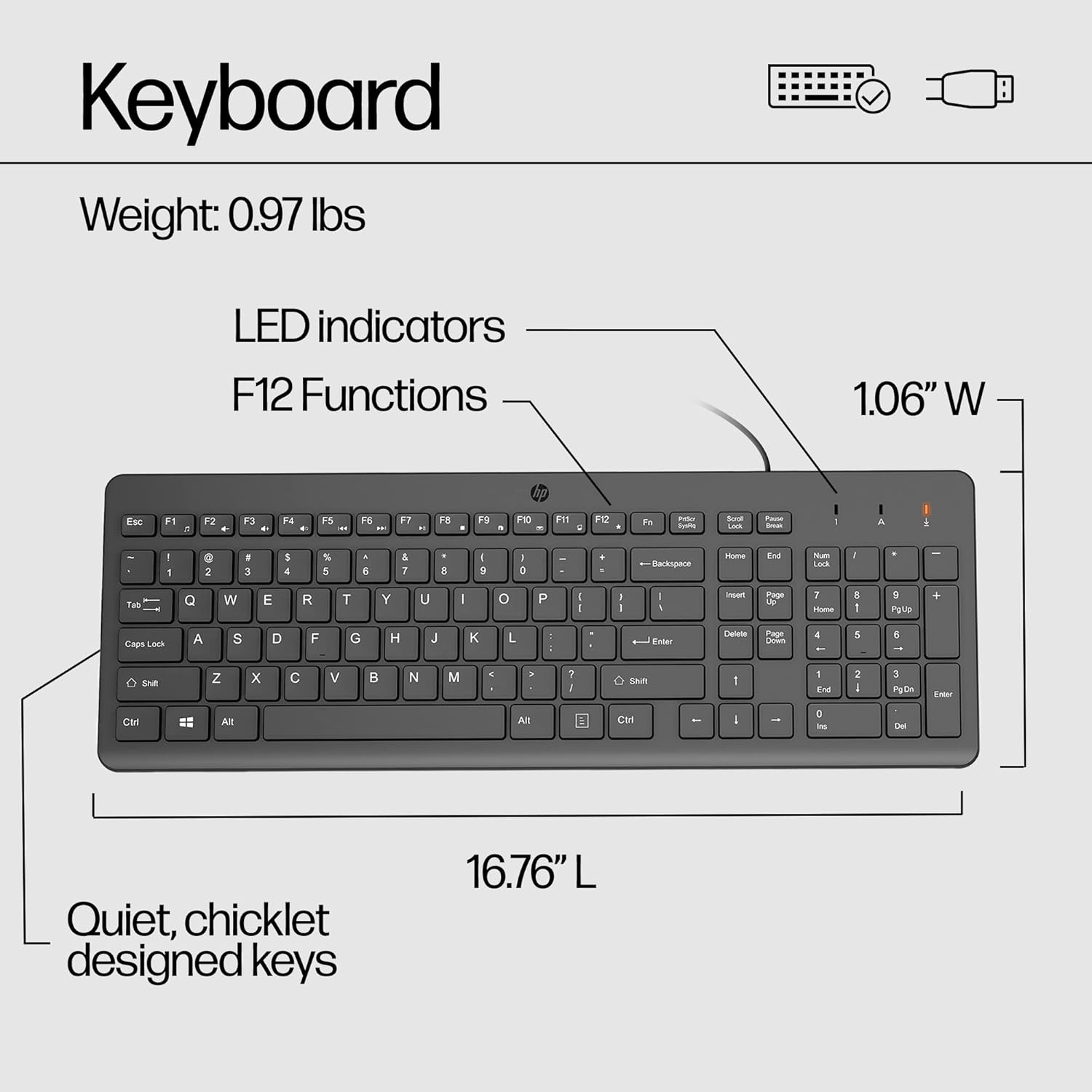
Image: Detailed view of the HP 150 Wired Keyboard, showing its dimensions, LED indicators, F12 functions, and quiet chiclet-designed keys.

Image: Detailed view of the HP 150 Wired Mouse, showing its dimensions, 1600 DPI, and easy scroll wheel.
What's in the Box
- HP 150 Wired Mouse
- HP 150 Wired Keyboard
- Quick Start Guide
- Warranty Information
Warranty and Support
The HP 150 Wired Mouse and Keyboard Combo is backed by HP's 2-year limited warranty. HP provides online support available 24x7. For detailed information and assistance, please consult the HP Customer Support Center. Internet access may be required for online support services.