Introduction
This manual provides essential information for the safe and effective use of your The Sleep Company Onyx Orthopedic Office Chair. Please read these instructions carefully before assembly and use, and retain them for future reference.
Safety Information
- Ensure all components are present and undamaged before assembly.
- Do not stand on the chair.
- Do not use the chair if any parts are missing, damaged, or worn.
- Keep children away from the chair during assembly. Small parts may pose a choking hazard.
- Maximum weight capacity: 120 kg.
Package Contents
Verify that all the following components are included in your package:
- 1 Onyx SmartGRID Chair (Black & Grey)
- Warranty Card
- Assembly Hardware (screws, washers, Allen key - assumed)
- Casters (wheels)
- Gas Lift Cylinder
- Chair Base
- Seat Cushion
- Backrest
- Armrests (2)
- Headrest
Setup and Assembly
Assembly typically requires one person and takes approximately 30-60 minutes. Follow these general steps for assembly. Refer to the included assembly diagram for visual guidance.
- Attach Casters to Base: Insert the 60mm casters into the holes at the end of each leg of the chair base. Push firmly until they click into place.
- Insert Gas Lift: Place the gas lift cylinder into the center hole of the chair base.
- Attach Seat Mechanism: Secure the seat mechanism to the underside of the seat cushion using the provided screws. Ensure the front of the mechanism aligns with the front of the seat.
- Connect Seat to Gas Lift: Carefully place the assembled seat cushion onto the gas lift cylinder.
- Attach Armrests: Secure the armrests to the sides of the seat cushion using the designated screws.
- Attach Backrest: Connect the backrest to the seat mechanism/armrests using the appropriate screws. Ensure it is securely fastened.
- Install Headrest: Insert the headrest into the top of the backrest. Adjust its height as desired.
Operating Instructions
Your Onyx chair features several adjustable components designed to provide ergonomic support and comfort.
- Seat Height Adjustment: Locate the lever on the right side beneath the seat.
- To raise the seat: Lift the lever while taking your weight off the seat.
- To lower the seat: Lift the lever while seated.
- Release the lever to lock the height.
- Recline Function and Tension Adjustment:
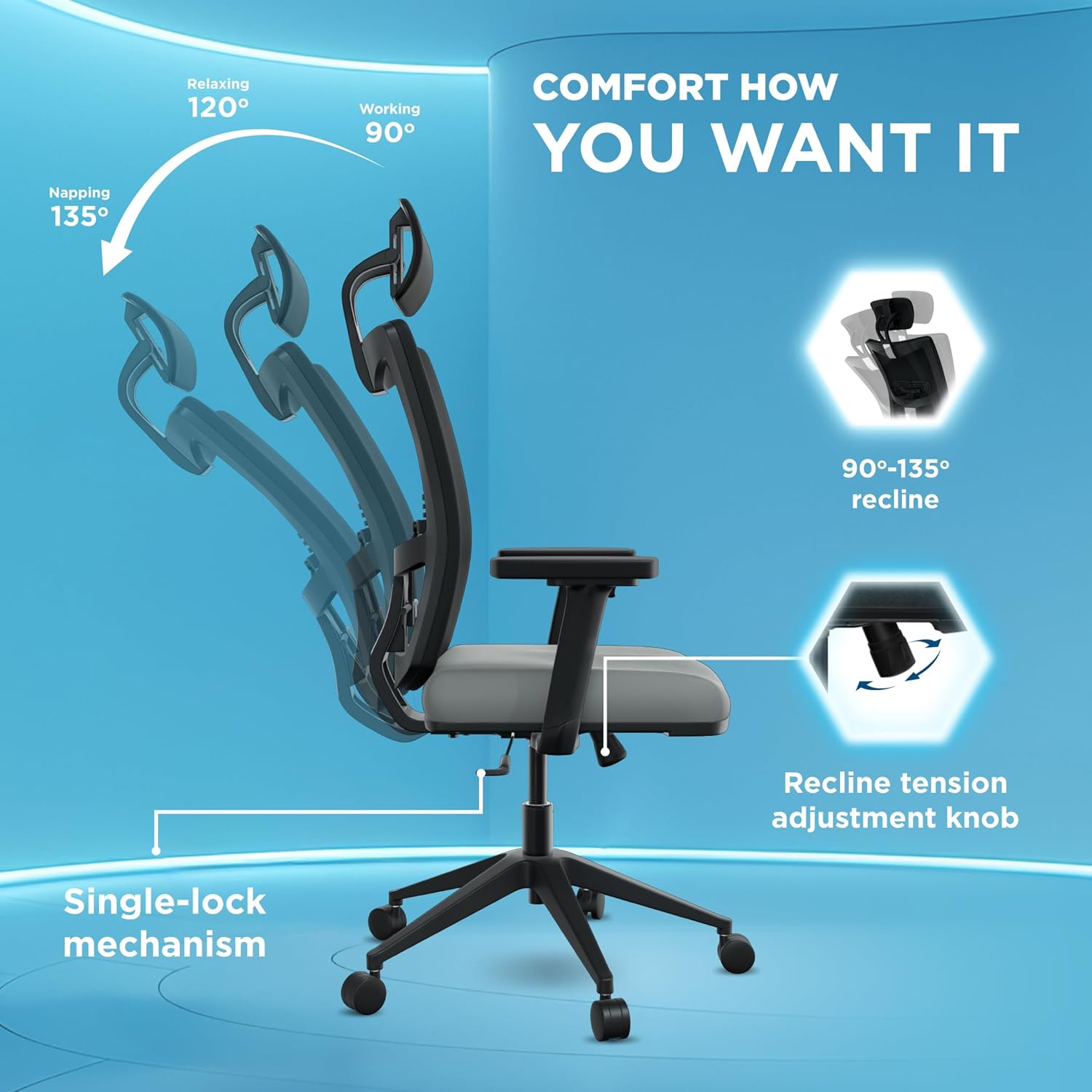
- The chair offers a 90° to 135° recline with a single-lock mechanism. Pull the lever on the left side (assumed, common design) to unlock the recline, lean back to your desired angle, and push the lever back in to lock.
- Adjust the recline tension using the round knob located under the seat, at the front. Turn clockwise to increase tension (harder to recline) and counter-clockwise to decrease tension (easier to recline).
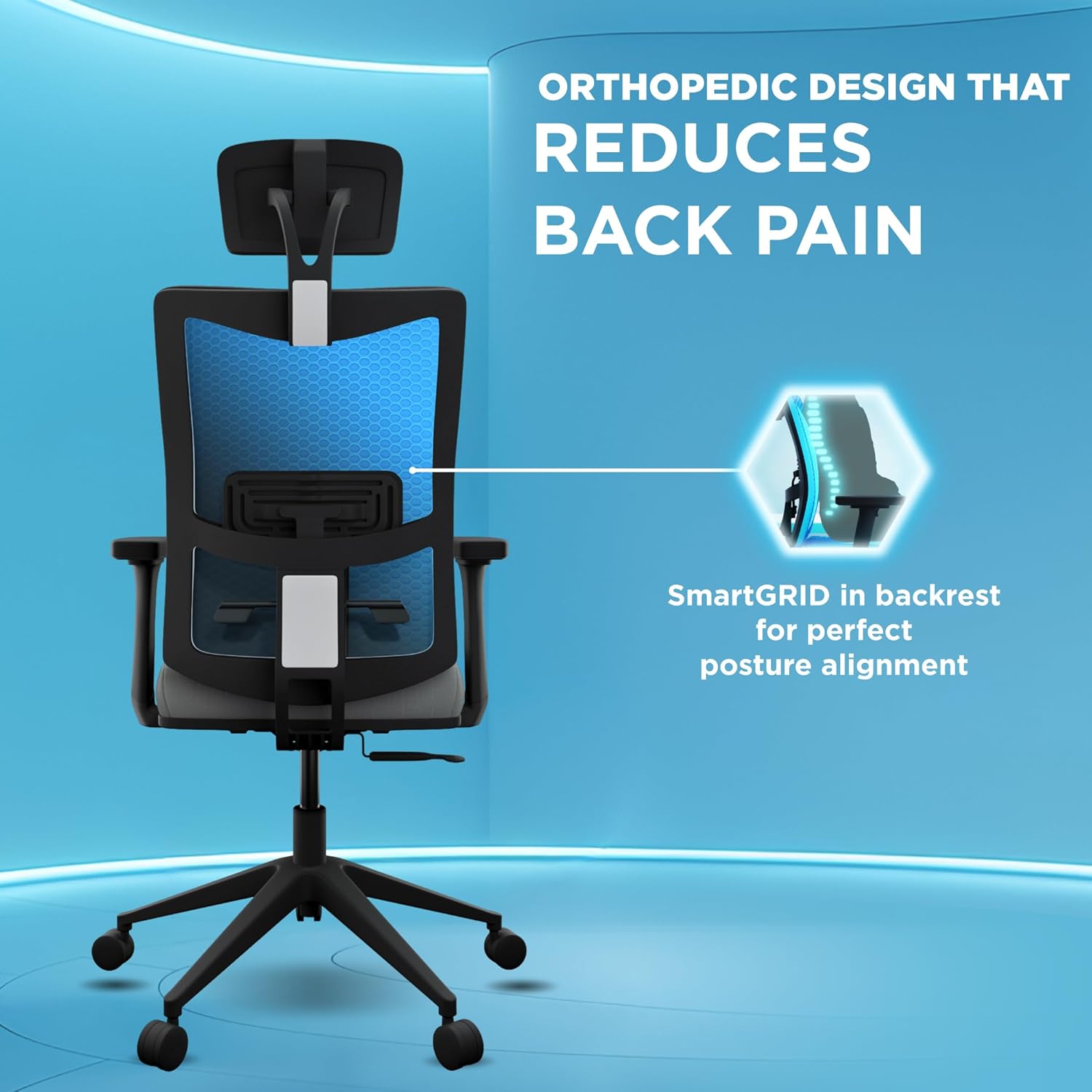
- Adjustable Lumbar Support: The lumbar support is integrated into the backrest. Adjust its position by sliding it up or down to align with the natural curve of your lower back.
- 2D Adjustable Armrests: The armrests can be adjusted in two dimensions.
- Height Adjustment: Press the button on the side of the armrest post and slide the armrest up or down. Release the button to lock.
- Pivot Adjustment: The armrest pads can pivot inwards or outwards to support various arm positions.
- 2D Adjustable Headrest: The headrest can be adjusted for height and tilt.
- Height Adjustment: Grasp the headrest and slide it up or down to your preferred height.
- Tilt Adjustment: Tilt the headrest forward or backward to support your neck and head comfortably.

Maintenance
Regular maintenance helps prolong the life and appearance of your office chair.
- Cleaning: Wipe clean with a damp cloth. Avoid harsh chemicals or abrasive cleaners. For the SmartGRID material, a mild soap solution can be used if necessary, followed by wiping with a clean, damp cloth.
- Caster Care: Periodically check the casters for accumulated dust or hair and clean them to ensure smooth movement. The 60mm casters are designed with anti-scratch properties for various surfaces.
- Hardware Check: Every few months, check all screws and bolts to ensure they are tight. Re-tighten if necessary to maintain stability.
- Avoid Overloading: Do not exceed the maximum weight capacity of 120 kg.
Troubleshooting
| Problem | Possible Cause | Solution |
|---|---|---|
| Chair does not adjust height | Gas lift cylinder malfunction or lever not engaged properly. | Ensure the lever is fully engaged. If the issue persists, the gas lift may need replacement. Contact customer support. |
| Chair squeaks or wobbles | Loose hardware or friction between components. | Check and tighten all assembly screws. Apply a small amount of silicone lubricant to moving parts if necessary. |
| Casters not rolling smoothly | Debris (hair, dust) caught in casters. | Turn the chair over and carefully remove any debris from the caster wheels. |
| Recline mechanism not locking | Lever not fully engaged or mechanism obstruction. | Ensure the recline lock lever is pushed in completely. Check for any obstructions under the seat. |
Specifications
| Feature | Detail |
|---|---|
| Brand | The Sleep Company |
| Model Name | Onyx |
| Colour | Black & Grey |
| Material | SmartGRID, Foam |
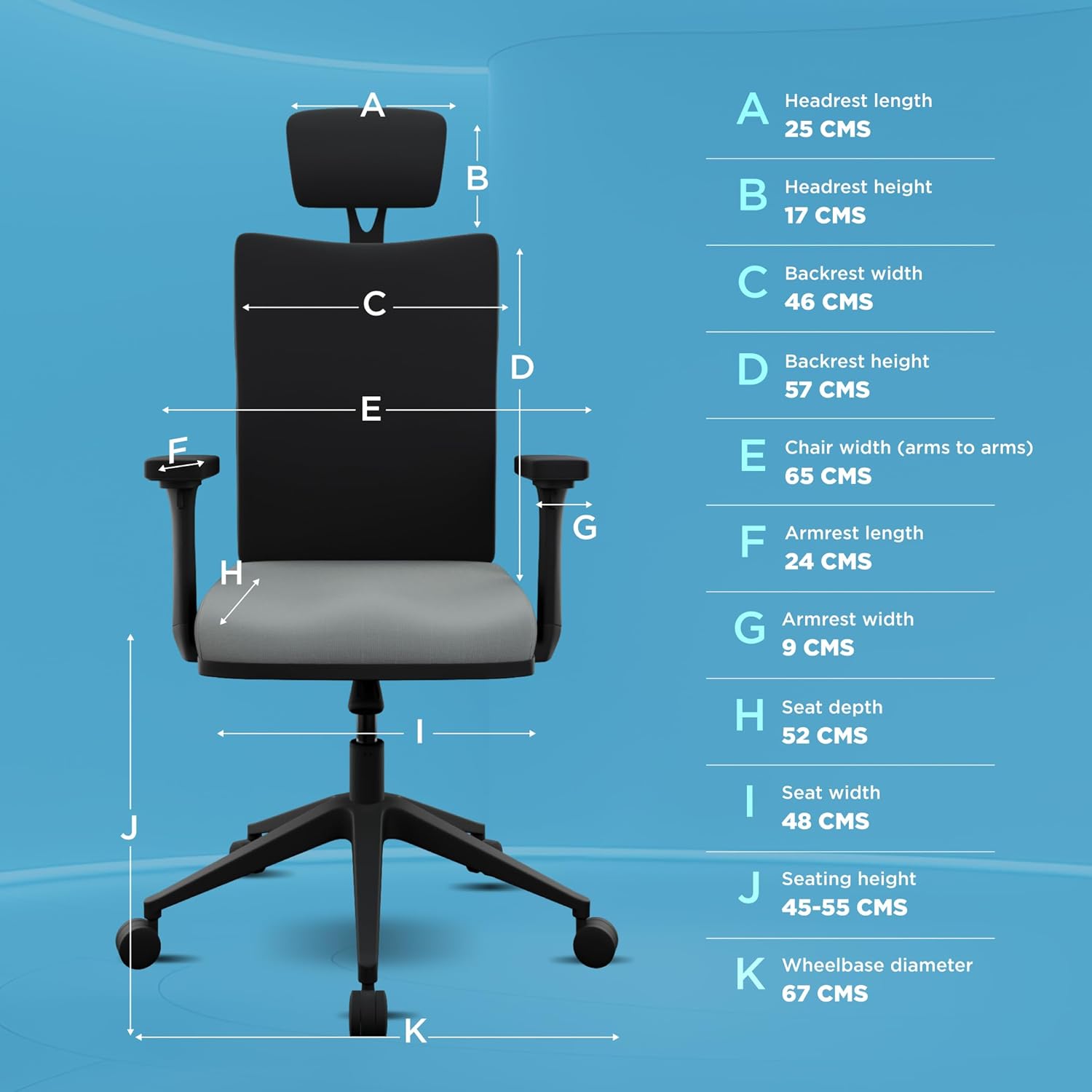
| Product Dimensions (D x W x H) | 48D x 62W x 117H Centimeters |
| Seat Depth | 48.3 Centimeters |
| Seat Height | 55 Centimetres (Adjustable) |
| Seat Length | 52 Centimetres |
| Chair Backrest Width | 46 Centimetres |
| Seat Back Interior Height | 57 Centimetres |
| Item Weight | 22 kg |
| Max Weight Capacity | 120 kg |
| Reclining Position Count | 1 (with tilt-lock mechanism, 90-135 degrees) |
| Special Features | Adjustable Lumbar, Ergonomic, Adjustable Headrest (2D), Arm Rest (2D), Scratch Resistant Casters, Swivel |
| Casters | 60mm Nylon Wheelbase |
| Gas Lift System | Samhongsa Gas-Lift (Top-quality) |
| Country of Origin | India |


Warranty and Support
The Sleep Company Onyx Orthopedic Office Chair comes with a comprehensive warranty and dedicated customer support.
- Warranty: A 3-year hassle-free warranty is provided by the manufacturer, effective from the date of delivery. This warranty covers manufacturing defects and significant functional issues under normal use.
- Packaging: The product is shipped using ISTA Standard packaging to minimize damage during transit.
- Customer Support: For any queries, assistance with assembly, troubleshooting, or warranty claims, please refer to the contact information provided on your warranty card or visit The Sleep Company's official website.


