
Yamaha YDP105B
Yamaha Arius YDP105B Digital Piano
Instruction Manual
1. Product Overview
The Yamaha Arius YDP105B is an 88-key weighted action digital piano designed for beginner and intermediate players. It offers an authentic grand piano sound and natural touch, making it a joy to play. Its upright design with attractive wood cabinetry and a 3-pedal unit integrates seamlessly into any home environment. This manual provides essential information for setting up, operating, maintaining, and troubleshooting your YDP105B digital piano.

Figure 1.1: The Yamaha Arius YDP105B digital piano, shown with the included bench and 3-pedal unit.
Key Features:
- Essential Grand Piano Sound: Enjoy the rich, dynamic sound of an acoustic piano, complemented by 9 additional instrument Voices.
- Acoustic Piano Touch: Experience the natural feel of an acoustic piano through the Graded Hammer Standard (GHS) keyboard with Touch Response.
- Elegant Design: A traditional upright design featuring elegant wood grain and a built-in 3-pedal setup, designed to fit seamlessly into various room aesthetics.
- Solo or Duo Play: Equipped with dual headphone jacks, allowing for private practice, collaborative learning with a teacher, or shared musical experiences with a friend.
- Complete Package: Includes a matching bench, a 3-pedal unit, 10 voice demo songs, 10 piano preset songs, and an integrated stereo amplifier and speakers for immediate use.
2. Setup and Assembly
Before operating your Yamaha Arius YDP105B, ensure proper assembly and connection. While specific assembly steps are detailed in the separate assembly guide (not included in this manual), the general process involves attaching the main keyboard unit to the stand, connecting the pedal unit, and securing the music rest.
2.1 Unpacking and Component Check
Carefully unpack all components from the packaging. Verify that all parts are present:
- Main Keyboard Unit
- Piano Stand (left and right legs, crossbar)
- Pedal Unit
- Music Rest
- Power Adapter
- Bench
- Owner's Manual (this document)
- Assembly Guide (separate document)
If any parts are missing or damaged, contact your dealer or Yamaha customer support.
2.2 Assembly (General Steps)
- Attach the side panels of the stand to the crossbar.
- Secure the pedal unit to the assembled stand.
- Carefully place the main keyboard unit onto the stand and secure it with the provided screws.
- Insert the music rest into its designated slot on the keyboard unit.
- Assemble the bench according to its separate instructions.
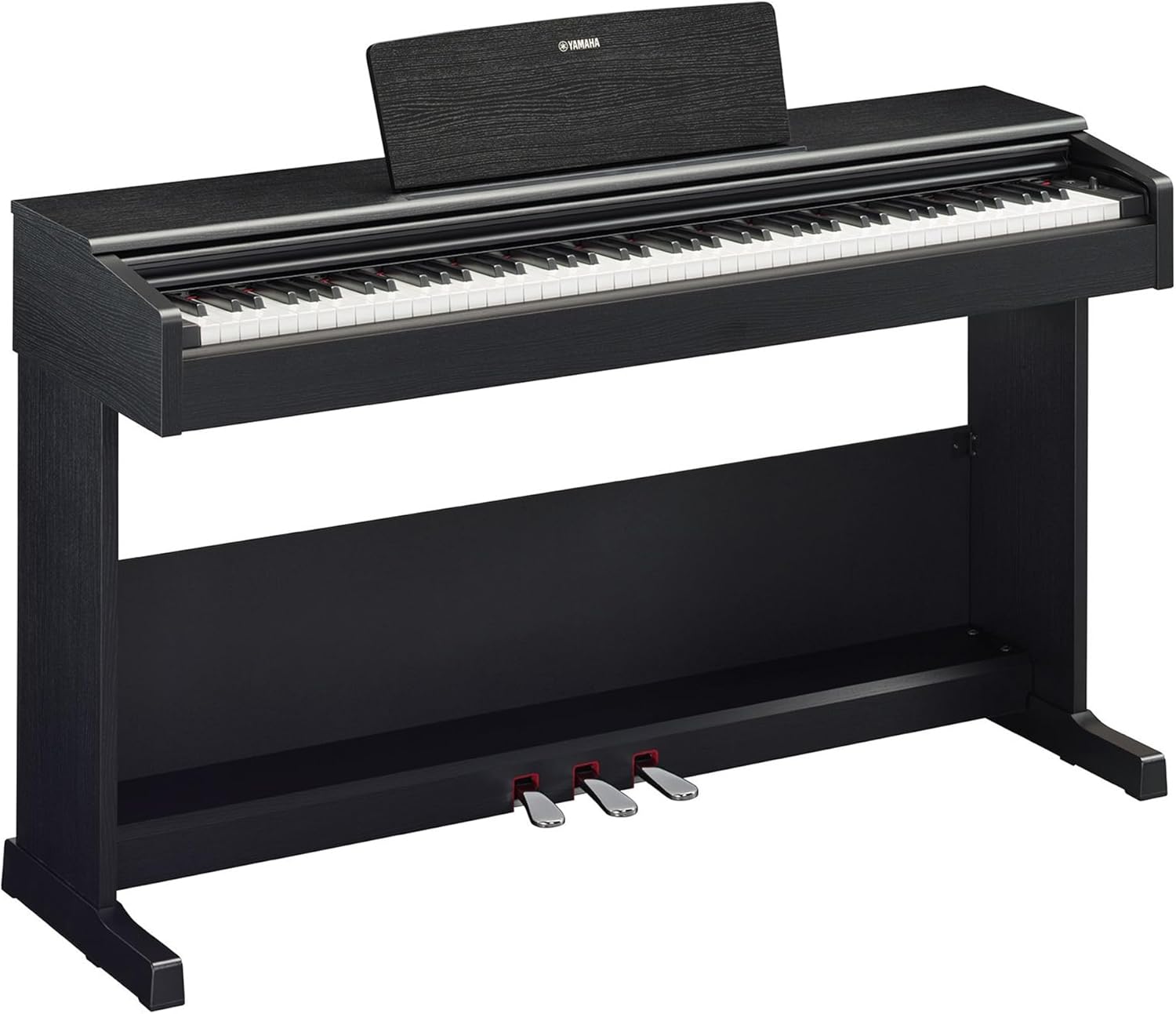
Figure 2.1: Ensure all components are securely fastened during assembly for stability.
2.3 Power Connection
Connect the supplied power adapter to the DC IN jack on the rear of the instrument. Plug the other end into a standard AC wall outlet. Use only the specified Yamaha power adapter to prevent damage.
2.4 Connecting Headphones and External Devices
The YDP105B features two 3.5mm headphone jacks located on the front left underside of the keyboard, allowing for private practice or duet sessions. Additionally, a USB TO HOST terminal is provided for connecting to a computer or smart device.

Figure 2.2: Connectivity options for the YDP105B, including dual headphone jacks and USB TO HOST for PC or smart device connection.
- Headphones: Plug 3.5mm stereo headphones into either of the PHONES jacks. The internal speakers will automatically mute when headphones are connected.
- USB TO HOST: Use a standard USB cable (Type A to Type B) to connect the piano to a computer for MIDI data transfer or to a smart device for use with applications like Yamaha's Smart Pianist.
3. Basic Operation
3.1 Power On/Off
To turn on the instrument, press the POWER button located on the left side of the keyboard. To turn it off, press and hold the POWER button until the display (if applicable) or indicator lights turn off.
3.2 Playing the Piano
The YDP105B features a Graded Hammer Standard (GHS) keyboard, which provides a heavier touch in the low end and a lighter touch in the high end, mimicking the feel of an acoustic piano. The Touch Response feature allows for dynamic expression; playing harder produces a louder sound, and playing softer produces a quieter sound.

Figure 3.1: The GHS keyboard provides an authentic piano playing experience.
3.3 Voice Selection
The YDP105B includes 10 different instrument voices. To select a voice, press the FUNCTION button and then press the corresponding key on the keyboard as indicated in the voice list (refer to the instrument's panel markings or the full owner's manual for specific key assignments).

Figure 3.2: The function button and labeled keys allow for easy voice selection.
3.4 Pedal Functions
The 3-pedal unit provides the standard piano pedals:
- Right Pedal (Damper/Sustain): Sustains the notes played.
- Middle Pedal (Sostenuto): Sustains only the notes held down at the moment the pedal is pressed.
- Left Pedal (Soft/Una Corda): Softens the sound.

Figure 3.3: The three pedals offer full expressive control.
3.5 Duo Mode
Duo mode splits the keyboard into two identical halves, each with its own middle C. This feature is ideal for student-teacher lessons, allowing both to play the same piece in the same octave range simultaneously. Refer to the full owner's manual for instructions on activating and deactivating Duo mode.
3.6 Using the Smart Pianist App
The Yamaha Smart Pianist App provides intuitive control over settings and sound selection, and can display scores of built-in songs. Connect your smart device to the YDP105B via the USB TO HOST terminal. A cable connection is required, and the app is available on the App Store and Google Play.

Figure 3.4: The Smart Pianist App enhances the user experience with advanced control and features.
4. Maintenance and Care
Proper care will ensure the longevity and optimal performance of your Yamaha Arius YDP105B.
4.1 Cleaning the Instrument
- Cabinet: Wipe the cabinet with a soft, dry cloth. For stubborn dirt, dampen the cloth slightly with water and a mild, neutral detergent, then wipe dry immediately. Avoid using abrasive cleaners, waxes, or solvents as they can damage the finish.
- Keyboard: Wipe the keys with a soft cloth dampened with water. For more thorough cleaning, use a mild soap solution, then wipe with a clean, damp cloth and dry thoroughly. Do not use chemical cleaning agents.
4.2 Storage and Environment
- Avoid exposing the instrument to direct sunlight, extreme temperatures, or high humidity, as these can cause damage to the wood and electronic components.
- Do not place heavy objects on the instrument.
- Keep the instrument away from sources of strong electrical interference.
5. Troubleshooting
If you encounter issues with your YDP105B, refer to the following common problems and solutions before contacting service.
| Problem | Possible Cause | Solution |
|---|---|---|
| No sound from speakers. | Headphones are plugged in. Volume is too low. Power is off. | Unplug headphones. Increase volume. Ensure power is on. |
| Keys do not produce sound or sound is distorted. | Incorrect voice selected. MIDI connection issue (if applicable). | Select a different voice. Check MIDI connections and software settings. |
| Pedals not functioning correctly. | Pedal unit cable not fully connected. | Ensure the pedal unit cable is securely plugged into the main unit. |
| Instrument does not power on. | Power adapter not connected. Outlet not working. | Check power adapter connection. Try a different outlet. |
For issues not listed here, or if solutions do not resolve the problem, please refer to the comprehensive owner's manual or contact Yamaha customer support.
6. Specifications
Detailed technical specifications for the Yamaha Arius YDP105B digital piano.
| Feature | Detail |
|---|---|
| Model Name | YDP-105 |
| Item Model Number | YDP105B |
| Number of Keys | 88 |
| Key Action | Graded Hammer Standard (GHS) with Touch Response |
| Instrument Voices | 10 |
| Pedals | 3 (Damper, Sostenuto, Soft) |
| Connectivity | 2 x 3.5mm Headphone Jacks, USB TO HOST |
| Power Source | Corded Electric |
| Product Dimensions (D x W x H) | 16.63"D x 53.44"W x 38.13"H (42.2cm D x 135.7cm W x 96.8cm H) |
| Item Weight | 82.7 pounds (37.5 kg) |
| Body Material | Wood |
| Color | Black |
| Included Accessories | Bench, 3-pedal design, Power Adapter, Music Rest |
| Supported Software | Smart Pianist |

Figure 6.1: Physical dimensions and weight of the YDP105B.
7. Warranty and Support
For detailed warranty information, please refer to the warranty card included with your product or visit the official Yamaha website. Yamaha provides comprehensive customer support for its products.
7.1 Official User Guide
A more detailed User Guide in PDF format is available for download:
7.2 Contacting Support
For technical assistance, service, or parts, please contact Yamaha customer support through their official website or the contact information provided in your product documentation.
You can also visit the official Yamaha store on Amazon for more product information and support resources: Yamaha Store
© 2023 Yamaha Corporation. All rights reserved.
Related Documents - YDP105B
 |
YAMAHA ARIUS YDP-164/YDP-144/YDP-S54 デジタルピアノ取扱説明書 YAMAHA ARIUSシリーズのデジタルピアノ、YDP-164、YDP-144、YDP-S54の取扱説明書です。安全な使用方法、機能、設定、お手入れ方法など、製品を最大限に活用するための詳細情報を提供します。 |
 |
Yamaha ARIUS YDP-165, YDP-145, YDP-S55, YDP-S35 數位鋼琴 使用說明書 Yamaha ARIUS 系列數位鋼琴 YDP-165, YDP-145, YDP-S55, YDP-S35 的詳細使用說明書, 包含操作指南、規格、組裝說明與故障排除。 |
 |
Yamaha Arius YDP-165/145/S55/S35 Digital Piano: Quick Operation Guide Concise guide to operating the Yamaha Arius YDP-165, YDP-145, YDP-S55, and YDP-S35 digital pianos, covering song playback, sound settings, metronome, tuning, and dual mode. |
 |
Yamaha ARIUS YDP-105 Owner's Manual Comprehensive owner's manual for the Yamaha ARIUS YDP-105 digital piano, covering setup, operation, safety precautions, and features. |
 |
Yamaha ARIUS YDP-105 Digital Piano Benutzerhandbuch Umfassendes Benutzerhandbuch für das Yamaha ARIUS YDP-105 Digital Piano. Enthält Anleitungen zur Bedienung, Funktionen, Sicherheit und Wartung für ein optimales Musikerlebnis. |
 |
Yamaha ARIUS YDP-105 Digital Piano Benutzerhandbuch Umfassendes Benutzerhandbuch für das Yamaha ARIUS YDP-105 Digitalpiano. Enthält Anleitungen zur Einrichtung, Bedienung, Funktionen, Wartung und technische Daten für ein optimales Spielerlebnis. |