
Introduction
The VIDOKA BL-70 WiFi Bluetooth Projector is designed to provide a high-quality visual and audio experience for both home and outdoor entertainment. Featuring Native 1080P resolution, 8000L brightness, and a 10000:1 contrast ratio, it delivers sharp, detailed, and vibrant images. With advanced Bluetooth 5.0 technology and built-in Hi-Fi stereo speakers, it offers versatile audio options. The projector supports wireless mirroring for smart devices and a wide range of multimedia connections, making it compatible with various entertainment sources.

Figure 1: The VIDOKA BL-70 Projector, highlighting its WiFi and Bluetooth capabilities, and Native 1080P resolution.
What's in the Box
Upon opening your VIDOKA BL-70 projector package, you will find the following components:
- VIDOKA BL-70 Projector
- Portable Carrying Bag
- Remote Control (batteries not included)
- HDMI Cable
- AV Cables
- Power Cable
- Lens Cover
- User Manual and Quick Start Guide
- Adjustable Screw
An unboxing video demonstrates the contents of the package, including the projector, carrying case, remote, and various cables. The projector itself is lightweight and compact, making it easy to transport. The carrying case includes straps to secure the projector during transport.
Product Overview
Familiarize yourself with the key components and interfaces of your VIDOKA BL-70 projector:
Top Panel Controls

Figure 2: Top view of the projector with control buttons for navigation and settings.
The top panel features intuitive buttons for power, menu navigation, and selection, allowing for direct control of the projector's functions.
Rear Panel Ports

Figure 3: Rear view of the projector displaying the array of connectivity ports.
The rear panel provides a comprehensive set of input/output ports for connecting various devices:
- HDMI Port: For high-definition video and audio input.
- VGA Port: For connecting to older computers or laptops.
- 2x USB Ports: For connecting USB drives or other USB-compatible devices.
- AV Port: For connecting legacy audio/video devices.
- 3.5mm Headphone Jack: For external audio output.
- Power Input: For connecting the power cable.
Side Panel Features
The side panels include ventilation grilles for the dual-fan cooling system and the focus adjustment wheel located near the lens.
Setup Guide
1. Placement and Projection Distance
Optimal viewing experience depends on proper projector placement. The VIDOKA BL-70 offers a watching size from 33 inches to 200 inches with a projection distance between 6.3 feet to 16.4 feet. The recommended viewing distance for a balanced image size and clarity is approximately 6.6 feet.

Figure 4: Recommended projection distances for various screen sizes.
2. Power Connection
Connect the provided power cable to the projector's power input port on the rear panel, then plug the other end into a standard electrical outlet.
3. Focus and Keystone Correction
Adjust the image clarity and shape using the focus and keystone correction features:
- Focus Adjustment: Rotate the focus wheel on the side of the projector until the projected image appears sharp and clear.
- Keystone Correction: The projector supports ±15° 2D keystone correction. Use the keystone adjustment on the projector or remote control to correct trapezoidal distortion, ensuring a rectangular image even if the projector is not perfectly perpendicular to the screen.

Figure 5: Visual guide for adjusting focus and keystone correction.
Operating Instructions
1. Connectivity Options
The VIDOKA BL-70 offers multiple ways to connect your devices:
A. Bluetooth 5.0 Audio Connection
Utilize the upgraded Bluetooth 5.0 technology to connect external audio devices such as Bluetooth speakers or headphones for enhanced sound. The projector also has a built-in 3W Hi-Fi stereo speaker.

Figure 6: Bluetooth connectivity for external audio devices.
B. Wi-Fi Mirroring for Smart Devices
Wirelessly mirror content from your iPhone, iPad, or Samsung devices directly to the projector. Ensure both your smart device and the projector are connected to the same Wi-Fi network for seamless mirroring.

Figure 7: Steps for connecting and mirroring your smart device via Wi-Fi.
Note: Due to copyright restrictions, streaming services like Netflix, Amazon Prime, Disney+, and Hulu are generally not supported for direct wireless mirroring. For these platforms, it is recommended to connect a TV stick (e.g., Amazon Fire TV Stick), laptop, or PC via HDMI/VGA.
C. Wired Connections
Connect a variety of devices using the available ports:
- HDMI: TV box, Amazon Fire TV Stick, Chromecast, PC, laptop, gaming consoles (Xbox, PS4).
- VGA: PC, laptop.
- USB: USB flash drives for media playback.
- AV: DVD players, older video devices.
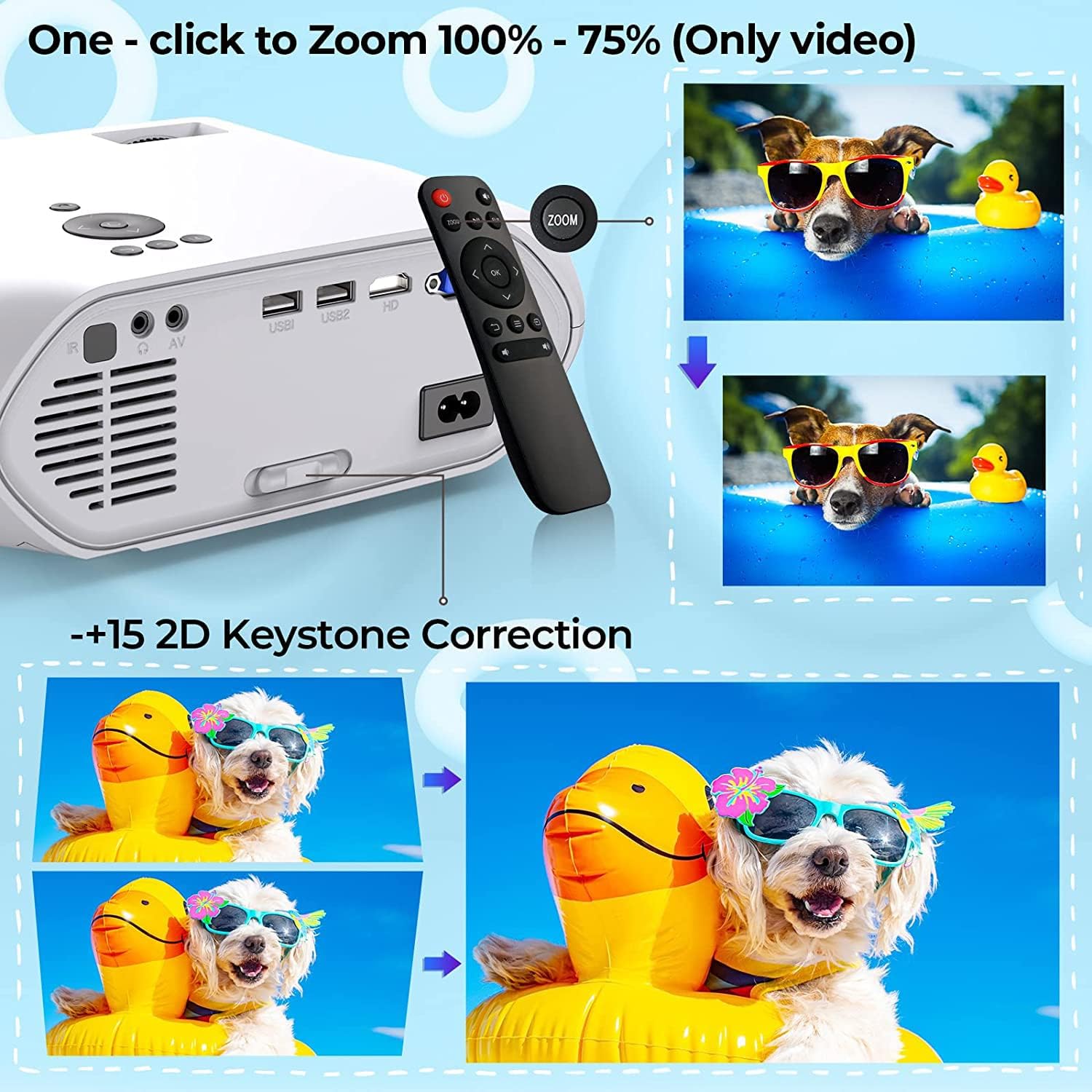
Figure 8: Examples of devices that can be connected via wired interfaces.
2. Sound Modes
The projector supports 5 sound modes to optimize your audio experience for different content types:
- Standard
- Music
- Movie
- Sport
- User Customize
Select the appropriate mode via the projector's menu or remote control to enhance your viewing or gaming experience.
3. Zoom Function
The remote control allows you to zoom the screen size from 100% down to 75% with a single click. This feature is particularly useful when the projector is mounted on a ceiling or in a fixed position, allowing for flexible screen size adjustment without moving the unit. Note that this zoom function applies to video content only.

Figure 9: Remote control zoom feature for adjusting video screen size.
Maintenance
Proper maintenance ensures the longevity and optimal performance of your projector:
- Lens Cleaning: Gently wipe the projector lens with a soft, lint-free cloth. For stubborn smudges, use a lens cleaning solution specifically designed for optical surfaces. Avoid abrasive materials that could scratch the lens.
- Ventilation Cleaning: Regularly check and clean the ventilation grilles to prevent dust buildup, which can impede airflow and lead to overheating. The dual-fan cooling system helps regulate temperature, but clear vents are crucial for its efficiency.
- Storage: When not in use, store the projector in its portable carrying bag to protect it from dust and physical damage. Ensure the lens cover is in place.
- Lamp Lifespan: The projector's lamp is designed for extended use. Minimizing power consumption through proper usage and ensuring adequate ventilation will help prolong its lifespan.
Troubleshooting
If you encounter issues with your projector, refer to the following common solutions:
| Problem | Possible Cause | Solution |
|---|---|---|
| No image or distorted image | Loose cable connection, incorrect input source, out of focus, keystone not adjusted. | Check all cable connections (HDMI, VGA, etc.). Ensure the correct input source is selected on the projector. Adjust the focus wheel and keystone correction. |
| No sound | Volume too low, external audio device not connected, incorrect audio output selected. | Increase projector volume. If using external speakers, ensure they are properly connected via Bluetooth or 3.5mm jack and powered on. Check audio output settings on the projector and source device. |
| Wi-Fi mirroring issues (e.g., no picture from streaming apps) | Copyright restrictions, unstable Wi-Fi connection. | For streaming services like Netflix, Amazon Prime, Disney+, Hulu, etc., connect a TV stick (e.g., Amazon Fire TV Stick) or a laptop/PC via HDMI/VGA due to content protection. Ensure a strong and stable Wi-Fi signal. |
| Projector overheating or fan noise | Blocked ventilation, prolonged use in hot environment. | Ensure ventilation grilles are clear and not obstructed. Operate the projector in a well-ventilated area. Allow the projector to cool down if used for extended periods. |
Specifications
| Feature | Detail |
|---|---|
| Brand | VIDOKA |
| Model Number | 70P |
| Native Resolution | 1920 x 1080P (Supports Partial 4K Video) |
| Brightness | 8000L |
| Contrast Ratio | 10000:1 |
| Connectivity Technology | Bluetooth 5.0, Built-In Wi-Fi |
| Input Interfaces | HDMI, VGA, 2x USB, AV |
| Output Interface | 3.5mm Headphone Jack |
| Projection Size | 33" to 200" |
| Recommended Projection Distance | 6.6 ft |
| Keystone Correction | ±15° 2D |
| Zoom Function | 100% to 75% (Video only) |
| Item Weight | Approximately 4.62 pounds |
| Color | White |
Warranty and Support
The VIDOKA BL-70 projector is built with reliability and durability in mind, featuring a dual-fan cooling system designed to minimize power consumption and extend lamp lifespan.
For specific warranty information, including terms, conditions, and duration, please refer to the warranty card included in your product packaging or visit the official VIDOKA website. For technical support or service inquiries, please contact VIDOKA customer service through the contact information provided with your purchase or on the official product support page.


