
1. Introduction
This manual provides detailed instructions for the safe and efficient operation of your AEK CYBER S-10307 Portable Bluetooth Speaker. Please read this manual thoroughly before using the product and retain it for future reference.

Figure 1: AEK CYBER S-10307 Portable Bluetooth Speaker. This image shows the front view of the speaker with its colorful RGB LED light ring and control panel at the top.
2. Package Contents
Ensure all items listed below are present in the package:
- AEK CYBER S-10307 Portable Bluetooth Speaker
- Auxiliary cable (3.5 mm)
- USB charging cable (V8 type)
- User manual (this document)
3. Key Features
The AEK CYBER S-10307 Portable Bluetooth Speaker offers a range of features for an enhanced audio experience:
- Multiple Playback Modes: Supports Bluetooth, Auxiliary (AUX), FM Radio, USB, and Micro SD card playback.
- True Wireless Stereo (TWS): Connect two S-10307 speakers wirelessly for a stereo sound experience.
- High-Definition Stereo Sound: Equipped with a 3-inch speaker and 10W RMS output for clear and powerful audio.
- Compact and Portable Design: Easy to carry with a built-in handle, suitable for various environments.
- Integrated RGB LED Lights: Features dynamic LED lighting for visual appeal.
- Built-in Rechargeable Battery: 1500mAh battery provides hours of continuous playback.
- Microphone Input: Includes a 6.3mm input for a wired microphone (microphone not included), ideal for karaoke or public announcements.
- Phone/Tablet Stand: Convenient slot on top to hold your device.
- Physical Control Buttons: Dedicated buttons for volume, playback, mode selection, and light control.
- Powerful Bass Mode: Activate enhanced bass with a dedicated button.

Figure 2: Overview of key features including Bluetooth connectivity, rechargeable battery, Micro SD support, TWS connection, LED light, and FM Radio.
4. Setup
4.1 Initial Charge
Before first use, fully charge the speaker. Connect the supplied USB charging cable to the speaker's V8 charging port and the other end to a USB power adapter (not included) or a computer USB port. The charging indicator will illuminate during charging and turn off when fully charged.
4.2 Powering On/Off
Locate the ON/OFF switch, typically near the auxiliary input. Slide the switch to the "ON" position to power on the speaker. Slide it to the "OFF" position to power off.
5. Operating Instructions
5.1 Bluetooth Mode
- Power on the speaker. It will automatically enter Bluetooth pairing mode, indicated by a flashing LED light and an audible prompt.
- On your device (smartphone, tablet, PC), enable Bluetooth and search for available devices.
- Select "AEK CYBER S-10307" from the list of devices.
- Once paired, the speaker will emit an audible confirmation, and the LED light will stop flashing.
- You can now play audio from your device through the speaker. The effective Bluetooth range is 8 to 10 meters.
5.2 Auxiliary (AUX) Mode
- Connect one end of the supplied 3.5mm auxiliary cable to the AUX input port on the speaker.
- Connect the other end of the cable to the audio output jack of your external device (e.g., MP3 player, computer).
- The speaker should automatically switch to AUX mode. If not, press the "M" (Mode) button to cycle through modes until AUX mode is selected.
- Control playback and volume from your connected device or the speaker's controls.
5.3 FM Radio Mode
- Power on the speaker.
- Press the "M" (Mode) button repeatedly until FM Radio mode is selected.
- To auto-scan and save available stations, press and hold the Play/Pause button. The speaker will scan and store stations within the 87.5-108 MHz range.
- Use the "Previous Track" (◀◀) and "Next Track" (▶▶) buttons to navigate between saved stations.
5.4 USB / Micro SD Card Playback
- Insert a USB flash drive or a Micro SD card (up to 32GB, formatted to FAT32) containing MP3 audio files into the respective port on the speaker.
- The speaker will automatically detect the storage device and begin playing music. If not, press the "M" (Mode) button to switch to USB or TF (Micro SD) mode.
- Use the playback control buttons on the speaker to manage your music.
5.5 True Wireless Stereo (TWS) Pairing
The TWS function allows you to connect two AEK CYBER S-10307 speakers for a true stereo sound experience.
- Ensure both S-10307 speakers are powered on and are not connected to any Bluetooth device.
- On one of the speakers (this will be the primary speaker), press and hold the "M" (Mode) button for a few seconds until you hear a pairing tone, indicating it's searching for another TWS speaker.
- The two speakers will automatically connect to each other. You will hear a confirmation tone once TWS pairing is successful.
- Now, connect your Bluetooth device to the primary speaker as described in Section 5.1. Audio will play through both speakers in stereo.
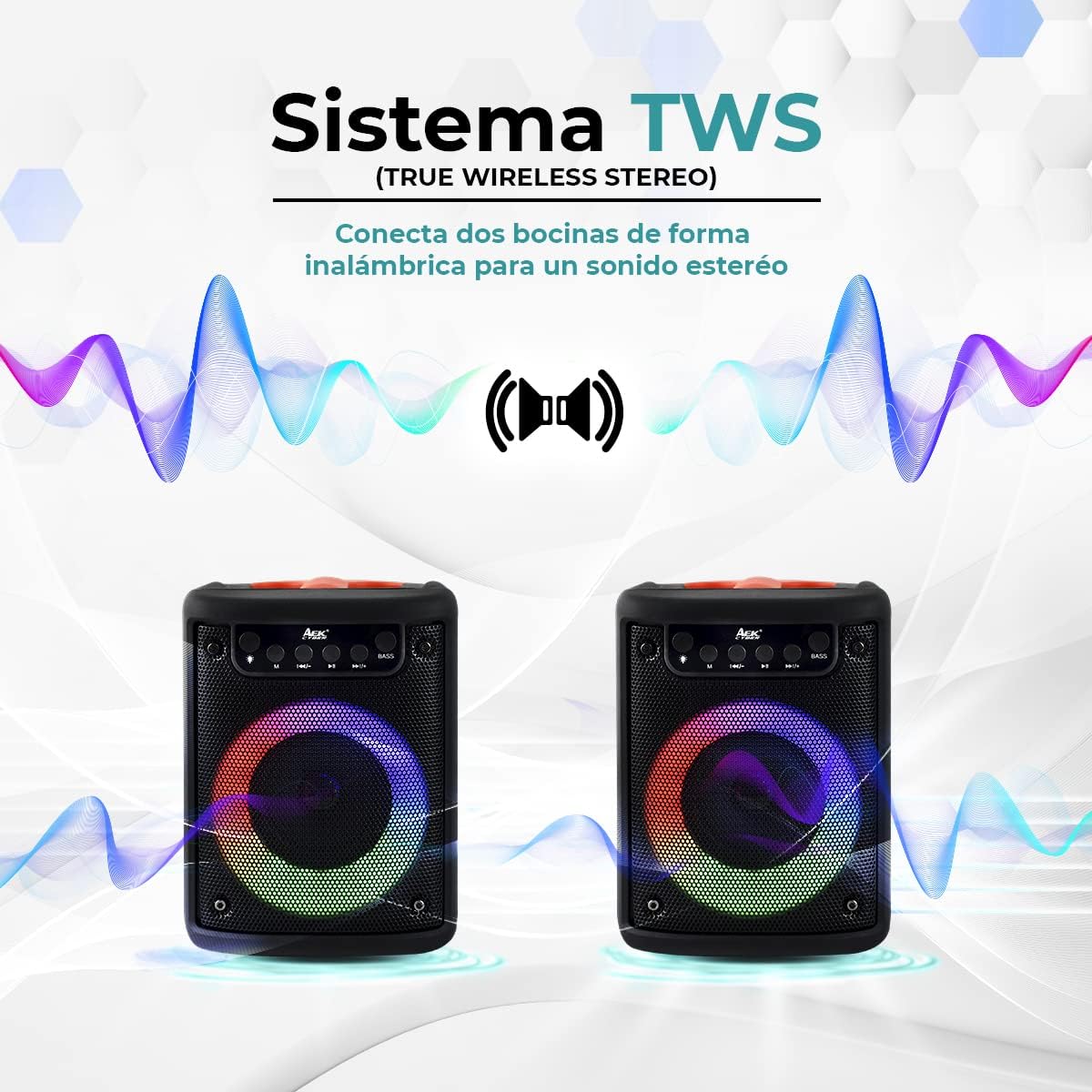
Figure 3: Diagram illustrating the True Wireless Stereo (TWS) connection, showing two speakers wirelessly linked for stereo sound.
6. Controls and Indicators
The speaker features an intuitive control panel located on the top. Refer to the image below for button identification.

Figure 4: Detailed view of the speaker's control panel and input ports (AUX, USB/Micro SD, MIC). The control panel includes buttons for mode, previous track/volume down, play/pause, next track/volume up, and bass.
| Button/Port | Function |
|---|---|
| M (Mode) | Press to cycle through playback modes: Bluetooth, AUX, FM Radio, USB, Micro SD. Press and hold for TWS pairing (in Bluetooth mode). |
| ◀◀ (Previous Track / Volume Down) | Short press: Previous track. Long press: Decrease volume. In FM mode, short press for previous station. |
| ▶▶ (Play / Pause) | Press to play or pause audio. In FM mode, long press to auto-scan and save stations. |
| ▶▶ (Next Track / Volume Up) | Short press: Next track. Long press: Increase volume. In FM mode, short press for next station. |
| BASS | Press to activate or deactivate powerful bass mode. |
| Light Control Button | Press to cycle through different RGB LED light modes or turn lights off. |
| AUX Input (3.5mm) | Connect external audio devices using the supplied 3.5mm cable. |
| USB Port | Insert USB flash drives for audio playback. |
| Micro SD (TF) Slot | Insert Micro SD cards for audio playback. |
| MIC Input (6.3mm) | Connect a wired microphone (not included). |
| DC5V Charging Port (V8) | Connect the USB charging cable to power the speaker. |
7. Charging the Speaker
The AEK CYBER S-10307 speaker is equipped with a 1500mAh rechargeable battery, providing extended playback time.
- Connect the small end of the supplied V8 USB charging cable to the DC5V charging port on the speaker.
- Connect the standard USB end of the cable to a USB power source, such as a wall adapter (5V/1A recommended), a computer USB port, or a power bank.
- The charging indicator light will illuminate during charging.
- Once fully charged, the indicator light will typically turn off or change color. A full charge provides approximately 4-5 hours of continuous use, depending on volume level and features used.
- Disconnect the charging cable once charging is complete to preserve battery life.

Figure 5: Illustration of the speaker's rechargeable 1500mAh battery, indicating 4-5 hours of duration per charge.
8. Maintenance and Care
- Cleaning: Use a soft, dry cloth to clean the speaker's exterior. Do not use abrasive cleaners, waxes, or solvents.
- Storage: When not in use for extended periods, store the speaker in a cool, dry place away from direct sunlight and extreme temperatures.
- Battery Care: To prolong battery life, avoid fully discharging the battery frequently. Charge the speaker regularly, even if not in use, to maintain battery health.
- Water Resistance: This speaker is not waterproof. Avoid exposure to water, rain, or excessive moisture.
- Handling: Do not drop the speaker or subject it to strong impacts.
9. Troubleshooting
If you encounter issues with your speaker, refer to the following common problems and solutions:
| Problem | Possible Cause | Solution |
|---|---|---|
| Speaker does not power on. | Battery is depleted. | Charge the speaker fully using the supplied USB cable. |
| No sound from speaker. | Volume is too low or muted. Incorrect mode selected. Device not connected properly. | Increase volume on both the speaker and the connected device. Ensure the correct playback mode (Bluetooth, AUX, USB, TF) is selected. Reconnect the device. |
| Bluetooth device cannot pair. | Speaker is not in pairing mode. Device Bluetooth is off. Speaker is already connected to another device. Too far from speaker. | Ensure speaker is in Bluetooth pairing mode (flashing LED). Turn on Bluetooth on your device. Disconnect speaker from other devices. Move device closer to speaker (within 10 meters). |
| Poor FM radio reception. | Weak signal in the area. Interference. | Relocate the speaker to an area with better reception. Extend the antenna if available (not explicitly mentioned, but common for portable radios). |
| USB/Micro SD not playing. | Incorrect file format. Card/drive not inserted correctly. Corrupted files. | Ensure files are MP3 format. Reinsert the USB drive or Micro SD card. Try a different drive/card. |
| TWS pairing fails. | Speakers are too far apart. One speaker is already paired to a device. | Ensure both speakers are close to each other. Disconnect both speakers from any Bluetooth devices before initiating TWS pairing. |
10. Technical Specifications
Detailed technical specifications for the AEK CYBER S-10307 Portable Bluetooth Speaker:

Figure 6: Dimensions of the AEK CYBER S-10307 speaker: 17.5 cm (height) x 13.5 cm (depth) x 13 cm (width).
| Specification | Value |
|---|---|
| Model Name | S-10307 |
| Brand | AEK CYBER |
| Product Dimensions | 13.5 x 13 x 17.5 cm |
| Weight | 642 g |
| Speaker Output Power | 10W RMS |
| Frequency Response | 100Hz-20KHz |
| Connectivity Technology | Bluetooth, Auxiliary, USB |
| Bluetooth Distance | 8 to 10 meters |
| Audio Output Mode | Mono (Stereo with TWS pairing) |
| Battery Capacity | 1500 mAh |
| Rated Voltage | 3.7V |
| FM Range | 87.5-108 MHz |
| Max Micro SD/USB Capacity | 32GB |
11. Warranty and Support
For warranty information or technical support, please refer to the documentation provided with your purchase or contact AEK CYBER customer service through their official channels. Specific warranty terms and conditions may vary by region and retailer.
Note: The product description mentions "You can only invoice the same month of your purchase, you cannot make invoices, pasand". This seems to be a specific local policy regarding invoicing and is not a general warranty statement. Therefore, a generic statement about contacting customer service is more appropriate for a global instruction manual.