
Introduction
This manual provides essential instructions for the assembly, operation, maintenance, and troubleshooting of your Monarch Specialties I 7597 L-shaped computer desk. Please read these instructions carefully before assembly and use to ensure proper function and longevity of your product.
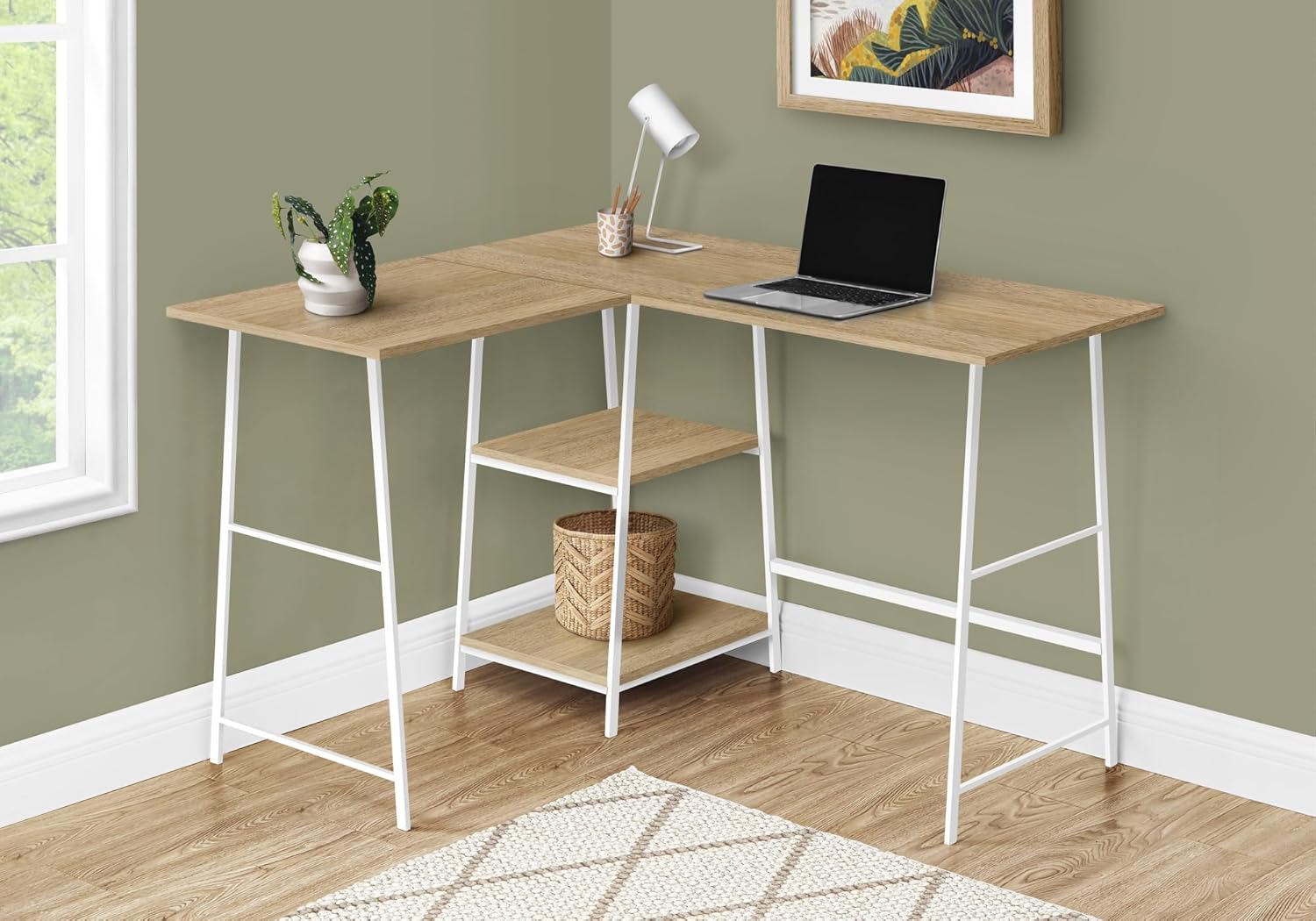
Image: The Monarch Specialties I 7597 L-shaped computer desk, featuring a natural wood-look top and white metal legs, set up in a corner with a laptop and decorative items.
Safety Information
Always follow basic safety precautions when assembling and using this product to reduce the risk of injury or damage.
- Keep all small parts and packaging materials away from children and pets.
- Ensure all connections are securely fastened before use.
- Do not exceed the maximum weight recommendation of 75 pounds for the desktop.
- Place the desk on a level surface to prevent tipping.
- Use caution when moving the assembled desk to avoid damage or injury.
Setup and Assembly
This desk requires assembly. Detailed, illustrated instructions and all necessary hardware are included with your purchase. Additional tools may be required (e.g., screwdriver).
Components Checklist
Before beginning assembly, verify that all parts are present and undamaged. Refer to the included parts list in your packaging.
- Desktop panels (L-shaped)
- Metal frame legs (sawhorse style)
- Shelf panels
- Assembly hardware (screws, bolts, etc.)
Assembly Steps (General)
- Unpack all components and lay them out on a clean, soft surface to prevent scratches.
- Identify all parts using the provided diagram and parts list.
- Attach the metal frame legs to the designated desktop panels using the provided hardware. Do not overtighten screws initially.
- Assemble the shelf panels between the central leg structures as indicated in the detailed instructions.
- Connect the L-shaped desktop sections, ensuring proper alignment.
- Once all parts are loosely assembled, gradually tighten all screws and bolts until secure.
- Place the desk in its desired location and ensure it is stable.

Image: Technical diagram illustrating the dimensions and individual components of the desk, including desktop lengths, shelf sizes, and overall height.

Image: A detailed view of the two integrated shelves and the white metal sawhorse-style legs, highlighting the natural wood-look finish of the shelves.
Operating Instructions
The Monarch Specialties I 7597 computer desk is designed for use in home offices, bedrooms, dormitories, or living rooms. Its L-shaped design allows for flexible placement in corners or against walls.
- Placement: Position the desk on a flat, stable floor. The finished-on-all-sides design allows for versatile placement.
- Weight Capacity: Do not place items exceeding 75 pounds on the desktop. Distribute weight evenly.
- Storage: Utilize the two built-in open shelves for organizing office supplies, books, or decorative items.
- Usage: Suitable for gaming, working, and writing with laptops or desktop computers.
Maintenance
Proper care will help maintain the appearance and extend the life of your desk.
- Cleaning: Wipe surfaces with a damp cloth. Avoid harsh chemicals or abrasive cleaners, which can damage the laminate finish.
- Spills: Clean up spills immediately to prevent staining or damage to the wood-look laminate.
- Hardware: Periodically check and tighten all screws and bolts to ensure the desk remains stable.
- Sunlight: Avoid prolonged exposure to direct sunlight to prevent fading or discoloration of the finish.

Image: A close-up texture shot of the natural wood-look laminate surface, demonstrating the finish that requires gentle cleaning.
Troubleshooting
If you encounter issues with your desk, refer to the following common solutions:
- Desk is wobbly:
- Ensure all assembly hardware is securely tightened.
- Verify the desk is placed on a level surface. Adjust floor glides if present.
- Parts missing or damaged:
- Review the parts list in your assembly manual.
- Contact Monarch Specialties customer support for assistance (refer to the Support section).
- Difficulty with assembly:
- Carefully re-read the step-by-step instructions and diagrams provided in the original packaging.
- Ensure you are using the correct hardware for each step.
Specifications
| Feature | Detail |
|---|---|
| Model Number | I 7597 |
| Brand | Monarch Specialties |
| Desk Design | L-Shape Computer Desk |
| Dimensions (D x W x H) | 47.25"D x 42"W x 30"H |
| Color | Natural/White |
| Material Type | Metal, Wood (Laminate finish) |
| Item Weight | 38 pounds |
| Maximum Weight Recommendation | 75 pounds |
| Number of Shelves | 2 (open, built-in) |
| Assembly Required | Yes |
| Product Care Instructions | Wipe with Damp Cloth |
Warranty Information
This Monarch Specialties I 7597 Computer Desk comes with a 1-year limited warranty on parts only. Please retain your proof of purchase for warranty claims. The warranty covers manufacturing defects in parts under normal use and service.
For detailed warranty terms and conditions, please refer to the documentation included with your product or contact Monarch Specialties customer service.
Customer Support
If you have any questions, require assistance with assembly, or need to report missing/damaged parts, please contact Monarch Specialties customer support.
- Website: Visit the official Monarch Specialties website for support resources.
- Contact Information: Refer to your product packaging or the Monarch Specialties website for current contact details (phone, email).


