
1. Introduction
This manual provides essential information for the safe and effective operation of your LYCEBELL LC-5800G Professional Ammonia Gas Meter Detector. This device is designed for continuous quantitative analysis of ammonia concentration, offering high precision and reliability for various applications.
2. Safety Information
Ammonia gas (NH3) is a hazardous substance. Always exercise caution when operating this device in environments where ammonia may be present. The following table outlines potential health effects at various ammonia concentrations:
| Concentration (PPM) | Human Physiological Reaction |
|---|---|
| 5-10 | Sensory odor threshold; some people may detect it. |
| 20 | Most people have obvious irritation, generally harmless. |
| 40 | Eye pain, tears for 30 minutes. |
| 100 | Most people feel uncomfortable, harmless. |
| 250 | Stimulates the nose, throat, eyes, and other senses. |
| 700 | The limit that the human body can endure; not advisable to stay for more than 30 minutes, may cause permanent eye damage. |
| 1700 | Severe cough, irritation of the nose, throat; 30 minutes may be fatal. |
| 2500 | Severe cough, irritation of the nose, throat; 15 minutes may cause death. |
Always ensure proper ventilation and evacuate the area immediately if alarm thresholds are exceeded. Do not attempt to repair or modify the device yourself.
3. Product Overview
The LYCEBELL LC-5800G is a professional handheld ammonia gas detector designed for accurate monitoring of NH3 levels, temperature, and humidity. It features an advanced electrochemical sensor for reliable readings.
Key Features:
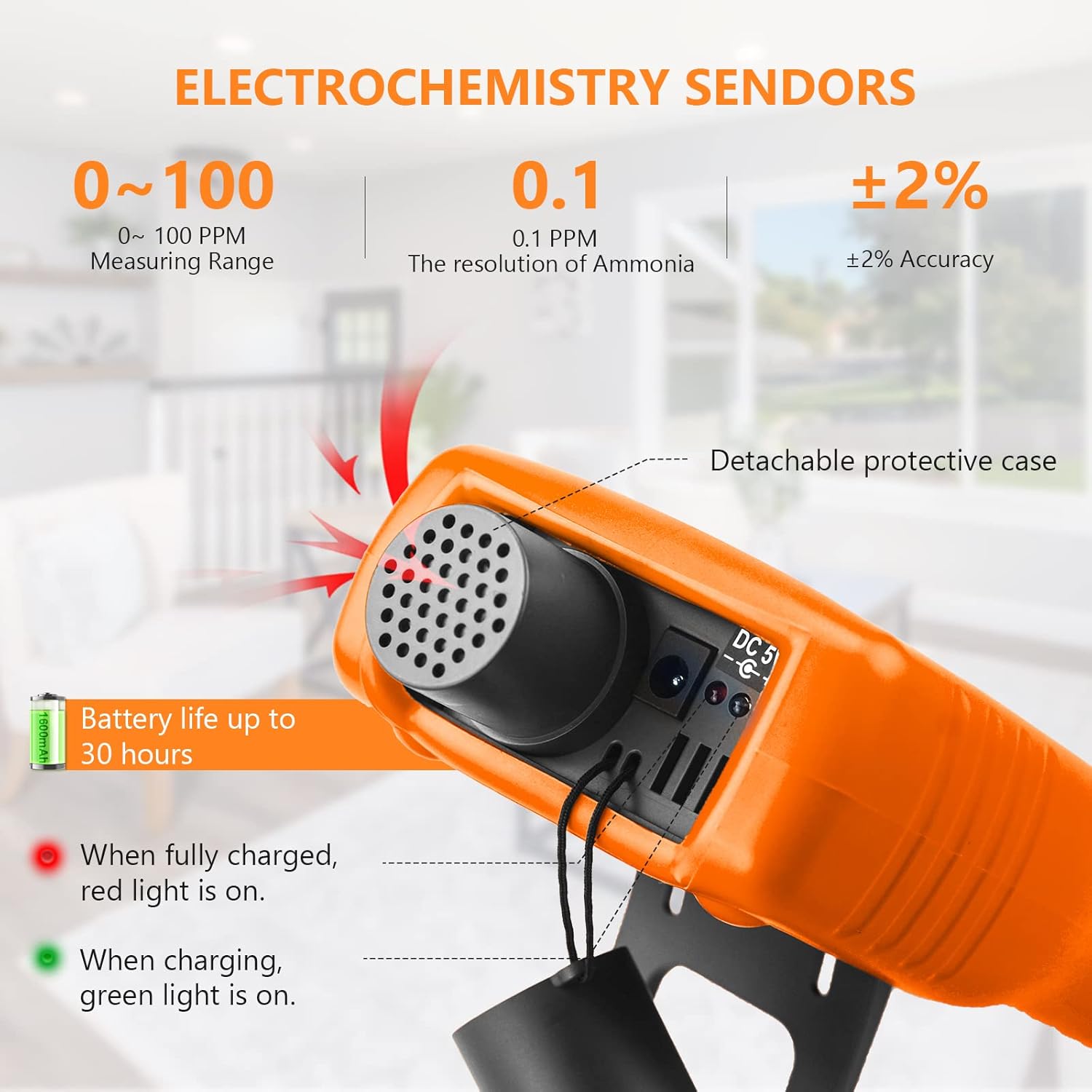
- Ammonia Detection: Wide measurement range of 0-100 PPM with 0.1 PPM resolution and ±5% accuracy.
- Multi-Functional Monitoring: Simultaneously measures temperature (-10℃ to 50℃) and humidity (0-95%RH). Temperature units are switchable between Celsius and Fahrenheit.
- Two-Level Warning System: Adjustable high/low alarm thresholds with audible and visual signals (slow/fast beeps, flashing lights).
- Rechargeable Battery: Powered by a long-lasting lithium battery, supporting continuous operation.
- Auto Power Off: Configurable automatic shutdown to conserve battery life.
- Tripod-Mountable Design: Integrated tripod mounting hole for stable, hands-free measurements.
Device Components:

- Probe (Sensor): Located at the top, responsible for detecting ammonia gas. Keep it clear of obstructions.
- Display: Large LCD screen showing NH3 concentration, temperature, humidity, and battery status.
- Alarm Indicator Light: Flashes during alarm conditions.
- °C/°F Button: Toggles between Celsius and Fahrenheit temperature units.
- Power On/Off Button: Central button to power the device on or off.
- Mode Button: Accesses settings and various display modes.
- Alarm Setting Button: Used to configure alarm thresholds.
- Increment/Decrement Buttons: Used for navigation and adjusting values in settings.
- Tripod Screw Hole: Located on the back for mounting the device on a tripod.
- Charging Interface: USB port for recharging the internal battery.
4. Setup
4.1 Initial Charging
Before first use, fully charge the device using the provided USB cable. Connect the USB cable to the charging interface on the device and a compatible USB power source. The charging indicator light will show the charging status (e.g., red for charging, green for fully charged).
4.2 Powering On/Off
To power on the device, press and hold the central power button. The display will illuminate, and the device will perform a self-test. To power off, press and hold the power button again. The device also supports an automatic power-off function, which can be configured in the settings.
5. Operating Instructions
5.1 Basic Operation
Once powered on, the device will display the current ammonia concentration in PPM, along with temperature and humidity readings. Ensure the sensor probe is exposed to the environment you wish to monitor.

5.2 Changing Temperature Units
Press the '°C/°F' button to switch the temperature display between Celsius and Fahrenheit.
5.3 Setting Alarm Thresholds
The device features two adjustable alarm levels: AL1 (first alarm) and AL2 (second alarm). To set these:
- Press the 'ALARM' button to enter the alarm setting state.
- Use the increment/decrement buttons to adjust the AL1 value.
- Press the 'ALARM' button again to switch to AL2 setting.
- Use the increment/decrement buttons to adjust the AL2 value.
- Press the 'MODE' button to exit the alarm setting state.
When ammonia levels reach or exceed the set thresholds, the device will trigger audible and visual alarms. The alarm sound is approximately 80 dB.
5.4 Auto Power Off (APO)
The device can be configured for automatic power off to save battery. To adjust this setting:
- Press the 'MODE' button to enter the settings menu.
- Navigate to the 'TIM SHUT' option using the increment/decrement buttons.
- Press 'OK' (central power button) to enter the APO setting.
- Toggle between 'APO ON' (auto power off enabled) and 'APO OFF' (auto power off disabled) using the increment/decrement buttons.
- Press 'OK' to confirm your selection and 'ESC' to exit the menu.
5.5 Applications
This ammonia gas detector is suitable for a wide range of applications, including:
- Poultry farms, pig farms, horse stables, and other livestock facilities.
- Fish farms and animal welfare shelters.
- Cold storage rooms and laboratories.
- Waste management and chemical industries.
- Environmental protection and other fields requiring ammonia monitoring.

6. Maintenance
To ensure the longevity and accuracy of your device:
- Keep the sensor probe clean and free from dust or debris. Use a soft, dry cloth for cleaning.
- Store the device in a cool, dry place away from direct sunlight and extreme temperatures.
- Regularly charge the battery to maintain optimal performance.
- Avoid dropping or subjecting the device to strong impacts.
- Do not expose the device to corrosive liquids or gases other than those it is designed to detect.
7. Troubleshooting
If you encounter issues with your device, consider the following:
- Device not powering on: Ensure the battery is fully charged.
- Inaccurate readings: Check if the sensor probe is clean and unobstructed. Ensure the device has been allowed sufficient time to stabilize in the environment.
- Alarm not sounding: Verify that alarm thresholds are set correctly and the volume is not muted (if applicable).
- Short battery life: Ensure the device is fully charged. Consider enabling the auto power off (APO) function.
For persistent issues, please contact customer support.
8. Specifications
| Parameter | Value |
|---|---|
| Detection Gas | Ammonia (NH3) |
| Measuring Range | 0-100ppm |
| Resolution | 0.1ppm |
| Basic Error | Less than ±5% (F.S) |
| Response Time | Less than 120 seconds |
| Recovery Time | Less than 240 seconds |
| Repeatability | Less than ±1% |
| Sensor Principle | Electrochemical principle, life for two years |
| Battery | Lithium battery (rechargeable) |
| Display | Large screen liquid crystal display |
| Alarm | Acoustic, optical double alarm, set the alarm value, an alarm sound is divided into 80 dB |
| Working Temperature | -20℃~50℃ |
| Working Humidity | 0-95%RH (Non Gel) |
| Product Dimensions | 6.8 x 2.8 x 0.7 inches |
| Item Weight | 14.82 ounces |
9. Package Contents
The following items are included in your product package:
- 1x LYCEBELL LC-5800G Ammonia Gas Detector
- 1x USB Cable
- 1x Storage Bag
- 1x User Manual

10. Product Video Overview
Watch this video for a visual guide on the LYCEBELL LC-5800G Ammonia Gas Detector's features and operation.
11. Warranty and Support
For warranty information or technical support, please refer to the contact details provided in the packaging or visit the official LYCEBELL website. Keep your purchase receipt for warranty claims.