
LYCEBELL LC-866A
LYCEBELL LC-866A Handheld Anemometer User Manual
Digital CFM Meter Wind Gauge for Wind Velocity, Temperature, Humidity, and Dew Point Measurement with USB PC Sync
1. Introduction
The LYCEBELL LC-866A Handheld Anemometer is a versatile digital instrument designed for precise measurement of various environmental parameters. It accurately measures wind speed, air volume (CFM), ambient temperature, humidity, dew point temperature, and wet bulb temperature. Equipped with a USB interface, this device allows for real-time data logging, analysis, and monitoring on a personal computer, making it ideal for a wide range of applications from HVAC system testing to outdoor activities.

Figure 1.1: The LC-866A Anemometer is suitable for diverse applications such as HVAC, meteorology, agriculture, hiking, and sailing.
2. Safety Information
- Do not expose the device to extreme temperatures, direct sunlight, or high humidity.
- Avoid dropping the device or subjecting it to strong impacts.
- Do not attempt to disassemble or modify the device. Refer all servicing to qualified personnel.
- Keep the device away from strong magnetic fields.
- Ensure batteries are inserted with correct polarity. Remove batteries if the device will not be used for an extended period.
- Clean the device with a soft, dry cloth. Do not use abrasive cleaners or solvents.
3. Package Contents
Verify that all items listed below are present in your package:
- 1 x LYCEBELL LC-866A Anemometer
- 1 x USB Cable
- 1 x Lanyard
- 1 x Screwdriver
- 2 x 1.5V AAA Batteries
- 1 x Portable Storage Bag

Figure 3.1: All components included in the LC-866A Anemometer package.
4. Product Overview
The LC-866A Anemometer features a compact design with an intuitive button layout and a clear LCD display. Key components include:
- 8-Leaf Wind Vanes: Upgraded low friction bearing technology for accurate wind speed measurement.
- Dual Wind Chill Sensor: Two sensitive temperature sensors for improved accuracy.
- LCD Display: Large backlit display for easy reading in various lighting conditions.
- Control Buttons: Intuitive buttons for mode selection, unit conversion, data hold, and backlight control.
- USB Port: For connecting to a PC for data transfer and real-time monitoring.
- Tripod Hole: A screw hole at the bottom allows for mounting on a standard tripod (tripod not included).

Figure 4.1: Overview of the LC-866A Anemometer's physical features and dimensions.
5. Setup
5.1 Battery Installation
- Locate the battery compartment on the back of the device.
- Use the provided screwdriver to loosen the screw securing the battery cover.
- Remove the battery cover.
- Insert two 1.5V AAA batteries, ensuring correct polarity (+/-) as indicated inside the compartment.
- Replace the battery cover and tighten the screw.
5.2 Powering On/Off
- To power on the device, press the Power button (
 ).
). - The device features an auto power-off function to conserve battery life. It will automatically shut down after a period of inactivity.
- To manually power off, press and hold the Power button for a few seconds.
6. Operating Instructions
6.1 Basic Measurements
Upon powering on, the device will display current wind speed, temperature, and humidity readings. Ensure the wind vanes are unobstructed for accurate wind measurements.
6.2 Changing Wind Speed Units
The LC-866A supports 5 wind speed units:
- m/s (meters per second)
- km/h (kilometers per hour)
- ft/min (feet per minute)
- knots (nautical miles per hour)
- mph (miles per hour)
To cycle through the units, press the UNIT button.
6.3 Backlight Function
The LCD display features a backlight for improved visibility in low-light conditions.
- To activate the backlight, press the Backlight button (often marked with a lightbulb icon).
- The backlight will automatically turn off after a short period to conserve battery.

Figure 6.1: The large LCD display with backlight for easy reading in dark conditions.
6.4 Data Hold Function
To freeze the current reading on the display, press the HOLD/MODE button briefly. Press it again to release the hold and resume live readings.
6.5 Air Volume (CFM/CMM/CMS) Measurement
The device can calculate air volume. To use this feature:
- Enter the cross-sectional area of the duct or opening you are measuring. Refer to the device's specific instructions or software for inputting this value.
- The device will then display the air volume in CFM (Cubic Feet per Minute), CMM (Cubic Meters per Minute), or CMS (Cubic Meters per Second).

Figure 6.2: Real-time air volume and CFM measurement display.
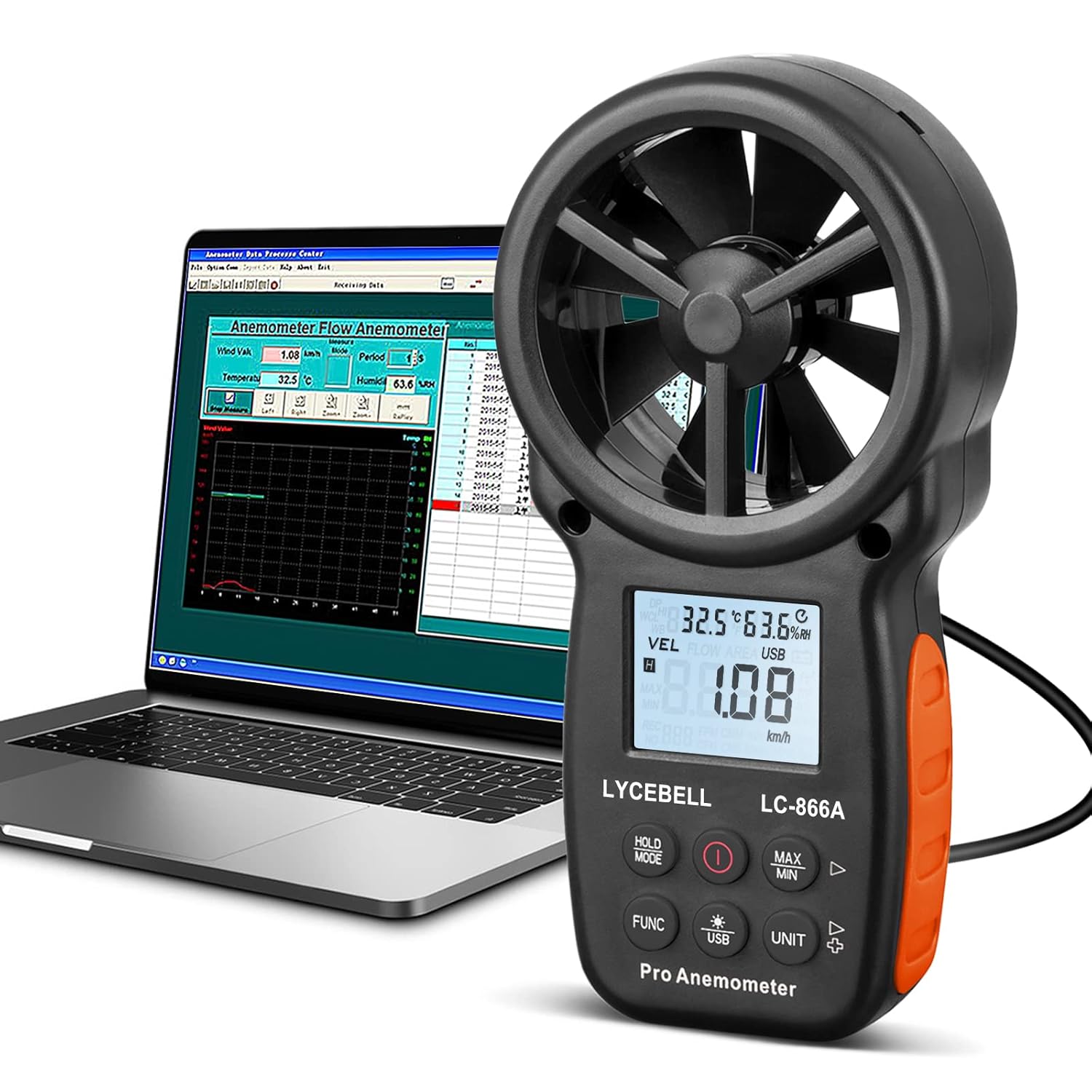
6.6 USB PC Connection and Data Sync
The LC-866A allows for real-time data transfer and logging to a personal computer.
- Install the provided PC software from the included CD or download it from the manufacturer's website.
- Connect the anemometer to your PC using the supplied USB cable.
- Long press the USB key on the anemometer for 3 seconds to enable or disable the USB real-time data uploading function.
- Open the software on your PC to view, log, and analyze the wind data. The software supports graph display for historical data.
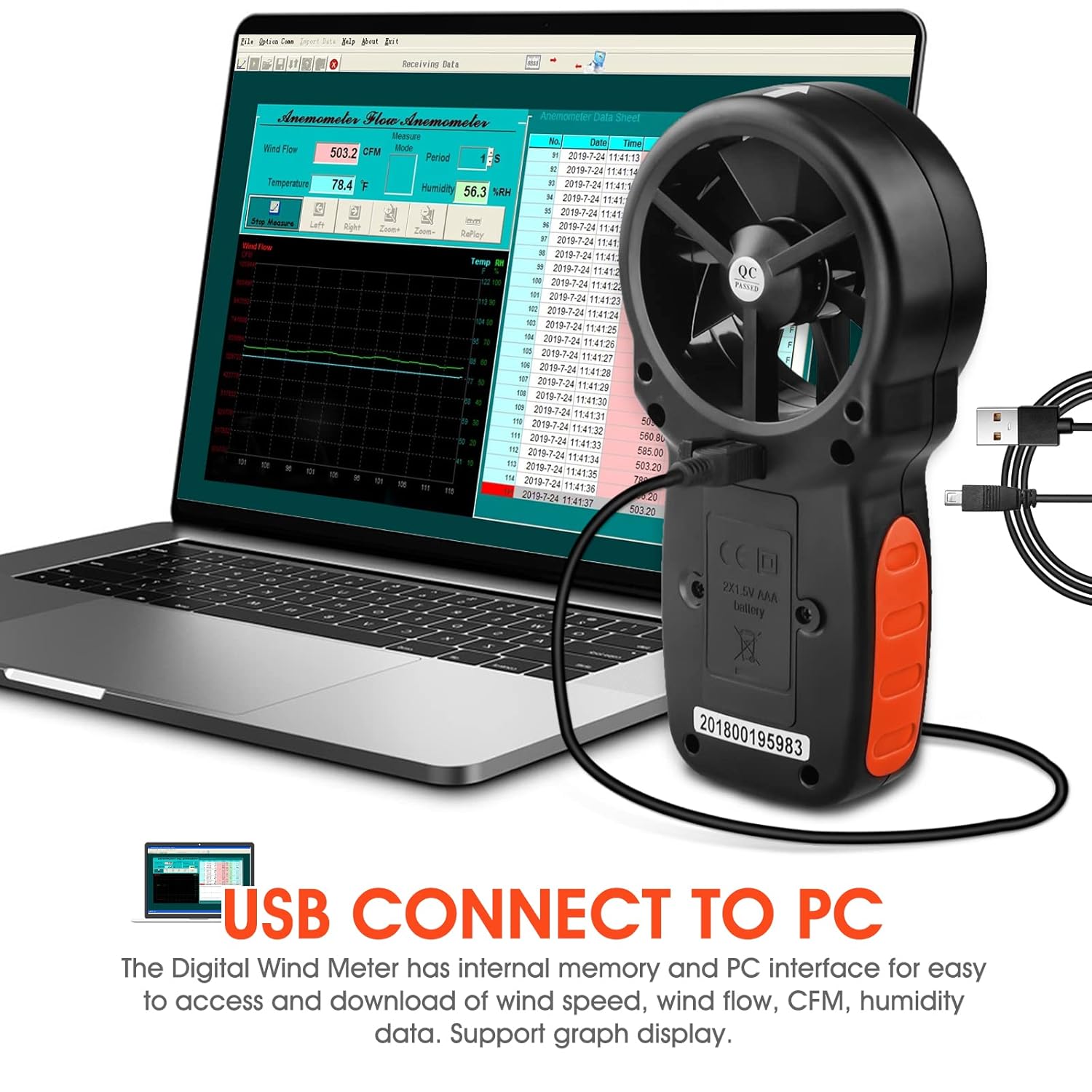
Figure 6.3: Connecting the LC-866A to a PC for data sync and analysis.
Figure 6.4: The anemometer connected to a PC, showing the data analysis software interface.
7. Maintenance
- Cleaning: Wipe the device with a soft, dry cloth. Do not use liquid cleaners or solvents. Ensure the wind vanes are free from dust and debris.
- Storage: When not in use for extended periods, store the anemometer in its portable storage bag in a cool, dry place, away from direct sunlight and extreme temperatures. Remove the batteries before long-term storage to prevent leakage.
- Battery Replacement: Replace batteries when the low battery indicator appears on the display.
8. Troubleshooting
| Problem | Possible Cause | Solution |
|---|---|---|
| Device does not power on. | Batteries are dead or incorrectly inserted. | Check battery polarity or replace with new 1.5V AAA batteries. |
| Inaccurate wind speed readings. | Wind vanes are obstructed or damaged. | Ensure wind vanes are clean and spin freely. Avoid measuring in turbulent airflow. |
| LCD display is dim or blank. | Low battery or backlight is off. | Replace batteries. Press the backlight button to activate. |
| USB data sync not working. | USB function not enabled on device, incorrect cable, or software issue. | Long press the USB key for 3 seconds. Ensure correct USB cable is used. Reinstall PC software if necessary. |
9. Specifications
| Parameter | Value |
|---|---|
| Model | LC-866A |
| Wind Speed Range | 0.67 ~ 67.1 mph; 1.40~144.0 km/h; 1.30~131.20 ft/s; 0.80~77.70 knots; 78~7874 ft/m (0.3~40 m/s) |
| Wind Speed Resolution | 0.2 mph |
| Wind Temperature Range | -10~45℃ (14℉-113℉) |
| Relative Humidity | 0~80% RH |
| Air Volume CFM | 0-9999; CMM: 0-9999; CMS: 0-9999 |
| Wind Meter Altitude | 0-19685 Ft |
| Power Source | 2 x 1.5V AAA Batteries |
| Product Dimensions | 8.64 x 3.81 x 16.51 cm |
| Item Weight | 290 g |
| Material | Acrylonitrile Butadiene Styrene (ABS) |
| Features | Reading Hold, Auto Power Off, Backlight LCD, 5 Wind Speed Units, USB Connect to PC, Low Battery Indicator, USB Real-time Data Sync |
10. Warranty and Support
LYCEBELL LC-866A Handheld Anemometer provides 1 year after-sale service and technical support. If you encounter any problems with your product, please do not hesitate to contact us. We are committed to resolving any issues promptly.
For support, please visit the LYCEBELL store on Amazon or contact their customer service directly through the contact information provided with your purchase.
Online Store: LYCEBELL Amazon Store
Related documentsLC-866A

Ask a question about this manual
Ask about setup, troubleshooting, compatibility, parts, safety, or missing instructions. Manuals+ will review the question and use this page’s manual context to help answer it.