
GEAMENT LED Light Kit for LEGO 75308 R2-D2 Instruction Manual
Model: 75308D
1. Introduction
Thank you for choosing the GEAMENT LED Light Kit. This kit is designed to enhance your LEGO 75308 R2-D2 model with dynamic lighting effects. Please note that this product includes only the LED lighting kit and not the LEGO model set itself. The LEGO model shown in images and videos is for demonstration purposes only.
For optimal results and to ensure proper installation, please read this manual carefully before beginning the setup process. A detailed PDF installation instruction guide is available for download as indicated in the packaging.

Image 1.1: Important notice regarding product contents.
2. Safety Information
- This product contains small parts and is not suitable for children under 3 years old due to choking hazards.
- Handle LED wires and connectors with care to avoid damage. Do not pull or bend wires excessively.
- Ensure the power source (battery box or USB) is correctly connected according to instructions.
- Do not expose the lighting kit to water or extreme temperatures.
- If any component is damaged, discontinue use and contact customer support.
3. Package Contents
Please verify that all components listed below are present in your package:
- GEAMENT LED Light Kit for LEGO 75308 R2-D2
- Battery Box (batteries not included)
- USB Power Cable
- Instruction Manual (this document)
- QR code/link for detailed PDF installation guide

Image 3.1: Included components: Lighting Kit and Battery Box.
4. Setup Instructions
The installation of the GEAMENT LED Light Kit requires careful handling and adherence to the provided instructions. It is recommended to complete the LEGO 75308 R2-D2 model assembly first before installing the lighting kit.
- Download Detailed PDF Instructions: Locate the QR code or link provided in your package to download the comprehensive PDF installation guide. This guide will provide step-by-step visual instructions specific to the LEGO 75308 R2-D2 model.
- Prepare Your Model: The PDF guide will instruct you on which sections of your completed LEGO model may need to be partially disassembled to integrate the light wires and components.
- Install LED Components: Follow the PDF instructions to carefully place the LED lights and route the wires through the LEGO bricks. Ensure wires are not pinched or excessively bent.
- Connect to Power Source: Connect the lighting kit to the battery box (insert 3x AA batteries, not included) or a USB power source using the provided cable.
- Test Functionality: Before fully reassembling your model, test the lights to ensure all connections are secure and lights are functioning correctly.
- Final Assembly: Carefully reassemble any disassembled parts of your LEGO model, ensuring all wires are neatly tucked away and not visible.

Image 4.1: Example of internal wiring and light placement.
5. Operating Instructions
Once the GEAMENT LED Light Kit is installed and connected to a power source, operating it is straightforward.
5.1 Powering On/Off
If using the battery box, simply switch the power button on the battery box to the 'ON' position to illuminate your model. Switch to 'OFF' to turn off the lights. If using a USB power source, the lights will turn on when connected to power and turn off when disconnected.
5.2 Lighting Effects
The GEAMENT LED Light Kit is designed to bring your R2-D2 model to life with various lights, including head, body, and base illumination, replicating the iconic droid's appearance.
Video 5.1: Official GEAMENT video demonstrating the LED light kit in action on the LEGO R2-D2 model.
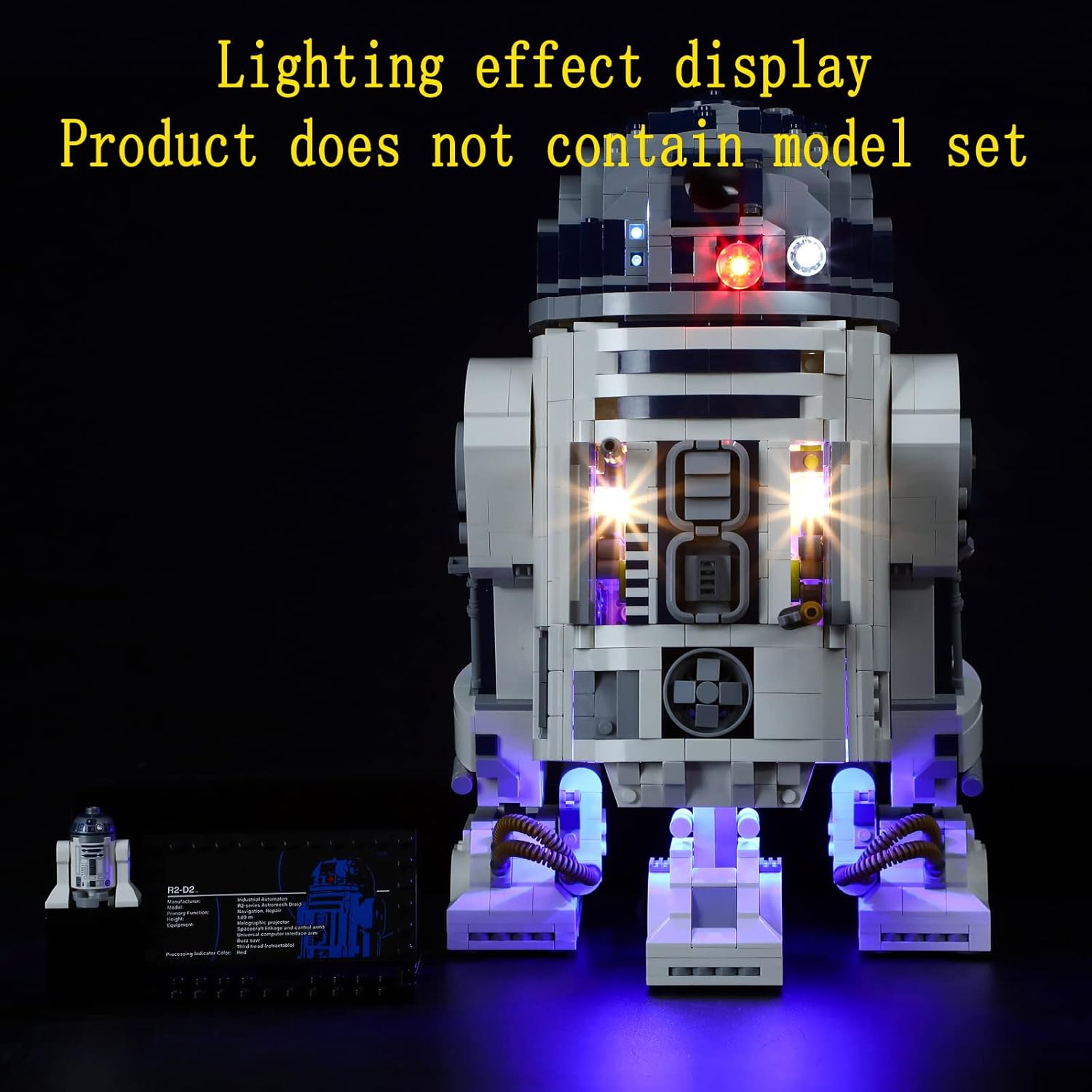
Image 5.2: Overall lighting effect display on the R2-D2 model.

Image 5.3: Head lighting detail.

Image 5.4: Body panel lighting detail.

Image 5.5: Base lighting detail.
6. Maintenance
To ensure the longevity and optimal performance of your GEAMENT LED Light Kit, follow these maintenance guidelines:
- Cleaning: Use a soft, dry cloth to gently wipe away dust from the LED components and wires. Avoid using liquid cleaners directly on the lights or electrical connections.
- Battery Replacement: If the lights become dim or stop working, replace the batteries in the battery box with new ones (3x AA). Ensure correct polarity.
- Wire Inspection: Periodically check the wires for any signs of wear, fraying, or damage. If damage is found, contact customer support.
- Storage: If storing the model for an extended period, it is recommended to remove the batteries from the battery box to prevent leakage.
7. Troubleshooting
If you encounter any issues with your GEAMENT LED Light Kit, please refer to the following troubleshooting tips:
| Problem | Possible Cause | Solution |
|---|---|---|
| Lights do not turn on. |
|
|
| Some lights are dim or flickering. |
|
|
| Wires are visible or pinched. | Incorrect wire routing. | Refer to the detailed PDF instructions for proper wire routing and re-route as necessary. |
If these steps do not resolve the issue, please contact GEAMENT customer support for further assistance.
8. Specifications
- Model Number: 75308D
- Product Dimensions: 5.91 x 3.94 x 1.18 inches (packaging)
- Item Weight: 3.17 ounces (packaging)
- Power Source: 3x AA Batteries (not included) or USB Power
- Recommended Age: 15 years and up
9. Warranty and Support
GEAMENT provides quality lighting solutions for building models. For warranty information, technical support, or any questions regarding your product, please refer to the contact information provided in your product packaging or visit the official GEAMENT store online.
We are committed to customer satisfaction and will assist you with any concerns.