
Introduction
This manual provides comprehensive instructions for installing and operating your GEAMENT LED Light Kit, specifically designed for the LEGO Technic 42009 Mobile Crane MK II building model. This kit enhances the visual appeal of your model with integrated lighting. Please note that the LEGO model set is not included with this lighting kit.
It is recommended to complete the LEGO model assembly before proceeding with the light kit installation.
Package Contents
Verify that all components listed below are present in your package:
- LED Light Strips and Wires
- Battery Box (requires batteries, not included)
- USB Power Cable
- Connection Cables and Expansion Boards
- Adhesive Squares/Mounting Brackets
- Instruction Manual (simple guide, detailed PDF available online)
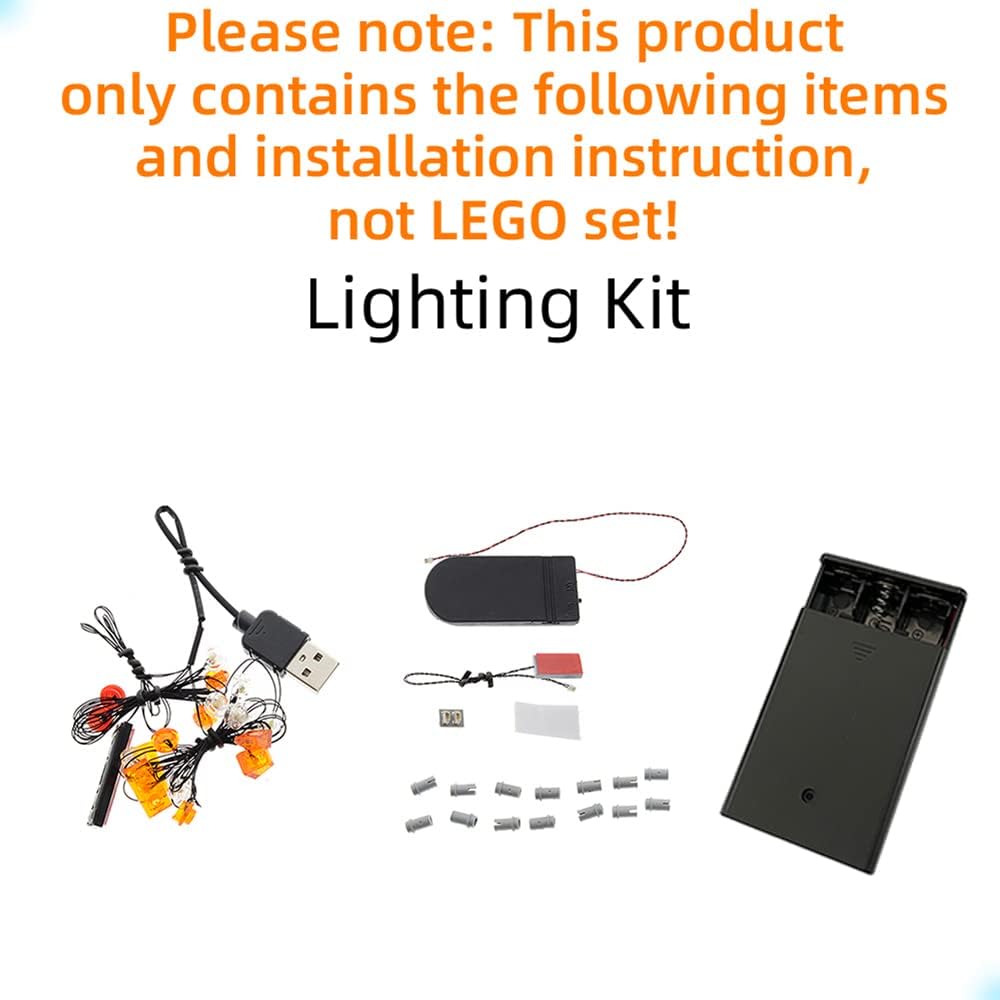
Image: Components included in the GEAMENT LED Light Kit. This kit does not include the LEGO model set.

Image: A multilingual notice clarifying that the product is an LED lighting kit only, and the model set is not included.
Setup and Installation
Follow these steps to install the LED light kit onto your LEGO Technic 42009 Mobile Crane MK II model. A detailed PDF installation guide is available for download as indicated in the packaging.
- Prepare the Model: Ensure your LEGO Technic 42009 Mobile Crane MK II model is fully assembled and stable.
- Identify Components: Familiarize yourself with the various LED lights, connection cables, and expansion boards provided in the kit.
- Route Wires: Carefully route the thin LED wires through the LEGO bricks and gaps in your model. Avoid pinching or damaging the wires.
- Connect Lights: Attach the LED lights to the designated areas on your model as per the detailed instructions. Use adhesive squares or mounting brackets where necessary to secure the lights.
- Connect to Expansion Boards: Connect the LED wires to the expansion boards. Ensure correct polarity if applicable.
- Power Connection: Connect the expansion boards to the battery box or USB power cable. If using the battery box, insert the required batteries (typically AA or AAA, not included).
- Test Functionality: Before finalizing all connections and hiding wires, briefly test the lights to ensure they are working correctly.
- Finalize Installation: Secure all wires and components, ensuring they are neatly tucked away and do not interfere with the model's functionality or appearance.
Operating Instructions
Once the light kit is fully installed, operating it is straightforward:
- Power On: If using the battery box, switch it to the "ON" position. If using the USB power cable, connect it to a compatible USB power source (e.g., power bank, USB wall adapter).
- Power Off: To turn off the lights, switch the battery box to the "OFF" position or disconnect the USB power cable from its source.
Video: Demonstration of the GEAMENT LED Light Kit installed on the LEGO Technic 42009 Mobile Crane MK II, showcasing the illuminated features.

Image: Front view of the LEGO Technic 42009 Mobile Crane MK II model with the GEAMENT LED light kit installed and active, highlighting headlights and cabin lights.

Image: Rear view of the LEGO Technic 42009 Mobile Crane MK II model with the GEAMENT LED light kit installed and active, showing taillights and warning lights.
Maintenance
To ensure the longevity and optimal performance of your LED light kit, consider the following maintenance tips:
- Battery Replacement: If using batteries, replace them when the lights become dim or stop working. Ensure to use the correct battery type and insert them with the correct polarity.
- Cleaning: Gently dust the LED lights and wires with a soft, dry cloth. Avoid using liquids or abrasive cleaners.
- Wire Inspection: Periodically check wires for any signs of wear, damage, or loose connections. Address any issues promptly to prevent malfunctions.
- Storage: When not in use for extended periods, remove batteries from the battery box to prevent leakage and corrosion. Store the model in a cool, dry place away from direct sunlight.
Troubleshooting
If you encounter any issues with your GEAMENT LED Light Kit, refer to the following common problems and solutions:
| Problem | Possible Cause | Solution |
|---|---|---|
| Lights do not turn on. |
|
|
| Lights are dim or flickering. |
|
|
| Some lights are not working. |
|
|
Specifications
- Product Dimensions: 3.94 x 1.18 x 5.91 inches
- Item Weight: 3.52 ounces
- Model Number: 42009D
- Manufacturer: GEAMENT
- Recommended Age: 15 years and up
- Power Source: Battery box (batteries not included) or USB power.
Warranty and Support
For detailed warranty information, please refer to the documentation included with your product packaging or visit the official GEAMENT website. If you require further assistance, encounter missing parts, or have questions regarding installation, please contact GEAMENT customer support through the retailer's platform or the contact information provided in your product packaging.
A detailed PDF instruction manual can be downloaded by following the instructions provided inside the product packaging.