
SOFFRIA E1
SOFFRIA E1 Motorcycle Bluetooth Headset User Manual
Model: E1
Introduction
Thank you for choosing the SOFFRIA E1 Motorcycle Bluetooth Headset. This device is designed to enhance your riding experience by providing seamless communication, music playback, and navigation audio. With its advanced CVC Noise Cancellation, IPX6 waterproof rating, and long-lasting battery, the E1 ensures clear audio and reliable performance in various conditions. This manual will guide you through the setup, operation, and maintenance of your new headset.
Package Contents
Please verify that all items listed below are included in your package:
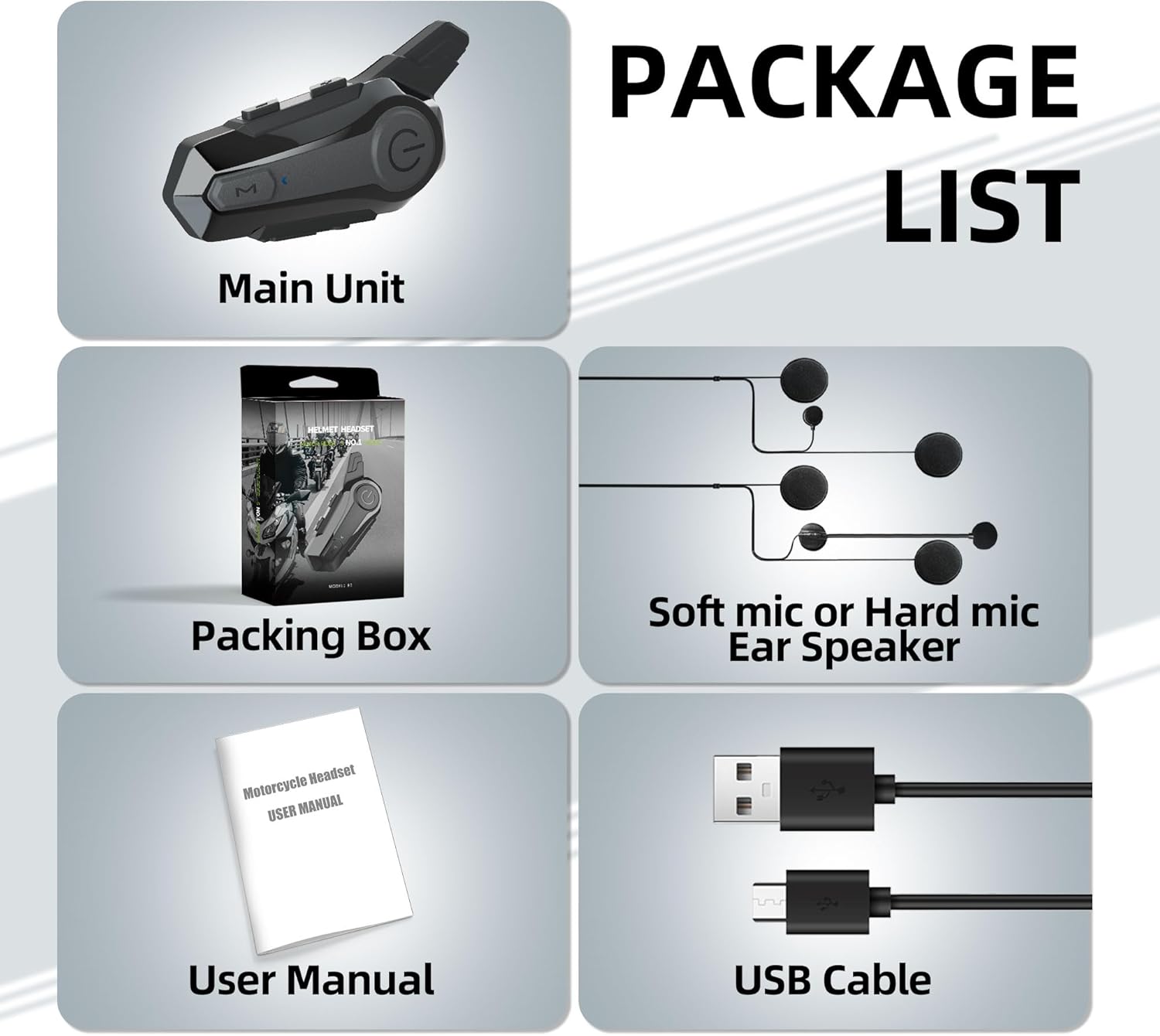
Image: Contents of the SOFFRIA E1 package, including the main unit, packing box, soft/hard microphone ear speakers, user manual, and USB cable.
- 1 x Main Unit (Bluetooth Headset)
- 1 x Packing Box
- 1 x Soft Microphone or Hard Microphone Ear Speaker Set
- 1 x User Manual
- 1 x USB Cable
- Mounting Accessories (Velcro pads, clips)
Specifications
Key technical specifications of the SOFFRIA E1 Bluetooth Headset:
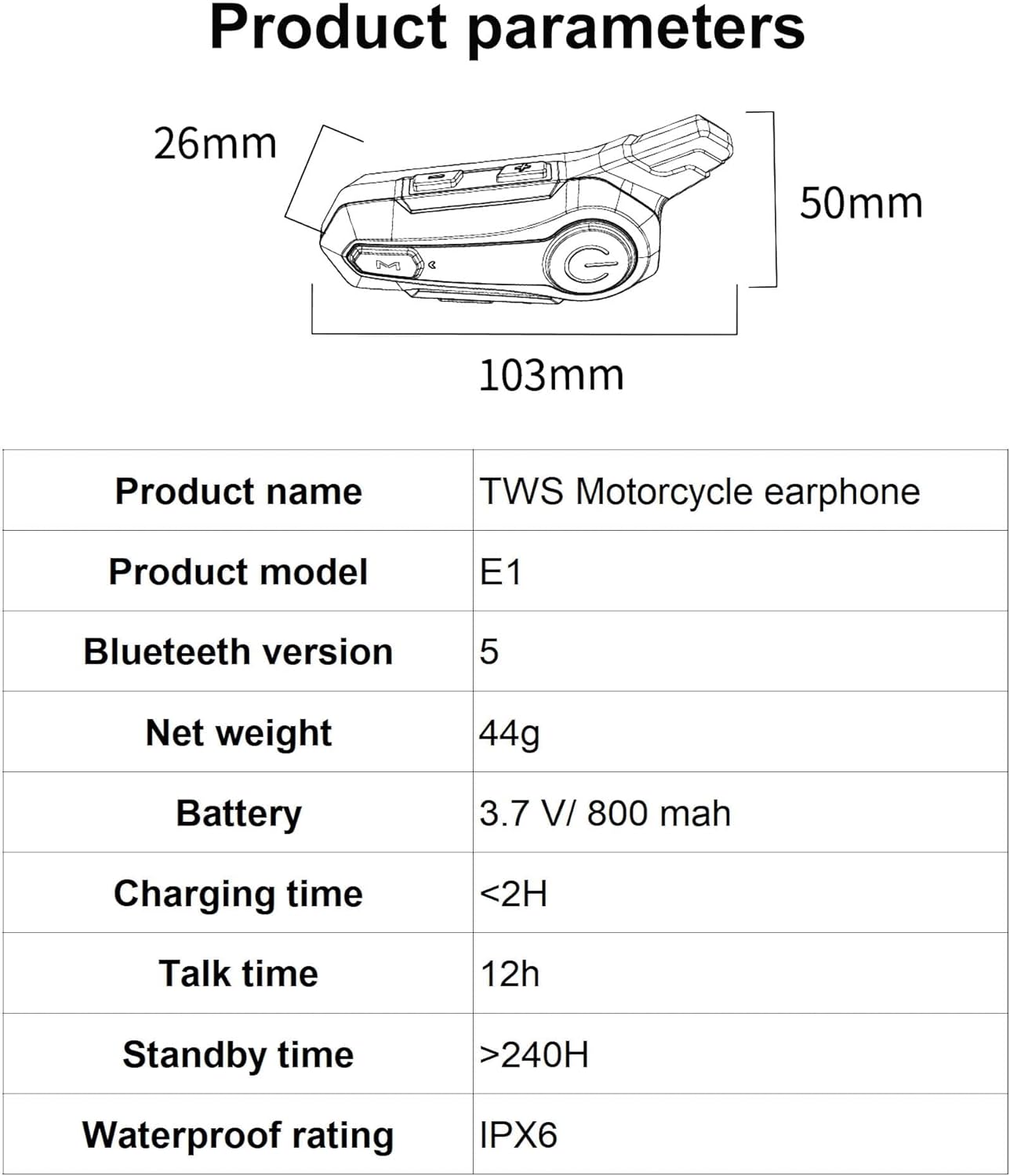
Image: Detailed product parameters including dimensions (103mm x 50mm x 26mm), Bluetooth version 5, net weight 44g, 3.7V/800mAh battery, charging time <2H, talk time 12h, standby time >240H, and IPX6 waterproof rating.
| Feature | Specification |
|---|---|
| Model Name | E1 |
| Brand | SOFFRIA |
| Connectivity Technology | Wireless (Bluetooth) |
| Bluetooth Version | 5.0 |
| Bluetooth Range | 30 Meters |
| Noise Control | Active Noise Cancellation (CVC) |
| Battery Capacity | 800mAh |
| Charging Time | 2 Hours |
| Battery Life (Music/Talk) | 12 Hours |
| Water Resistance Level | IPX6 Waterproof |
| Item Weight | 44 Grams (1.55 ounces) |
| Product Dimensions | 7.52 x 1.73 x 3.98 inches |
| Frequency Range | 20 Hz - 20,000 Hz |
Setup & Installation
Follow these steps to properly install the SOFFRIA E1 headset into your helmet:

Image: Visual guide for installing the headset, detailing the placement of speakers, routing of cables, attachment of the main unit to the helmet, and connecting the microphone.
- Speaker Placement: Attach the speakers to the Velcro on both sides of the helmet's ear areas. Ensure they are positioned comfortably and securely.
- Cable Routing: Pass the speaker cable through the top of the helmet lining, carefully arranging the lining to conceal the wires.
- Main Unit Base Attachment: Stick the adhesive base to the side of the helmet, choosing a flat and accessible surface.
- Main Unit Clamping: Clamp the main unit upwards onto the attached base and tighten it securely.
- Microphone Connection: After installation, connect the microphone cable to the main unit.
For optimal audio quality, ensure speakers are positioned directly over your ears and the microphone is close to your mouth.
Operating Instructions
This section covers the basic operations of your SOFFRIA E1 headset.
Power On/Off & Bluetooth Pairing
Video: Demonstrates powering on the headset, entering Bluetooth mode, pairing with a smartphone, and controlling music playback and calls.
- Power On: Long press the Power button for two seconds.
- Bluetooth Mode: Short press the Mode key to enter Bluetooth mode.
- Pairing: On your smartphone, open settings, go to Bluetooth, and search for "E1". Select "E1" to pair.
- Power Off: Long press the Power button until the device powers off.
Music Playback
- Play/Pause: Short press the Power button to play or pause music.
- Volume Up: Short press the Volume Plus (+) key to increase the volume.
- Volume Down: Short press the Volume Down (-) key to decrease the volume.
- Next Song: Long press the Volume Plus (+) key to switch to the next song.
- Previous Song: Long press the Volume Down (-) key to switch to the previous song.
Call Handling
- Answer Call: Short press the Power button to answer an incoming call.
- Hang Up: Short press the Power button to hang up an active call.
- Reject Call: Long press the Power button to reject an incoming call.
- Redial Last Number: Double press the Power button to redial the last dialed number.
Intercom Function
The E1 supports intercom communication for up to 2 riders with a maximum distance of 400M.
- Initiate Intercom: (Specific steps for initiating intercom are not detailed in the provided video/text, but generally involves a specific button press or sequence after pairing with another E1 unit.)
- End Intercom: (Specific steps for ending intercom are not detailed.)
Usage Tips

Image: Important usage tips regarding noise cancellation effectiveness, intercom range, and cross-brand compatibility.
- Noise Cancellation: Effective within 20 km/h. The advanced CVC noise cancellation technology helps reduce background noise for clearer communication.
- Intercom Range: Ideal range is 200m for optimal performance, though it can reach up to 400m. Environmental factors may affect the signal.
- Cross-Brand Connectivity: Our protocol may conflict with other brands. Linking products across different brands is not permitted for intercom functionality.
- Dual Device Connection: The headset supports connecting to two devices simultaneously, allowing for one-click switching without repeated pairing.
- Environmental Adaptation: The IPX6 waterproof rating ensures the headset can withstand various outdoor environments, including rain, scorching heat, freezing cold, and sandstorms.
Maintenance
- Cleaning: Use a soft, damp cloth to clean the headset. Do not use harsh chemicals or abrasive cleaners.
- Storage: Store the headset in a cool, dry place away from direct sunlight and extreme temperatures when not in use.
- Charging: Charge the device fully before first use and regularly to maintain battery health. Avoid overcharging.
- Water Exposure: While IPX6 waterproof, avoid prolonged submersion in water. Ensure the charging port cover is securely closed when exposed to moisture.
Troubleshooting
If you encounter any issues with your SOFFRIA E1 headset, please refer to the following common problems and solutions:
| Problem | Possible Solution |
|---|---|
| Device won't power on. | Ensure the battery is charged. Connect to a power source and try again. |
| Cannot pair with phone. | Make sure the headset is in Bluetooth pairing mode. Turn off and on Bluetooth on your phone. Clear previous pairings on both devices and try again. Ensure no other devices are connected. |
| No sound or low volume. | Check the volume levels on both the headset and your connected device. Ensure speakers are correctly connected and positioned. |
| Intercom not working. | Ensure both headsets are within range and properly paired for intercom. Verify that both units are SOFFRIA E1 models, as cross-brand compatibility is not guaranteed. |
| Poor audio quality / static. | Move closer to the connected device or other intercom unit. Reduce interference from other electronic devices. Check microphone placement for CVC noise cancellation effectiveness. |
Warranty & Support
SOFFRIA is committed to providing high-quality products and customer satisfaction. If you have any questions or require assistance with your E1 Motorcycle Bluetooth Headset, please do not hesitate to contact us.
For support, please reach out via our storefront by clicking "Ask a question". We will endeavor to provide prompt and helpful service.
Please retain your proof of purchase for any warranty claims.
Ask a question about this manual
Ask about setup, troubleshooting, compatibility, parts, safety, or missing instructions. Manuals+ will review the question and use this page’s manual context to help answer it.