
1. Product Overview
The Sangyn Big Button Landline Phone is designed for ease of use, particularly for seniors and individuals with visual or hearing impairments. It features large, easy-to-read buttons, picture speed dial capabilities, adjustable volume controls, and a dedicated SOS emergency button.
Key Features:
- Large Buttons: Enlarged keypad for improved visibility and tactile feedback.
- Picture Speed Dial: 9 customizable buttons for one-touch dialing with contact photos.
- Adjustable Ringer Volume: Multiple levels (Off/Low/High) to suit individual needs.
- Adjustable Handset Volume: Three levels (High/Medium/Low) for clear conversation.
- SOS Fast Dial: Dedicated emergency button for quick contact in urgent situations.
- Hands-Free Speaker: Integrated speakerphone function for convenient calls.
- Durable Construction: Made from high-quality ABS materials for longevity.

Image 1.1: Front view of the Sangyn Big Button Landline Phone, highlighting its large buttons and picture speed dial slots.
2. Package Contents
Please verify that all items listed below are included in your product package:
- Telephone Base
- Handset with Cord
- Telephone Line Cord
- User Manual (this document)

Image 2.1: Illustration of the items included in the Sangyn Big Button Phone package.
3. Setup
3.1 Connecting the Phone
- Connect one end of the coiled handset cord to the handset and the other end to the Handset Jack located on the side of the telephone base.
- Connect one end of the telephone line cord to the Phone Line Jack on the back of the telephone base.
- Connect the other end of the telephone line cord to your wall telephone jack.
3.2 Adjusting Ringer Volume
On the back of the phone, locate the RINGER switch. Slide the switch to your desired volume level: OFF (no ring), LO (low ring), or HI (high ring).
3.3 Adjusting Handset Volume
On the back of the phone, locate the HANDSET VOLUME switch. Slide the switch to your desired volume level during a call: LO (low), MED (medium), or HI (high).
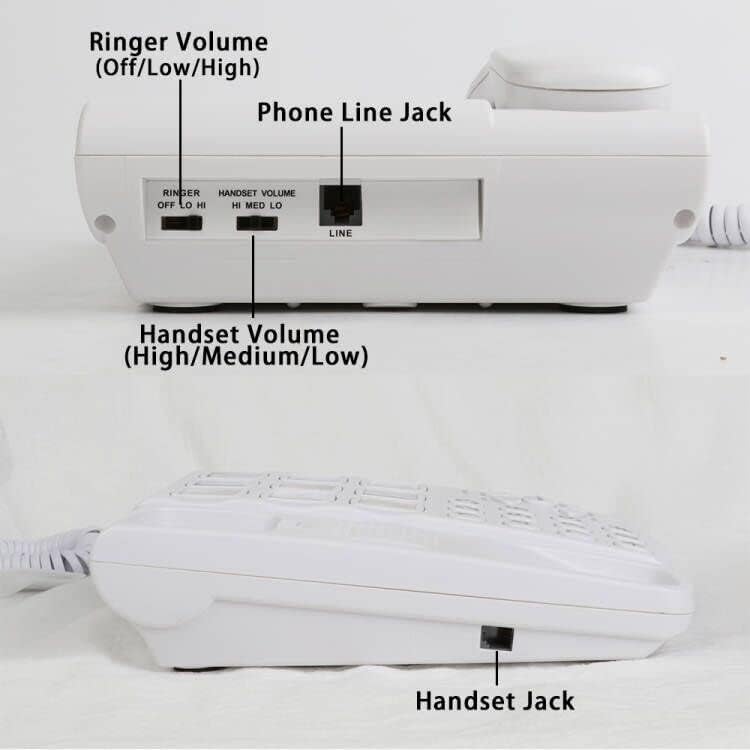
Image 3.1: Connection points and volume controls on the back and side of the phone.
4. Operating Instructions
4.1 Making a Call
- Pick up the handset or press the SPEAKER button to activate the speakerphone.
- Dial the desired phone number using the large numeric keypad.
- Wait for the call to connect.
- To end the call, replace the handset or press the SPEAKER button again if using speakerphone.
4.2 Programming Picture Speed Dial Buttons
The phone features 9 picture buttons for one-touch speed dialing. You can insert photos of your contacts under the clear plastic covers.
- Pick up the handset.
- Press the STORE button.
- Enter the phone number you wish to store using the numeric keypad.
- Press the STORE button again.
- Press one of the 9 picture buttons where you want to save this number.
- Replace the handset. The number is now stored.

Image 4.1: Step-by-step guide for programming the picture speed dial buttons.
4.3 Using Picture Speed Dial
- Pick up the handset or press the SPEAKER button.
- Press the desired picture button. The phone will automatically dial the stored number.
4.4 Using the SOS Button
The red SOS button is designed for emergency calls. To use it:
- Ensure an emergency contact number is programmed into the SOS button (follow programming steps for picture buttons, using the SOS button as the target).
- In an emergency, pick up the handset or press the SPEAKER button, then press the SOS button. The phone will automatically dial the pre-programmed emergency number.
4.5 Using the Speakerphone
To use the speakerphone function, press the SPEAKER button. The indicator light will illuminate. You can then dial or answer calls without lifting the handset. Press the SPEAKER button again to end the call or switch back to the handset.
4.6 Replacing Picture Inserts
To customize your speed dial buttons with photos:
- Gently lift the clear plastic cover on the desired picture button. A small screwdriver or thin object may assist.
- Insert your pre-cut photo into the slot.
- Replace the clear plastic cover, ensuring it snaps securely into place.

Image 4.2: Demonstrating how to replace the picture inserts on the speed dial buttons.
5. Maintenance
5.1 Cleaning
To clean your phone, use a soft, damp cloth. Avoid using harsh chemicals, abrasive cleaners, or excessive moisture, as these can damage the phone's surface and internal components.
5.2 Durability
The Sangyn Big Button Phone is constructed from high-quality ABS materials, designed for durability and resistance to impact. Handle the phone with care to ensure its long service life.
6. Troubleshooting
If you encounter issues with your Sangyn Big Button Phone, please refer to the following common problems and solutions:
| Problem | Possible Cause | Solution |
|---|---|---|
| No dial tone | Phone line not connected properly. | Ensure the telephone line cord is securely connected to both the phone and the wall jack. Test with another phone if possible. |
| Cannot hear caller / Caller cannot hear me | Handset volume too low; faulty connection. | Adjust the HANDSET VOLUME switch to a higher setting. Check handset cord connection. |
| Phone does not ring | Ringer volume set to OFF; phone line issue. | Adjust the RINGER switch to LO or HI. Verify phone line connection. |
| Speed dial buttons not working | Number not programmed correctly. | Re-program the speed dial button following the instructions in Section 4.2. |
| Dial tone comes on periodically when phone is on hook | Possible line interference or phone malfunction. | Ensure the handset is seated correctly. If the issue persists, contact customer support. |
7. Specifications
| Feature | Detail |
|---|---|
| Product Dimensions | 9 x 2.6 x 9 inches |
| Item Weight | 1.56 pounds |
| Brand | Sangyn |
| Color | White |
| Telephone Type | Corded |
| Material | Plastic (ABS) |
| Power Source | Corded Electric (No batteries required) |
| Dialer Type | Single Keypad |
| Compatible Devices | Landline Networks |

Image 7.1: Visual summary of product specifications.
8. Warranty and Support
For warranty information or technical assistance, please refer to the contact details provided with your purchase documentation or visit the official Sangyn website. Keep your purchase receipt as proof of purchase.