
LECPOP 8038
Instruction Manual
LECPOP 5-in-1 STEM Robot Toy Building Kit
Model: 8038 | Brand: LECPOP
Introduction
Thank you for choosing the LECPOP 5-in-1 STEM Robot Toy Building Kit. This versatile kit offers an engaging and educational experience, allowing children to build and control five different models: a bulldozer, robot, dump truck, all-terrain vehicle, and triceratops truck. Designed to foster critical thinking, problem-solving, and spatial awareness, this kit provides hours of screen-free entertainment through both remote control and mobile app functionalities, including STEM programming.
Product Overview
The LECPOP 5-in-1 STEM Robot Toy Building Kit allows for the construction of five distinct models from a single set of 452 pieces. Each model provides a unique building and play experience.

Figure 1: The complete LECPOP 5-in-1 STEM Robot Toy Building Kit, showcasing the five different models that can be constructed: Bulldozer, Robot, Dump Truck, All-Terrain Vehicle, and Triceratops Truck.

Figure 2: A visual guide to the five distinct models: (A) Bulldozer, (B) Dump Truck, (C) All-Terrain Vehicle, (D) Robot, and (E) Triceratops Truck.
Safety Information
This robot building kit is crafted from high-quality ABS material and rigorously tested to meet ASTM F963 and CPSIA safety standards, ensuring non-toxic, odorless play. Parents can rest assured of their child’s safety while they explore the wonders of robotics. Always supervise children during play, especially during assembly and operation of the models.
What's in the Box
- Building Blocks (452 PCS)
- Remote Control
- Rechargeable Lithium Ion Battery (1 included for the main unit)
- Instruction Manuals (2 books)

Figure 3: Key components included in the kit: building blocks, remote control, power box (housing the rechargeable battery), and two detailed instruction books.
Setup
- Battery Installation:
- For the main unit (Mini Crawler Motor Box): The kit includes one rechargeable Lithium Ion battery. Install it into the designated compartment as shown in the instruction manual. Ensure it is fully charged before first use.
- For the Remote Control: The remote control requires 2x AAA batteries (not included). Insert them into the battery compartment, observing correct polarity.
- App Download (Optional):
To utilize the advanced app control and programming features, download the official LECPOP app. Scan the QR code located on the product box to quickly access the download link for your device.

Figure 4: Locate the QR code on the product packaging to download the companion app.
- Pairing:
Follow the pairing instructions in the manual to connect the remote control or the mobile app via Bluetooth to your assembled model. Ensure both the model and the controller/device are powered on and within range.
Assembly Instructions
The kit comes with two comprehensive instruction manuals, providing clear, step-by-step visual guides for building each of the five models. The instructions are designed to be easy to follow, even for younger builders, often including multiple angles and 1:1 references for piece identification.

Figure 5: A child following the detailed instruction manuals to assemble one of the models.
Each manual covers specific models:
- Manual 1: Typically covers the Bulldozer and other initial models.
- Manual 2: Covers the Robot and other complex models.
Carefully identify the required pieces for each step and ensure they are securely connected. The modular design allows for easy disassembly and reassembly to create different models.
Operating Instructions
Your LECPOP STEM Robot Toy offers multiple control modes for dynamic play.
1. Remote Control Mode
Use the included physical remote control for direct operation. The remote features two joysticks, each controlling one track of the vehicle. This allows for precise movement, including forward, backward, and turning by moving the tracks independently.
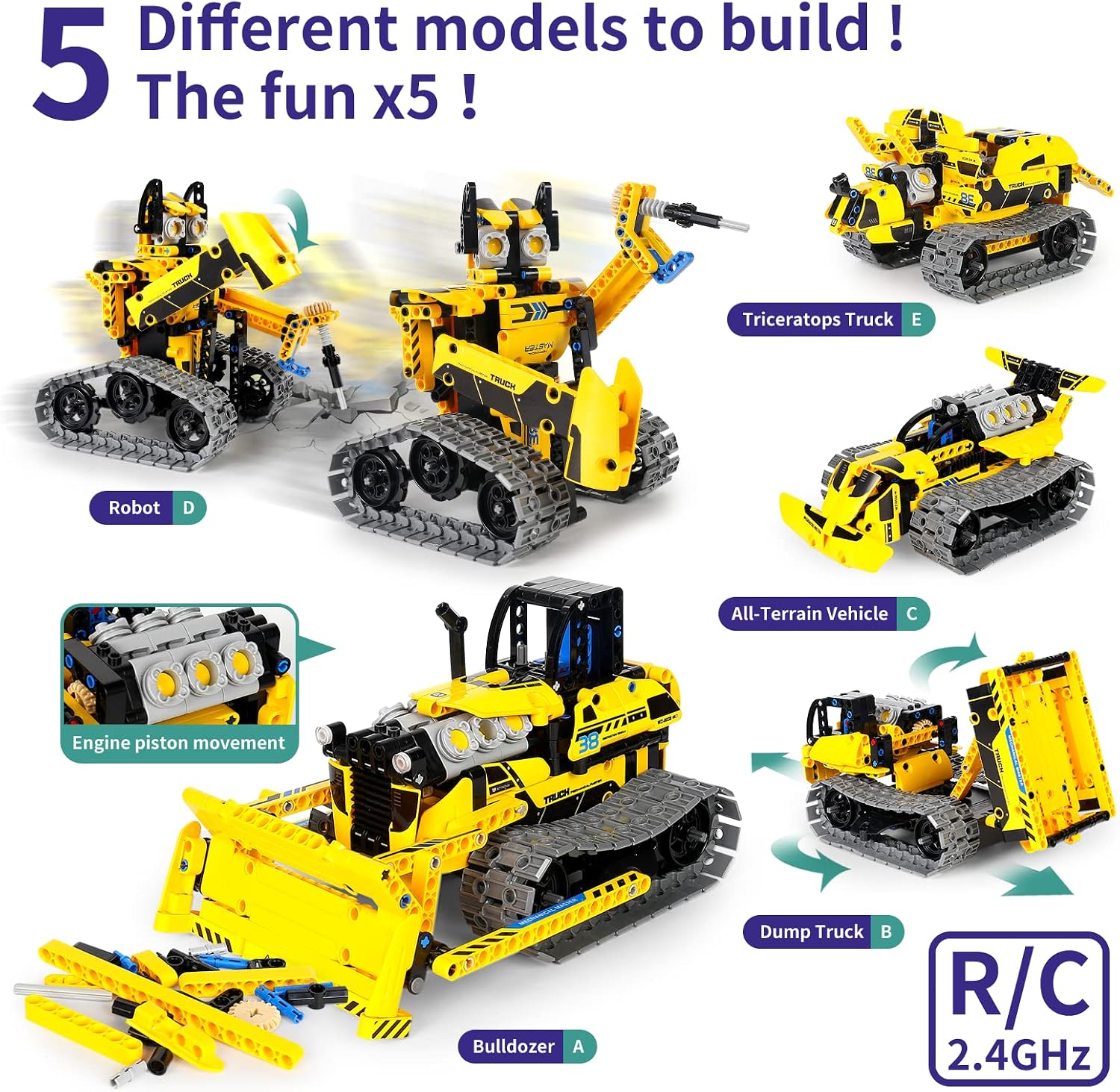
Figure 6: The remote control allows for direct manipulation of the model's tracks, enabling movement and steering.
2. Mobile App Control Modes
Connect your smartphone via Bluetooth to unlock advanced control and programming capabilities through the LECPOP app.
- Remote Control Mode: Control direction using on-screen buttons, similar to the physical remote.
- Gyro Mode: Control the model's movement by tilting your phone.
- Driving Simulation: Experience a virtual driving interface for controlling the model.
- Navigation Path Mode: Draw a path on your screen, and the model will follow it.
- Programming Mode: Program custom movements and actions using a visual block-based coding interface, fostering STEM learning.

Figure 7: The mobile app provides diverse control options, from direct remote control to advanced programming and path following.

Figure 8: The programming mode within the app allows users to create custom sequences of movements for the robot.
Special Feature: Moving Pistons
A notable mechanical feature of the models is the functional pistons, which move realistically as the tracks operate, adding to the immersive engineering experience.
Maintenance
- Cleaning: Use a soft, dry cloth to wipe down the models and remote control. Avoid using water or harsh chemicals.
- Battery Care: Ensure the rechargeable battery is fully charged before each play session for optimal performance. When storing for extended periods, charge the battery to about 50% and remove AAA batteries from the remote control to prevent leakage.
- Storage: Store the building blocks and assembled models in a cool, dry place away from direct sunlight to prevent material degradation.
- Component Check: Periodically check all connections and ensure no pieces are loose or damaged. Replace any broken parts if necessary.
Troubleshooting
| Problem | Possible Cause | Solution |
|---|---|---|
| Model does not move or respond. | Low battery in model or remote; Not paired; Loose connection. | Charge model battery; Replace remote batteries; Re-pair controller/app; Check all block connections. |
| App connection issues. | Bluetooth off; App not updated; Interference. | Ensure Bluetooth is enabled; Update app to latest version; Move closer to the model; Restart app/phone. |
| Parts are missing or broken. | Manufacturing defect; Wear and tear. | Contact LECPOP customer support for replacement parts. |
Specifications
- Product Dimensions: 12 x 9 x 2 inches
- Item Weight: 2.2 pounds
- Country of Origin: China
- ASIN: B09XMFFMGS
- Item Model Number: 8038
- Batteries: 1 Lithium Ion battery required (included for main unit), 2x AAA batteries required (not included for remote control)
- Number of Pieces: 452 PCS
- Control: 2.4GHz Remote Control & Bluetooth App Control
- Recommended Age: 6-14+ years
- Manufacturer: SHANTOU QIHUI TOYS INDUSTRIAL CO.,LTD
Warranty and Support
For any questions, concerns, or assistance with your LECPOP 5-in-1 STEM Robot Toy Building Kit, please contact LECPOP customer support. Refer to the contact information provided on the product packaging or visit the official LECPOP store on Amazon for further details and support resources.
Manufacturer: SHANTOU QIHUI TOYS INDUSTRIAL CO.,LTD
Amazon Store: Visit the LECPOP Store
Ask a question about this manual
Ask about setup, troubleshooting, compatibility, parts, safety, or missing instructions. Manuals+ will review the question and use this page’s manual context to help answer it.