
1. Introduction
Thank you for purchasing the Mikado MD-18BT Bluetooth Speaker. This manual provides essential information for the safe and efficient operation of your device. Please read these instructions carefully before use and retain them for future reference.
2. Product Features
- Bluetooth Connectivity: Wirelessly connect to your smartphone, tablet, or other Bluetooth-enabled devices.
- Multiple Playback Options: Supports USB drive and TF (Micro SD) card playback.
- Rechargeable Battery: Built-in battery for portable use.
- LED Light: Integrated LED lighting for enhanced ambiance.
- Durable Design: Features a shockproof construction.
- Compact and Portable: Easy to carry for on-the-go audio.
3. Package Contents
- Mikado MD-18BT Bluetooth Speaker (1 unit)
- USB Charging Cable (quantity may vary)
- User Manual
4. Component Identification

Figure 1: Top Controls
This image displays the top surface of the speaker, highlighting the main control buttons. From left to right, these typically include: Previous Track, Play/Pause, Next Track, and Power On/Off.

Figure 2: Front View with LED Light
This image shows the front of the speaker, featuring the integrated LED light strip that illuminates during operation. The speaker grille is visible, indicating the audio output area.
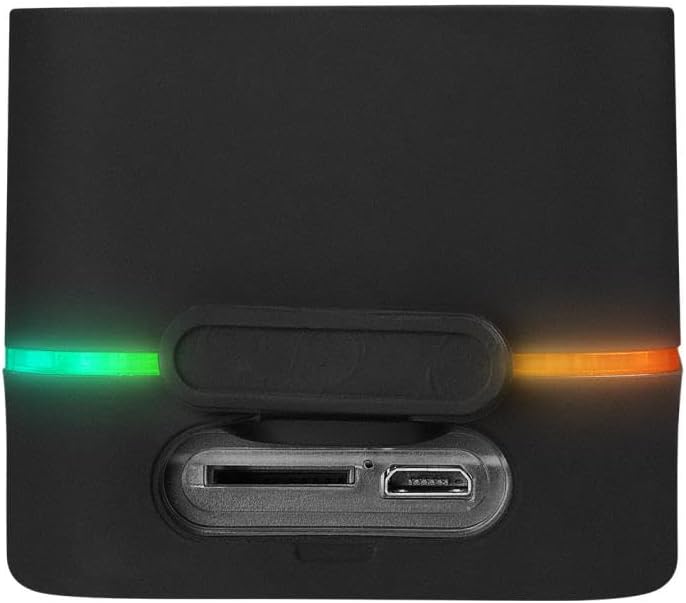
Figure 3: Rear Ports
This image illustrates the rear panel of the speaker, where the connectivity ports are located. These include the USB port for flash drives, the TF (Micro SD) card slot for memory cards, and the charging port (likely Micro USB).
5. Charging the Speaker
Before first use, fully charge the speaker. Use the provided USB charging cable to connect the speaker's charging port to a 5V DC USB power source (e.g., computer USB port, USB wall adapter).
- A charging indicator light (if present) will typically illuminate during charging and turn off or change color when fully charged.
- Charging time may vary.
6. Power On/Off
- To Power On: Press and hold the Power button (refer to Figure 1) for a few seconds until you hear an audible prompt or see the LED light activate.
- To Power Off: Press and hold the Power button again for a few seconds until the speaker powers down.
7. Bluetooth Connection
- Ensure the speaker is powered on and in Bluetooth pairing mode (it usually enters this mode automatically upon power-on if no other source is connected). The LED light may flash to indicate pairing mode.
- On your smartphone or tablet, enable Bluetooth and search for available devices.
- Select "MD-18BT" from the list of found devices.
- Once paired, the speaker will provide an audible confirmation, and the LED light may change its flashing pattern or become solid.
- You can now play audio from your device through the speaker.
8. USB/TF Card Playback
- USB Playback: Insert a USB flash drive containing MP3 audio files into the USB port (refer to Figure 3). The speaker should automatically switch to USB mode and begin playing.
- TF Card Playback: Insert a TF (Micro SD) card containing MP3 audio files into the TF card slot (refer to Figure 3). The speaker should automatically switch to TF card mode and begin playing.
- If the speaker does not switch automatically, you may need to briefly press the Power button or a dedicated Mode button (if available) to cycle through input modes.
9. Controlling Playback
Use the control buttons on the speaker (refer to Figure 1) to manage your audio playback:
- Play/Pause: Press the Play/Pause button once to pause playback, press again to resume.
- Next Track: Press the Next Track button once to skip to the next song.
- Previous Track: Press the Previous Track button once to go to the beginning of the current song or to the previous song.
- Volume Control: Volume is typically controlled by pressing and holding the Next/Previous track buttons, or via your connected device.
10. LED Light Operation
The integrated LED light (refer to Figure 2) provides visual feedback and ambiance. Its operation is usually linked to the speaker's power state or playback. Specific controls for the LED light (e.g., changing modes or turning off) may be integrated with the power button or a dedicated button if available. Consult the quick start guide for specific LED control functions.
11. Maintenance
- Cleaning: Use a soft, dry cloth to clean the speaker's exterior. Do not use abrasive cleaners or solvents.
- Storage: Store the speaker in a cool, dry place away from direct sunlight and extreme temperatures when not in use for extended periods.
- Battery Care: To prolong battery life, charge the speaker regularly, even if not used frequently. Avoid fully discharging the battery for long periods.
12. Troubleshooting
| Problem | Possible Cause | Solution |
|---|---|---|
| Speaker does not power on. | Battery is discharged. | Charge the speaker fully. |
| No sound. | Volume is too low or muted. Device not connected. | Increase volume on speaker and connected device. Ensure proper Bluetooth/USB/TF connection. |
| Bluetooth pairing fails. | Speaker not in pairing mode. Device too far. Interference. | Ensure speaker is in pairing mode. Move device closer. Turn off other Bluetooth devices. |
| USB/TF card not playing. | Incorrect file format. Card/drive not inserted correctly. | Ensure files are MP3 format. Reinsert card/drive. Try a different card/drive. |
13. Specifications
| Feature | Detail |
|---|---|
| Brand Name | Mikado |
| Model Number | MD-18BT (Manufacturer's Model: 550.50.50.0139) |
| Connectivity Technology | USB, Bluetooth |
| Audio Output Mode | Stereo |
| Mounting Type | Tabletop |
| Speaker Type | 3D |
| Special Features | Shockproof |
| Recommended Uses | For Smartphones or Tablets |
| Compatible Devices | Laptop, Smartphone |
| Number of Items | 1 |
| Control Method | Touch |
| Power Source | Battery Powered (5V DC Input) |
14. Safety Information
- Do not expose the speaker to extreme temperatures, direct sunlight, or high humidity.
- Avoid dropping or subjecting the speaker to strong impacts, despite its shockproof feature.
- Do not disassemble, repair, or modify the device yourself. This may void the warranty and pose safety risks.
- Keep out of reach of children.
- Use only the specified charging voltage (5V DC).
15. Warranty and Support
For warranty information and technical support, please refer to the documentation provided with your purchase or contact the Mikado customer service department. Keep your proof of purchase for warranty claims.