
1. Introduction
This manual provides detailed instructions for the installation, operation, and maintenance of your MACROM M-AN700 2-DIN 6.75-inch car stereo. This unit features the Android 10 operating system, offering a wide range of multimedia functionalities and smart connectivity options. Please read this manual thoroughly before using the product to ensure proper operation and to prevent damage.
2. Product Overview
The MACROM M-AN700 is a versatile 2-DIN car stereo designed to enhance your in-car entertainment and navigation experience. Its compact design, with a reduced depth of only 4 cm, allows for installation in various vehicle types.
Key Features:
- Android 10 Operating System
- 6.75-inch Capacitive Display (1024x600 resolution)
- Integrated Bluetooth for hands-free calls and A2DP music streaming
- Built-in GPS receiver for online navigation
- Wi-Fi and Hotspot functionality
- Pre-installed Netflix
- Smartphone mirroring via EasyConnection application
- Rear USB memory reader (2 ports)
- Multilingual system
- RGB lighting with 7 selectable GUI colors
- Customizable welcome logo
- Integrated resistive steering wheel controls
- Rear camera input and front camera input
- FM/AM tuner with RDS (DAB+ optional, M-AN.DAB sold separately)
- 4x45W Mosfet amplifier output
- 4 pre-amplified audio outputs, 1 pre-amplified subwoofer output
- 9-band graphic equalizer
- 1 audio/video input, 2 video outputs
Product Components:
The package includes the main unit, various wiring harnesses, and accessories for installation and connectivity.


3. Setup & Installation
Professional installation is recommended. Ensure the vehicle's power is disconnected before beginning installation. Refer to your vehicle's specific wiring diagram for accurate connections.
3.1 Wiring Connections
Connect the main power harness, speaker wires, and other accessory cables according to the provided wiring diagram. Ensure all connections are secure to prevent electrical issues.
3.2 Camera Connection
The unit supports both rear and front cameras. Connect the camera video output to the corresponding input on the stereo. Ensure the reverse trigger wire is connected to the vehicle's reverse light circuit for automatic camera activation.
3.3 GPS Antenna
Connect the GPS antenna to the dedicated port on the rear of the unit. Mount the antenna in a location with a clear view of the sky, typically on the dashboard or under the windshield, to ensure optimal signal reception.
4. Operating Instructions
4.1 Initial Power On
After installation, turn on the vehicle's ignition. The unit will boot up, displaying the customizable welcome logo. Follow any on-screen prompts for initial setup.
4.2 Bluetooth Pairing
To pair your smartphone:
- Go to the 'Phone' or 'Bluetooth' application on the car stereo.
- Enable Bluetooth on your smartphone and search for available devices.
- Select 'M-AN700' (or similar device name) from your phone's Bluetooth list.
- Confirm the pairing code on both devices.
Once paired, you can make hands-free calls and stream music (A2DP) from your phone.
4.3 Smartphone Mirroring (EasyConnection)
The unit supports smartphone mirroring via the EasyConnection app. Download and install the EasyConnection app on your smartphone. Connect your phone to the unit via USB. Follow the on-screen instructions to enable mirroring. This allows you to display your phone's screen on the car stereo's display.
4.4 Navigation
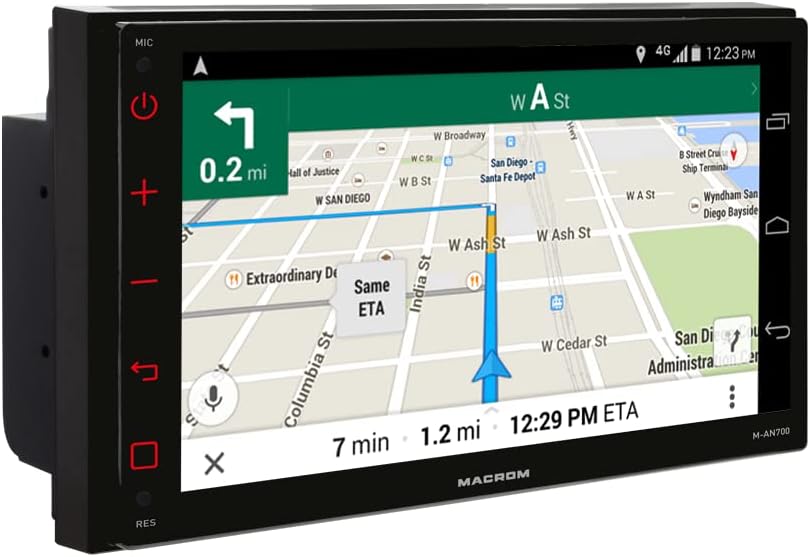
The built-in GPS receiver allows for online navigation. Ensure the unit is connected to Wi-Fi or a mobile hotspot for real-time map data and traffic updates. Offline navigation software (M-NV.AN19FEU or M-NV.AN19FEC camper version) can be purchased separately.
4.5 Multimedia Playback
The unit supports various audio and video formats from USB memory. Insert a USB drive into one of the two rear USB ports. Use the 'Music' or 'Video' application to browse and play your media files.
5. Maintenance
To ensure the longevity and optimal performance of your car stereo, follow these maintenance guidelines:
- Cleaning the Screen: Use a soft, lint-free cloth to gently wipe the display. Do not use abrasive cleaners or solvents, as they may damage the screen.
- General Cleaning: Keep the unit free from dust and debris. Use a soft brush or compressed air to clean vents and button areas.
- Software Updates: Periodically check for software updates to ensure the best performance and access to new features. Follow the instructions provided with the update.
- Avoid Extreme Temperatures: Do not expose the unit to extreme heat or cold, as this can affect its electronic components.
6. Troubleshooting
If you encounter issues with your MACROM M-AN700, refer to the following common problems and solutions:
| Problem | Possible Cause | Solution |
|---|---|---|
| Unit does not power on | Incorrect wiring, blown fuse, insufficient power supply. | Check power connections, inspect the fuse, ensure proper voltage from the vehicle's electrical system. |
| No sound output | Speaker wires disconnected, volume too low, mute activated, incorrect audio source. | Verify speaker connections, increase volume, check mute status, select the correct audio source. |
| Bluetooth not connecting | Bluetooth off on phone/unit, device not discoverable, incorrect pairing process. | Ensure Bluetooth is active on both devices, make the unit discoverable, re-attempt pairing. |
| GPS signal weak or lost | Antenna obstruction, poor antenna placement, environmental interference. | Relocate the GPS antenna to a clearer spot, ensure no obstructions, check antenna connection. |
| Smartphone mirroring not working | EasyConnection app not installed/updated, USB cable issue, phone settings. | Install/update EasyConnection, use a high-quality USB cable, check phone's USB debugging/mirroring settings. |
If the problem persists after trying these solutions, please contact customer support.
7. Specifications
| Feature | Specification |
|---|---|
| Brand | MACROM |
| Model | M-AN700 |
| Operating System | Android 10 |
| CPU | Quad Core ARM A7 4*1.2 GHz |
| RAM | 2 GB DDR3 |
| Flash Memory | 16 GB |
| Display Size | 6.75 inches |
| Display Type | Capacitive LCD |
| Screen Resolution | 1024x600 pixels |
| Amplifier Output | 4*45 W Mosfet |
| Audio Outputs | 4 pre-amplified, 1 subwoofer pre-amplified |
| Equalizer | 9-band graphic equalizer |
| Connectivity | Bluetooth, Wi-Fi, USB (2 rear ports) |
| Compatible Devices | Mobile phone |
| Media Type | SD (via USB reader), USB |
| Supported Music Formats | MP3, WMA, AAC, RM, FALC, etc. |
| Supported Video Formats | MPEG-1/2/4, H264, H263, VC1, RV, RMVB, DivX, Sorenson SparK, Spark, VP8, AVS |
| Supported Image Formats | JPG/BMP/JEPG/GIF/PNG |
8. Warranty & Support
Your MACROM M-AN700 car stereo comes with a manufacturer's warranty. Please refer to the warranty card included in your product packaging for specific terms and conditions. For technical support, troubleshooting assistance, or service inquiries, please contact your authorized MACROM dealer or visit the official MACROM website.