
1. Product Overview
The iBUYPOWER Pro Gaming PC SlateMR 281a is a high-performance desktop computer designed for gaming and demanding applications. It features an AMD Ryzen 5 5600G processor, Nvidia GeForce RTX 3060 12GB graphics card, 16GB DDR4 RAM, and a 500GB NVME SSD, running on Windows 11 Home. This manual provides essential information for setting up, operating, maintaining, and troubleshooting your new system.
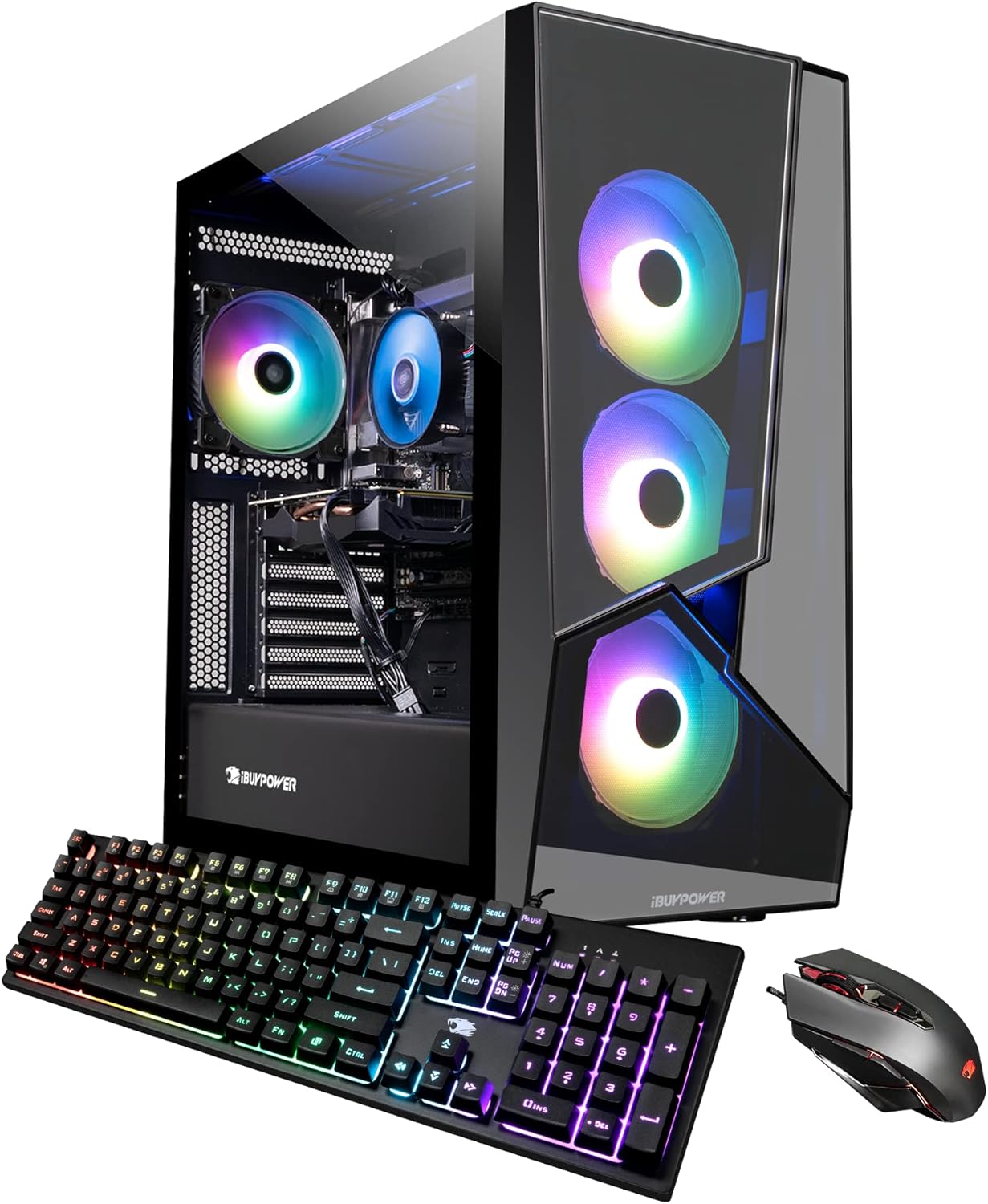
Image: Front view of the iBUYPOWER SlateMR 281a Gaming PC, showcasing its tempered glass side panel and three RGB fans on the front panel.
2. Setup Guide
2.1 Unboxing
Carefully remove the PC from its packaging. Ensure all accessories, including the power cord, iBUYPOWER USB keyboard, iBUYPOWER USB mouse, and Wi-Fi antenna, are present. Retain the original packaging for future transportation or service needs.
Video: Official iBUYPOWER Unboxing and Setup Guide. This video demonstrates the proper steps for unboxing your new iBUYPOWER PC, including removing packaging materials and identifying included accessories.
2.2 Internal Inspection and Foam Removal
Before powering on, remove the side panel to access the interior. Carefully remove any internal foam packaging designed to protect components during shipping. Ensure all cables and components are securely seated. Replace the side panel and secure it with screws.
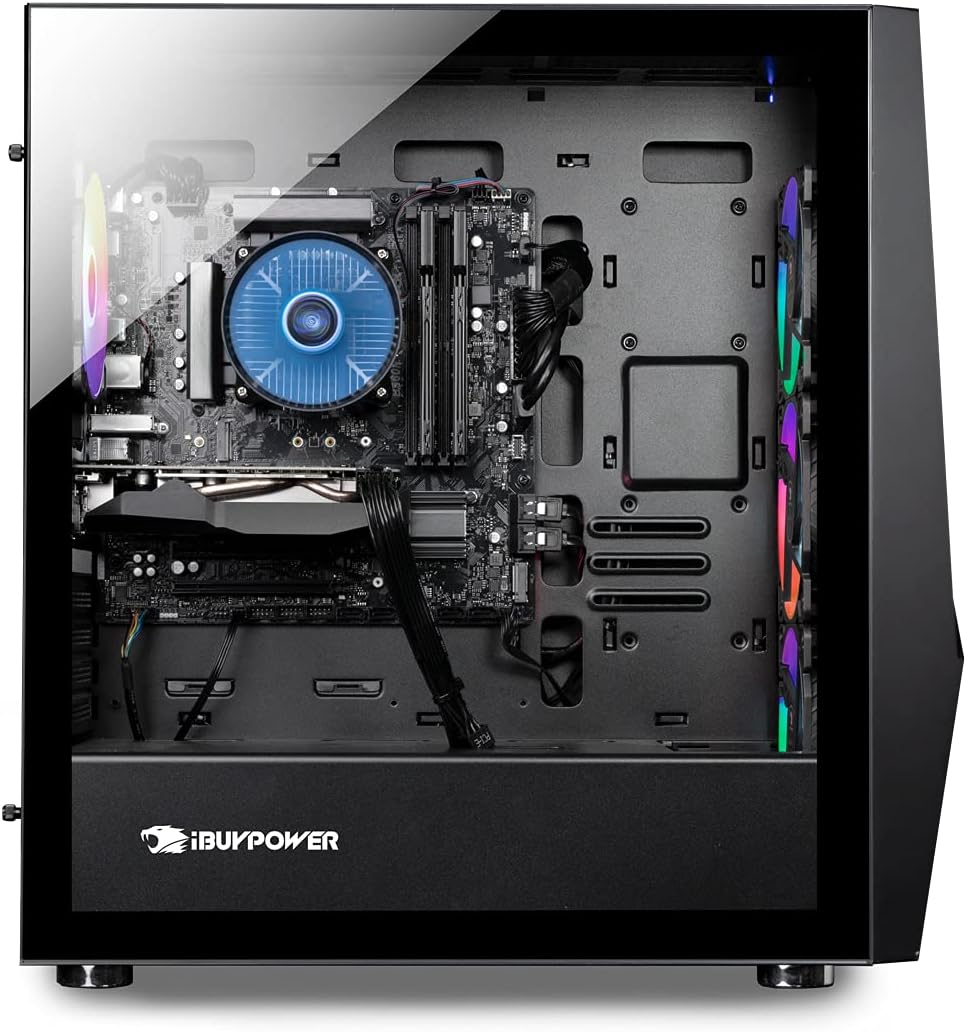
Image: Internal view of the iBUYPOWER SlateMR 281a PC, showing the motherboard, CPU cooler, RAM, and graphics card. Note the space for internal packaging foam.
2.3 Connecting Peripherals
- Monitor: Connect your monitor cable (HDMI or DisplayPort) directly to the graphics card ports located at the lower section of the PC's rear panel. Do not use the motherboard's video ports.
- Keyboard and Mouse: Plug the USB cables for the included iBUYPOWER keyboard and mouse into any available USB ports on the rear or top of the PC.
- Power: Connect the power cable to the power supply unit (PSU) at the rear of the PC and then to a wall outlet. Ensure the PSU switch is in the 'ON' position.
- Wi-Fi Antenna: Screw the included Wi-Fi antenna into the designated ports on the rear I/O panel for wireless connectivity.

Image: Rear view of the iBUYPOWER SlateMR 281a PC, highlighting the various connectivity ports including USB, Ethernet, audio jacks, and the graphics card's video outputs.
3. Operating Instructions
3.1 Power On
Press the power button located on the top of the PC case. The system will boot into Windows 11 Home. Follow the on-screen instructions for initial Windows setup if this is your first time powering on the PC.

Image: Top view of the iBUYPOWER SlateMR 281a PC, showing the power button, USB ports, and audio jacks for convenient access.
3.2 RGB Lighting Control
The PC features customizable RGB lighting for its fans and internal components. Specific software or physical buttons may be available to adjust lighting modes and colors. Refer to the included quick start guide or manufacturer's website for detailed instructions on RGB control.
Video: A short demonstration of the iBUYPOWER PC's RGB lighting, showcasing various color changes and effects within the case.
3.3 Gaming and Performance
The iBUYPOWER SlateMR 281a is equipped to handle modern games and applications with its AMD Ryzen 5 5600G processor and Nvidia GeForce RTX 3060 graphics card. For optimal gaming performance, ensure your graphics drivers are up to date. The system is designed for efficient cooling to maintain performance during extended use.
4. Maintenance
4.1 Cleaning
Regular cleaning is essential to maintain optimal performance and prevent overheating. Pay particular attention to dust accumulation in fan areas and air vents. To clean, power off the PC, unplug it, and use compressed air or a soft brush to gently remove dust from fans and internal components. For the front panel, which may have triangular holes, regular cleaning may be required to prevent dust and debris buildup.

Image: Side view of the iBUYPOWER SlateMR 281a PC, showing the side vents designed for optimal airflow. These areas should be kept clear of dust.
4.2 Internal Inspection
Periodically inspect internal connections and hardware to ensure everything remains secure. This can be done by carefully removing the side panel. If any components appear loose or disconnected, gently re-seat them. Always power off and unplug the PC before performing any internal inspections.
5. Troubleshooting
- No Display: Ensure your monitor cable is connected to the graphics card's output ports, not the motherboard's integrated video ports. Verify the monitor is powered on and set to the correct input source.
- Fan LEDs Not Lit: If the fan LEDs are not lit, check the internal connections. Sometimes, a simple re-connection of the header plug for power can resolve this.
- Overheating/Loud Fans: Ensure the PC's vents are not obstructed and that internal fans are clean. Consider adding additional intake/exhaust fans if persistent overheating occurs, as suggested by some users.
- Performance Issues: Update your graphics drivers and Windows operating system. Close unnecessary background applications.
6. Specifications
| Component | Specification |
|---|---|
| Brand | iBUYPOWER |
| Model | SlateMR 281a |
| Operating System | Windows 11 Home |
| CPU | AMD Ryzen 5 5600G (3.9 GHz, Max 4.4 GHz) |
| Graphics Card | Nvidia GeForce RTX 3060 12GB GDDR6 |
| RAM | 16GB DDR4 (3000 MHz), 4 slots available, Max 128GB |
| Storage | 500GB NVME SSD |
| Connectivity | 802.11AC Wi-Fi, 10/100/1000 Ethernet |
| Ports | 4 x USB 3.0, 2 x USB 2.0, 1 x HDMI, 3 x DisplayPort, HD Audio Jacks |
| Dimensions | 18.9 x 8.66 x 19.3 inches |
7. Warranty and Support
The iBUYPOWER Pro Gaming PC SlateMR 281a comes with a 1-Year Parts and Labor Warranty. Additionally, iBUYPOWER provides Free Lifetime US Tech Support. For any technical assistance or warranty claims, please refer to the contact information provided in your Quick Start Guide or visit the official iBUYPOWER website.


