
1. Introduction
The MalTec AirFryer2500W is designed to provide a healthy and efficient way to prepare a variety of meals. Utilizing rapid hot air circulation technology, it allows for frying, grilling, roasting, baking, and steaming with significantly less oil compared to traditional methods. This manual provides essential information for the safe and effective use of your new appliance.

The MalTec AirFryer2500W, a black digital hot air fryer, shown with the basket partially pulled out, revealing cooked shrimp and asparagus.
2. Safety Instructions
Please read all safety instructions carefully before operating the appliance to prevent injury or damage.
- Always place the appliance on a stable, level, and heat-resistant surface.
- Do not immerse the main unit, cord, or plug in water or any other liquid.
- Ensure the voltage indicated on the appliance corresponds to your local mains voltage before connecting.
- Keep the appliance and its cord out of reach of children.
- Do not block any air vents. Ensure adequate space around the appliance for proper ventilation.
- Unplug the appliance from the power outlet when not in use and before cleaning. Allow it to cool down completely before handling.
- Do not touch hot surfaces. Use oven mitts or the non-heating handle when removing the basket.
- This appliance is equipped with overheat protection. If it overheats, it will automatically shut off.
- Do not operate the appliance with a damaged cord or plug, or after the appliance malfunctions or has been damaged in any manner.
3. Product Overview
3.1 Components
- Main Unit
- Digital LED Display and Control Panel
- Frying Basket (with non-stick coating)
- Outer Pan (with non-stick coating)
- Non-heating Handle
3.2 Control Panel
The MalTec AirFryer2500W features an intuitive digital LED display with touch controls for easy operation.
A detailed view of the air fryer's digital LED display, showing temperature and time settings, along with touch controls for power, temperature, and timer adjustments.

An illustrative image highlighting the key functions of the control panel: the fan icon for hot air circulation, the power button, the digital display for temperature and time, and the plus/minus buttons for adjustments.
- Power Button: Turns the appliance on/off and starts/pauses cooking.
- Temperature Control (+/-): Adjusts the cooking temperature from 80°C to 200°C.
- Timer Control (+/-): Sets the cooking time up to 60 minutes.
- Preset Programs (M button): Cycles through 7 pre-programmed cooking settings.

The air fryer's control panel displaying icons for its seven preset cooking programs, including options for fries, meat, shrimp, cake, baked chicken, steak, and fish.
4. Setup
4.1 Unpacking and Initial Cleaning
- Remove all packaging materials and promotional labels.
- Wipe the exterior of the appliance with a damp cloth.
- Wash the frying basket and outer pan with hot water, mild dish soap, and a non-abrasive sponge. Rinse thoroughly and dry completely.
4.2 Placement
Place the air fryer on a stable, level, and heat-resistant surface, ensuring there is at least 10 cm of free space on the back and sides, and 10 cm above the appliance for proper air circulation.
4.3 First Use
It is recommended to run the air fryer empty for about 10 minutes at 180°C before first use to eliminate any manufacturing odors. A slight smell or smoke may occur, which is normal and will dissipate.
5. Operating Instructions
5.1 Basic Operation
- Plug the power cord into a grounded wall outlet. The display will light up briefly.
- Pull the outer pan out of the appliance using the handle. Place the food into the frying basket. Do not overfill the basket.
- Slide the outer pan back into the appliance until it clicks into place.
- Press the Power button to turn on the display.
- Use the Temperature (+/-) buttons to set the desired cooking temperature (80°C - 200°C).
- Use the Timer (+/-) buttons to set the desired cooking time (1 - 60 minutes).
- Press the Power button again to start the cooking process. The fan icon will illuminate.
- During cooking, you can pull out the pan to check or shake the food. The appliance will pause automatically and resume when the pan is reinserted.
- Once the timer reaches zero, the appliance will beep, indicating cooking is complete.

The MalTec AirFryer2500W positioned on a kitchen counter, surrounded by plates of cooked food such as chicken, salmon, a burger, and fries, demonstrating its versatility.
5.2 Using Preset Programs
The appliance comes with 7 preset programs for common dishes:
- Fries
- Meat
- Shrimp
- Cake
- Baked Chicken
- Steak
- Fish
To use a preset program:
- Prepare the food and place it in the basket.
- Press the Power button to activate the display.
- Press the 'M' (Mode) button repeatedly to cycle through the preset icons until you reach the desired program. The display will show the default temperature and time for that program.
- You can adjust the temperature and time manually if needed using the (+/-) buttons.
- Press the Power button to start cooking.
5.3 Shaking Food
For certain foods, especially smaller items like fries or nuggets, shaking the basket halfway through the cooking time ensures even browning and crispiness. To do this, carefully pull out the pan, shake the basket, and then slide it back into the air fryer.

A series of close-up images demonstrating how to safely detach the frying basket from the outer pan using the handle's release button.
6. Cleaning and Maintenance
Regular cleaning ensures optimal performance and extends the lifespan of your air fryer.
- Always unplug the appliance and allow it to cool down completely before cleaning.
- The frying basket and outer pan are dishwasher safe. Alternatively, wash them with hot water, mild dish soap, and a non-abrasive sponge.
- Wipe the exterior of the appliance with a damp cloth. Do not use abrasive cleaners or scouring pads.
- Clean the heating element with a cleaning brush to remove any food residue.
- Ensure all parts are completely dry before storing the appliance.
7. Troubleshooting
| Problem | Possible Cause | Solution |
|---|---|---|
| Appliance does not turn on. | Not plugged in; power outlet issue. | Ensure the power cord is securely plugged into a working outlet. |
| Food not cooked evenly. | Basket overloaded; food not shaken. | Do not overload the basket. Shake the basket halfway through cooking. |
| White smoke coming from appliance. | Grease residue from previous use; fatty food being cooked. | Clean the basket and pan thoroughly. For fatty foods, absorb excess oil before cooking. |
| Food not crispy. | Too much moisture; insufficient oil (for some recipes). | Pat food dry before cooking. Lightly brush or spray with oil for extra crispiness. |
8. Specifications
| Feature | Specification |
|---|---|
| Brand | MalTec |
| Model | AirFryer2500W |
| Type | Hot Air Fryer |
| Power | 1400 W |
| Temperature Range | 80°C - 200°C |
| Maximum Timer | 60 minutes |
| Basket Capacity | 3.2 Liters |
| Pan Capacity | 4.3 Liters |
| Control Panel | LCD display with Touchscreen |
| Voltage | 220-240 V |
| Frequency | 50 Hz |
| Cable Length | 75 cm |
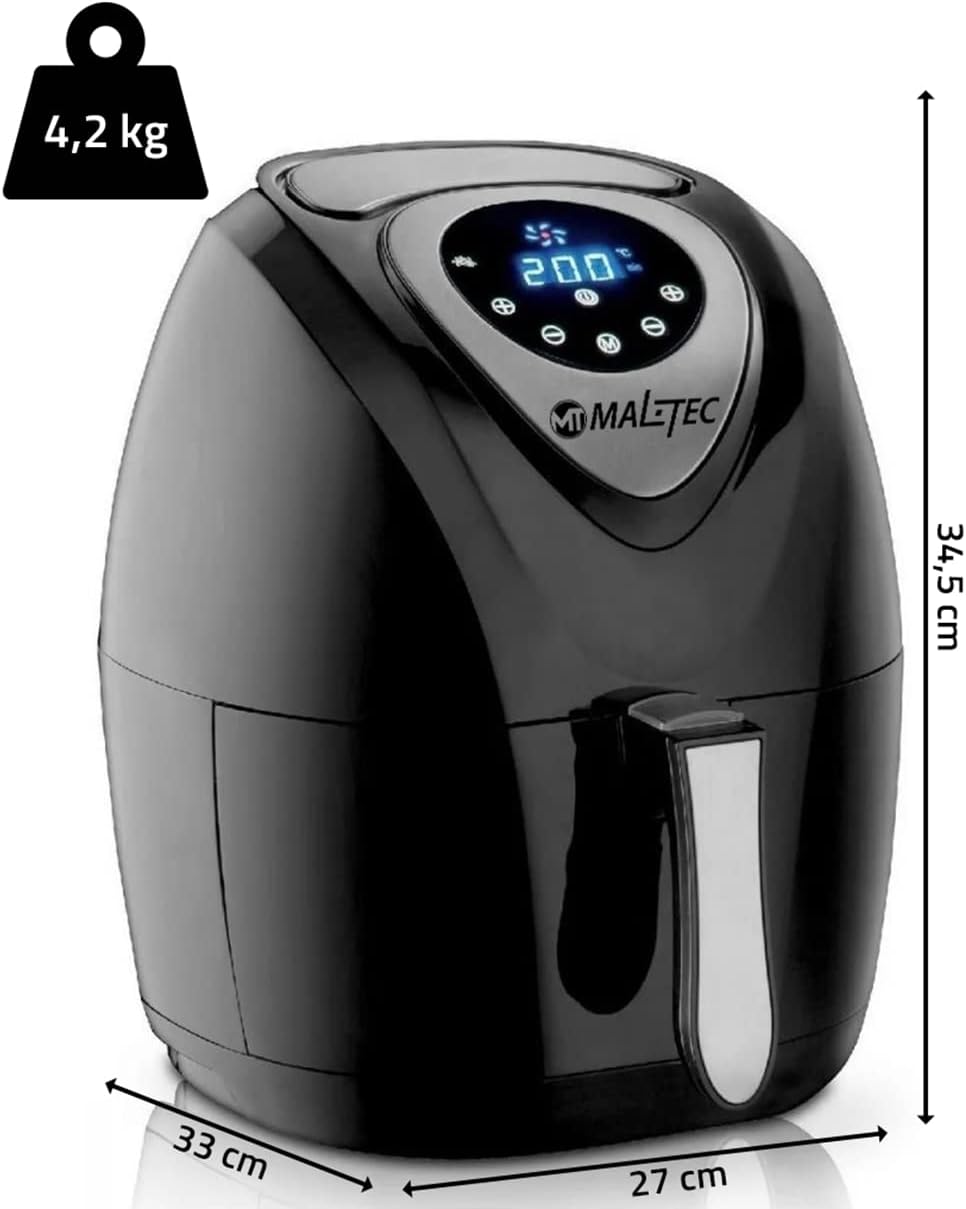
| Product Dimensions (L x W x H) | 33 x 27 x 34.5 cm |
| Weight | 4.2 kg |
| Special Features | Overheat protection, Non-heating handle, Non-stick coating, Anti-slip feet, Sound signal for end of cooking. |

A diagram illustrating the physical dimensions of the MalTec AirFryer2500W, showing its height (34.5 cm), width (27 cm), and depth (33 cm), along with its weight (4.2 kg).
9. Warranty and Support
Your MalTec AirFryer2500W is covered by a manufacturer's warranty. Please refer to the warranty card included with your purchase for specific terms and conditions. For technical support, service, or questions regarding your product, please contact the retailer or manufacturer's customer service department.