
1. Product Overview
This manual provides detailed instructions for the assembly, operation, and maintenance of your VASAGLE File Cabinet, model UOFC048T41. This 2-drawer filing cabinet is designed for home office use, accommodating A4 and letter-size hanging file folders, and can also function as a printer stand.

Image: VASAGLE File Cabinet UOFC048T41, a honey brown 2-drawer file cabinet with barn door style fronts and black metal accents, suitable for home office environments.
2. Safety Information
Please read and understand all safety instructions before assembly and use. Failure to follow these instructions may result in injury or damage to the product.
- Anti-Tip Kit: Always secure the filing cabinet to the wall using the included anti-tip kit to prevent tip-over and potential injury. This is crucial for stability, especially in households with children or pets.
- Weight Limit: Do not exceed the maximum static load capacity of 110 lb (50 kg) for the entire unit. The top surface has a specific weight limit for items like printers.
- Assembly: Assemble the product on a soft, clean surface to prevent scratches. Ensure all parts are correctly installed and fasteners are tightened before use.
- Placement: Place the cabinet on a level surface to ensure stability.
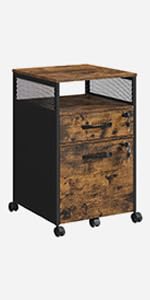
Image: Illustration of the anti-tip kit installation, showing a bracket secured to the wall and floor for stability.
3. Package Contents
Before beginning assembly, verify that all components listed below are present and undamaged.
- 1 x File Cabinet (disassembled components)
- 1 x Assembly Kit (hardware, tools if included)
- 1 x Anti-Tip Kit
- 1 x Instructions Manual (this document)
4. Product Specifications
| Brand | VASAGLE |
| Model Name | File Cabinet |
| Model Number | UOFC048T41 |
| Color | Honey Brown |
| Material | Particleboard, Engineered Wood |
| Product Dimensions (D x W x H) | 15.7" x 17.7" x 27" (40 x 45 x 68.5 cm) |
| Item Weight | 40.6 lb (18.4 kg) |
| Overall Max. Static Load Capacity | 110 lb (50 kg) |
| Number of Drawers | 2 |
| File Folder Compatibility | A4, Letter Size |
| Assembly Required | Yes |

Image: Dimensional diagram of the file cabinet, illustrating its overall size and the internal dimensions of the drawers, along with the maximum weight capacity.
5. Assembly Instructions
Follow these steps carefully to assemble your VASAGLE File Cabinet. It is recommended to have two people for assembly.
5.1 Preparation
- Clear a spacious area for assembly.
- Lay out all parts on a soft, clean surface (e.g., carpet or cardboard) to prevent scratches.
- Identify all components using the provided parts list and diagrams.
- Ensure you have the necessary tools (a screwdriver is usually included in the assembly kit).

Image: Exploded diagram of the cabinet components with labels, alongside a depiction of the instruction manual, highlighting the ease of assembly with labeled parts and clear instructions.
5.2 Step-by-Step Assembly
- Assemble the Frame: Connect the side panels (D, E) to the top (A) and bottom (C) panels using the designated hardware. Ensure all connections are secure.
- Install Back Panel: Attach the back panel (I) to the assembled frame.
- Assemble Drawers: Construct each drawer by connecting the front (J), back (L), side (K, N), and bottom (M) panels.
- Install Drawer Slides: Attach the drawer slides to both the cabinet frame and the assembled drawers. Ensure they are aligned correctly for smooth operation.
- Insert Drawers: Carefully slide the assembled drawers into the cabinet frame.
- Attach Handles: Secure the handles to the front of each drawer.
- Install Anti-Tip Kit: Following the instructions provided with the anti-tip kit, secure the cabinet to a wall. This step is critical for safety.

Image: Detail of the adjustable hanging rail mechanism, demonstrating how to switch between A4 and Letter size file configurations within the drawer.
6. Operation
6.1 Using the Drawers
- Opening/Closing: The drawers are equipped with smooth, quiet slides for easy access. Pull or push the handles gently.
- File Organization: Each drawer features an adjustable hanging rail to accommodate both A4 and letter-size hanging file folders. Adjust the rail position as needed for your file type.
- Weight Distribution: Distribute the weight evenly within the drawers to maintain stability and prevent strain on the slides.

Image: View of the cabinet with both drawers open, showcasing ample storage for hanging files and other office items.
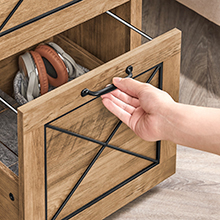
Image: A hand demonstrating the smooth and quiet operation of the drawer slides.
6.2 Using as a Printer Stand
The sturdy top surface of the cabinet can support a printer or other office equipment, provided the total weight does not exceed the specified load capacity.

Image: The file cabinet functioning as a printer stand in an office environment.
7. Maintenance
- Cleaning: Wipe surfaces with a soft, damp cloth. Avoid harsh chemicals or abrasive cleaners that could damage the finish.
- Hardware: Periodically check all screws and fasteners to ensure they remain tight. Retighten if necessary.
- Drawer Slides: If drawers become stiff, a small amount of silicone-based lubricant can be applied to the slides.
- Avoid Moisture: Protect the cabinet from excessive moisture and direct sunlight to prevent warping or fading.

Image: Detail showing the thickened, scratch-resistant surface of the cabinet, indicating durability.
8. Troubleshooting
| Problem | Possible Cause | Solution |
|---|---|---|
| Cabinet is wobbly/unstable. | Uneven floor; loose fasteners; anti-tip kit not installed. | Ensure cabinet is on a level surface. Retighten all assembly screws. Install the anti-tip kit as per instructions. |
| Drawers do not slide smoothly. | Misaligned drawer slides; debris in slides; loose hardware. | Check alignment of drawer slides and re-adjust if necessary. Clean any debris from the slides. Apply a silicone-based lubricant. Ensure all drawer hardware is tight. |
| Drawers do not close completely. | Obstruction inside drawer or cabinet; misaligned slides. | Remove any items obstructing the drawer. Check and adjust drawer slide alignment. |
9. Warranty and Support
For warranty information, replacement parts, or further assistance, please contact VASAGLE customer service. Refer to your purchase documentation for specific contact details or visit the official VASAGLE website.
Online Resources:


