1. Introduction
Thank you for choosing the Generic KU2 Smart Watch. This device is designed to enhance your daily life with its advanced features, including health monitoring, activity tracking, and smart notifications. This manual provides essential information for setting up, operating, and maintaining your smart watch.
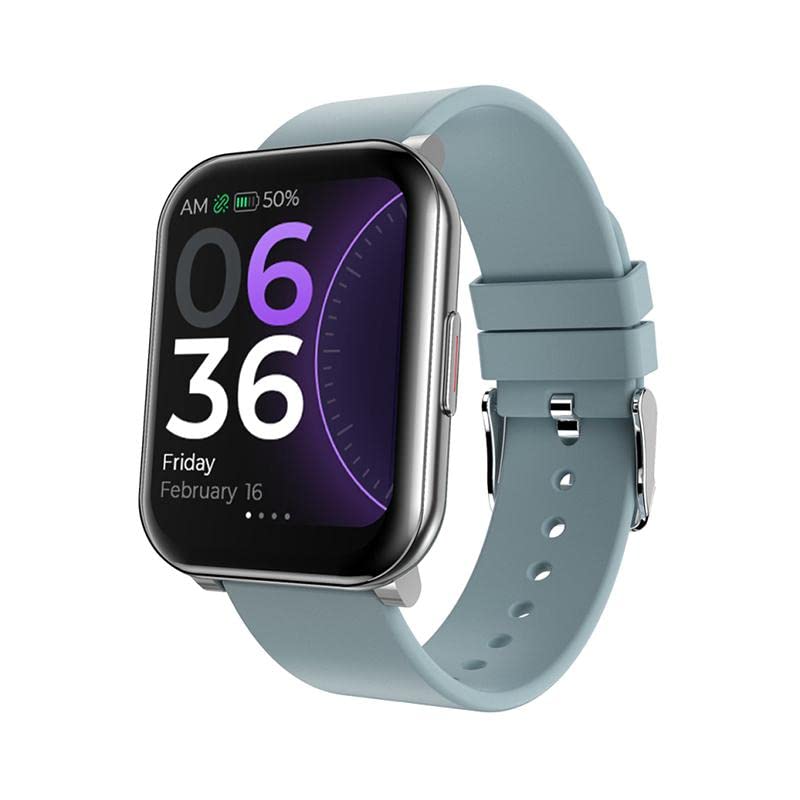
Image: Front view of the KU2 Smart Watch, showing the digital time (06:36), date (Friday, February 16), battery level, and heart rate icon.
2. Setup
2.1. Charging the Device
Before first use, fully charge your KU2 Smart Watch. Connect the provided magnetic charging cable to the charging points on the back of the watch and to a standard USB power adapter (not included). The watch will display a charging indicator. A full charge typically takes approximately 2 to 3 hours.
2.2. App Installation
To unlock the full functionality of your smart watch, download and install the Da Fit application on your smartphone. The app is compatible with Android 4.4 or higher and iOS 9.0 or higher. Search for "Da Fit" in your smartphone's app store.
2.3. Pairing with Your Smartphone
- Ensure your smartphone's Bluetooth is enabled.
- Open the Da Fit app on your smartphone.
- Follow the in-app instructions to search for and connect to your KU2 Smart Watch. The watch uses Bluetooth 5.0 for a stable connection.
- Once connected, the watch's time and date will synchronize with your phone, and you can customize settings and view data through the app.
3. Operating Instructions
3.1. Basic Navigation
The KU2 Smart Watch features a 1.7-inch full-touch TFT display. Swipe left, right, up, or down to navigate through menus and functions. Tap to select an option or confirm an action.
3.2. Health Monitoring

Image: Three KU2 Smart Watches showing different health monitoring screens: heart rate (bpm), blood pressure, and blood oxygen levels.
- Heart Rate Monitor: The watch provides 24/7 continuous heart rate monitoring using its VC31/VC11 HR sensor. Access this feature from the main menu to view your current heart rate and historical data in the app.
- Blood Oxygen (SpO2) Monitor: Measure your blood oxygen saturation levels. Follow the on-screen instructions for accurate readings.
- Blood Pressure Monitor: Monitor your blood pressure. Ensure the watch is worn correctly for best results.
- Sleep Monitor: The watch automatically tracks your sleep patterns, including deep sleep, light sleep, and wake times. View detailed analysis in the Da Fit app.
3.3. Activity Tracking

Image: The KU2 Smart Watch showing different sports modes, including outdoor running, cycling, and swimming, along with activity data for football, running, and swimming.
- Daily Activity: The watch records your daily steps, distance traveled, and calories burned. This data is synchronized with the Da Fit app.
- Multi-Sport Modes: Choose from 23 different sport modes, such as outdoor running, cycling, swimming, and football, to track specific workout data.
3.4. Smart Features

Image: A collage of images demonstrating various features of the KU2 Smart Watch, including stopwatch, weather display, remote camera control, alarm, music playback control, and countdown timer.
- Notifications: Receive call, message, and app notifications directly on your watch when connected to your smartphone. The watch will vibrate to alert you.
- Sedentary Reminder: Get alerts when you've been inactive for too long, encouraging you to move.
- Alarm Clock: Set alarms through the Da Fit app, and your watch will vibrate to wake you or remind you.
- Stopwatch & Countdown: Utilize the built-in stopwatch and countdown timer for various activities.
- Music Control: Control music playback on your smartphone directly from your watch (play, pause, skip tracks).
- Remote Camera Control: Use your watch as a remote shutter button for your smartphone's camera.
- Weather: View current weather information on your watch (requires app connection and location permissions).
4. Maintenance
4.1. Water Resistance
The KU2 Smart Watch has an IP67 water resistance rating. This means it is protected against dust and can withstand immersion in water up to 1 meter for up to 30 minutes. It is suitable for daily use, such as hand washing, rain, and shallow swimming. However, it is not recommended for hot showers, saunas, diving, or high-pressure water activities, as steam and high water pressure can compromise the seals.
4.2. Cleaning
Wipe the watch and strap regularly with a soft, damp cloth. Avoid using harsh chemicals or abrasive materials, which can damage the device. Ensure the charging contacts are clean and dry before charging.
4.3. Battery Care
To prolong battery life, avoid fully discharging the watch frequently. Charge it when the battery level is low. Store the watch in a cool, dry place away from extreme temperatures.
5. Troubleshooting
- Watch not turning on: Ensure the watch is fully charged. Connect it to the charger and wait a few minutes before attempting to turn it on again.
- Unable to pair with smartphone:
- Ensure Bluetooth is enabled on your smartphone.
- Make sure the watch is within range of your smartphone.
- Restart both your watch and smartphone.
- Check if the Da Fit app is updated to the latest version.
- If previously paired, try unpairing the device from your phone's Bluetooth settings and then re-pairing through the Da Fit app.
- Inaccurate health data: Ensure the watch is worn snugly on your wrist, about one finger's width above the wrist bone. Avoid excessive movement during measurements. Note that the watch is not a medical device and readings are for reference only.
- Notifications not received:
- Verify that the watch is connected to the Da Fit app.
- Check notification settings within the Da Fit app and your smartphone's system settings to ensure permissions are granted.
- Ensure your phone is not in 'Do Not Disturb' mode.
6. Specifications
| Model | KU2 |
| Body Material | Alloy |
| Strap Material | Silicone (Replaceable) |
| Display Type | 1.7-inch TFT Full Touch Screen |
| Resolution | 240 x 280 pixels |
| Chipset | RK8762C |
| Memory | 64MB |
| HR Sensor | VC31 / VC11 |
| Connectivity | Bluetooth 5.0 |
| Compatible OS | Android 4.4+ / iOS 9.0+ |
| Water Resistance | IP67 |
| Battery Capacity | 200 mAh Polymer Lithium |
| Usage Time | 5-7 days (typical) |
| Standby Time | Up to 30 days |
| Charging Time | Approx. 2-3 hours |
| Charging Type | Magnetic |
| App Name | Da Fit |
| Watch Languages | English, Arabic, Czech, Spanish, French, Italian, Japanese, Korean, Portuguese, Russian, Thai, Simplified Chinese |
7. Warranty and Support
7.1. Package Contents
The package includes:
- 1 x KU2 Smart Watch
- 1 x Magnetic Charging Cable
- 1 x User Manual
7.2. Warranty Information
Specific warranty details are not provided in this manual. Please refer to the warranty card included with your purchase or contact your retailer or the manufacturer for information regarding warranty coverage and terms.
7.3. Customer Support
For further assistance or technical support, please contact the customer service department of your retailer or the manufacturer. Contact information can typically be found on the product packaging or the retailer's website.
