
1. Product Overview
The Fugetek FT-557-B is a versatile selfie stick featuring a patented 4-leg quadrapod design for enhanced stability. It includes an integrated light and a detachable Bluetooth remote control, making it suitable for various photography and videography needs.
- Quadrapod Design: Features a patented 4-leg base for superior stability compared to standard 3-leg selfie sticks.
- Integrated Light: An onboard light is located at the end of the selfie stick. It offers 3 color modes and 12 bright LEDs, rechargeable via USB cable.
- Detachable Bluetooth Remote: Equipped with a modern chip for easy pairing with iPhone and Android devices. The remote can be detached for flexible photo capture.
- Multi-Angle Rotation: Allows for 270° neck rotation and 360° phone holder rotation, enabling both horizontal and vertical camera modes.

Image 1.1: The Fugetek FT-557-B Selfie Stick Quadrapod in its extended form with a smartphone, showcasing its 4-leg stability.
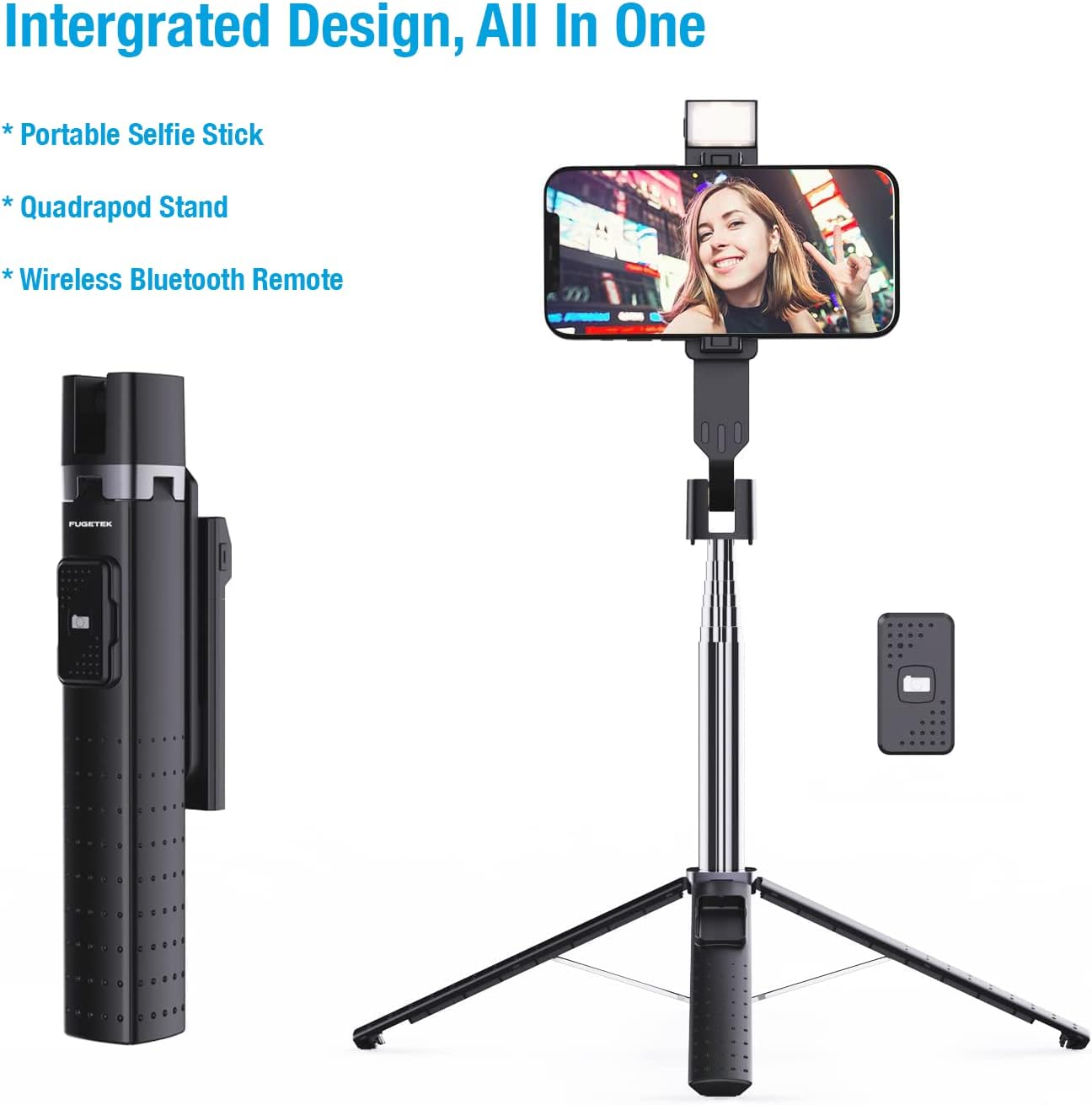
Image 1.2: Integrated design of the Fugetek FT-557-B, highlighting its components: portable selfie stick, quadrapod stand, and wireless Bluetooth remote.
2. Setup
2.1 Charging the Onboard Light
- Locate the USB charging port on the side of the onboard light.
- Connect the provided USB cable to the charging port and a suitable USB power source (e.g., computer, wall adapter).
- The light will indicate charging status (e.g., an indicator light will turn on/off). Charge until fully powered.
2.2 Bluetooth Remote Pairing

Image 2.1: The wireless Bluetooth remote control, illustrating its connectivity.
- Ensure the remote control has power. If it uses a replaceable battery, ensure it is correctly inserted.
- Turn on the remote control (usually by pressing and holding a button until an indicator light flashes).
- On your smartphone (iPhone or Android), go to your Bluetooth settings.
- Search for available devices. The remote should appear as "Fugetek" or a similar identifier.
- Select the remote to pair. Once paired, the indicator light on the remote will typically stop flashing or change color.
2.3 Mounting Your Phone

Image 2.2: The adjustable phone mount, demonstrating its compatibility with various smartphone sizes (2.56 to 3.62 inches).
- Gently pull apart the phone holder clamps at the top of the selfie stick.
- Carefully insert your smartphone between the clamps, ensuring it is securely held. The mount is adjustable to fit phones from 2.56 inches to 3.62 inches wide.
- Verify that your phone is stable and will not fall out.
3. Operating Instructions
3.1 Extending and Folding the Selfie Stick

Image 3.1: The selfie stick in its folded (7.6 inches) and fully extended (40 inches) states.
- To Extend: Hold the base firmly and pull the phone holder upwards. The stick will extend telescopically. It can extend from 7.6 inches (folded) to 40 inches (fully extended).
- To Fold: Push the phone holder downwards towards the base until it is fully collapsed.
3.2 Using the Quadrapod Stand
- With the stick folded or partially extended, gently spread the four legs at the base until they lock into position.
- Place the quadrapod on a flat, stable surface.
- Adjust the stick's height as needed.
3.3 Operating the Onboard Light

Image 3.2: The onboard selfie light with its three selectable color modes: White, Natural, and Warm.
- Press the power button on the light to turn it on.
- Press the button repeatedly to cycle through the 3 color modes (White, Natural, Warm) and 9 brightness levels.
- Press and hold the button to turn the light off.
3.4 Adjusting Phone Angle
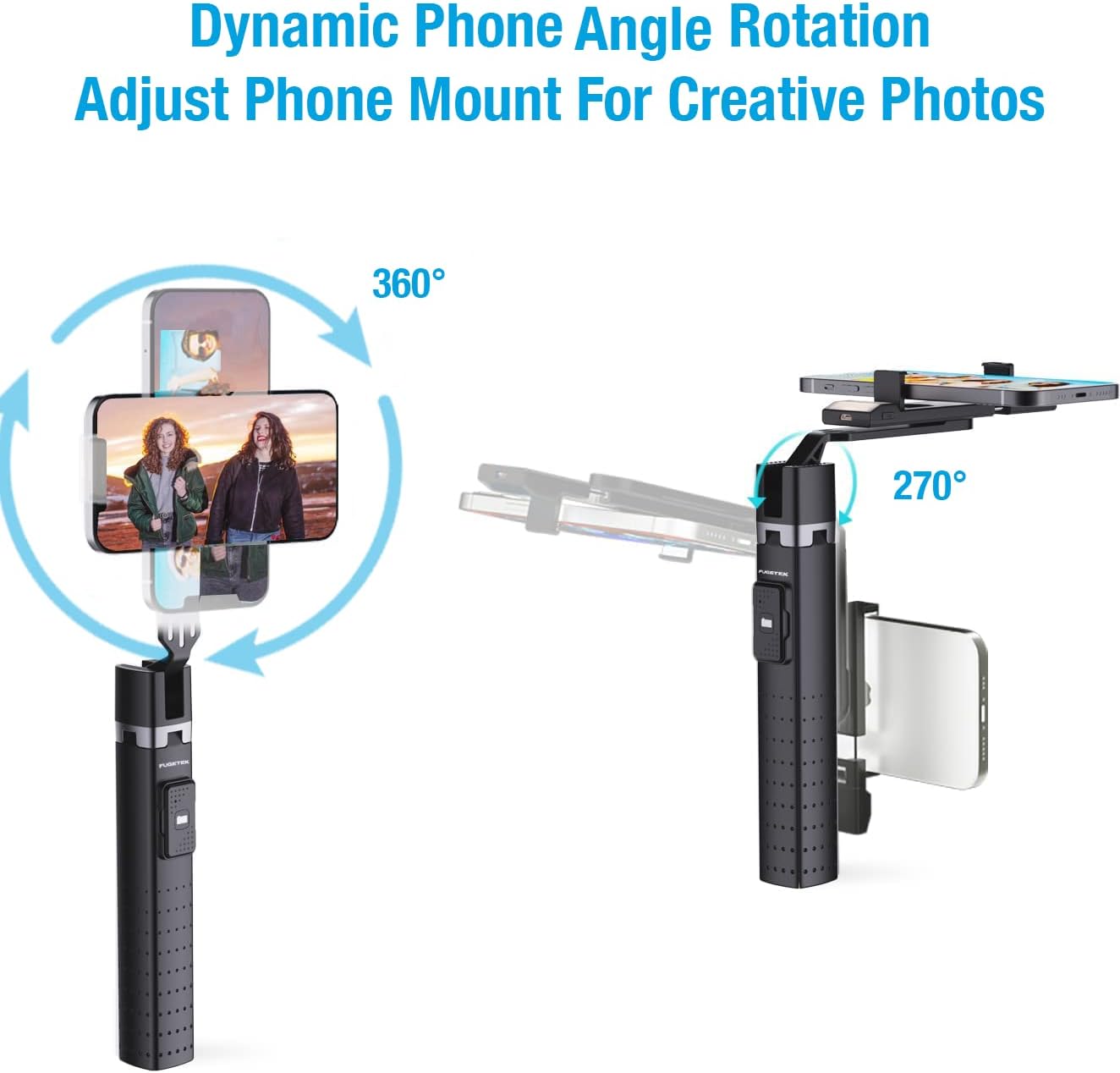
Image 3.3: Dynamic phone angle rotation, illustrating 360° phone holder rotation and 270° neck rotation for flexible shooting.
- The phone holder can rotate 360° to switch between horizontal and vertical camera modes.
- The neck of the phone holder can be adjusted up to 270° to achieve desired shooting angles.
- Ensure all adjustments are secure before taking photos or videos.
3.5 Using the Bluetooth Remote
Once paired, open your smartphone's camera application. Press the button on the Bluetooth remote to remotely trigger the camera shutter.
4. Maintenance
- Cleaning: Wipe the selfie stick with a soft, dry cloth. Avoid using abrasive cleaners or solvents.
- Storage: Store the device in a cool, dry place away from direct sunlight and extreme temperatures.
- Battery Care: For the onboard light, recharge regularly to maintain battery health. For the remote, replace the battery when performance degrades.
- Avoid Water: This product is not waterproof. Keep it away from water and high humidity.
5. Troubleshooting
- Remote Not Pairing:
- Ensure the remote is powered on and its battery is not depleted.
- Turn off and on your phone's Bluetooth, then try pairing again.
- Ensure the remote is within range of your phone.
- Onboard Light Not Working:
- Check if the light is fully charged.
- Ensure the power button is pressed correctly.
- Phone Shaky on Stick:
- Ensure the phone is securely clamped in the holder.
- Avoid over-extending the stick, especially in windy conditions, to maintain stability.
6. Specifications
| Feature | Detail |
|---|---|
| Brand | Fugetek |
| Product Model Number | FT-557-B |
| Connectivity | Bluetooth |
| Color | Black |
| Compatible Devices | Camera (Smartphones) |
| Max Height (Extended) | 40 inches |
| Folded Size | 7.6 inches |
| Item Weight | 7 ounces (approx. 198.45 g) |
| Batteries Included | No (for remote, light is rechargeable) |
| UPC | 702735670496 |
7. Warranty and Support
Fugetek is dedicated to providing high-quality products. If you have any questions or require assistance with your FT-557-B Selfie Stick Quadrapod, please do not hesitate to contact our customer service team. Refer to your purchase documentation for specific warranty details.