
Introduction
Thank you for choosing the AMERTEER H101 Digital Presenter. This device is designed to enhance your presentations with advanced features such as a digital pointer, spotlight, magnifier, and timer. Please read this manual carefully to ensure proper use and optimal performance.
Package Contents
- AMERTEER H101 Presenter Unit x 1
- USB Receiver x 1
- Instruction Manual x 1
Product Overview
The AMERTEER H101 features an ergonomic design for comfortable handling and intuitive controls for seamless presentation delivery. Its black and silver finish provides a professional appearance.

Figure 1: Front and back view of the AMERTEER H101 Digital Presenter, showcasing its sleek design and ergonomic shape.
Key features include:
- Digital Pointer: Displays a red circle on screen, visible on LED/LCD displays, controlled by gravity induction.
- Spotlight Function: Dims surroundings to highlight content within a circular area.
- Magnifier Function: Enlarges content within a circular area for detailed viewing.
- Timer Function: Helps manage presentation time with an on-device display, configurable via a PC application.
- Wireless Range: Operates up to 20 meters (66.6 feet) radius.
- Compatibility: Supports Windows, macOS, and Android operating systems. Compatible with presentation software like PowerPoint and Keynote.
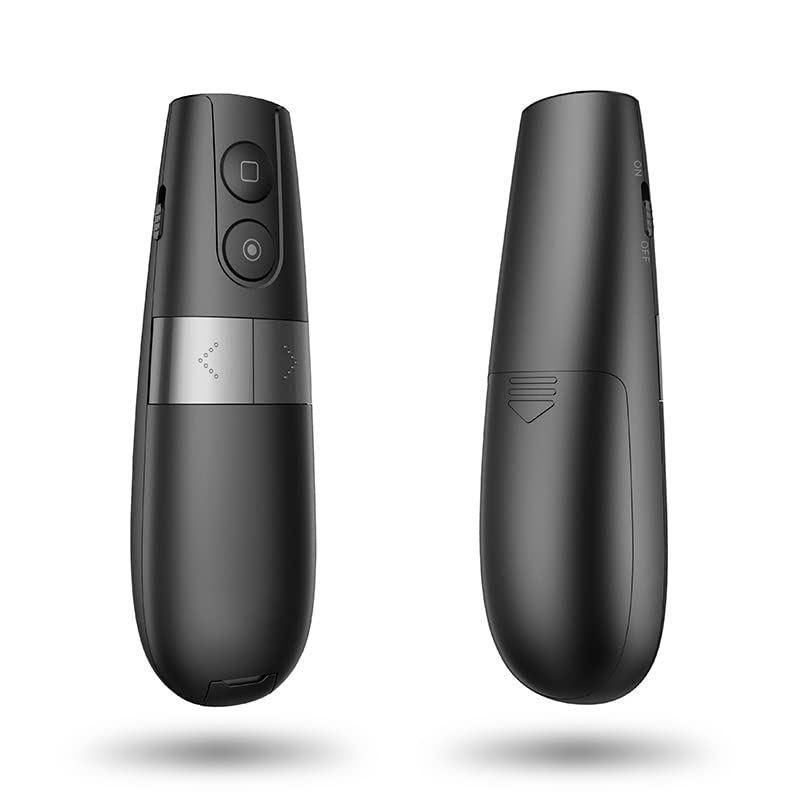
Figure 2: The presenter is compatible with Windows, macOS, Android, and Linux, supporting applications like PowerPoint and Keynote.
Setup
1. Installing Batteries
The AMERTEER H101 requires batteries for operation. Locate the battery compartment on the presenter unit.
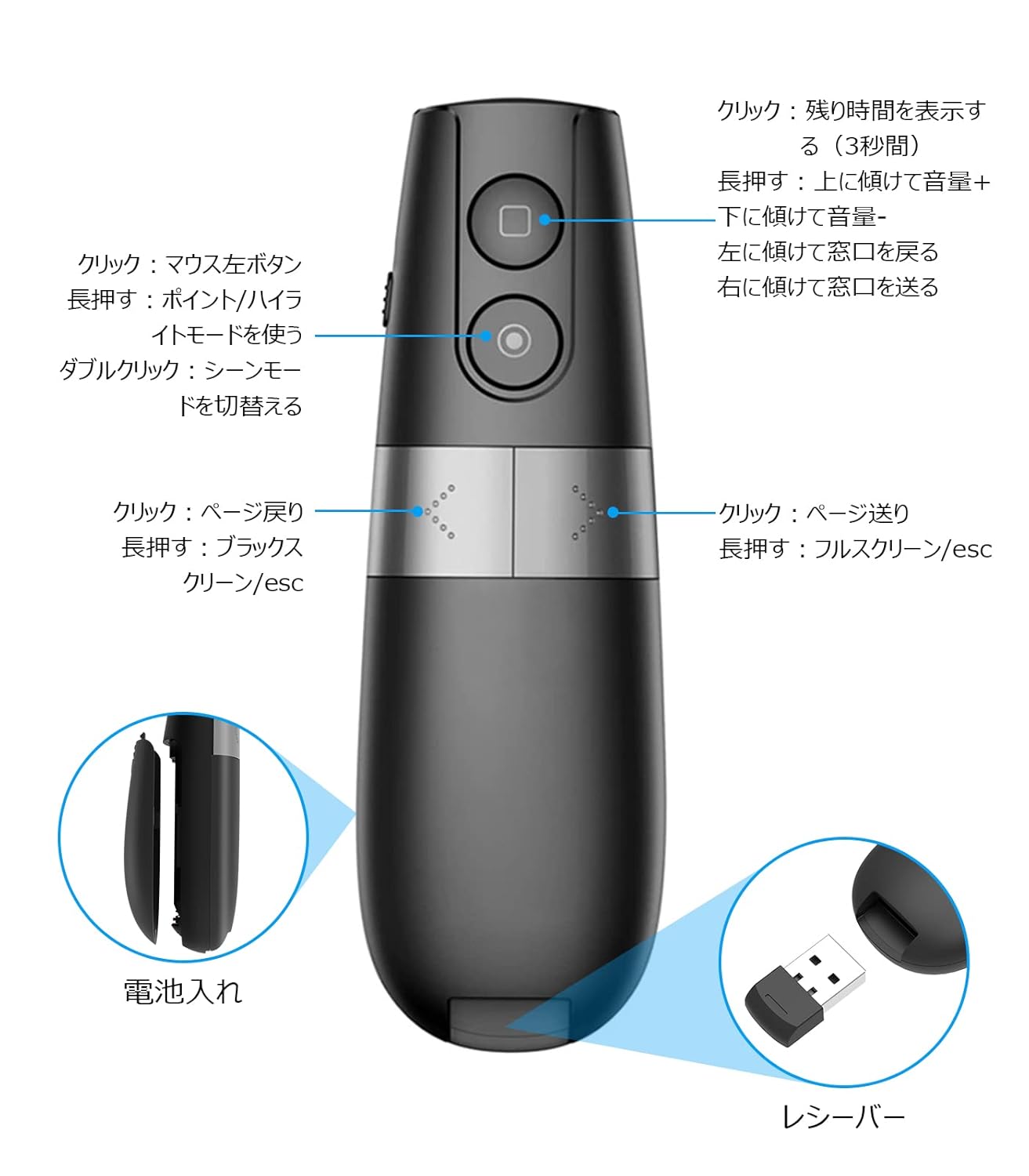
Figure 3: The battery compartment is located at the bottom of the presenter. Insert the required batteries, ensuring correct polarity.
- Open the battery compartment cover.
- Insert the specified alkaline batteries, observing the correct polarity (+/-).
- Close the battery compartment cover securely.
2. Connecting the USB Receiver
The presenter communicates wirelessly with your computer via the USB receiver.

Figure 4: The USB receiver is conveniently stored within the presenter unit. Remove it before use.

Figure 5: Insert the USB receiver into an available USB port on your computer. For Android devices, a Type-C adapter may be required.
- Remove the USB receiver from its storage slot in the presenter.
- Plug the USB receiver into an available USB port on your computer (Windows, macOS) or Android device (using a Type-C adapter if necessary).
- Your operating system should automatically detect and install the necessary drivers.
Operating Instructions
Basic Functions

Figure 6: Detailed view of the presenter's buttons and their corresponding functions for navigation and special features.
- Page Up/Down: Use the dedicated buttons to navigate slides forward or backward.
- Full Screen/Black Screen: Long press the page down button to enter/exit full screen or black screen mode.
- Volume Control: Tilt the presenter up or down while holding the appropriate button (refer to Figure 6 for exact button) to adjust volume.
- Window Switching: Tilt the presenter left or right while holding the appropriate button to switch between open windows.
Advanced Pointer Modes
The AMERTEER H101 offers three distinct emphasizing modes: Spotlight, Magnifier, and Digital Pointer.

Figure 7: Visual representation of the three pointer modes: Analog Pointer, Spotlight, and Magnifier, demonstrating their effects on screen content.
- Entering Mode: Press and hold the designated mode button (refer to Figure 6).
- Switching Modes: Double-click the mode button to cycle between Spotlight, Magnifier, and Digital Pointer.
- Spotlight: Dims the screen except for a circular area, drawing attention to specific content.
- Magnifier: Enlarges content within a circular area for detailed viewing.
- Digital Pointer: Displays a red circular pointer on the screen, controlled by the presenter's movement (gravity induction). The size of the pointer can be adjusted.
Timer Function
The built-in timer helps you keep track of your presentation time.
- Setting the Timer: Use the accompanying PC application to set your desired presentation time.
- Displaying Remaining Time: Click the square button on the presenter to display the remaining time on its mini screen.
Maintenance
- Keep the device clean by wiping it with a soft, dry cloth.
- Avoid exposing the presenter to extreme temperatures, humidity, or direct sunlight.
- Remove batteries if the device will not be used for an extended period to prevent leakage.
- Store the USB receiver inside the presenter unit when not in use to prevent loss.
Troubleshooting
| Problem | Possible Cause | Solution |
|---|---|---|
| Presenter not responding |
|
|
| Digital pointer not visible |
|
|
| Timer not functioning |
|
|
Specifications
| Model Number | LNKO13157-01 |
| Brand | AMERTEER |
| Wireless Technology | TELEC certified wireless technology |
| Operating Distance | Up to 20 meters (66.6 feet) |
| Compatible Operating Systems | Windows, macOS, Android, iOS |
| Compatible Software | PowerPoint, Keynote |
| Item Weight | 50 g |
| Package Dimensions | 14.9 x 6.1 x 2.9 cm |
| Battery Type | Alkaline (Batteries not included) |
| Color | Black |
Warranty and Support
AMERTEER products undergo rigorous inspection before shipping. If you encounter any quality issues or require assistance, please contact AMERTEER customer support. Refer to your purchase documentation for specific warranty terms and contact information.
For support, please visit the AMERTEER official website or contact your retailer.
Compliance Information
This device complies with TELEC wireless technology standards, ensuring reliable and safe operation.