
1. Introduction
Thank you for choosing the MP Bluetooth Wireless Mini Mouse. This device is a versatile 2-in-1 tool, functioning as both a compact wireless mouse and a presentation remote with an integrated red light pointer. Its portable design and long-lasting battery make it ideal for various computing and presentation needs.
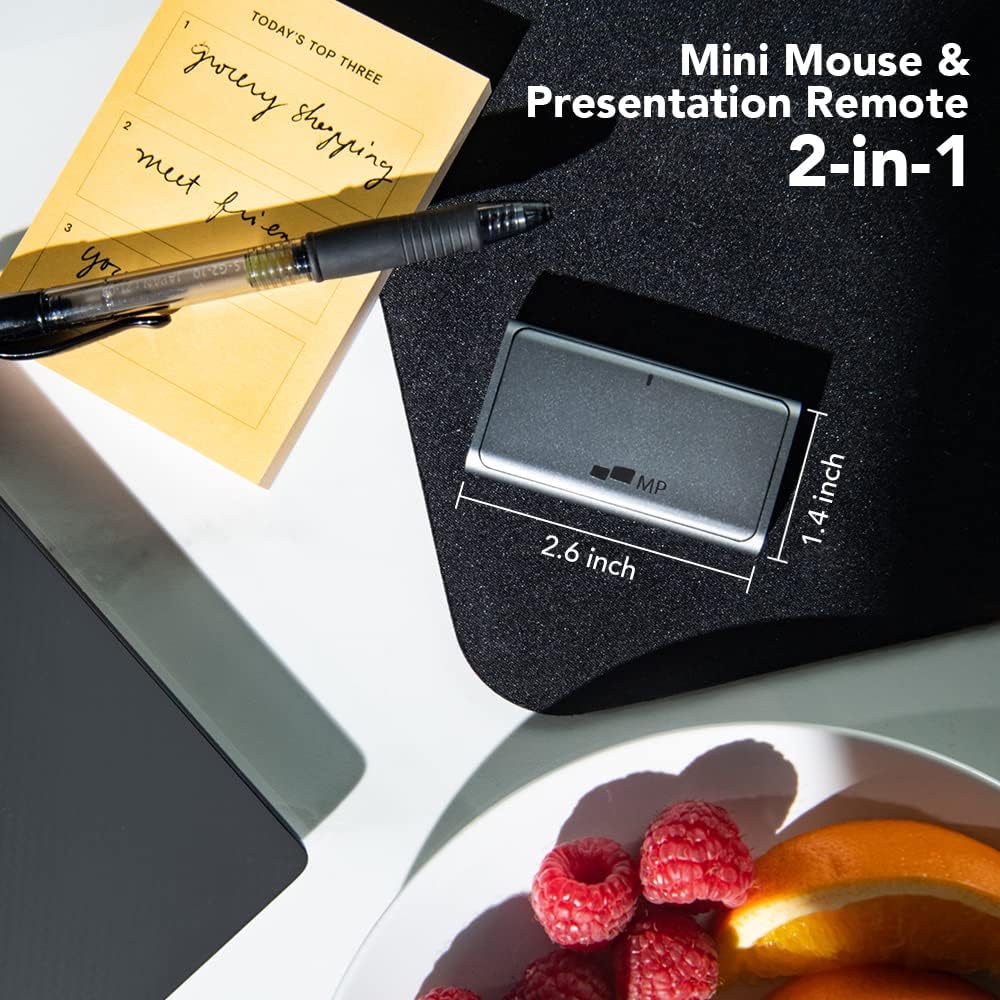
Figure 1: The MP Bluetooth Wireless Mini Mouse, highlighting its dual functionality as a mouse and presentation remote.
2. Package Contents
- MP Bluetooth Wireless Mini Mouse
- USB-C Charging Cable
- User Manual
3. Setup
3.1 Charging the Device
Before initial use, fully charge the MP Mini Mouse. Connect the provided USB-C charging cable to the charging port on the mouse and to a compatible USB power source. A full charge takes approximately 1.5 hours and provides over 20 days of average use.
3.2 Bluetooth Pairing
Follow these steps to pair your MP Mini Mouse with your device:
- Ensure the mouse is sufficiently charged.
- Turn on the mouse using the power switch.
- Enable Bluetooth on your computer, tablet, or smartphone.
- Search for available Bluetooth devices. The mouse should appear as "MP Mini Mouse" or similar.
- Select the mouse to initiate pairing. Once connected, the indicator light may change or turn off.
Compatibility: The mouse is compatible with Windows 8/10 (with Bluetooth Low Energy), Mac (2013 or later), iPad OS 13 or above, and Android 5 or above.

Figure 2: Detailed diagram of the MP Mini Mouse, showing the Red Light Pointer, Modes Switcher, Scroll Wheel, TouchPad, and Type-C Charging Port.
4. Operating Modes
The MP Mini Mouse features two distinct operating modes: Ground Mode for standard mouse functionality and Air Mode for presentations.
4.1 Ground Mode (Mouse Function)
In Ground Mode, the device functions as a fully operational wireless mouse. It offers silent clicks, a responsive scroll wheel, and a touchpad for precise navigation. Use this mode for everyday computing tasks on a flat surface.

Figure 3: The MP Mini Mouse being used in Ground Mode on a mousepad, demonstrating its standard mouse functionality.
4.2 Air Mode (Presentation Remote Function)
Switch to Air Mode for presentation control. This mode activates the red light pointer and allows you to navigate presentation slides. The modes switcher button on the side of the mouse allows for easy transition between Ground and Air modes.

Figure 4: A hand holding the MP Mini Mouse in Air Mode, with the red light pointer active, suitable for presentations.
5. Maintenance
5.1 Cleaning
To clean your MP Mini Mouse, gently wipe the surface with a soft, dry cloth. For stubborn dirt, a slightly damp cloth can be used, ensuring no moisture enters the ports or internal components. Avoid using harsh chemicals or abrasive materials.
5.2 Battery Care
To prolong battery life, avoid fully discharging the mouse frequently. Recharge the device when the battery indicator suggests low power. Store the mouse in a cool, dry place and avoid exposure to extreme temperatures.
6. Troubleshooting
- Mouse not connecting via Bluetooth:
Ensure the mouse is powered on and fully charged. Verify Bluetooth is enabled on your device and that the mouse is within the 10-meter operating range. Try restarting both the mouse and your device, then attempt pairing again. - Laser pointer not working:
Confirm the mouse is in Air Mode. Check the battery level; a low battery can affect laser performance. - Mouse cursor is unresponsive or erratic:
Ensure the mouse is in Ground Mode for standard use. Clean the optical sensor on the bottom of the mouse. If using on a surface, ensure it is clean and non-reflective. - Device not charging:
Check that the USB-C cable is securely connected to both the mouse and the power source. Try using a different USB-C cable or power adapter to rule out cable or adapter issues.
7. Specifications

Figure 5: The MP Mini Mouse's compact size, illustrated by its comparison to an AA battery, and its dimensions of 2.6 x 1.4 x 0.43 inches.
| Brand | MP |
| Model Number | 110-1001P01 |
| Color | Grey |
| Connectivity Technology | Bluetooth |
| Special Feature | Wireless, Presentation Remote with Laser Pointer |
| Movement Detection Technology | Optical |
| Button Quantity | 3 |
| Hand Orientation | Ambidextrous |
| Compatible Devices | Personal Computer (Laptop, PC) |
| Operating System | Win8/10 (BLE), Mac (2013 or Later), Pad OS13 or Above, Android 5 or Above |
| Battery Average Life | 20 days |
| Charging Duration | 1.5 hours |
| Wireless Range | 10.0 meters |
| Item Weight | 1.6 ounces (33g) |
| Item Dimensions (L x W x H) | 2.6" x 1.4" x 0.43" |
| Manufacturer | Mobile Pixels |
| UPC | 850001446471 |
8. Official Product Video
Video 1: This video demonstrates the MP Mini Mouse's compact size, its functionality in Ground Mode as a mouse, and its use in Air Mode as a presentation remote with a built-in laser pointer.
9. Warranty and Support
9.1 Warranty Information
For detailed warranty information regarding your MP Bluetooth Wireless Mini Mouse, please refer to the official Mobile Pixels website or contact their customer service directly. Standard warranty terms typically cover manufacturing defects for a specified period from the date of purchase.
9.2 Customer Support
If you encounter any issues or have questions about your product, please contact the Mobile Pixels customer service team. You can typically find contact information on the manufacturer's official website or through the Amazon store customer service where the product was purchased. Please have your model number (110-1001P01) and purchase details ready when contacting support.